
₨28,000.00
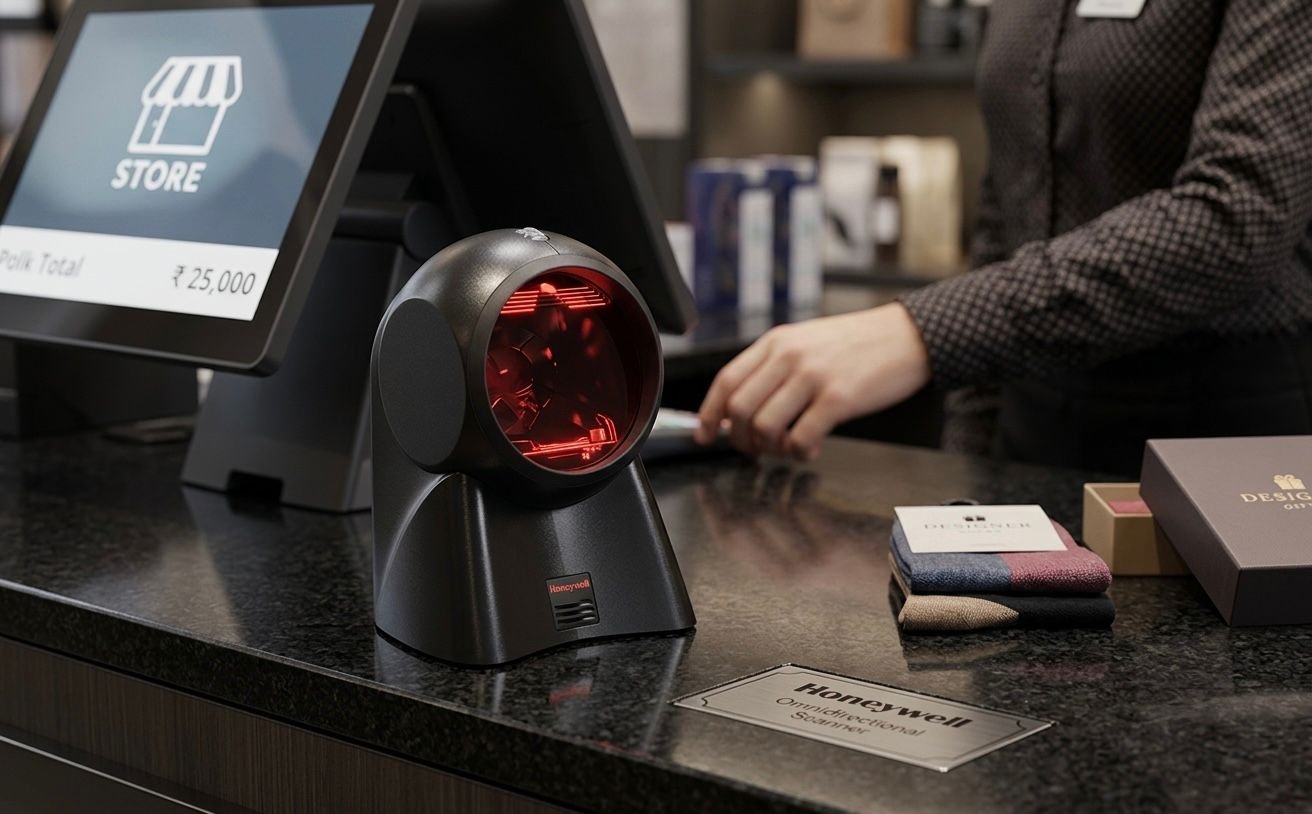
The Honeywell MK7120, also known as the Honeywell Orbit 7120, is a corded hands-free laser barcode scanner designed for retail counters, supermarkets, pharmacies and other point-of-sale environments.
It uses a 20-line omnidirectional scan pattern and reads standard 1D and GS1 DataBar barcodes at up to 1,120 scan lines per second. Its compact countertop design is suitable for businesses that need fast product scanning without holding the scanner for every transaction.
The Honeywell MK7120 provides automatic hands-free scanning for businesses that process products repeatedly at a checkout or billing counter.
Instead of aligning every barcode with one laser line, the scanner projects 20 scan lines in different directions. This creates an easy-to-find scanning area that can improve first-pass barcode reading and speed up routine checkout work.
Its adjustable scan head can tilt through a 30-degree range, allowing the operator to direct the scanning field toward products of different sizes and shapes. The complete scanner can also be lifted from the counter and presented to the barcode on larger or bulky products.
The MK7120 supports several host interfaces, including USB, RS-232, keyboard wedge and IBM 468xx through RS485. This gives businesses flexibility when connecting it to compatible POS terminals, computers and older retail systems.
Buy the Honeywell MK7120 from GS Systemz for your retail and point-of-sale barcode-scanning requirements in Pakistan.
The Honeywell MK7120 is designed for rapid hands-free scanning of standard one-dimensional barcodes.
Key features:
These features are based on Honeywell’s official Orbit 7120 and OrbitCG 7180 product datasheet. Features such as CodeGate and the integrated RF EAS antenna apply to the OrbitCG 7180, not the standard MK7120 or Orbit 7120.
The Honeywell MK7120 is best suited to fixed indoor workstations where products carry standard linear barcodes.
| Application | Suitability |
|---|---|
| Supermarket checkout | Excellent |
| Retail product scanning | Excellent |
| Pharmacy billing counter | Excellent |
| Convenience stores | Excellent |
| Bookstores | Excellent |
| Cosmetics counters | Excellent |
| Clothing and footwear stores | Excellent |
| Small product scanning | Excellent |
| Large-product scanning | Good |
| Stockroom barcode checking | Good |
| Fixed inventory workstation | Good |
| QR-code scanning | Not supported |
| Data Matrix scanning | Not supported |
| Mobile-screen QR payments | Not supported |
| Wireless warehouse scanning | Not supported |
| Heavy outdoor industrial use | Consider a rugged scanner |
Honeywell positions the Orbit series for convenience retail and other checkout environments where counter space is limited and rapid hands-free barcode presentation is required.
Here are the main Honeywell MK7120 technical specifications:
| Specification | Detail |
|---|---|
| Product name | Honeywell MK7120 / Orbit 7120 |
| Product type | Hands-free presentation barcode scanner |
| Scanner technology | 1D laser |
| Scan pattern | Omnidirectional |
| Scan lines | 20 lines |
| Scan fields | Five fields of four parallel lines |
| Scan speed | Up to 1,120 scan lines per second |
| Decode capability | Standard 1D and GS1 DataBar barcodes |
| Minimum barcode resolution | 5 mil / 0.125mm |
| Minimum print contrast | 35% reflectance difference |
| Pitch tolerance | 60 degrees |
| Skew tolerance | 60 degrees |
| Adjustable scan head | Up to 30 degrees |
| Interfaces | USB, RS-232, keyboard wedge and IBM 468xx/RS485 |
| Input voltage | 5V DC ±0.25V |
| Operating power | 900mW / 180mA at 5V |
| Standby power | 850mW / 170mA at 5V |
| Dimensions | 105 × 102 × 150mm |
| Weight | Approximately 400g |
| Drop resistance | Designed for 1.2-metre drops |
| Operating temperature | 0°C to 40°C |
| Storage temperature | -40°C to 60°C |
| Operating humidity | 5%–95%, non-condensing |
| Ambient light tolerance | Up to 4,842 lux |
| Configuration software | Honeywell MetroSet 2 |
| Warranty | Three-year factory warranty |
Barcode-reading performance can vary according to barcode size, print quality, contrast, surface curvature and surrounding conditions.
Hands-free scanning means the operator can leave the Honeywell MK7120 on the counter and move products through its scanning field.
The scanner activates automatically when it detects a compatible barcode. The user does not need to press a trigger for every product, which can make it practical for repeated retail checkout transactions.
Hands-free operation is useful for:
The operator only needs to present the barcode within the scanning area and confirm that the scanner has successfully decoded it.
Omnidirectional scanning allows the scanner to read a compatible 1D barcode from several orientations.
A basic single-line laser scanner usually requires the operator to align one scan line across the complete width of the barcode. The MK7120 instead projects five fields containing four parallel scan lines each, producing a total 20-line pattern.
This means the product barcode can normally be presented:
The complete barcode must still be visible and pass through the scanner’s active reading area.
The Honeywell MK7120 provides an omnidirectional scanning speed of up to 1,120 scan lines per second.
This fast scan pattern is designed to improve first-pass reading when products are moved through the scanning field during checkout.
Actual transaction speed can depend on:
The scan-speed figure describes the laser pattern and should not be interpreted as 1,120 separately processed products per second.
The Honeywell MK7120 reads standard 1D and GS1 DataBar barcode symbologies.
Depending on the scanner’s configuration, common applications may include:
The exact barcode types enabled on a scanner can be managed through configuration barcodes or Honeywell MetroSet 2 software.
A specialised barcode should be tested before ordering multiple scanners.
No. The Honeywell MK7120 is a 1D laser scanner and does not read QR codes.
QR Code, Data Matrix, PDF417 and other two-dimensional barcodes require a compatible 2D area-imaging scanner. Honeywell officially lists the Orbit 7120 with 1D decoding capability and a 1D laser engine.
Choose a 2D scanner when your business needs to scan:
The MK7120 is most appropriate when the business uses standard printed linear barcodes.
The MK7120 is designed for printed 1D barcodes and should not be selected for routine barcode scanning from smartphones or computer displays.
Laser scanners depend on reflected laser light from a printed barcode surface. Digital screens produce light differently and may not provide reliable results.
Choose a 2D area-imaging scanner when the main workflow includes:
The Honeywell MK7120 should be used primarily with properly printed 1D barcode labels.
Yes. Although the MK7120 is mainly a hands-free countertop scanner, its compact body can be lifted and moved toward the barcode on larger products.
Honeywell designed the scanner’s shape to support handheld scanning of bulky items that may be difficult to pass across a fixed checkout scanner.
This can be useful for:
The scanner is still corded, so movement is limited by the connected cable.
The MK7120’s working distance depends on the width and density of the barcode.
Honeywell provides the following typical depth-of-field figures for the Orbit 7120:
| Barcode Density | Typical Depth of Field |
|---|---|
| 5.2 mil | 0–50mm |
| 7.5 mil | 0–150mm |
| 10 mil | 0–175mm |
| 13 mil | 0–215mm |
| 26 mil | 0–250mm |
Larger, lower-density barcodes can generally be read from farther away than very narrow, high-density barcodes.
Actual performance may be affected by:
Move difficult barcodes closer to the scanner’s active scanning area and adjust the angle to reduce reflections.
Honeywell lists a minimum resolution of 5 mil, equal to approximately 0.125mm, under suitable conditions.
A “mil” is one-thousandth of an inch and describes the width of the narrowest barcode element.
Very small barcodes require:
The scanner’s typical depth of field is shorter for narrow 5.2-mil barcodes than for larger 13-mil or 26-mil barcodes.
The MK7120’s 20-line scanning pattern and engineered scanning sweet spot can improve first-pass performance with ordinary printed retail barcodes.
However, successful scanning still depends on enough barcode information being visible and correctly printed.
The scanner may struggle when:
Severely damaged or unreadable product labels should be replaced or reprinted.
Print contrast describes the visual difference between the dark barcode lines and the lighter background.
Honeywell lists a minimum reflectance difference of 35% for the MK7120.
A barcode may become difficult to scan when:
Use clean, high-contrast barcode labels for more dependable scanning.
The Honeywell MK7120 supports several host-system interfaces:
The exact interface depends on the scanner kit and cable supplied.
USB is commonly used for connection to:
The scanner may enter barcode data like a keyboard when configured for compatible USB keyboard operation.
RS-232 is used by some specialised POS terminals and older business systems.
A serial installation may require:
A keyboard-wedge interface connects the scanner into the keyboard input path of a compatible computer.
IBM 468xx support through RS485 is intended for compatible retail POS systems.
Confirm the required host interface before ordering because the cable supplied with one MK7120 kit may not match another system.
No. The Honeywell MK7120 is a corded scanner and does not contain a rechargeable battery.
Honeywell lists its connectivity as corded, with USB, RS-232, keyboard-wedge and RS485 host-interface options.
A corded scanner is suitable when:
Choose a wireless scanner when employees need to scan products around shelves, across warehouse aisles or away from the checkout station.
The MK7120 is designed for retail and point-of-sale barcode scanning.
Honeywell lists MetroSet 2 configuration support and OPOS/JPOS compatibility to help configure the scanner and integrate it with compatible retail systems.
Compatibility still depends on:
Test the scanner with the actual GS Systemz customer setup before deploying multiple units.
MetroSet 2 is Honeywell configuration software used with supported barcode scanners.
It can help businesses manage scanner settings and update compatible scanner firmware through a standard computer. Honeywell states that this ability helps protect the scanner investment when POS systems or software configurations change.
Configuration options may include:
Only change settings when the business understands the required POS-software format.
The MK7120 scanning head can tilt through a range of approximately 30 degrees.
This allows the user to direct the scanning field toward the normal position of products on the counter.
The adjustable head is useful when:
Set the head at an angle that keeps the scanning field easy to reach without interfering with normal checkout movement.
The Honeywell MK7120 is designed to withstand drops from approximately 1.2 metres.
Its enclosure is also sealed to resist airborne particulate contaminants, making it suitable for normal indoor retail and commercial environments.
The official datasheet does not describe it as waterproof. Therefore, the scanner should be kept away from:
A specialised rugged scanner is more appropriate for heavy dust, outdoor work, moisture or demanding industrial use.
Honeywell lists an operating-temperature range of 0°C to 40°C.
The scanner can be stored between -40°C and 60°C and used at 5%–95% relative humidity, provided condensation does not form.
The scanner is suitable for normal indoor environments such as:
Avoid rapid movement between cold and warm environments because condensation may form inside or on the scanner.
Choose the Honeywell MK7120 when your business needs fast hands-free scanning of printed 1D barcodes at a fixed checkout counter.
| Requirement | Recommendation |
|---|---|
| Printed product barcodes | MK7120 is suitable |
| Hands-free scanning | Supported |
| Omnidirectional scanning | Supported |
| Fast retail checkout | Suitable |
| Compact countertop installation | Suitable |
| Large-product scanning | Can be lifted by hand |
| USB connection | Supported with correct kit |
| RS-232 connection | Supported with correct kit |
| Keyboard-wedge connection | Supported with correct kit |
| GS1 DataBar scanning | Supported |
| QR-code scanning | Not supported |
| Data Matrix scanning | Not supported |
| Mobile-screen scanning | Choose a 2D imager |
| Wireless movement | Not supported |
| Outdoor industrial use | Consider a rugged scanner |
The MK7120 is most suitable for businesses that still use standard printed 1D retail barcodes and do not require digital QR-code scanning.
A hands-free scanner remains on the counter and automatically scans products presented within its reading area.
A traditional handheld scanner is usually picked up, aimed at the barcode and activated with a trigger.
| Feature | Honeywell MK7120 | Traditional Handheld Scanner |
|---|---|---|
| Main form | Countertop presentation scanner | Handheld scanner |
| Scanning operation | Automatic | Usually trigger-operated |
| Scan pattern | 20-line omnidirectional | Depends on model |
| Fixed checkout use | Excellent | Suitable |
| Repetitive product scanning | Convenient | Requires more handling |
| Large-product scanning | Scanner can be lifted | Easy to point manually |
| Counter space | Compact fixed position | Requires storage or stand |
| User movement | Limited by cable | Limited by cable on wired models |
| Best use | Retail checkout | General scanning tasks |
Choose the MK7120 for repeated product presentation at a fixed counter.
Choose a handheld model when the operator mainly scans products stored in different positions or needs more precise targeting.
A 1D scanner reads linear barcodes made from vertical lines. A 2D scanner reads those linear barcodes as well as square or stacked symbols.
| Feature | Honeywell MK7120 1D | 2D Area-Imaging Scanner |
|---|---|---|
| UPC and EAN barcodes | Supported | Supported |
| Code 39 and Code 128 | Supported | Supported |
| GS1 DataBar | Supported | Usually supported |
| QR codes | Not supported | Supported |
| Data Matrix | Not supported | Supported |
| PDF417 | Not supported | Supported |
| Printed retail labels | Excellent | Excellent |
| Mobile-screen codes | Not recommended | Commonly supported |
| Scanning technology | Laser | Image sensor |
| Best use | Traditional retail barcodes | Mixed print and digital codes |
Choose the MK7120 when the business only scans normal printed 1D barcodes.
Choose a 2D scanner when QR codes, payment codes, digital coupons or modern logistics symbols are required.
The Orbit 7120 and OrbitCG 7180 share the same main omnidirectional scanning design, but the 7180 adds features for targeted barcode selection.
| Feature | Orbit 7120 | OrbitCG 7180 |
|---|---|---|
| Hands-free scanning | Supported | Supported |
| 20-line omnidirectional pattern | Supported | Supported |
| 1,120 scan lines per second | Supported | Supported |
| Adjustable scan head | Supported | Supported |
| CodeGate button | No | Yes |
| Single-line targeting mode | No | Yes |
| RF EAS antenna | No | Available on 7180 |
| Standard retail scanning | Excellent | Excellent |
| Menu or selected-code scanning | Basic | Better suited |
Honeywell states that CodeGate technology and the integrated RF EAS antenna apply to the OrbitCG 7180, not the standard Orbit 7120.
Do not advertise the MK7120 with CodeGate or RF EAS features unless the supplied product is actually an OrbitCG 7180.
GS Systemz provides the Honeywell MK7120 for customers in Pakistan who need fast hands-free 1D barcode scanning at retail and point-of-sale counters.
This product page helps customers check:
Before placing an order, confirm:
Checking these details helps ensure that the supplied scanner matches your checkout terminal and POS software.
Place the MK7120 on a stable checkout counter with its scanning head directed toward the normal product path.
Scanner-care tips:
A dirty scan window or damaged cable can reduce scanning reliability.
Buy the Honeywell MK7120 if your business needs automatic scanning of printed 1D barcodes at a fixed counter.
It is suitable for:
It is especially useful when staff repeatedly scan products with standard UPC, EAN or other printed 1D barcodes.
Businesses that accept QR-code payments or digital mobile coupons should choose a compatible 2D scanner instead.
Get the Honeywell MK7120 Hands-Free 1D Barcode Scanner from GS Systemz for your retail checkout, pharmacy, supermarket and point-of-sale scanning requirements.
Use its 20-line omnidirectional scan pattern to process standard printed 1D and GS1 DataBar barcodes without holding or triggering the scanner for every product.
Confirm the exact interface cable, product condition, barcode compatibility, warranty and package contents before adding the Honeywell MK7120 to your POS setup.
The Honeywell MK7120, also known as the Orbit 7120, is a corded hands-free 1D laser barcode scanner for retail and point-of-sale counters.
The MK7120 is a 1D laser scanner. It reads standard linear and GS1 DataBar barcodes but does not read QR codes or Data Matrix.
No. QR codes require a compatible 2D area-imaging scanner.
The Honeywell MK7120 produces up to 1,120 omnidirectional scan lines per second.
It uses a 20-line pattern created from five fields of four parallel scan lines.
Yes. The compact scanner can be lifted from the counter and presented to the barcode on large or bulky products.
USB is one supported interface. Other options include RS-232, keyboard wedge and IBM 468xx through RS485. The included interface depends on the kit.
No. It is a corded scanner and does not use a rechargeable battery.
Honeywell lists a three-year factory warranty. Local warranty coverage and claim terms should be confirmed with GS Systemz.
You can buy the Honeywell MK7120 Hands-Free 1D Barcode Scanner from GS Systemz in Pakistan.
Reviews
There are no reviews yet.