
₨47,000.00
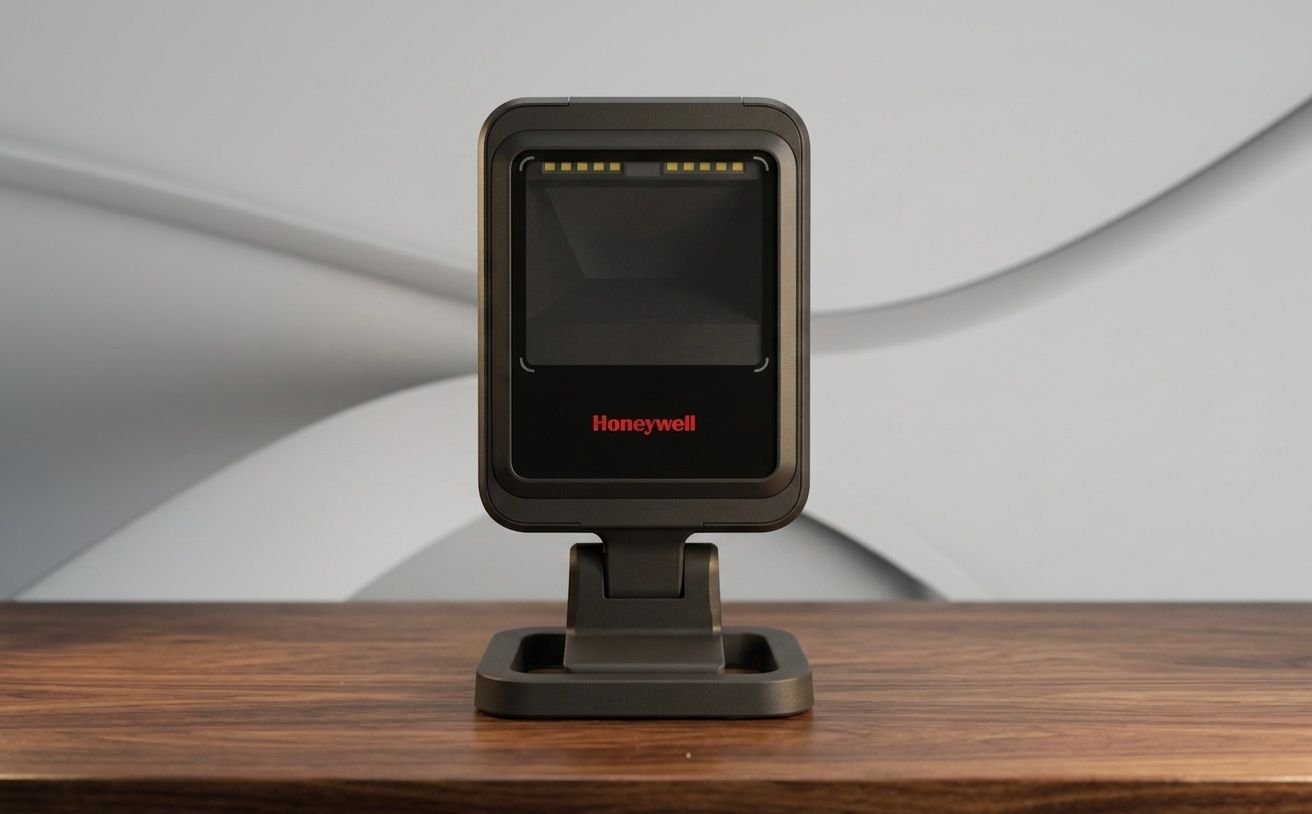
The Honeywell Genesis XP 7680g is a compact, corded presentation barcode scanner designed for hands-free scanning at retail counters, healthcare workstations, kiosks and logistics desks.
It uses a 1-megapixel area-imaging engine to read standard 1D and 2D barcodes, including QR, PDF, DotCode and supported Digimarc codes. Its fast motion tolerance, wide scanning area and flexible mounting options make it suitable for high-traffic business environments.
The Honeywell Genesis XP 7680g is designed for businesses that need fast barcode scanning without requiring staff to hold and trigger a scanner for every transaction.
Honeywell states that the Genesis XP provides a 20% faster scanning speed and a larger scanning area than the previous Genesis model. Its XP scanning technology is designed to improve the reading of poorly printed, damaged and difficult barcodes, helping reduce repeated scans at busy counters.
The scanner can read barcodes placed directly against its front surface as well as codes presented from a greater distance. Its 400cm-per-second motion tolerance supports fast product movement during checkout and other repeated scanning tasks.
A 360-degree tri-colour LED ring provides visible scanning feedback, while warm white illumination is intended to be easier on the eyes. Automatic object detection turns the illumination off between scans to reduce unnecessary light at the workstation.
Buy the Honeywell Genesis XP 7680g from GS Systemz for retail, healthcare, logistics and point-of-sale barcode scanning in Pakistan.
The Genesis XP 7680g combines fast area-imaging performance with a compact and flexible presentation-scanner design.
Key features:
Decode capability, interfaces, stand and cable contents can vary according to the exact Honeywell product kit.
The Honeywell Genesis XP 7680g is suitable for fixed workstations that need quick scanning of printed and digital barcodes.
| Application | Suitability |
|---|---|
| Retail product scanning | Excellent |
| Supermarket checkout | Excellent |
| QR-code scanning | Excellent |
| Mobile coupon scanning | Excellent |
| Digital loyalty cards | Excellent |
| Pharmacy billing | Excellent |
| Healthcare registration | Excellent |
| Patient-document scanning | Good |
| Membership identification | Excellent |
| Ticket verification | Excellent |
| Logistics workstation scanning | Good |
| Packing-station scanning | Good |
| Kiosk integration | Excellent |
| Fixed inventory workstation | Good |
| Wireless warehouse scanning | Not supported |
| Long-distance warehouse scanning | Not designed for this use |
| Outdoor scanning in rain | Not suitable |
Honeywell identifies retail, healthcare, logistics and warehouse workflows as suitable industries for the Genesis XP 7680g.
Here are the main official Honeywell Genesis XP 7680g specifications:
| Specification | Detail |
|---|---|
| Product name | Honeywell Genesis XP 7680g |
| Product type | Flexible presentation barcode scanner |
| Form factor | Hands-free desktop scanner |
| Connection type | Corded |
| Scan technology | Area imaging |
| Imaging array | 1280 × 800 pixels |
| Camera resolution | 1 megapixel |
| Decode capability | 1D, 2D, PDF, DotCode and supported Digimarc |
| Motion tolerance | Up to 400cm/s for 13 mil UPC |
| Horizontal scan angle | 48 degrees |
| Vertical scan angle | 30 degrees |
| Pitch tolerance | 65 degrees |
| Skew tolerance | 65 degrees |
| Minimum print contrast | 20% |
| Minimum 1D resolution | 3 mil |
| Minimum 2D resolution | 5 mil |
| Host interfaces | USB, RS-232, keyboard wedge and IBM 46xx/RS-485 |
| Input voltage | 5V DC |
| Operating power | 2.5W / 500mA at 5V |
| Dimensions without stand | 80 × 40 × 105mm |
| Height with stand | 145mm |
| Weight | Approximately 340g |
| Operating temperature | 0°C–50°C |
| Storage temperature | -40°C–70°C |
| Operating humidity | 0%–95%, non-condensing |
| Drop resistance | 50 drops from 1.5 metres |
| Tumble resistance | 1,000 tumbles from 0.5 metres |
| Environmental sealing | IP52 |
| Ambient-light tolerance | Up to 100,000 lux |
| Beeper volume | 90dB at 10cm |
| Warranty | Three-year factory warranty |
Honeywell notes that supported decode capabilities depend on the selected kit configuration.
A presentation scanner remains positioned on a counter or workstation and automatically reads barcodes placed within its scanning area.
The Genesis XP 7680g can be installed with its removable stand, integrated into a kiosk or positioned with compatible wall, POS and vertical-mount accessories. Its angled rear cable connection helps the scanner fit into compact installations.
It can be used in:
The top-mounted button can also be used when the operator needs more controlled scanning rather than automatic presentation scanning.
XP refers to Honeywell’s extreme-performance scanning platform.
The Genesis XP uses a 1-megapixel imager, a fast processor and improved scanning algorithms to read barcodes quickly and reduce repeated scanning. Honeywell states that it delivers 20% faster scanning and a larger scanning area than the previous Genesis model.
XP scanning technology is intended to improve performance with:
Scanning performance still depends on barcode quality, dimensions, contrast and environmental conditions.
Yes. The Honeywell Genesis XP 7680g supports standard 2D barcode formats, including QR-code applications.
Honeywell lists a typical scanning range of approximately 0–212mm for a 20 mil QR code. The exact distance depends on the QR-code size, screen or print quality, contrast and surrounding conditions.
QR-code scanning can be used for:
Confirm that the required 2D symbologies are enabled in the exact scanner configuration.
Yes. Honeywell designed the Genesis XP 7680g to scan both printed and digital barcodes.
It can be useful for scanning:
When a code displayed on a phone is difficult to scan:
A damaged screen or extremely small digital code may reduce scanning performance.
Yes. Honeywell specifically designed its XP scanning technology to improve the reading of damaged and poorly printed barcodes.
The scanner’s larger reading area, 1-megapixel imager and high motion tolerance help reduce repeated scans in demanding retail and business workflows.
It may improve scanning of:
Successful scanning is not guaranteed when important sections of the barcode are missing or the symbol is too damaged to decode.
Honeywell lists a motion tolerance of up to 400cm per second for a 13 mil UPC barcode at the optimal focal position.
This allows products to move quickly through the scanner’s reading area during busy checkout or processing workflows.
Actual scanning performance may depend on:
The motion-tolerance figure describes the speed at which a barcode can move through the scanning field. It does not mean the scanner processes 400 separate products per second.
The scanning range varies according to the barcode format and density.
| Barcode Type | Typical Scanning Range |
|---|---|
| 3 mil Code 39 | 0–98mm |
| 5 mil Code 39 | 0–151mm |
| 10 mil Data Matrix | 0–129mm |
| 13 mil UPC | 0–250mm |
| 6.7 mil PDF | 0–138mm |
| 20 mil QR Code | 0–212mm |
The scanner can read selected barcodes when they are placed directly against its face. Barcode quality and environmental conditions may affect the practical working distance.
Honeywell lists a minimum resolution of 3 mil for 1D barcodes and 5 mil for 2D barcodes under suitable conditions.
Small or high-density barcodes require good print quality, sufficient contrast and correct positioning.
For better performance:
Very small codes may be more sensitive to printing defects than standard retail barcodes.
The Genesis XP 7680g includes a tri-colour LED ring around the front of the scanner.
The ring highlights the target area and provides visible feedback to employees and customers during scanning. Honeywell designed it to make the scanning process more intuitive at retail, healthcare and self-service workstations.
The LED feedback can help users understand:
The exact colours and behaviours may depend on scanner configuration and software integration.
The scanner uses warm white illumination intended to be more comfortable for employees and customers than harsher scanning lights.
Automatic object detection turns the illumination off when no object is present. This helps reduce unnecessary light and distraction at busy counters.
This feature can be useful in:
The Genesis XP 7680g uses disinfectant-ready housing designed for environments where equipment requires frequent cleaning.
Honeywell identifies healthcare facilities as one suitable use case for the scanner and its compatible placement accessories.
Disinfectant-ready does not mean that every chemical cleaner is safe to use.
Before cleaning:
Using an unapproved chemical may damage the scanner housing or scanning window.
The Honeywell Genesis XP 7680g supports several host-system interfaces:
The exact cable and interface depend on the product kit purchased.
USB is commonly used with:
RS-232 may be required for:
An RS-232 kit may include a separate power supply.
Keyboard-wedge operation sends barcode data through the keyboard input path of a compatible system.
IBM 46xx support through RS-485 is intended for compatible retail installations.
Confirm the required interface and included cable before ordering.
No. The Genesis XP 7680g is a corded presentation scanner and does not contain a rechargeable battery.
It must remain connected to a compatible computer, POS terminal or business system through the selected interface cable.
A corded presentation scanner is suitable when:
Choose a cordless handheld scanner when staff must scan products around shelves, cartons or warehouse aisles.
Yes. Honeywell offers the Genesis XP 7680g as a core scan module that can be integrated into compatible kiosk installations.
Its compact, flat front design, rear cable attachment and visible LED ring support different kiosk layouts.
Available configurations include:
The mounting accessory and product kit should be selected according to the intended installation.
Yes. Honeywell states that the Genesis XP 7680g is backward-compatible with legacy Genesis 7580g cables.
This can help businesses replace an older 7580g scanner without changing every compatible cable already installed at the workstation.
Compatibility should still be checked for the exact:
Do not assume compatibility with an unbranded or modified third-party cable without testing.
The Genesis XP 7680g is designed for regular commercial use in demanding retail, healthcare and business environments.
Honeywell lists resistance to:
It also carries an IP52 environmental-sealing rating.
The scanner should still be protected from excessive impact, liquid immersion and severe environmental exposure.
The IP52 rating describes the scanner’s protection against solid particles and limited water exposure.
The first digit, 5, indicates protection against dust entering in quantities that would interfere with normal operation.
The second digit, 2, indicates protection against vertically dripping water when the device is tilted within specified limits.
IP52 does not make the scanner waterproof. It should not be:
Use only cleaning methods approved for the scanner’s disinfectant-ready housing.
The Genesis XP 7680g is designed for point-of-sale, healthcare, kiosk and business barcode-scanning applications.
Honeywell states that it is compatible with its scanner software tools, plug-ins and Operational Intelligence platform.
Compatibility still depends on:
Test the scanner with the actual billing, inventory or registration software before deploying several units.
Choose the Genesis XP 7680g when you need fast hands-free scanning of printed and digital 1D or 2D barcodes.
| Requirement | Recommendation |
|---|---|
| Standard product barcodes | Genesis XP 7680g is suitable |
| QR-code scanning | Supported |
| Data Matrix scanning | Supported through 2D capability |
| PDF barcode scanning | Supported |
| DotCode scanning | Supported |
| Digimarc scanning | Depends on configuration |
| Mobile-screen scanning | Supported |
| Damaged-barcode reading | Designed for improved performance |
| High-speed checkout | Suitable |
| Hands-free scanning | Supported |
| Kiosk integration | Supported |
| Wall or POS mounting | Supported with accessories |
| USB connection | Supported |
| RS-232 connection | Supported |
| Wireless scanning | Not supported |
| Outdoor waterproof use | Not suitable |
| Long-range warehouse scanning | Choose a specialised scanner |
The Genesis XP 7680g is most suitable for fixed counters and installations that process printed and digital barcodes repeatedly.
A presentation scanner remains positioned on a counter and automatically reads codes placed in front of it. A handheld scanner is normally picked up and aimed at each barcode.
| Feature | Genesis XP 7680g | Handheld Scanner |
|---|---|---|
| Main position | Countertop or mounted | Held by operator |
| Scanning operation | Automatic presentation scanning | Usually trigger-operated |
| Fixed checkout use | Excellent | Suitable |
| Mobile scanning | Limited by installation | Better |
| Counter space | Compact fixed position | Requires stand or storage |
| Kiosk integration | Excellent | Less suitable |
| Repetitive scanning | Convenient | More physical handling |
| Large-item scanning | Depends on positioning | Easier to aim manually |
| Best use | Retail, healthcare and kiosks | General mobile scanning |
Choose the Genesis XP 7680g for a fixed scanning location.
Choose a handheld model when employees need to move around products, shelves or cartons.
The Genesis XP 7680g is Honeywell’s newer replacement for the legacy Genesis 7580g.
| Feature | Genesis 7580g | Genesis XP 7680g |
|---|---|---|
| Product generation | Legacy model | Newer XP model |
| Current Honeywell status | End-of-life model | Current product |
| Imaging array | 832 × 504 pixels | 1280 × 800 pixels |
| Imaging resolution | Lower | 1 megapixel |
| Motion tolerance | Up to 200cm/s | Up to 400cm/s |
| Minimum 1D resolution | 4 mil | 3 mil |
| Minimum 2D resolution | 7.5 mil | 5 mil |
| Drop resistance | 1.5-metre rating | 50 drops from 1.5 metres |
| Tumble testing | Not listed at XP level | 1,000 tumbles from 0.5 metres |
| Environmental sealing | Particulate-resistant design | IP52 |
| LED feedback | Standard feedback | 360-degree tri-colour ring |
| Illumination | Standard | Warm white with object detection |
| Mounting options | Desktop installation | Stand, kiosk, wall, POS and vertical options |
| Cable compatibility | Legacy cables | Backward-compatible with 7580g cables |
Choose the Genesis XP 7680g for a new installation requiring stronger performance, current support and flexible placement.
GS Systemz provides the Honeywell Genesis XP 7680g for businesses in Pakistan that need professional hands-free barcode scanning.
This product page helps customers check:
Before placing an order, confirm:
Checking these details helps ensure that the supplied scanner matches your counter, kiosk, POS system or healthcare workstation.
Position the scanner on a stable counter or compatible mount with the scanning face directed toward the normal barcode-presentation area.
Scanner-care tips:
Correct placement, cleaning and configuration can reduce failed scans and unnecessary interruptions.
Buy the Honeywell Genesis XP 7680g if your business needs a compact hands-free scanner for printed and digital 1D or 2D barcodes.
It is suitable for:
It is especially useful when fast motion tolerance, QR-code scanning, damaged-barcode reading and flexible mounting are important.
Get the Honeywell Genesis XP 7680g Flexible Presentation Scanner from GS Systemz for retail, healthcare, pharmacy, kiosk, logistics and point-of-sale scanning.
Use it to read standard product barcodes, QR codes, PDF symbols, DotCode and compatible digital-screen barcodes with fast hands-free presentation scanning.
Confirm the exact kit, colour, interface cable, stand, mounting accessories, warranty and package contents before adding the Genesis XP 7680g to your business setup.
The Genesis XP 7680g is a corded hands-free presentation scanner designed to read standard printed and digital 1D and 2D barcodes.
Yes. It supports standard 2D barcode formats and has a typical range of up to approximately 212mm for a 20 mil QR code.
Yes. The scanner reads common 1D product and retail barcodes as well as supported PDF, 2D, DotCode and Digimarc formats.
Yes. Honeywell states that the scanner excels at reading both printed and digital barcodes.
It supports motion tolerance of up to 400cm per second for a 13 mil UPC barcode at optimal focus.
No. It is a corded scanner that supports USB, RS-232, keyboard wedge and IBM 46xx through RS-485.
The scanner has an IP52 environmental-sealing rating. It is dust-protected but should not be treated as waterproof.
Yes. Honeywell states that the Genesis XP 7680g is backward-compatible with legacy Genesis 7580g cables.
Honeywell lists a three-year factory warranty. Local warranty coverage and claim terms should be confirmed with GS Systemz.
You can buy the Honeywell Genesis XP 7680g Flexible Presentation Scanner from GS Systemz in Pakistan.
Reviews
There are no reviews yet.