
₨24,500.00
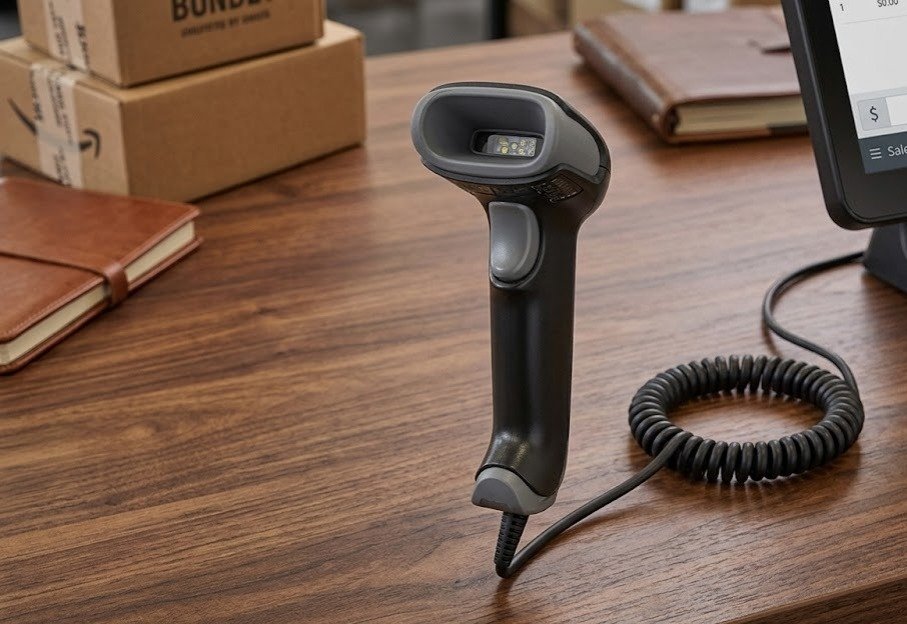
The Honeywell Voyager XP 1470g is a corded handheld area-imaging scanner designed to read traditional 1D barcodes, QR codes and other supported 2D symbols.
It delivers reliable scanning from printed labels and digital screens, including damaged and difficult-to-read barcodes. Its extended scanning distance, durable body and USB, keyboard-wedge and RS-232 connectivity make it suitable for retail checkout, pharmacies, inventory counters and other commercial workstations.
The Honeywell Voyager XP 1470g is a practical choice for businesses that need both traditional product-barcode scanning and modern QR-code capability from a fixed workstation.
It can read codes printed on product labels as well as compatible digital coupons, mobile wallets and barcodes displayed on customers’ smartphones. Honeywell also designed the scanner to improve decoding of faded, poorly printed and damaged symbols that may slow down checkout operations.
Its extended working range can help employees scan products positioned inside a shopping cart without bending as far toward the barcode. The scanner is also engineered to withstand repeated drops and tumbles in busy commercial environments.
Buy the Honeywell Voyager 1470g from GS Systemz for retail, pharmacy, inventory and point-of-sale barcode-scanning requirements in Pakistan.
The Honeywell Voyager XP 1470g combines 1D and 2D barcode reading with a durable corded handheld design.
Key features:
Decode capabilities, housing type, interface cable and included accessories can vary according to the exact Honeywell kit.
The Voyager XP 1470g is suitable for indoor commercial workstations that require reliable scanning of printed and digital codes.
| Application | Suitability |
|---|---|
| Retail product scanning | Excellent |
| Supermarket checkout | Excellent |
| QR-code scanning | Excellent |
| Mobile coupons | Excellent |
| Digital loyalty cards | Excellent |
| Pharmacy product scanning | Excellent |
| Inventory workstations | Excellent |
| Product receiving | Good |
| Carton verification | Good |
| Membership identification | Good |
| Digital-wallet codes | Excellent |
| Damaged product labels | Excellent |
| Fixed warehouse workstation | Good |
| Wireless aisle scanning | Not supported |
| Long-range warehouse scanning | Consider a specialised scanner |
| Outdoor scanning in rain | Not suitable |
Honeywell primarily positions the Voyager 1470g for retail and point-of-sale use, while also listing healthcare, logistics, warehousing, manufacturing and public-sector applications.
Here are the main official Honeywell Voyager XP 1470g specifications:
| Specification | Detail |
|---|---|
| Product name | Honeywell Voyager XP 1470g |
| Product type | Corded general-duty barcode scanner |
| Form factor | Handheld gun-shaped scanner |
| Scan technology | 2D area imaging |
| Imaging array | 1040 × 720 pixels |
| Imaging speed | Up to 60 frames per second |
| Decode capability | Supported 1D, 2D, PDF, OCR and digital-watermark formats |
| Motion tolerance | 70cm/s for a 13 mil UPC barcode |
| Horizontal scan angle | 39.2 degrees |
| Vertical scan angle | 27.4 degrees |
| Roll tolerance | ±180 degrees |
| Pitch tolerance | ±65 degrees |
| Skew tolerance | ±70 degrees |
| Minimum print contrast | 15% |
| Illumination | Warm white LED |
| Aimer | Red-dot LED |
| Host interfaces | USB, keyboard wedge and RS-232 |
| USB Type-C option | Compatible cable available |
| Keyboard support | Up to 84 international layouts |
| Input voltage | 4.0–5.5V DC |
| Operating power | 2W |
| Standby power | 0.45W |
| Dimensions | 82 × 62 × 169mm |
| Weight | Approximately 130g |
| Operating temperature | 0°C–50°C |
| Storage temperature | -40°C–60°C |
| Operating humidity | 0%–95%, non-condensing |
| Ambient-light tolerance | Up to 100,000 lux |
| Drop resistance | 30 drops to concrete from 1.8 metres |
| Tumble resistance | 1,000 tumbles from 0.5 metres |
| Vibration resistance | Up to 5G peak from 5–300Hz |
| Environmental sealing | IP52 |
| Warranty | Five-year factory warranty |
Performance can vary according to barcode size, printing quality, configuration and environmental conditions.
XP means Extreme Performance.
Honeywell uses the XP designation for scanners designed to provide improved accuracy, working range and decoding of damaged or difficult barcodes.
The Voyager XP 1470g combines its area-imaging engine with updated decoding technology to process the printed and digital codes commonly used at retail counters.
It is especially useful when staff regularly encounter:
A 2D area-imaging scanner captures a complete picture of the barcode rather than reading only one horizontal laser line.
This allows the Honeywell Voyager 1470g to scan traditional linear product barcodes as well as square and stacked codes.
Common 1D applications include:
Common 2D applications include:
The scanner can read barcodes at different rotations because it offers a roll tolerance of ±180 degrees. The complete list of enabled formats depends on the selected scanner configuration.
Yes. The Honeywell Voyager 1470g supports QR and Micro QR codes as part of its 2D decoding capability.
Honeywell lists a typical working range of approximately 5–325mm for a 20 mil QR code. Actual performance depends on the code’s dimensions, contrast, print quality and surrounding conditions.
QR-code scanning can support:
Confirm that the required barcode formats are enabled in the exact scanner configuration.
Yes. The Honeywell Voyager 1470g reads standard linear retail and inventory barcodes in addition to supported two-dimensional symbols.
Officially listed 1D formats include Code 39, Code 128, Code 93, EAN, UPC, Code 11, Code 32 Pharmaceutical, Codabar, China Post and GS1 DataBar.
This makes it suitable for:
Yes. The scanner is designed to read compatible codes displayed on smartphones and other digital screens.
Honeywell identifies digital coupons, mobile wallets and smartphone codes among the everyday retail formats the Voyager XP 1470g can process.
Screen scanning can be used for:
When an on-screen barcode is difficult to read:
Yes. Honeywell specifically designed the Voyager XP 1470g to improve scanning of damaged, faded and poorly printed barcodes.
Its area imager, XP decoding technology and extended working range can reduce failed scans and manual data entry at busy checkout counters.
It may improve the reading of:
No scanner can recover barcode data when important sections of the symbol are completely missing. Severely damaged labels should be replaced or reprinted.
The working distance depends on the barcode format and density.
| Barcode Type | Typical Scanning Range |
|---|---|
| 5 mil Code 39 | 20–205mm |
| 13 mil UPC | 18–400mm |
| 6.7 mil PDF417 | 15–185mm |
| 10 mil Data Matrix | 10–165mm |
| 20 mil QR Code | 5–325mm |
The extended working range can help checkout staff scan barcodes inside shopping carts or on larger products without moving as close to the code. Barcode quality and environmental conditions can affect these figures.
Yes. The scanner supports high-density barcode reading under suitable conditions.
Honeywell lists these minimum resolutions:
| Barcode Format | Minimum Listed Resolution |
|---|---|
| Code 39 | 3 mil |
| PDF417 | 4 mil |
| Data Matrix | 5 mil |
| QR Code | 6 mil |
Small barcodes require clear printing, strong contrast, sufficient quiet zones and the correct scanning distance.
For better small-code performance:
The Voyager 1470g captures images at up to 60 frames per second.
Honeywell also lists motion tolerance of 70cm per second for a 13 mil UPC barcode at the optimal focal point.
This supports normal retail workflows where products move quickly through the scanner’s reading area.
Actual productivity can depend on:
Print contrast describes the visual difference between the dark barcode elements and the lighter background.
Honeywell lists a minimum print contrast of 15% for the Voyager XP 1470g under suitable testing conditions.
A barcode may be difficult to scan when:
Clear black-on-white printing normally provides the most reliable results.
The Voyager XP 1470g uses a red-dot LED aimer to show the operator where the scanner is targeting.
The aimer is useful when:
The scanner uses warm white LED illumination around the target area, while the red dot helps guide the user toward the desired barcode.
Yes. The Voyager 1470g can be used with a compatible presentation stand.
When correctly configured, the scanner can remain in the stand while the operator presents products or barcodes in front of it.
Hands-free use is suitable for:
For large, awkward or cart-based products, the scanner can be removed from the stand and aimed by hand.
A stand may not be included with every product kit, so the package contents should be confirmed before ordering. Honeywell lists stands and wall-mount holders among the available accessories.
The Honeywell Voyager 1470g supports:
The included cable depends on the selected product kit.
USB is commonly used with:
In a compatible USB keyboard configuration, scanned barcode data can appear in the active software field like typed keyboard input.
Honeywell states that a USB Type-C cable is available for the Voyager XP 1470g.
This can be useful for compatible newer computers, POS terminals and business devices.
RS-232 is used by some:
A serial installation may require a compatible power supply and correct communication settings.
Keyboard-wedge operation sends barcode data through the keyboard input path of a compatible computer.
Confirm the required connection and included cable before purchasing.
No. The Honeywell Voyager 1470g is a corded scanner.
It does not contain a rechargeable battery or use Bluetooth. The scanner remains connected to the host system through USB, keyboard wedge or RS-232.
A corded scanner is suitable when:
Choose the Honeywell Voyager 1472g or another cordless model when employees need greater mobility.
Honeywell lists OCR A, OCR B, MICR E-13B and SEMI Font capability for compatible configurations.
Supported OCR text is listed within approximately 6–60 point type sizes.
OCR capability may be useful for specialised applications involving:
OCR support depends on the scanner configuration and software workflow. Test the required font and document before relying on it for a live business process.
Honeywell lists Digimarc digital-watermark decoding among the scanner’s available capabilities.
Digimarc codes can embed machine-readable information inside compatible product packaging or printed designs rather than displaying a traditional visible barcode.
Digimarc support depends on:
Confirm the exact scanner kit and configuration when Digimarc scanning is required.
The Voyager XP 1470g is designed for point-of-sale and retail applications.
Honeywell provides configuration and deployment tools such as EZConfig, Scanner Management Utility, TotalFreedom, Scanner Edge, SDKs and various drivers.
Compatibility still depends on:
The scanner supports up to 84 international keyboard layouts, helping it work across different regional computer configurations.
EZConfig is a Honeywell scanner-configuration utility.
It can help businesses configure an individual scanner, update supported firmware or create a programming barcode that applies a standard configuration through one scan.
Configuration options may include:
Only change scanner settings when the required data format is understood.
Scanner Management Utility, or SMU, helps organisations deploy and update supported Honeywell scanners.
It can be useful when a business operates several scanners and wants consistent settings across checkout counters or locations.
Potential uses include:
Software support, permissions and deployment requirements should be confirmed before implementation.
The Voyager XP 1470g is engineered to withstand 30 drops from a height of 1.8 metres onto concrete.
It is also tested for 1,000 tumbles from 0.5 metres and vibration levels of up to 5G peak between 5Hz and 300Hz.
This makes it suitable for busy commercial environments such as:
Durability testing does not mean the scanner is unbreakable. Avoid unnecessary drops and protect its imaging window and cable.
The Honeywell Voyager 1470g has an IP52 environmental-protection rating.
The first digit, 5, means the scanner is protected against dust entering in quantities that would interfere with normal operation.
The second digit, 2, indicates limited protection against vertically dripping water when the device is tilted within specified limits.
IP52 does not make the scanner waterproof. Do not:
Selected Voyager XP 1470g models are available with disinfectant-ready housings.
Honeywell states that these models can be cleaned regularly with a wider range of approved cleaning solutions without damaging the housing.
Disinfectant-ready housing can be useful for:
Not every Voyager 1470g has this housing. Confirm the exact part number before advertising disinfectant-ready construction.
Choose the Honeywell Voyager 1470g when you need reliable corded scanning of printed and digital 1D or 2D barcodes.
| Requirement | Recommendation |
|---|---|
| Standard product barcodes | Voyager 1470g is suitable |
| QR-code scanning | Supported |
| Data Matrix scanning | Supported |
| PDF417 scanning | Supported |
| Mobile-screen barcodes | Supported |
| Damaged-barcode reading | Designed for improved performance |
| Extended checkout scanning range | Supported |
| USB connection | Supported |
| USB Type-C option | Cable available |
| RS-232 connection | Supported |
| Hands-free stand use | Supported with accessory |
| Digimarc decoding | Depends on configuration |
| Wireless scanning | Not supported |
| Battery operation | Not supported |
| Outdoor waterproof use | Not suitable |
| Long-range warehouse scanning | Consider a specialised model |
The Voyager 1470g is best suited to fixed retail, pharmacy and inventory workstations that require dependable 2D scanning without battery management.
The Voyager 1470g is the corded model, while the Voyager 1472g provides cordless operation.
| Feature | Voyager 1470g | Voyager 1472g |
|---|---|---|
| Scan technology | 2D area imaging | 2D area imaging |
| 1D barcodes | Supported | Supported |
| QR codes | Supported | Supported |
| Digital-screen scanning | Supported | Supported |
| Damaged-code performance | Supported | Supported |
| Connection | Corded | Cordless |
| Battery | Not required | Required |
| Charging | Not required | Required |
| User movement | Limited by cable | Greater mobility |
| Fixed POS use | Excellent | Suitable |
| Large-product scanning | Limited by cable length | Easier |
| Best use | Fixed checkout counter | Mobile retail scanning |
Choose the Voyager 1470g when the scanner remains close to the POS terminal.
Choose the Voyager 1472g when staff need to move around the counter, scan products in carts or work away from the host computer.
The Voyager 1470g is a corded 2D area imager, while the Voyager 1202g is a cordless 1D laser scanner.
| Feature | Voyager 1470g | Voyager 1202g |
|---|---|---|
| Scanner technology | 2D area imager | Single-line laser |
| Corded or wireless | Corded | Bluetooth cordless |
| Standard 1D barcodes | Supported | Supported |
| QR codes | Supported | Not supported |
| Data Matrix | Supported | Not supported |
| PDF417 | Supported | Not supported |
| Mobile-screen scanning | Supported | Not recommended |
| Battery | Not required | Rechargeable |
| Mobility | Limited by cable | Greater |
| Best use | Modern print and digital codes | Wireless printed 1D scanning |
Choose the Voyager 1470g when QR codes and digital screens are required.
Choose the Voyager 1202g when wireless movement is required but the business scans only printed 1D barcodes.
A 1D scanner reads traditional linear barcodes. A 2D scanner reads those linear formats as well as square and stacked symbols.
| Feature | Basic 1D Scanner | Voyager 1470g |
|---|---|---|
| UPC and EAN | Supported | Supported |
| Code 39 and Code 128 | Supported | Supported |
| QR Code | Not supported | Supported |
| Data Matrix | Not supported | Supported |
| PDF417 | Usually not supported | Supported |
| Mobile-screen codes | Usually limited | Supported |
| Barcode rotation | More alignment may be needed | Omnidirectional imaging |
| Digital coupons | Usually unsuitable | Suitable |
| Best use | Basic product labels | Mixed print and digital workflows |
Choose a 2D scanner such as the Voyager 1470g when the business uses QR payments, digital coupons, mobile loyalty cards or modern logistics codes.
GS Systemz offers the Honeywell Voyager 1470g for businesses in Pakistan that need corded 1D and 2D barcode scanning.
This product page helps customers check:
Before placing an order, confirm:
Checking these details helps ensure that the supplied scanner matches your computer, POS terminal and barcode formats.
Keep the scanner and its cable in a clean, dry commercial environment.
Scanner-care tips:
A dirty window, damaged cable or incorrect configuration can reduce decoding performance.
Buy the Honeywell Voyager 1470g if your business needs a reliable corded scanner for printed and digital 1D and 2D barcodes.
It is suitable for:
It is especially useful when QR capability, digital-screen scanning and damaged-barcode performance are required at a fixed workstation.
Get the Honeywell Voyager XP 1470g 2D Corded QR Barcode Scanner from GS Systemz for retail checkout, pharmacy, inventory, membership and point-of-sale scanning.
Use it to scan traditional product barcodes, QR codes, Data Matrix, PDF417, digital coupons and compatible mobile-wallet codes.
Confirm the exact scanner kit, interface cable, stand, housing type, enabled symbologies, warranty and package contents before adding the Voyager 1470g to your business setup.
The Honeywell Voyager XP 1470g is a corded handheld area-imaging scanner that reads supported 1D, 2D and digital-screen barcodes.
Yes. It supports QR and Micro QR codes, with a listed range of approximately 5–325mm for a 20 mil QR code.
Yes. It reads standard product formats such as UPC, EAN, Code 39, Code 128 and GS1 DataBar.
Yes. Honeywell designed it to read compatible digital coupons, codes and mobile-wallet barcodes displayed on smartphones.
No. It is a corded scanner with USB, keyboard-wedge and RS-232 interface support.
Yes. It is designed to improve scanning of damaged, faded and difficult-to-read printed codes.
Honeywell lists a typical range of approximately 18–400mm for a 13 mil UPC barcode.
The scanner has an IP52 environmental-sealing rating. It is dust-protected but should not be treated as waterproof.
Honeywell lists a five-year factory warranty. Local coverage and claim terms should be confirmed with GS Systemz.
You can buy the Honeywell Voyager 1470g 2D Corded QR Barcode Scanner from GS Systemz in Pakistan.
Reviews
There are no reviews yet.