
₨74,500.00
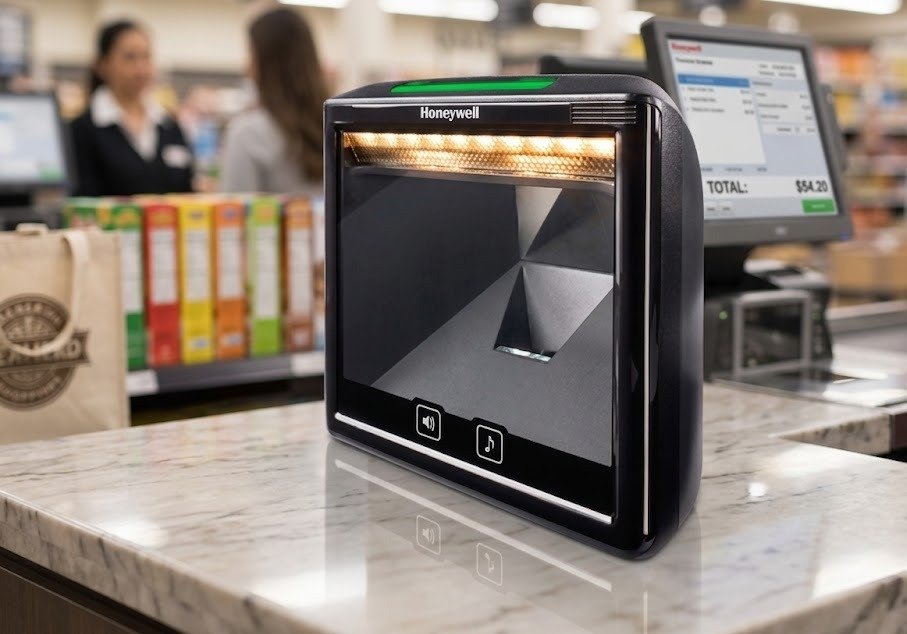
The Honeywell Solaris 7980g is a corded, high-speed vertical-slot barcode scanner designed for installation at busy retail checkout counters.
It uses area-imaging technology to read standard 1D, PDF, postal and 2D barcodes, including QR-code applications. It can scan printed product labels, digital coupons, mobile-wallet codes and compatible identification barcodes displayed on smartphone screens.
Although the Solaris 7980g is sometimes described as an in-counter scanner, Honeywell officially classifies it as a vertical-slot presentation scanner. It is designed to fit into existing checkout enclosures rather than operate as a large horizontal bioptic scanner with an integrated weighing scale.
Honeywell discontinued the Solaris 7980g in December 2019 and lists the Solaris XP 7990g as its replacement. Buyers should therefore confirm whether available stock is new, open-box, refurbished or used before ordering.
The Honeywell Solaris 7980g is designed for retail businesses that process a high volume of products and digital customer codes at a fixed checkout counter.
Its omnidirectional area-imaging system allows cashiers to present barcodes at different angles without carefully aligning each code with one scanning line. Honeywell designed the scanner with an extended depth of field and advanced decoding software to improve first-pass scanning across different barcode orientations and print conditions.
The scanner can process:
Its motion tolerance of up to 3 metres per second helps it read products moving quickly through the checkout area. This makes the scanner suitable for supermarkets, convenience stores, pharmacies and other high-traffic retail environments.
The Solaris 7980g can also connect to a compatible auxiliary handheld scanner. This allows staff to scan large, heavy or difficult-to-position products without removing them from a shopping trolley or checkout area.
Buy the Honeywell Solaris 7980g from GS Systemz after verifying the unit’s condition, interface cable, 2D activation, EAS configuration, local warranty and package contents.
The Solaris 7980g combines high-speed area imaging with checkout integration features.
Key features include:
Honeywell states that decoding capability and hardware features depend on the exact product-kit configuration.
The Solaris 7980g is suitable for fixed retail checkout environments that need rapid scanning of products and customer-facing digital codes.
| Application | Suitability |
|---|---|
| Supermarket checkout | Excellent |
| Grocery-store checkout | Excellent |
| Convenience stores | Excellent |
| Pharmacy billing | Excellent |
| High-volume retail scanning | Excellent |
| QR-code scanning | Excellent |
| Mobile-wallet codes | Excellent |
| Digital loyalty cards | Excellent |
| Smartphone coupons | Excellent |
| Printed identification cards | Excellent |
| Product returns counter | Good |
| Membership verification | Excellent |
| Auxiliary handheld scanning | Supported with compatible scanner |
| EAS-enabled checkout | Available on compatible configuration |
| Fixed inventory workstation | Good |
| Large-product scanning | Good with auxiliary scanner |
| Wireless aisle scanning | Not supported |
| Integrated weighing | Not included |
| Outdoor use in rain | Not suitable |
| Heavy industrial use | Consider an industrial scanner |
Honeywell designed the Solaris 7980g for retail environments selling high volumes of small products, including convenience stores, pharmacies, specialist retailers, liquor stores and grocery stores.
Here are the main official Honeywell Solaris 7980g specifications:
| Specification | Detail |
|---|---|
| Product name | Honeywell Solaris 7980g |
| Product type | Vertical-slot presentation barcode scanner |
| Installation style | Checkout enclosure or fixed counter |
| Connection type | Corded |
| Scanning technology | Area imaging |
| Imaging array | 1280 × 960 pixels |
| Decode capability | Standard 1D, PDF, 2D, postal and OCR |
| QR-code support | Supported on 2D configuration |
| Motion tolerance | Up to 3m/s for 13 mil UPC |
| Horizontal scan angle | 42° |
| Vertical scan angle | 34° |
| Pitch tolerance | ±65° |
| Skew tolerance | ±75° |
| Minimum print contrast | 25% |
| Minimum 1D resolution | 3 mil |
| Minimum 2D resolution | 8.3 mil Data Matrix |
| Host interfaces | USB, RS-232, keyboard wedge and IBM 46xx/RS-485 |
| Auxiliary port | USB for compatible secondary scanner |
| EAS support | Checkpoint and Sensormatic options |
| Input voltage | 5.0–5.2V |
| Operating current | Approximately 400mA |
| Short standby current | Approximately 270mA |
| Extended standby current | Approximately 210mA |
| Dimensions | 148 × 152 × 85mm |
| Weight | Approximately 539g |
| Operating temperature | 0°C to 40°C |
| Storage temperature | -20°C to 60°C |
| Operating humidity | 5%–95%, non-condensing |
| Ambient-light tolerance | Up to 100,000 lux |
| Protection rating | IP5X |
| Original warranty | Three-year factory warranty |
| Product status | End of life |
| End-of-life date | December 2019 |
| End of service | January 2023 |
| Official replacement | Honeywell Solaris XP 7990g |
Specifications and barcode performance may vary according to the product kit, activated barcode licences, barcode quality and working environment.
A high-speed in-counter scanner is installed at a fixed checkout position and is designed to process products rapidly as cashiers move them through the scanning field.
The Solaris 7980g is more accurately described as a vertical-slot scanner. It is positioned vertically inside or beside a checkout enclosure, with its scan window facing the cashier and products.
It is not the same as a large horizontal scanner-scale installed flat inside a supermarket counter.
The Solaris 7980g is suitable when a business needs:
Businesses requiring an integrated weighing scale should choose a compatible bioptic scanner-scale system instead.
A vertical-slot scanner has an upright scanning window that faces the product-presentation area.
Cashiers can move products past the window while the scanner captures the barcode from different orientations. This design uses less counter space than some large horizontal bioptic installations.
Vertical-slot scanning is useful for:
The Solaris 7980g’s compact dimensions allow it to fit into many existing checkout enclosures. Honeywell specifically designed it for environments processing high volumes of small items.
A 2D area imager captures a complete visual image of the barcode instead of reading one horizontal laser line.
This allows the Honeywell Solaris 7980g to read traditional linear product codes as well as square, stacked and digital symbols.
Common 1D barcode applications include:
Common 2D applications include:
Area imaging also allows the barcode to be presented at different angles because the scanner captures the complete symbol rather than requiring one line to cross it precisely.
Honeywell lists standard 1D, PDF, 2D, postal and OCR decoding, subject to kit configuration.
Yes. A 2D-enabled Solaris 7980g can read QR codes.
Honeywell lists a typical scanning range of approximately 0–190mm for a 20 mil QR code. Actual performance depends on the QR code’s dimensions, contrast, screen quality and surrounding conditions.
QR-code scanning can support:
Some legacy Solaris 7980g units were sold in 1D configurations that could later be upgraded to full 2D imaging. Confirm that the exact GS Systemz unit has 2D decoding activated before advertising guaranteed QR-code support.
Yes. The Solaris 7980g reads standard 1D retail barcodes as part of its primary checkout function.
It can scan product codes used on:
Honeywell lists a typical scanning range of approximately 0–270mm for a 13 mil UPC-A barcode.
Its omnidirectional scanning allows the cashier to present products at different rotations without precisely aligning the barcode.
Yes. Honeywell designed the Solaris 7980g to read compatible digital coupons, mobile wallets and identification codes displayed on smartphone screens.
Mobile-screen applications can include:
When a smartphone code is difficult to scan:
Very small codes, cracked screens and strong glare can reduce digital scanning performance.
The Solaris 7980g’s omnidirectional imaging, extended depth of field and advanced decoding software can improve the reading of some poorly printed or damaged barcodes.
Honeywell designed it to process codes across different orientations and print-quality conditions, helping cashiers achieve more first-pass reads.
It may improve scanning of:
The current Solaris user guide also provides an enhanced mode for poor-quality PDF and other difficult barcode conditions. Activating enhanced processing can improve difficult-code reading but may reduce responsiveness with good-quality codes.
No scanner can decode a barcode when too much essential information is missing. Severely damaged labels should be replaced or reprinted.
Honeywell lists motion tolerance of up to 3 metres per second for a 13 mil UPC barcode at the optimal focal point.
Motion tolerance measures how quickly a barcode can move through the scanner’s reading field while remaining decodable.
This performance supports:
Actual checkout performance can depend on:
The 3m/s figure describes barcode motion tolerance. It does not mean the scanner processes three separate transactions every second.
The scanning distance depends on the barcode format and density.
| Barcode Type | Typical Scanning Range |
|---|---|
| 5 mil Code 39 | 10–140mm |
| 13 mil UPC-A | 0–270mm |
| 20 mil Code 39 | 0–300mm |
| 6.7 mil PDF417 | 20–140mm |
| 20 mil Data Matrix | 15–190mm |
| 20 mil QR Code | 0–190mm |
These are the original Honeywell datasheet performance figures. Barcode quality and environmental conditions can affect the practical scanning distance.
The newer combined Solaris 7980g and 7990g user guide lists somewhat different guaranteed ranges for supported configurations. This suggests that firmware, hardware revision or test conditions can affect published performance. Confirm the exact unit and revision when a specific scan distance is essential.
Yes. Honeywell lists a minimum 1D Code 39 resolution of 3 mil and a minimum 2D Data Matrix resolution of 8.3 mil in the original datasheet.
A mil is one-thousandth of an inch and describes the narrowest bar or module inside a barcode.
Small barcode performance requires:
A physical scan test is recommended when a business uses unusually small jewellery, electronics, pharmaceutical or component barcodes.
Print contrast describes the visual difference between the dark barcode elements and the lighter background.
Honeywell lists a minimum reflectance difference of 25% for the Solaris 7980g under its testing conditions.
A barcode may become difficult to read when:
Clear black-on-white barcodes normally provide the most dependable scanning results.
Omnidirectional scanning allows the barcode to be presented at different rotations.
Instead of carefully aligning the code in one direction, cashiers can move products past the Solaris 7980g’s scanning window horizontally, vertically or at an angle.
This helps reduce:
The complete barcode still needs to be visible within the scanning field.
The Solaris 7980g uses white LED illumination to light the barcode for area-image capture.
Honeywell designed the lighting to reduce glare without reducing scanning performance. This is particularly important when customers present bright smartphone screens or barcodes printed on reflective product packaging.
White illumination supports:
The illumination area should not be covered by tape, stickers or checkout signage.
Yes. The Solaris 7980g provides a multifunction auxiliary USB port for connecting a compatible secondary handheld scanner.
An auxiliary scanner can be used for:
Honeywell recommends using compatible Honeywell handheld scanners. The current user guide warns that non-Honeywell or third-party auxiliary scanners may not function correctly. It also states that certain EL variants do not support an auxiliary scanner.
Before ordering, confirm:
Selected Solaris 7980g configurations support electronic article surveillance integration.
Honeywell lists:
EAS integration can combine product scanning with compatible security-tag processing during checkout.
EAS support depends on the exact model and installation.
Before ordering, confirm:
Do not advertise integrated EAS as a standard feature of every Solaris 7980g unit.
The Solaris 7980g supports several common POS interfaces:
The exact interface cable depends on the product kit.
USB is commonly used with:
The Solaris 7980g can receive power through compatible USB installations, potentially removing the need for a separate power supply and additional power cabling.
RS-232 may be required for:
A serial installation may require:
Keyboard-wedge mode sends barcode data through the keyboard-input path of a compatible computer.
IBM 46xx support through RS-485 is intended for compatible legacy retail POS systems.
Confirm the required interface before ordering because one Solaris kit may not include the cable required for another host system.
Automatic interface detection allows the Solaris 7980g to recognise a compatible attached host cable and configure itself for the supported connection.
This can simplify deployment when:
The cable must still be designed for the Solaris scanner and the connected POS system. Honeywell warns that incorrect cable pin assignments can damage the scanner and may not be covered by warranty.
No. The Solaris 7980g is a corded checkout scanner.
It does not contain a rechargeable battery or use Bluetooth for normal host communication. It connects through USB, RS-232, keyboard wedge or IBM RS-485, depending on the product kit.
A corded checkout scanner is suitable when:
Choose a cordless handheld scanner when staff need to move between aisles, shelves, cartons or warehouse areas.
The Solaris 7980g was designed for compatibility with a wide range of point-of-sale systems.
Its integrated interfaces and automatic interface detection support modern and legacy checkout installations.
Compatibility still depends on:
Because the Solaris 7980g is discontinued, test it with the actual POS software and hardware before purchasing multiple units.
Selected Solaris 7980g units were originally offered as omnidirectional 1D scanners that could later be upgraded to full 2D area-imaging capability.
Honeywell presented this as a way for retailers to invest in the hardware before they needed QR codes or other 2D formats.
However, the model is now discontinued and its official service period has ended.
Before relying on an upgrade, confirm:
Do not advertise QR-code capability for a 1D-only unit unless the 2D licence has been verified.
The Solaris 7980g is designed for fixed indoor checkout installations rather than repeated handheld drops.
It carries an IP5X protection rating and can operate at surrounding light levels of up to 100,000 lux.
It is suitable for:
Because it is normally installed inside an enclosure, the scanner should be protected from:
The Honeywell Solaris 7980g has an IP5X environmental-protection rating.
The first digit, 5, indicates that dust may enter in limited quantities but should not enter at a level that prevents satisfactory operation.
The X means that no water-protection rating is specified in this classification.
The Solaris 7980g should not be:
Keep the scan window and housing dry.
Honeywell lists an operating-temperature range of 0°C to 40°C.
The scanner can be stored between -20°C and 60°C and used at 5%–95% relative humidity when condensation does not form. Its listed ambient-light tolerance is up to 100,000 lux.
Avoid:
Yes. Honeywell lists the Solaris 7980g as an end-of-life product.
| Lifecycle Detail | Honeywell Listing |
|---|---|
| End of life | December 2019 |
| End of contract availability | January 2020 |
| End of service | January 2023 |
| Official replacement | Honeywell Solaris XP 7990g |
This means Honeywell’s official service period has ended. Remaining units may still be available as old stock, open-box, refurbished or used equipment.
Before ordering, confirm:
The original Honeywell datasheet listed a three-year factory warranty.
However, the model reached end of life in December 2019 and end of service in January 2023. The historical three-year warranty statement does not guarantee that remaining stock currently carries a new manufacturer warranty.
GS Systemz should clearly state:
Do not advertise a current three-year Honeywell warranty unless coverage has been verified for the exact unit and serial number.
Choose the Solaris 7980g when you need a replacement for an existing installation or have verified remaining stock that matches your checkout system.
| Requirement | Recommendation |
|---|---|
| Standard product barcodes | Solaris 7980g is suitable |
| High-speed checkout scanning | Suitable |
| QR-code scanning | Supported on activated 2D unit |
| Data Matrix scanning | Supported on 2D configuration |
| PDF417 scanning | Supported |
| Smartphone coupons | Supported |
| Mobile-wallet codes | Supported |
| Omnidirectional scanning | Supported |
| USB connection | Supported |
| RS-232 connection | Supported |
| Keyboard wedge | Supported |
| IBM RS-485 | Supported |
| Auxiliary handheld scanner | Supported on compatible variant |
| EAS integration | Available on selected configuration |
| Integrated weighing scale | Not included |
| Wireless scanning | Not supported |
| Current Honeywell product | No |
| New installation | Consider Solaris XP 7990g |
| Waterproof operation | Not suitable |
The 7980g is most appropriate when compatibility with an existing checkout enclosure, cable or scanner deployment is more important than obtaining a current-generation product.
A vertical-slot scanner has an upright scan window. A horizontal in-counter scanner is installed flat inside the checkout counter.
| Feature | Solaris 7980g Vertical Slot | Horizontal In-Counter Scanner |
|---|---|---|
| Scan-window position | Vertical | Flat and horizontal |
| Installation | Upright checkout enclosure | Cut into checkout counter |
| Counter space | Compact | Requires larger counter opening |
| Product presentation | Pass beside upright window | Pass over horizontal glass |
| Integrated scale | No | Available on selected bioptic models |
| Smartphone scanning | Supported | Depends on model |
| Best use | Compact retail checkout | Supermarket lane or scanner-scale use |
Choose the Solaris 7980g for a compact vertical checkout installation.
Choose a bioptic scanner-scale when weighing produce and scanning from multiple counter planes are required.
The Solaris 7980g uses a full area-imaging engine, while the Orbit 7190g combines an omnidirectional laser with a smaller area imager.
| Feature | Solaris 7980g | Orbit 7190g |
|---|---|---|
| Product style | Vertical-slot scanner | Desktop presentation scanner |
| Main technology | Area imaging | Hybrid laser and imager |
| Imaging array | 1280 × 960 pixels | 640 × 480 pixels |
| Standard 1D barcodes | Supported | Supported |
| QR codes | Supported on 2D unit | Supported |
| Mobile-screen scanning | Supported | Supported |
| Checkout-enclosure installation | Designed for this | Desktop-focused |
| Auxiliary scanner port | Available | Not the same integration focus |
| EAS support | Available on selected configuration | Available on selected configuration |
| Product status | End of life | Verify current availability |
| Best use | Integrated vertical retail checkout | Compact desktop mixed-code scanning |
Choose the Solaris 7980g when replacing an existing vertical-slot installation.
Choose the Orbit 7190g when a desktop hybrid scanner fits the counter without requiring an enclosure-based installation.
The Solaris XP 7990g is Honeywell’s official replacement for the discontinued Solaris 7980g.
| Feature | Solaris 7980g | Solaris XP 7990g |
|---|---|---|
| Product generation | Legacy Solaris | Current XP generation |
| Current status | End of life | Current replacement |
| Scanning platform | Adaptus area imaging | Honeywell XP imaging |
| 1D and 2D scanning | Supported | Supported |
| Damaged-barcode performance | Legacy platform | Improved XP performance |
| Motion performance | Up to 3m/s listed | Higher current-generation performance |
| Field of view | Standard Solaris | Wider field of view |
| Environmental protection | IP5X | IP53 listed |
| Existing-installation fit | Original enclosure | Designed for backward-compatible upgrades |
| Manufacturer support | Service ended | Current support options |
| Best purchase | Existing-unit replacement | New retail installation |
Honeywell states that the Solaris XP 7990g offers faster scanning, a wider field of view and improved damaged-barcode performance compared with previous Solaris models. It is also designed for backward-compatible installation into existing checkout enclosures.
Choose the 7980g only when existing-system compatibility, verified condition and price make it appropriate.
Choose the Solaris XP 7990g for a new installation requiring current Honeywell support.
GS Systemz offers barcode-scanning equipment for retail and point-of-sale businesses in Pakistan.
This product page helps customers evaluate:
Before placing an order, confirm:
Checking these details is especially important because the Solaris 7980g is discontinued and was sold in several configurations.
Install the Solaris 7980g securely inside a compatible checkout enclosure with its scan window facing the normal product-presentation area.
Scanner-care tips:
Honeywell states that repairs and upgrades should be performed by an authorised service centre rather than by the user.
Buy the Honeywell Solaris 7980g when your business needs a verified replacement for an existing Solaris checkout installation.
It may be suitable for:
It is especially relevant when replacing an existing 7980g without redesigning the checkout enclosure or POS cabling.
Businesses creating a new checkout installation should compare it with the current Honeywell Solaris XP 7990g.
Get the Honeywell Solaris 7980g High-Speed 2D In-Counter Barcode Scanner from GS Systemz for high-volume retail, pharmacy, supermarket and point-of-sale scanning.
Use its area-imaging engine to capture standard product barcodes, PDF symbols, QR codes, Data Matrix codes and compatible digital coupons displayed on customer smartphones.
Confirm the scanner’s condition, 2D activation, interface cable, power supply, EAS configuration, auxiliary-port support, local warranty and package contents before adding the discontinued Solaris 7980g to your checkout system.
The Honeywell Solaris 7980g is a corded vertical-slot area-imaging scanner designed for high-volume retail checkout and 1D, PDF and 2D barcode scanning.
Yes, a 2D-enabled Solaris 7980g can scan QR codes. Some legacy units were sold as 1D configurations, so 2D activation must be confirmed.
Yes. It reads standard 1D retail barcodes and has a typical range of up to approximately 270mm for a 13 mil UPC-A code.
Yes. Honeywell designed it to scan compatible digital coupons, mobile wallets and identification codes displayed on smartphones.
Honeywell lists motion tolerance of up to 3 metres per second for a 13 mil UPC barcode at the optimal focal position.
Compatible configurations include an auxiliary USB port for connecting a supported handheld scanner. Some EL variants do not support this feature.
Selected configurations support Checkpoint or Sensormatic EAS integration. Confirm the exact part number and security system before ordering.
No. It is a corded scanner supporting USB, RS-232, keyboard wedge and IBM 46xx through RS-485.
Yes. Honeywell lists end of life in December 2019 and end of service in January 2023. The Solaris XP 7990g is its official replacement.
You can buy the Honeywell Solaris 7980g from GS Systemz in Pakistan, subject to confirmed stock, product condition, 2D activation and local warranty.

Reviews
There are no reviews yet.