
₨79,500.00
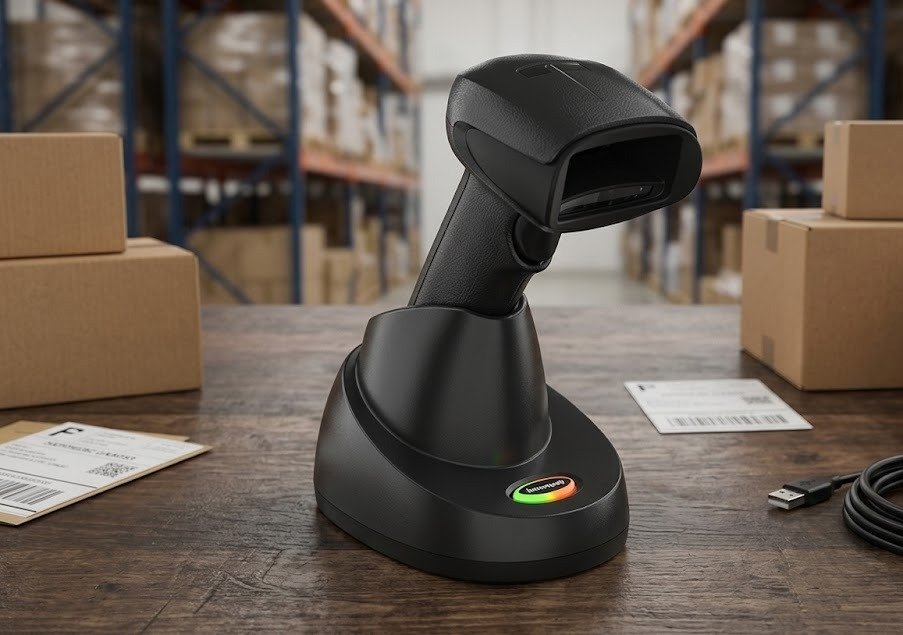
The Honeywell Xenon XP 1952g is a premium wireless area-imaging scanner designed to read traditional product barcodes, QR codes and other supported 2D symbols.
Also searched as the Honeywell Xenon 1952, it connects through Bluetooth and is commonly supplied with a charging and communication dock. The scanner is suitable for retail checkout, pharmacies, warehouses, distribution centres, packing stations and inventory operations where employees need to move away from a fixed computer.
Its 1280 × 800-pixel imaging engine reads printed labels and compatible digital codes displayed on smartphones. Honeywell also designed the scanner to improve the capture of damaged, faded, poorly printed and difficult-to-reach barcodes.
The Xenon XP 1952g offers the scanning performance of Honeywell’s premium Xenon XP platform without restricting the operator with a handheld cable.
The Bluetooth Class 1 connection provides a listed line-of-sight range of up to 100 metres by default. It can also be programmed for Class 2 operation with a line-of-sight range of approximately 10 metres. Walls, metal shelving and other obstacles can reduce the practical distance.
Its 2400mAh lithium-ion battery provides an expected operating duration of approximately 18 hours. Honeywell’s Rev H datasheet lists up to 65,000 scans per charge, while its current online product specifications list 72,000 scans. Because Honeywell publishes both figures, GS Systemz should avoid guaranteeing one exact scan count without checking the supplied hardware and battery revision.
The scanner is engineered to withstand 50 drops from 1.8 metres onto concrete and 2,000 tumbles from 0.5 metres. Its IP52 rating adds protection against operational dust and limited dripping water, making it suitable for high-use indoor commercial workstations.
Buy the Honeywell Xenon XP 1952g from GS Systemz for wireless retail, inventory, logistics and point-of-sale barcode scanning in Pakistan.
Key features include:
The exact focus, dock, interface cable, colour and enabled decoding functions depend on the Honeywell part number.
| Application | Suitability |
|---|---|
| Retail checkout | Excellent |
| Supermarket product scanning | Excellent |
| QR-code scanning | Excellent |
| Mobile coupons and loyalty cards | Excellent |
| Pharmacy product scanning | Excellent |
| Warehouse inventory | Excellent |
| Distribution centres | Excellent |
| Product receiving | Excellent |
| Packing and dispatch stations | Excellent |
| Large-product scanning | Excellent |
| Shopping-cart barcode scanning | Excellent |
| Damaged-label scanning | Excellent |
| Small high-density barcodes | Excellent with HD or UD model |
| Hands-free counter scanning | Supported with presentation dock |
| Wall-mounted charging | Supported with compatible base |
| Wireless aisle scanning | Good within Bluetooth coverage |
| Offline batch collection | Confirm exact configuration |
| Heavy outdoor rain | Not suitable |
| Industrial long-range scanning | Consider a Granit industrial model |
Honeywell identifies retail, distribution centres, transportation, logistics and point-of-sale environments as primary applications for the Xenon XP 1952g.
| Specification | Detail |
|---|---|
| Official product name | Honeywell Xenon XP 1952g |
| Product type | Cordless area-imaging scanner |
| Form factor | Wireless handheld gun-style scanner |
| Imaging array | 1280 × 800 pixels |
| Decode capability | Standard 1D, PDF, 2D, postal, DotCode, Digimarc and OCR |
| QR-code support | Yes |
| Wireless technology | Bluetooth v4.2 |
| Wireless frequency | 2.4GHz |
| Class 1 range | Up to 100m line of sight |
| Class 2 range | Approximately 10m line of sight |
| Battery | Minimum 2400mAh lithium-ion |
| Scans per charge | Up to 65,000 in Rev H datasheet |
| Current webpage figure | 72,000 scans |
| Expected operating duration | Approximately 18 hours |
| Expected charging time | Approximately 4.5 hours |
| Motion tolerance | Up to 400cm/s for 13 mil UPC |
| Standard/HD scan angle | 42° horizontal, 27° vertical |
| Ultra High Density angle | 40° horizontal, 26° vertical |
| Roll tolerance | ±360° |
| Pitch tolerance | ±45° |
| Skew tolerance | ±65° |
| Minimum print contrast | 15% in Rev H datasheet |
| Current webpage contrast | 20% |
| Host interfaces | USB, keyboard wedge, RS-232 and IBM 46xx/RS-485 |
| Scanner dimensions | 104.1 × 71.1 × 160mm |
| Scanner weight | Approximately 212.62g |
| Presentation base dimensions | 132 × 101 × 81mm |
| Presentation base weight | Approximately 179g |
| Desktop/wall base dimensions | 231 × 89 × 83mm |
| Desktop/wall base weight | Approximately 260g |
| Charging-base power | 2.5W, 500mA at 5V |
| Non-charging base power | 0.75W, 150mA at 5V |
| Scanner operating temperature | 0°C to 50°C |
| Base charging temperature | 5°C to 40°C |
| Storage temperature | -40°C to 70°C |
| Operating humidity | 0%–95%, non-condensing |
| Ambient-light tolerance | Up to 100,000 lux |
| Drop resistance | 50 drops from 1.8m |
| Tumble resistance | 2,000 tumbles from 0.5m |
| IP rating | IP52 |
| Scanner warranty | Three-year factory warranty |
| Battery warranty | One year |
The official datasheet notes that decoding capability and working distance depend on the selected configuration.
A wireless 2D scanner captures traditional linear barcodes and modern square or stacked codes while transmitting the data through a radio connection.
The Xenon XP 1952g communicates by Bluetooth with a compatible charging and communication base. The base then transfers the barcode data to the connected POS terminal, computer or business system.
The dock performs several jobs:
Honeywell offers separate presentation and desktop/wall-mount charging and communication bases for the battery-powered 1952g.
The Honeywell dock is both a charging cradle and a communication base.
When correctly connected, the dock receives barcode data from the scanner over Bluetooth and sends it to the host system through the selected interface cable. It also charges the scanner whenever it is placed correctly in the cradle.
The dock may connect to the host through:
The required interface depends on the cable and base kit supplied.
A USB connection can often provide both host communication and charging power. Honeywell’s user guide notes that charging may be slower when the dock is powered only through the host-interface cable than when a compatible external power supply is connected.
Honeywell offers more than one charging and communication base for the Xenon XP 1952g.
| Dock Type | Main Use |
|---|---|
| Presentation charging base | Countertop storage, charging and hands-free scanning |
| Desktop/wall-mount base | Secure horizontal, desktop or wall installation |
| Access Point | Wireless communication without a conventional charging cradle |
| Multi-bay charger | Charging several compatible batteries separately |
The presentation base holds the scanner upright and supports scanning while the scanner remains in the cradle by default.
It is suitable for:
The desktop/wall base is designed for secure installation on a counter, vertical surface or compatible equipment.
Honeywell’s user guide states that scanning in the cradle is enabled by default for the presentation base and disabled by default for the desktop/wall-mount base. This setting can be changed through scanner configuration.
Yes. The scanner can operate in presentation mode while placed in a compatible presentation charging base.
Honeywell enables “scan in cradle” by default for its presentation base. This allows employees to move products in front of the docked scanner without holding it.
Hands-free docked scanning is useful for:
The scanner can be removed from the dock when a barcode is attached to a large, heavy or awkward product.
The standard scanner uses a Bluetooth v4.2 radio with adaptive frequency hopping.
Honeywell lists two range settings:
| Bluetooth Setting | Listed Range |
|---|---|
| Class 1 default | Up to 100m line of sight |
| Programmable Class 2 | Up to 10m line of sight |
The 100-metre figure requires a clear, unobstructed line of sight. Practical indoor coverage is usually lower because walls, metal shelves, machinery and other wireless equipment can weaken the connection.
For dependable operation:
The normal commercial kit links the scanner to a charging and communication base, which connects to the host system.
Honeywell also supports compatible Access Point installations, but direct Bluetooth pairing behaviour can depend on the scanner’s mode, host device, software and security requirements.
Before purchasing for direct pairing, confirm compatibility with the intended:
Do not assume that every Bluetooth device will support the same scanner profile or configuration.
The scanner reads standard 1D, PDF, 2D and postal barcode families. Selected configurations can also support DotCode, Digimarc and OCR applications.
Common 1D formats include:
Common 2D formats include:
The exact enabled symbologies depend on the scanner configuration.
Yes. The Xenon XP 1952g reads QR and Micro QR codes.
The QR-code working distance depends on the scanner’s focus option.
| QR Code | Standard Range | High Density | Ultra High Density |
|---|---|---|---|
| 4 mil QR | Not listed | Not listed | 25–55mm |
| 10 mil QR | 35–250mm | 10–185mm | 0–105mm |
| 20 mil QR | 0–438mm | 0–331mm | 0–160mm |
These are typical Honeywell laboratory figures. Actual performance can be affected by code size, print quality, contrast, screen brightness and surrounding conditions.
QR-code applications can include:
Yes. Honeywell optimised the Xenon XP 1952g to read compatible digital codes displayed on customer smartphones as well as merchandise codes scanned by employees.
It can support:
When an on-screen code is difficult to scan:
Yes. Damaged and poor-quality barcode scanning is one of the primary benefits Honeywell promotes for the Xenon XP series.
The 1952g is designed to improve the capture of:
Honeywell states that its improved decoding can reduce wasted transaction time and manual barcode entry.
A scanner cannot reconstruct data when essential parts of a barcode are completely missing. Severely damaged labels should still be replaced.
Honeywell lists motion tolerance of up to 400cm per second for a 13 mil UPC barcode at optimal focus.
This means a compatible barcode can move quickly through the scanner’s field while remaining readable. It does not mean the scanner completes 400 separate transactions every second.
High motion tolerance is useful for:
Actual performance depends on barcode size, label condition, working distance, employee movement and host-system response.
| Barcode Type | Typical Range |
|---|---|
| 3 mil Code 39 | 56–132mm |
| 5 mil Code 39 | 28–242mm |
| 10 mil Code 39 | 0–443mm |
| 13 mil UPC | 0–490mm |
| 15 mil Code 128 | 0–543mm |
| 20 mil Code 39 | 4–822mm |
| 5 mil PDF417 | 54–160mm |
| 6.7 mil PDF417 | 34–220mm |
| 7.5 mil Data Matrix | 49–172mm |
| 10 mil Data Matrix | 29–245mm |
| 10 mil QR | 35–250mm |
| 20 mil QR | 0–438mm |
| Barcode Type | Typical Range |
|---|---|
| 3 mil Code 39 | 27–131mm |
| 5 mil Code 39 | 14–219mm |
| 10 mil Code 39 | 0–389mm |
| 13 mil UPC | 0–368mm |
| 15 mil Code 128 | 0–417mm |
| 20 mil Code 39 | 6–604mm |
| 5 mil PDF417 | 30–155mm |
| 6.7 mil PDF417 | 17–211mm |
| 5 mil Data Matrix | 45–100mm |
| 10 mil Data Matrix | 12–211mm |
| 10 mil QR | 10–185mm |
| 20 mil QR | 0–331mm |
Performance can change with barcode quality and environmental conditions.
| Focus Option | Best Use |
|---|---|
| Standard Range | Retail products, cartons and longer working distances |
| High Density | Small pharmacy, electronics and jewellery labels |
| Ultra High Density | Extremely small manufacturing and component codes |
Standard Range is usually the best option for retail checkout, product receiving and general warehouse scanning.
High Density is designed for smaller barcode elements and compact labels. It provides better close-range performance on small symbols but less maximum distance than Standard Range.
Ultra High Density is intended for specialised small codes. Honeywell lists support for selected 2 mil Code 39 and 4 mil QR symbols under suitable conditions.
GS Systemz should confirm whether available stock is SR, HD or UD before publishing a guaranteed scanning distance.
Honeywell’s Rev H datasheet lists an expected operating duration of approximately 18 hours from its minimum 2400mAh lithium-ion battery.
Real battery life depends on:
The scanner should be returned to its dock when not in use so it remains ready for the next shift.
Honeywell publishes two figures:
The difference may reflect product, battery or test revisions, but Honeywell does not explain it on those pages. GS Systemz should describe the capacity as up to approximately 65,000–72,000 scans per charge, subject to battery condition and operating circumstances.
The number of scans can be reduced by:
Honeywell lists an expected charging time of approximately 4.5 hours.
The scanner should be charged while the base is within its supported charging-temperature range of 5°C to 40°C.
Charging can be affected by:
A compatible external power supply may charge more effectively than relying only on power delivered through some host-interface connections.
The Xenon XP 1952g uses a rechargeable battery pack, and Honeywell publishes current battery-pack and multi-bay charger documentation for the standard scanner family.
Before ordering a replacement battery, confirm:
Honeywell lists a three-year scanner warranty but only a one-year warranty for the battery pack.
The Honeywell charging and communication base supports these host-interface categories:
The required interface is determined by the base, cable and scanner configuration.
USB is commonly used with:
RS-232 may be required for:
A serial installation may require a compatible external power supply.
Keyboard-wedge operation transmits barcode data through the keyboard-input path of a compatible system.
This interface supports compatible legacy retail systems.
Confirm the included cable because a USB kit may not contain the hardware needed for serial or IBM operation.
The scanner is designed for point-of-sale, retail, logistics and barcode-data-entry systems.
In a compatible keyboard configuration, scanned data can normally appear in an active software field like typed keyboard input.
Compatibility depends on:
Honeywell supports the Xenon XP 1952g with Scanner Management Utility and Operational Intelligence tools for larger deployments.
Honeywell engineered the scanner for:
These specifications make it suitable for demanding indoor retail, warehouse and distribution workstations.
Durability testing does not make the scanner unbreakable. Protect its imaging window, battery, trigger, dock and charging contacts from unnecessary impact.
The first digit, 5, indicates protection against dust entering in quantities that would interfere with satisfactory operation.
The second digit, 2, indicates limited protection against vertically dripping water when the scanner is tilted within specified limits.
IP52 does not make the Xenon XP 1952g waterproof. Do not:
Honeywell officially lists IP52 protection for the scanner.
Selected Xenon XP 1952g models use disinfectant-ready housing.
Honeywell states that these versions can be cleaned regularly with a wider range of approved cleaning solutions without damaging the product housing.
This option may be useful for:
Not every black or white 1952g has disinfectant-ready housing. Verify the exact part number and follow Honeywell’s approved cleaning instructions.
Honeywell continues to publish an active product page for the standard battery-powered Xenon XP 1952g, along with regulatory documents and a user guide updated in 2026. The standard battery model was not identified in the official discontinued-products table reviewed for this article.
However, Honeywell retired the separate Xenon XP 1952g-BF battery-free model with a last ship date of February 1, 2025. Its listed replacement is the Xenon Ultra 1962.
Do not confuse these products:
| Model | Power Source | Lifecycle Note |
|---|---|---|
| Xenon XP 1952g | Lithium-ion battery | Standard model remains on active product page |
| Xenon XP 1952g-BF | Supercapacitor, battery-free | Retired by Honeywell |
| Xenon Ultra 1962g | Newer lithium-ion wireless model | Current-generation alternative |
Choose the Xenon XP 1952g when your business needs premium cordless scanning of printed and digital barcodes.
| Requirement | Recommendation |
|---|---|
| Standard product barcodes | Excellent |
| QR-code scanning | Supported |
| Data Matrix and PDF417 | Supported |
| Mobile-screen scanning | Supported |
| Damaged-barcode reading | Major strength |
| Wireless movement | Supported |
| Long Bluetooth range | Up to 100m line of sight |
| Full-shift battery operation | Approximately 18 hours |
| Hands-free dock scanning | Supported |
| Wall-mount charging | Supported with compatible base |
| Small high-density codes | Select HD or UD focus |
| Longer general scanning range | Select SR focus |
| Replaceable battery | Supported with correct pack |
| Outdoor waterproof use | Not suitable |
| Heavy industrial use | Consider a rugged Granit scanner |
| Battery-free operation | Standard 1952g does not provide this |
Confirm the focus, dock and interface before ordering.
The 1950g is corded, while the 1952g is wireless and includes battery and dock requirements.
| Feature | Xenon XP 1950g | Xenon XP 1952g |
|---|---|---|
| Scan technology | 2D area imaging | 2D area imaging |
| QR-code support | Yes | Yes |
| Main connection | Corded | Bluetooth |
| Battery | Not required | 2400mAh lithium-ion |
| Charging dock | Not required | Required for normal charging |
| Wireless range | No | Up to 100m line of sight |
| Operating time | Continuous host power | Approximately 18 hours |
| Scanner weight | Lighter | Heavier due to battery |
| Mobility | Limited by cable | Greater movement |
| Best use | Fixed workstation | Mobile scanning near POS or warehouse station |
Choose the 1950g when the scanner remains beside one workstation and battery management is unnecessary.
Choose the 1952g when employees need to scan products, shopping carts or inventory away from the host computer.
The standard 1952g uses a lithium-ion battery. The 1952g-BF uses supercapacitors instead of a conventional battery.
| Feature | Xenon XP 1952g | Xenon XP 1952g-BF |
|---|---|---|
| Power system | Lithium-ion battery | Supercapacitor |
| Expected operation | Approximately 18 hours | Designed for rapid recharge cycles |
| Scans per charge | Up to 65,000–72,000 published | Different lower-cycle specification |
| Charging behaviour | Approximately 4.5 hours | Faster short charging cycles |
| Battery replacement | Battery eventually replaceable | No conventional battery |
| Lifecycle | Active product page | Retired by Honeywell |
| Replacement | Compare with 1962g | Honeywell lists Xenon Ultra 1962 |
The GS Systemz product title should state clearly whether the unit is the standard battery model or the BF version.
The Xenon Ultra 1962g is Honeywell’s newer cordless premium scanner platform.
| Feature | Xenon XP 1952g | Xenon Ultra 1962g |
|---|---|---|
| Product generation | Xenon XP | Newer Xenon Ultra |
| Wireless operation | Bluetooth | Wireless next-generation platform |
| QR and 2D scanning | Supported | Supported |
| Damaged-code performance | Premium XP performance | Newer scan technology |
| Charging system | Contact-charging docks | Newer dock and battery options |
| Housing | IP52 | Redesigned, fully gasketed housing |
| Existing deployments | Established accessories and configurations | Better for new premium installations |
| Best purchase | Existing Xenon XP standardisation | Current-generation deployment |
Honeywell describes the Xenon Ultra 1962g as the next generation of its premium cordless scanning family.
Choose the 1952g when matching existing scanners, docks, batteries or configuration standards is important.
Choose the 1962g when creating a new long-term deployment and current-generation hardware is the priority.
GS Systemz can supply the Honeywell Xenon XP 1952g to businesses in Pakistan that need premium wireless barcode scanning.
This product page helps customers evaluate:
Before placing an order, confirm:
These checks are important because Honeywell offers several 1952g scanners, bases and regional kits.
Keep the scanner, dock, battery and interface cables in a clean indoor working environment.
Recommended care:
Proper charging, dock placement and cleaning can improve daily scanning reliability.
The scanner is suitable for:
It is particularly useful where employees need premium scanning performance and wireless movement without moving the host computer.
Get the Honeywell Xenon XP 1952g Wireless 2D Barcode Scanner with Dock from GS Systemz for retail, pharmacy, warehouse, distribution and point-of-sale scanning.
Use it to scan normal product barcodes, QR codes, Data Matrix, PDF417, DotCode and compatible digital codes displayed on smartphones.
Confirm the focus option, dock style, interface cable, battery condition, housing, enabled decoding features, local warranty and complete package contents before adding the Xenon XP 1952g to your business setup.
The Honeywell Xenon XP 1952g is a wireless area-imaging scanner that reads standard 1D, PDF and 2D barcodes and communicates through Bluetooth.
Yes. It reads QR and Micro QR codes. The working distance depends on whether the scanner uses SR, HD or UD focus.
Honeywell lists up to 100 metres line of sight in Class 1 mode and approximately 10 metres in programmable Class 2 mode.
Honeywell lists an expected operating duration of approximately 18 hours from its minimum 2400mAh lithium-ion battery.
Honeywell’s datasheet lists up to 65,000 scans, while its current product page lists 72,000. Actual capacity depends on battery and operating conditions.
Yes. The charging and communication base recharges the scanner and transfers Bluetooth barcode data to the connected host system.
Yes. Scanning in the cradle is enabled by default on Honeywell’s presentation charging base.
Yes. Honeywell optimised it for compatible digital smartphone codes as well as printed merchandise barcodes.
The standard battery-powered model remains on Honeywell’s active product page. The separate battery-free 1952g-BF was retired in February 2025.
You can buy the Honeywell Xenon XP 1952g Wireless 2D Barcode Scanner with Dock from GS Systemz in Pakistan, subject to confirmed stock, focus option and local warranty.
Reviews
There are no reviews yet.