
₨12,500.00
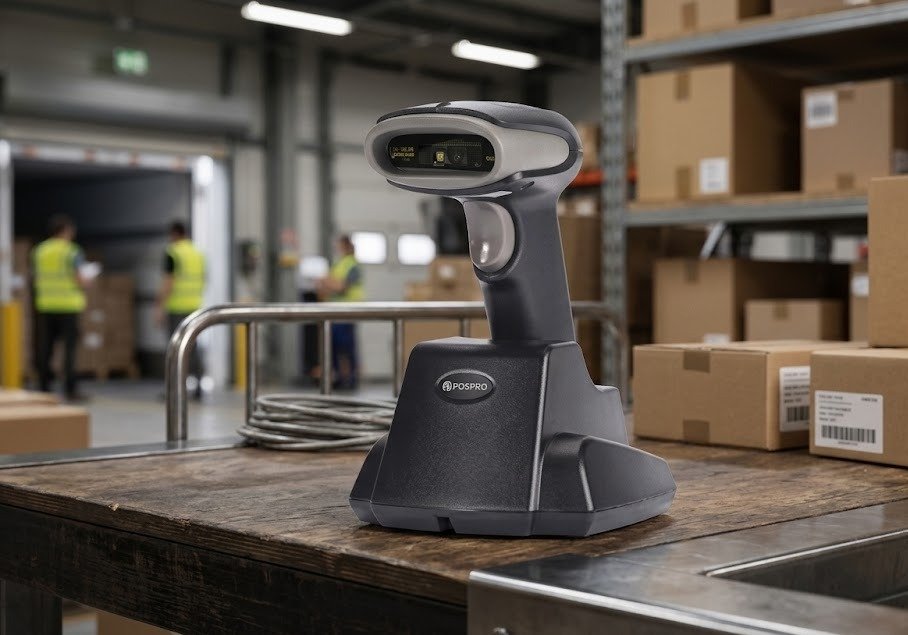
The POSPRO PBS-WX6 Wireless 1D Barcode Scanner With Dock is a cordless linear-imaging scanner designed for retail stores, pharmacies, warehouses, courier companies, libraries, inventory departments and packing stations.
It uses RF433 wireless communication and is supplied with a base that functions as both a wireless data receiver and a charging dock. The scanner can therefore remain charged and ready at a fixed workstation while still allowing employees to move toward shelves, cartons, parcels and products during scanning.
The PBS-WX6 reads supported 1D barcodes from:
It is specifically a 1D barcode scanner. It does not support QR Code, Data Matrix, PDF417 or other general 2D symbols.
Its combination of long-range wireless communication, offline memory, a 2000mAh battery and a charging dock makes it suitable for businesses that need mobility without relying on Bluetooth pairing or a small USB dongle.
| Feature | Published information |
|---|---|
| Brand | POSPRO |
| Model | PBS-WX6 |
| Product type | Wireless handheld barcode scanner |
| Barcode capability | 1D only |
| Scan technology | CCD linear imaging |
| Sensor resolution | 2500 pixels on matching OEM platform |
| Wireless technology | RF433 |
| Wireless frequency | 433–440MHz |
| Published open-area range | Up to 100 metres |
| Charging dock | Included with commonly advertised package |
| Dock function | Charging and wireless data reception |
| Offline memory | Approximately 100,000 13-byte barcode records |
| Operating modes | Real-time, inventory and cache |
| Battery | 2000mAh lithium battery |
| Manual-trigger runtime | Up to approximately 12 hours |
| Charging time | Approximately 6 hours |
| Scan rate | Approximately 350 ±50 scans per second |
| Minimum resolution | Approximately 4 mil |
| Screen scanning | Supported for compatible 1D codes |
| QR-code support | No |
| General 2D support | No |
| Local warranty | Confirm with GS Systemz |
| Box contents | Verify before dispatch |
The technical figures closely match the official Winson WNC-6083B/V platform and the POSPRO PBS-WX6 descriptions published by Pakistani dealers.
The PBS-WX6 is suitable for businesses that need reliable wireless scanning of conventional 1D barcodes.
Unlike a wired scanner, it allows employees to move toward the item instead of bringing every product or parcel to the computer. This is useful when scanning:
The charging dock gives the scanner a fixed storage location and replenishes its battery between shifts. The dock also acts as the RF433 data receiver, reducing the risk of losing a small USB wireless dongle.
The scanner also offers offline storage. Employees can collect barcode data outside wireless coverage and upload the stored records later, subject to correct inventory-mode configuration.
Key features include:
These features are published for both the PBS-WX6 and its closely matching Winson platform. Interface availability and package contents should still be verified against GS Systemz stock.
| Application | Suitability |
|---|---|
| Retail product billing | Excellent |
| Grocery-store checkout | Excellent |
| Pharmacy product scanning | Good for compatible 1D labels |
| Warehouse inventory | Excellent |
| Courier parcel processing | Excellent |
| E-commerce packing | Excellent |
| Product receiving | Excellent |
| Stock counting | Excellent |
| Shelf-label scanning | Excellent |
| Library circulation | Excellent |
| Membership-card scanning | Excellent |
| Dispatch verification | Excellent |
| Large-carton scanning | Excellent |
| Mobile-screen 1D barcodes | Supported |
| Reflective packaging | Supported within practical limits |
| Offline inventory collection | Supported |
| Multi-user warehouse scanning | Supported with correct network setup |
| QR-code scanning | Not supported |
| Data Matrix scanning | Not supported |
| PDF417 scanning | Not supported |
| Mobile QR payments | Not suitable |
| Long-range pallet barcodes | Limited by optical scan distance |
| Wet outdoor operation | Not recommended |
| Heavy industrial use | Choose a certified rugged scanner |
The official matching platform is promoted for supermarkets, retail, libraries, hospitals, logistics, express delivery, warehouses and registration environments.
The PBS-WX6 description published by POSPRO dealers closely matches the official WNC-6083B/V specifications. The table below should be checked against the GS Systemz unit before publication because imported batches may differ.
| Specification | Published detail |
|---|---|
| Product name | POSPRO PBS-WX6 |
| Product category | Wireless 1D barcode scanner |
| Form factor | Handheld scanner with dock |
| Scan technology | CCD linear sensor |
| Sensor resolution | 2500 pixels |
| Light source | 632nm red LED |
| Barcode capability | 1D |
| Wireless technology | RF433 |
| Communication frequency | 433–440MHz |
| Wireless range | Up to 100m in an unobstructed area |
| Data rate | 10Kbps |
| Offline memory | 100,000 records at 13 bytes each |
| Operating modes | Real-time, inventory and cache |
| Battery capacity | 2000mAh lithium battery |
| Charging time | Approximately 6 hours |
| Continuous-reading runtime | Approximately 6 hours |
| Manual-trigger runtime | Approximately 12 hours |
| Standby time | More than 15 days on matching platform |
| Scan rate | Approximately 350 ±50 scans per second |
| Minimum resolution | Approximately 0.101mm / 4 mil |
| Minimum print contrast | Greater than 25% |
| Pitch tolerance | Approximately ±30° |
| Skew tolerance | Approximately ±75° |
| Tilt tolerance | Approximately ±45° |
| Scanner dimensions | Approximately 70 × 95 × 168mm |
| Scanner weight | Approximately 172g |
| Receiver or dock weight | Approximately 188g |
| Interfaces | RS-232, USB HID keyboard and USB VCP |
| Input voltage | 5V DC ±10% |
| Maximum current | Approximately 138mA |
| Operating temperature | -20°C to 65°C |
| Storage temperature | -30°C to 70°C |
| Humidity | 5%–90% |
| Ambient sunlight tolerance | Up to approximately 80,000 lux |
| Published drop resistance | 1.5m on official OEM page |
| Battery charging dock | Yes |
| Bluetooth | No |
| 2.4GHz USB dongle | No |
| QR-code scanning | No |
| Local warranty | Confirm with GS Systemz |
The authorised POSPRO dealer publishes a 1.2-metre drop statement, while the official Winson specification table lists 1.5 metres. GS Systemz should use the figure printed in the PBS-WX6 manual or packaging rather than combining both claims.
The PBS-WX6 description closely matches the official Winson WNC-6083B/V platform.
Both sources publish the same distinctive combination of:
This strongly indicates that the PBS-WX6 is based on or rebranded from the WNC-6083B/V platform. However, POSPRO has not publicly confirmed that every PBS-WX6 production batch uses identical internal hardware.
The physical scanner label and supplied manual should remain the final authority.
The PBS-WX6 is a 1D scanner.
It reads linear barcodes made from vertical bars and spaces. Examples include product codes, inventory numbers, book identifiers and membership-card barcodes.
It does not support general 2D formats such as:
Postech and POSPRO dealer listings explicitly classify the PBS-WX6 as a wireless 1D scanner.
Choose a POSPRO PBS-WX7, PBS-WX9 or another verified 2D model when QR or Data Matrix scanning is required.
CCD means charge-coupled device.
A CCD linear scanner captures a narrow digital image across the barcode. It analyses the sequence of dark bars and light spaces to decode the information.
Compared with a conventional laser scanner, a CCD linear imager can provide useful advantages such as:
The official matching platform uses a 2500-pixel CCD linear sensor and a 632nm red LED.
A CCD scanner still remains a 1D device unless it includes a separate area-imaging engine.
The official matching platform lists support for common 1D formats including:
Some listed documentation contains a typographical reference to “EAN18.” GS Systemz should confirm the complete symbology list from the PBS-WX6 programming manual before advertising less common formats.
Yes. Standard retail and inventory barcodes are the PBS-WX6’s main purpose.
It can be used with compatible 1D labels printed on:
Common UPC, EAN, Code 39 and Code 128 families are included in the matching platform’s published symbology list.
No. The PBS-WX6 is a 1D CCD linear scanner and cannot decode general QR codes.
Do not use it for:
Choose a verified POSPRO 2D CMOS scanner when square or stacked symbols are required.
Yes, but only for compatible 1D barcodes.
The PBS-WX6 is advertised for reading 1D codes displayed on:
It does not become a QR scanner merely because it can read from a screen. The barcode shown on the screen must be a supported 1D format.
For better mobile-screen scanning:
The PBS-WX6 is promoted for reading compatible 1D codes from reflective silver paper and other challenging materials.
Reflective-label performance can still depend on:
Tilting the scanner or product slightly can reduce direct glare.
The product description states that it can read compatible 1D barcodes on surfaces affected by water or ice. This should be treated as a barcode-decoding claim—not as proof that the scanner itself is waterproof.
The barcode may remain readable when:
Keep the scanner housing, dock and charging contacts dry.
The PBS-WX6 is advertised for reading dirty, damaged, folded and low-quality 1D barcodes.
It may handle labels that are:
Scanning can still fail when:
Replace badly damaged pharmacy, courier and inventory labels when identification accuracy is critical.
A mil is one-thousandth of an inch.
A 4 mil specification means the scanner is published as capable of reading supported 1D barcodes whose narrowest bar measures approximately 0.101mm under suitable test conditions.
The matching platform lists 4 mil performance at high print contrast.
Successful scanning still depends on:
Businesses scanning jewellery tags, small electronics labels or compact pharmaceutical barcodes should test the physical labels before purchasing several units.
The PBS-WX6 is published with a decoding rate of approximately 350 ±50 scans per second.
This figure describes the scan engine’s sampling or decoding rate. It does not mean an employee can complete hundreds of separate product transactions every second.
Actual productivity depends on:
The published maximum range is up to 100 metres in a clear, unobstructed area.
Indoor range can be reduced by:
The 100-metre figure should not be presented as a guaranteed distance through walls.
Test the scanner throughout the customer’s shop, stockroom or warehouse before final deployment.
No. The published communication system is RF433, operating within approximately 433–440MHz.
RF433 is different from:
The scanner communicates with its dedicated charging and receiver base rather than pairing through a phone’s Bluetooth settings.
Choose a Bluetooth scanner when direct pairing with tablets or mobile phones is required.
RF433 is a radio-frequency communication method operating around the 433MHz band.
For the PBS-WX6 workflow:
RF433 is often useful for warehouse and inventory work because lower-frequency signals can provide practical long-distance communication, although actual performance depends heavily on the environment.
The PBS-WX6 dock has two main functions:
The scanner can be returned to the dock after use so that its battery remains charged for the next shift. The base also forms the wireless link between the scanner and the host system.
This differs from a basic plastic stand, which only holds a scanner and does not charge it or receive wireless data.
The exact interface supplied may be USB HID, USB Virtual COM or RS-232, depending on the dock and cable configuration. These interfaces are published for the matching official platform.
USB HID sends barcode information like keyboard typing.
It is suitable for:
USB VCP creates a virtual serial port on a compatible computer.
This may be useful when software expects structured COM-port communication.
RS-232 may be used with:
Confirm the cable and interface supplied with the GS Systemz package before ordering.
The matching official scanner platform is described as plug and play in compatible keyboard mode, without manual driver installation.
A normal USB HID setup may involve:
USB Virtual COM and RS-232 setups may require a driver or manual port configuration.
The PBS-WX6 supports three main data-handling modes.
Each barcode is transmitted to the host immediately after scanning.
Use real-time mode when:
Each scanned barcode is stored in the scanner’s internal memory.
Use inventory mode when:
The scanner attempts to transmit data and temporarily stores records when immediate communication is unavailable.
The exact cache behaviour should be tested using the PBS-WX6 programming manual before operational deployment.
Published memory capacity is approximately 100,000 barcode records when each record contains 13 bytes.
The actual number of stored records may be lower when:
A capacity statement based on 13-byte codes should not be interpreted as exactly 100,000 records of every possible barcode length.
The result depends on the selected mode.
In real-time mode, a scan may fail to reach the host when the scanner is outside RF coverage.
In inventory mode, the barcode is stored internally for later upload.
In cache mode, the scanner may temporarily retain data that cannot be transmitted immediately.
Employees should confirm the chosen operating mode before starting warehouse work. A successful scanner beep does not always prove that the data reached the POS or inventory software.
The published network options include:
This may allow several employees to scan into one warehouse workstation.
Before using a multiple-to-one configuration, verify:
The public documentation confirms the network concept but does not clearly publish the maximum number of scanners per base.
The PBS-WX6 is advertised with a 2000mAh lithium battery.
The matching official platform publishes:
Battery performance depends on scanner activity, wireless distance, battery age and operating conditions.
The dock is designed for charging and data communication, but the scanner normally sits in the base while charging.
Whether scanning remains practical while docked depends on:
The public sources do not confirm a presentation-scanning mode while docked. Do not describe the PBS-WX6 as a hands-free desktop scanner without physically testing this function.
The scanner can work with compatible POS, inventory, warehouse, pharmacy and courier applications.
In USB HID mode, scanned data normally appears in the active field like keyboard input.
Compatibility depends on:
The matching platform lists compatibility with Windows, Android, macOS, iOS and Linux, but actual mobile compatibility depends on how the dock connects to the host.
It should work with many locally developed POS and inventory applications that accept keyboard-style barcode input.
Potential workflows include:
Software requiring serial communication or specialised data formatting should be tested with the exact dock interface.
The matching platform supports custom functions such as:
An Enter or Tab suffix can therefore likely be configured through the appropriate programming barcode.
Use only the manual supplied with the PBS-WX6. Programming codes from another model can change unintended settings.
Yes. The matching platform lists multiple keyboard layouts, including US English and several European and international languages.
The scanner and host keyboard settings should match. An incorrect keyboard layout can change:
Yes. Its wireless range, offline memory and charging dock make it suitable for many warehouse inventory tasks.
It can support:
It is not designed for:
A rugged 2D industrial scanner may be a better choice for demanding warehouse environments.
No verified IP rating was published for the POSPRO-branded scanner or matching Winson page.
The claim that it can read barcodes beneath water or ice does not mean the scanner itself is waterproof.
Do not:
Keep the scanner and dock dry.
The POSPRO dealer describes the scanner as surviving an approximately 1.2-metre fall, while the official matching platform lists a 1.5-metre drop onto concrete.
Because the figures differ, GS Systemz should verify the rating printed in the product documentation.
The official platform also uses:
These claims indicate design for routine commercial use but do not make the scanner indestructible.
A typical package may include:
The exact cable may vary between:
GS Systemz should inspect the physical box before listing a power adapter, interface cable or other accessory as guaranteed content.
| Requirement | Recommendation |
|---|---|
| Standard retail 1D barcodes | Supported |
| UPC and EAN labels | Supported |
| Code 39 and Code 128 | Supported |
| Screen-displayed 1D codes | Supported |
| Reflective barcode labels | Supported within practical limits |
| Wireless warehouse scanning | Suitable |
| Offline inventory collection | Supported |
| Charging dock | Included with common package |
| Up to 100m open-area communication | Published |
| 2000mAh battery | Published |
| Multiple scanners to one base | Supported |
| QR-code scanning | Not supported |
| Data Matrix scanning | Not supported |
| PDF417 scanning | Not supported |
| Bluetooth pairing | Not supported |
| Direct phone connection | Not supported through RF433 |
| Waterproof operation | Not recommended |
| High-rack long-range scanning | Not specialised for this |
| Heavy industrial operation | Choose a rugged scanner |
Choose the PBS-WX6 when long-range wireless 1D scanning, offline storage and a charging dock are the main priorities.
Choose a 2D scanner when QR Code, Data Matrix or PDF417 is required.
| Feature | PBS-WX6 | PBS-WX7 |
|---|---|---|
| Barcode class | 1D | 1D and 2D |
| QR Code | No | Yes |
| Scan technology | CCD linear image | 2D area imaging |
| Wireless system | RF433 dock | Bluetooth and 2.4GHz dongle |
| Charging dock | Included | Not normally included |
| Published range | Up to 100m open area | Separate Bluetooth and dongle ranges advertised |
| Battery | 2000mAh published | 2000mAh advertised |
| Offline memory | Approximately 100,000 13-byte records | Available on matching platform; verify |
| Screen scanning | 1D screen codes | 1D and 2D screen codes |
| Best use | Long-range 1D warehouse work | QR scanning and wider device compatibility |
Choose the PBS-WX6 for traditional 1D inventory labels and dock-based RF433 communication.
Choose the PBS-WX7 when QR-code scanning or Bluetooth connectivity is required.
| Feature | PBS-WX6 | PBS-WX9 |
|---|---|---|
| Product class | Wireless 1D scanner | Wireless 2D scanner |
| Scan technology | CCD linear imager | CMOS area imager |
| QR Code | No | Yes |
| Data Matrix | No | Supported within 2D platform |
| Wireless method | RF433 | RF433 |
| Dock | Included with WX6 | Verify WX9 package |
| Open-area range | Up to 100m published | Up to approximately 50m in current listing |
| Offline memory | Approximately 100,000 records | Similar memory claim published |
| Best use | Traditional 1D inventory | QR and 2D wireless workflows |
Choose the PBS-WX6 when 1D scanning and a charging dock are sufficient.
Choose the PBS-WX9 when QR, Data Matrix or other 2D symbols are part of the workflow.
| Feature | PBS-WX6 | PBS-4410W |
|---|---|---|
| Barcode class | 1D | 1D and 2D |
| QR Code | No | Supported |
| Wireless system | RF433 | 2.4GHz receiver |
| Charging dock | Included | Not normally included |
| Battery details | 2000mAh published | Varies by revision |
| Offline storage | Published | Verify revision |
| Screen scanning | 1D screen codes | 1D and 2D screen codes |
| Bluetooth | No | Bluetooth depends on W/WB version |
| Best use | Docked long-range 1D operation | Affordable wireless QR scanning |
Choose the PBS-WX6 for dock-based RF433 scanning of conventional product labels.
Choose the PBS-4410W when 2D and QR-code support are required.
| Feature | PBS-WX6 dock system | USB-dongle scanner |
|---|---|---|
| Receiver | Integrated into charging dock | Small USB receiver |
| Charging | Scanner rests in dock | Cable charging is common |
| Receiver loss risk | Lower | Small dongle can be misplaced |
| Counter space | Requires dock space | Uses less space |
| Wireless frequency | RF433 | Usually 2.4GHz |
| Direct phone pairing | No | Depends on Bluetooth support |
| Storage location | Fixed dock | No fixed holder unless stand included |
| Best use | Warehouse and fixed charging station | Portable computer and POS use |
The PBS-WX6 is better when a permanent charging and receiver station is preferred.
GS Systemz can offer the POSPRO PBS-WX6 to businesses in Pakistan that need wireless scanning of conventional 1D barcodes.
This product page helps buyers evaluate:
Before ordering, confirm:
The scanner may be suitable for:
It is most suitable when wireless 1D scanning, offline memory and a dedicated dock are more important than QR-code support or Bluetooth pairing.
Check availability of the POSPRO PBS-WX6 Wireless 1D Barcode Scanner With Dock from GS Systemz in Pakistan.
Use it for conventional retail labels, inventory codes, shelf barcodes, courier parcels, books, cartons and compatible 1D barcodes displayed on digital screens.
Confirm the charging dock, host interface, battery, supported symbologies, wireless range, offline-memory functions, local warranty and complete box contents before ordering.
The PBS-WX6 is a wireless handheld 1D CCD barcode scanner supplied with an RF433 charging and data receiver dock.
No. It is a 1D linear scanner and does not support QR Code, Data Matrix or PDF417.
The published maximum is up to approximately 100 metres in a clear, unobstructed area. Indoor distance can be lower.
Yes. Commonly advertised packages include a 433MHz base used for both charging and data transfer.
Yes, but only compatible 1D barcodes. It cannot scan QR codes merely because they are displayed on a phone.
Published capacity is approximately 100,000 records when each barcode contains 13 bytes. Longer records may reduce the total number stored.
It is advertised with a 2000mAh rechargeable lithium battery and approximately 12 hours of manual-trigger operation.
No. It uses RF433 communication with its dedicated receiver dock rather than Bluetooth pairing.
The matching platform supports multiple-scanners-to-one-receiver networking. The maximum scanner count should be verified in the supplied manual.
You can check availability of the POSPRO PBS-WX6 Wireless 1D Barcode Scanner With Dock from GS Systemz in Pakistan.

Reviews
There are no reviews yet.