
₨5,000.00
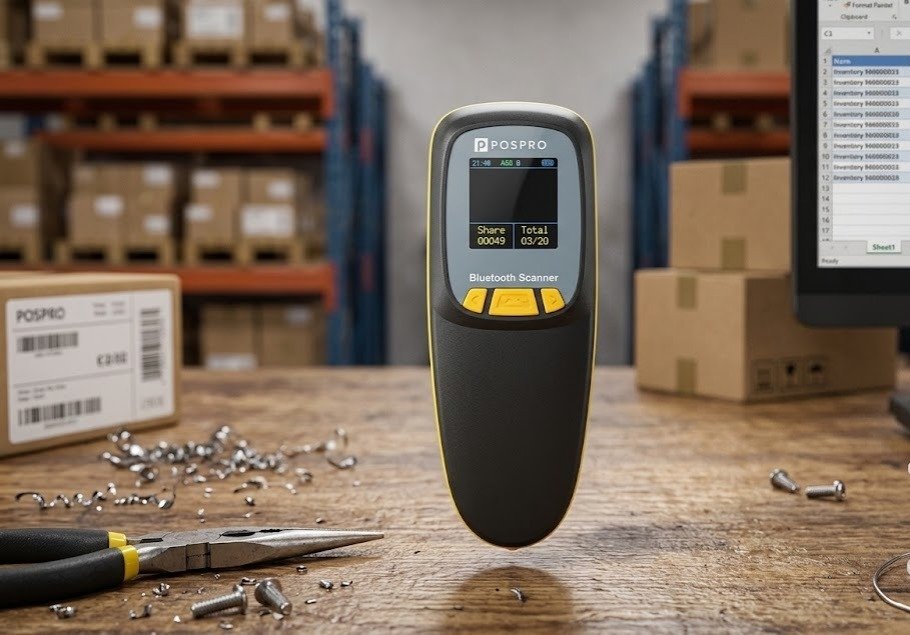
The PBS-300 Pocket 2D Wireless Barcode Scanner is a compact, rechargeable scanner designed for mobile barcode collection in retail stores, warehouses, courier operations, e-commerce businesses, pharmacies, stockrooms and field inventory workflows.
Pakistani POSPRO listings identify the product as the PBS-300 RS Pocket 2D Wireless Barcode Scanner. It is positioned as a portable scanner for businesses that need 1D and 2D barcode capability in a smaller form factor than a conventional gun-style handheld scanner.
The PBS-300 can be carried between shelves, packing tables, stock locations and customer-service counters. Its pocket-sized body is particularly useful when employees need a scanner that can be stored easily, carried throughout a shift or paired with a laptop, tablet, mobile device or POS workstation.
A technically matching R300-2D-BT pocket-scanner platform supports:
However, POSPRO has not publicly confirmed that every PBS-300 uses the exact R300-2D-BT hardware. GS Systemz should therefore verify the scanner label, programming manual and package before publishing numerical specifications as guaranteed.
| Feature | Available information |
|---|---|
| Brand | POSPRO |
| Model | PBS-300 / PBS-300 RS |
| Product type | Pocket wireless barcode scanner |
| Barcode capability | 1D and 2D |
| QR-code support | Yes |
| Printed-label scanning | Expected from product class |
| Screen scanning | Supported on matching pocket platform |
| Wireless communication | Bluetooth and 2.4GHz on matching platform |
| Wired communication | Type-C on matching platform |
| Image sensor | CMOS on matching platform |
| Published sensor resolution | 1280 × 800 pixels on matching platform |
| Published frame rate | 60 FPS on matching platform |
| Minimum listed resolution | Approximately 4 mil Code 39 |
| Rechargeable battery | Yes |
| Matching-platform battery | 1500mAh |
| Offline storage | Approximately 380,000 bytes on matching platform |
| Dimensions | Approximately 135 × 51 × 40mm on matching platform |
| Weight | Approximately 104g on matching platform |
| Optional display | Available on some platform revisions |
| Local warranty | Confirm with GS Systemz |
| Box contents | Confirm before publication |
Local sellers confirm the POSPRO PBS-300 name and its classification as a pocket-sized wireless 2D scanner. The more detailed figures come from a closely matching R300 platform rather than a public POSPRO datasheet.
The PBS-300 is designed for businesses that need mobility without carrying a full-size industrial scanner.
Its pocket format can make it useful for:
A standard wired scanner keeps the employee close to one computer. The PBS-300 allows the user to move toward products, bins, cartons and shelves while sending barcode data wirelessly to a compatible device.
A 2D scanner also provides greater flexibility than a 1D-only model. It can handle conventional retail labels and modern formats such as QR Code, Data Matrix and PDF417 when those formats are enabled on the supplied revision.
The matching R300 platform is promoted for trade, warehouses, logistics, express delivery and other mobile barcode workflows.
The main confirmed and likely platform features include:
The matching R300 technical sheet publishes a 1280 × 800 CMOS sensor, 60 FPS imaging, Type-C communication, Bluetooth, 2.4GHz wireless and 380,000 bytes of memory.
| Application | Suitability |
|---|---|
| Retail product scanning | Excellent |
| Warehouse stock counting | Excellent |
| E-commerce order verification | Excellent |
| Courier parcel processing | Excellent |
| Packing and dispatch | Excellent |
| Product receiving | Excellent |
| Shelf-label scanning | Excellent |
| QR-code scanning | Excellent |
| Customer membership codes | Excellent |
| Mobile loyalty cards | Excellent |
| Electronic coupons | Excellent |
| Digital tickets | Excellent |
| Smartphone-screen scanning | Excellent |
| Computer-screen scanning | Excellent |
| Pharmacy product scanning | Good; test specialist labels |
| Field inventory work | Excellent |
| Mobile POS applications | Excellent |
| Large-carton scanning | Good |
| Offline barcode collection | Supported on matching platform |
| Long-range pallet scanning | Not specialised for this |
| Direct part marks | Not confirmed |
| Wet outdoor operation | Not recommended without rating verification |
| Heavy industrial operation | Choose a certified industrial scanner |
Its strongest use case is mobile scanning where a full-size gun-shaped scanner would be inconvenient.
A complete POSPRO-specific specification sheet was not found. The table distinguishes local product identification from figures published for the closely matching R300-2D-BT platform.
| Specification | Confirmed information |
|---|---|
| Product name | POSPRO PBS-300 |
| Alternative listing name | PBS-300 RS Pocket |
| Product category | Pocket 2D wireless barcode scanner |
| Brand | POSPRO |
| Barcode category | 2D wireless scanner |
| Local market | Available through Pakistani POS suppliers |
| Warranty | Distributor warranty; confirm duration |
| Exact technical revision | Verify GS Systemz stock |
Pakistan import data also records a shipment described as a pocket 2D barcode scanner under the similar model reference PBS-00RS, branded “PSOPRO,” which appears likely to be a transcription variation of the locally sold POSPRO pocket model. This does not independently confirm the internal scan engine.
| Specification | Published platform figure |
|---|---|
| Imaging technology | CMOS area imager |
| Image resolution | 1280 × 800 pixels |
| Frame rate | Approximately 60 FPS |
| Minimum resolution | Approximately 4 mil Code 39 |
| Minimum print contrast | Approximately 20% |
| Field of view | Approximately 34° horizontal × 28° vertical |
| Scan angles | Elevation 65°, tilt 30°, declination 55° |
| Communication | Bluetooth, 2.4GHz and Type-C |
| Wireless frequency | 2.400–2.480GHz |
| Bluetooth modes | HID, BLE and SPP listed on platform |
| Battery capacity | 1500mAh |
| Offline memory | Approximately 380,000 bytes |
| Dimensions | Approximately 135 × 51 × 40mm |
| Weight | Approximately 104g |
| Indicators | Red, blue and green LEDs |
| Additional feedback | Beeper and vibration motor |
| Type-C cable | Approximately 1 metre on listed platform |
| Operating temperature | -20°C to 60°C |
| Storage temperature | -40°C to 70°C |
| Humidity | 5%–95%, non-condensing |
| Ambient-light tolerance | Up to approximately 100,000 lux |
| Published platform drop rating | 2 metres |
| Published platform protection | IP52 |
| Operating systems | Windows, Android and iOS |
| Display | Optional 1.44-inch colour display |
These are R300-2D-BT platform figures and must not be presented as guaranteed PBS-300 specifications until the hardware revision is verified.
The matching R300 documents contain two different sets of performance figures.
The detailed technical table lists approximately:
The marketing section of the same product documentation advertises:
This may reflect different batteries, firmware versions, test methods or production revisions. It may also reflect optimistic marketing figures compared with the more conservative technical table.
GS Systemz should avoid guaranteeing the higher numbers until they have been checked against:
For a trustworthy product page, use “range and runtime vary by revision and environment” unless the available stock has verified specifications.
A pocket scanner is smaller and lighter than a conventional gun-style handheld barcode scanner.
The matching R300 body measures approximately 135 × 51 × 40mm and weighs around 104g. This makes it compact enough for mobile workers to carry between stock locations or store with other portable business equipment.
A pocket design can benefit:
The smaller body may not provide the same pistol-grip comfort as a full-size scanner during thousands of repetitive trigger scans. Buyers should choose based on how frequently and for how long the device will be used.
The PBS-300 is marketed as a 2D wireless barcode scanner. A 2D area imager normally reads both supported linear barcodes and two-dimensional symbols.
The complete enabled symbology list should be checked in the PBS-300 programming manual.
The matching R300 platform publishes the following decode categories.
These detailed formats come from the matching platform and should be tested before being guaranteed for every POSPRO revision.
Yes. The PBS-300 is marketed as a 2D scanner, so QR-code scanning is one of its intended capabilities.
It may support compatible QR workflows such as:
The scanner captures the data encoded in a QR code. The connected software remains responsible for validating a ticket, identifying a customer or processing a payment.
The matching pocket platform lists Data Matrix and PDF417 among its supported formats.
These formats may be found on:
Very small Data Matrix symbols should be physically tested because successful reading depends on module size, focus, printing quality and scanner revision.
Yes. A 2D area imager also reads supported 1D retail and inventory codes.
The PBS-300 may be used with barcodes printed on:
The matching platform includes UPC, EAN, Code 39, Code 128 and other common linear formats.
The matching pocket platform is specifically designed to read 1D and 2D barcodes from both screens and paper.
Screen-scanning applications may include:
When a phone barcode is difficult to scan:
GS Systemz should test screen performance on the physical PBS-300 before making it an unconditional warranty claim.
Yes, provided the supplied revision uses the matching screen-capable imaging platform.
This can help with:
The scanner transmits the decoded barcode value. The host software performs the database lookup, verification or transaction.
| Feature | Bluetooth | 2.4GHz USB receiver |
|---|---|---|
| Connection | Direct host pairing | Dedicated USB dongle |
| USB port needed | Usually no | Yes |
| Best devices | Phones, tablets and Bluetooth computers | Desktop PCs, laptops and POS terminals |
| Setup | Pair through Bluetooth settings | Insert and pair receiver |
| Published platform range | Up to approximately 40m open air | 50–100m depending document revision |
| Input mode | HID, BLE or SPP depending revision | Usually keyboard-style input |
| Main benefit | Direct mobile-device connection | Simple dedicated computer connection |
The 2.4GHz receiver is normally the simpler choice for a Windows POS computer. Bluetooth is more useful for phones, tablets and computers without a free USB port.
The matching pocket-scanner manual uses the following general process:
The exact programming barcodes must come from the manual supplied with the PBS-300.
A Bluetooth-enabled pocket scanner normally pairs as follows:
The matching manual identifies the device name as Barcode Scanner HID, although the POSPRO revision may use another name.
The matching R300 platform supports Type-C communication in addition to wireless operation. When the cable is connected and recognised, the scanner can enter wired transmission mode.
Wired mode may be useful when:
The supplied cable should be checked to confirm whether it supports both charging and data rather than charging only.
The matching platform lists approximately 380,000 bytes of internal storage.
Offline storage is useful when:
A capacity of 380,000 bytes does not mean 380,000 individual barcodes. The number of records depends on:
Before deployment, test the commands for storing, counting, uploading and clearing barcode records.
The result depends on its configured upload mode.
The scanner sends each barcode to the host immediately. Data may fail to reach the software when the scanner is outside coverage.
The scanner saves barcode information internally for later transfer.
Employees should not assume that a successful beep always means data reached the host. The application should be checked during real-time work, and stored records should be verified before memory is cleared.
The matching platform’s documentation contains different 2.4GHz figures:
All figures refer to open, unobstructed conditions.
Indoor distance can be reduced by:
A practical site test is more reliable than designing a workflow around the highest published figure.
The matching R300 platform uses a 1500mAh rechargeable battery and charges through a Type-C cable.
The exact battery chemistry and whether the battery is user-replaceable should be confirmed from the physical POSPRO unit.
Battery duration depends on:
Published matching-platform figures vary between:
Charging time is similarly listed as approximately four to five hours in one section and three hours in another.
GS Systemz should test the exact stock revision before advertising a fixed runtime.
A safer conversion statement is:
Rechargeable battery designed for mobile shift-based scanning; runtime varies by scan volume, wireless mode and hardware revision.
The matching platform supports Type-C wired transmission, which indicates that scanning while physically connected may be available.
The actual PBS-300 should be tested for:
Use the supplied or approved cable to avoid charging instability or connector damage.
The matching R300 platform is available in versions with and without a display.
The display-equipped version uses a 1.44-inch colour screen that can show information such as battery status and scanned barcode data.
Do not advertise a display unless the physical PBS-300 unit has one.
Before publication, confirm:
The matching R300 technical table lists a frame rate of approximately 60 FPS.
FPS describes how many image frames the scan engine processes. It does not mean an employee can complete 60 business transactions every second.
Actual productivity also depends on:
The matching platform publishes approximate optical ranges of:
| Barcode | Published platform range |
|---|---|
| UPC/EAN, 13 mil | 40–200mm |
| QR Code, 20 mil | 20–250mm |
These figures describe the distance between scanner and barcode, not the wireless transmission distance.
Actual range varies according to:
The matching platform publishes a minimum resolution of approximately 4 mil for Code 39 under suitable conditions.
Small-code performance also depends on:
Businesses scanning jewellery tags, small pharmaceutical labels or electronic components should test the actual barcode before ordering multiple units.
It can work with compatible POS, inventory, courier, warehouse and e-commerce applications when configured as a keyboard-input scanner.
In a typical HID mode, scanned data enters the active software field as though it were typed on a keyboard.
Compatibility depends on:
A practical test should be completed before a large deployment.
The matching R300 platform lists:
Compatibility can still differ according to:
Linux or macOS compatibility should be tested rather than assumed from Windows support.
Pocket wireless scanners commonly support suffix programming through configuration barcodes.
The matching manual includes programmable transmission and interface settings, but GS Systemz should use only the manual supplied with the exact POSPRO revision.
Functions to verify include:
The matching R300 technical sheet lists ABS, PC and TPU housing materials, a 2-metre drop rating and IP52 protection.
These figures should not be attributed directly to every PBS-300 until verified.
Even where confirmed, a drop rating does not make the scanner indestructible. Protect:
The matching R300 platform lists IP52 protection, but no POSPRO-specific certification was found.
IP52 would not make the scanner waterproof. It should not be:
Until GS Systemz verifies the environmental rating, market the PBS-300 as an indoor commercial scanner.
A common package may include:
Depending on the revision, the package may also include:
Do not promise a display, dongle, adapter or strap until the GS Systemz package has been inspected.
| Requirement | Recommendation |
|---|---|
| Standard retail barcodes | Supported |
| QR-code scanning | Supported |
| Data Matrix scanning | Supported on matching platform |
| PDF417 scanning | Supported on matching platform |
| Printed-label scanning | Supported |
| Smartphone-screen scanning | Supported on matching platform |
| Bluetooth connectivity | Supported on matching platform |
| 2.4GHz USB receiver | Supported on matching platform |
| Type-C wired mode | Supported on matching platform |
| Offline barcode storage | Supported on matching platform |
| Pocket portability | Excellent |
| Mobile stock counting | Excellent |
| Android or iOS connection | Supported on matching platform |
| Optional display | Verify revision |
| Rugged industrial use | Verify rating or choose industrial model |
| Waterproof operation | Not recommended |
| Long-range pallet scanning | Not specialised for this |
| Direct part marks | Not confirmed |
Choose the PBS-300 when portability, QR scanning and multiple wireless connection options are the primary requirements.
| Feature | PBS-300 | PBS-WX7 |
|---|---|---|
| Form factor | Compact pocket scanner | Full-size handheld scanner |
| Barcode capability | 1D and 2D | 1D and 2D |
| QR Code | Supported | Supported |
| Bluetooth | Expected on matching platform | Advertised |
| 2.4GHz receiver | Expected on matching platform | Advertised |
| Wired mode | Type-C on matching platform | Type-B advertised |
| Battery | 1500mAh on matching platform | 2000mAh advertised |
| Display | Optional on some PBS-300-style revisions | Not normally highlighted |
| Best use | Highly portable mobile scanning | Longer handheld shifts and gun-style grip |
Choose the PBS-300 when compactness matters most.
Choose the PBS-WX7 when a conventional pistol grip and larger published battery are preferred.
| Feature | PBS-300 | PBS-4410W |
|---|---|---|
| Body style | Gun-shaped handheld | |
| Barcode class | 1D and 2D | 1D and 2D |
| QR Code | Supported | Supported |
| Screen scanning | Expected | Advertised |
| Bluetooth | Expected on matching platform | Depends on W/WB revision |
| USB receiver | Expected | Commonly included |
| Wired mode | Type-C on matching platform | Verify revision |
| Offline storage | Expected on matching platform | Not confirmed for every batch |
| Best use | Portable field and mobile scanning | General retail and warehouse scanning |
The PBS-300 offers greater portability. The PBS-4410W may be more comfortable for continuous trigger use.
| Feature | PBS-300 pocket scanner | Full-size handheld scanner |
|---|---|---|
| Portability | Excellent | Moderate |
| Storage | Easy to carry | Requires more space |
| Long scanning shifts | Depends on grip preference | Usually more comfortable |
| Battery size | Often smaller | Often larger |
| QR scanning | Supported | Supported on 2D models |
| Shelf scanning | Excellent | Excellent |
| POS counter use | Good | Excellent |
| Field inventory | Excellent | Good |
| Trigger ergonomics | Compact | Pistol grip |
| Best use | Mobile workers | Repetitive scanning stations |
The pocket design is best where employees value size and portability. A full-size scanner may be better for intensive all-day scanning.
GS Systemz can position the PBS-300 for Pakistani businesses that need compact mobile 2D barcode scanning.
This page helps buyers evaluate:
Before ordering, confirm:
The scanner may be suitable for:
It is most suitable when compact size, wireless flexibility and 2D scanning are more important than a full-size grip or certified industrial ruggedness.
Check availability of the PBS-300 Pocket 2D Wireless Barcode Scanner with GS Systemz in Pakistan.
Use it for conventional product labels, QR Code, Data Matrix, PDF417, mobile-screen codes, courier parcels, inventory records and e-commerce order workflows.
Confirm the scanner revision, optional display, Bluetooth mode, USB receiver, Type-C cable, battery, wireless range, warranty and complete package contents before ordering.
The PBS-300 is a compact POSPRO wireless barcode scanner marketed for mobile 2D and QR-code scanning. Local listings also call it the PBS-300 RS Pocket Scanner.
Yes. It is sold as a pocket 2D scanner, making QR-code capture one of its intended applications.
Yes. A 2D imaging scanner also reads supported 1D formats such as UPC, EAN, Code 39 and Code 128.
The matching pocket platform reads supported 1D and 2D codes from paper and electronic screens. Confirm this function on the POSPRO stock revision.
The matching R300 platform supports Bluetooth, 2.4GHz USB-receiver communication and Type-C wired mode. These connections should be verified against the PBS-300 package.
The matching platform lists a 1500mAh rechargeable battery, but the battery label should be checked before publishing the capacity as a guaranteed POSPRO specification.
Matching documentation lists approximately 40 metres for Bluetooth and either 50 or 100 metres for 2.4GHz in open space, depending on the document section. Indoor range will normally be lower.
The matching platform provides approximately 380,000 bytes of storage. Confirm the inventory-mode commands in the supplied PBS-300 manual.
No. The matching R300 platform is available with or without an optional 1.44-inch display. Check the physical scanner before advertising a screen.
You can check availability of the POSPRO PBS-300 Pocket 2D Wireless Barcode Scanner with GS Systemz in Pakistan.
Reviews
There are no reviews yet.