
₨93,500.00
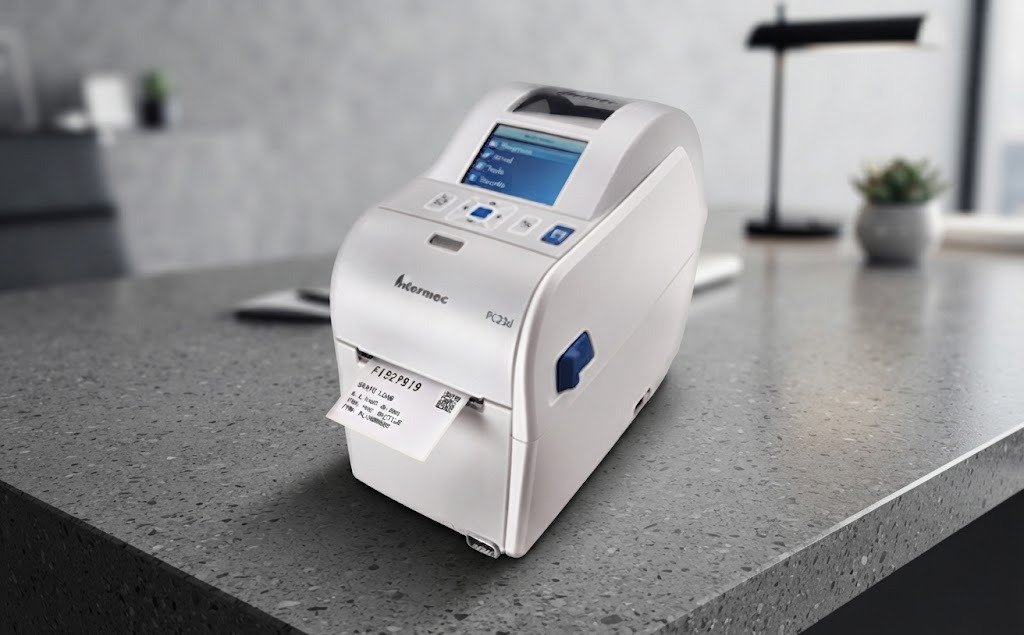
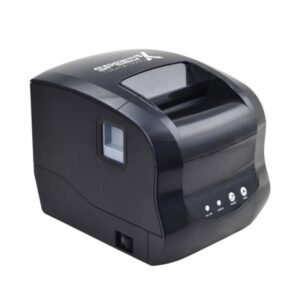
The Wrist Band Printer Honeywell PC23D is a compact direct-thermal desktop printer designed for patient identification wristbands, healthcare labels, laboratory identification, pharmacy workflows, visitor management and other applications that use narrow thermal media.
The Honeywell PC23d belongs to Honeywell’s compact desktop printer family and is particularly useful where businesses or healthcare facilities need a small-footprint printer capable of handling approximately 2-inch-wide media.
Unlike an inkjet printer, the PC23d uses direct thermal printing, so it does not require ink cartridges, toner or ribbons when used with compatible heat-sensitive wristbands and labels.
Depending on the exact PC23d configuration, the printer family is commonly available with 203 dpi, with higher-resolution configurations also existing in the PC23 platform. Interface combinations can also vary, so USB, Ethernet, serial and wireless connectivity should be confirmed against the exact GS Systemz SKU.
The Honeywell PC23d is a compact direct-thermal printer designed for narrow labels, receipts, tickets and wristband-type media.
For healthcare and identification applications, it can be used for:
Its small desktop footprint makes it particularly useful at:
| Feature | PC23d specification / status |
|---|---|
| Brand | Honeywell |
| Model | PC23d |
| Printer category | Compact desktop thermal printer |
| Primary technology | Direct thermal |
| Printer class | Approximately 2-inch |
| Main application | Wristbands and narrow labels |
| Standard resolution | 203 dpi commonly configured |
| Higher-resolution option | Configuration dependent |
| Maximum print speed | Up to approximately 203mm/s on appropriate configuration |
| Maximum print width | Approximately 56mm on common 203 dpi configuration |
| USB | Commonly supported |
| Ethernet | Configuration dependent |
| Serial | Configuration dependent |
| Wi-Fi | Optional/configuration dependent |
| Bluetooth | Optional/configuration dependent |
| Barcode printing | Supported |
| 2D barcode printing | Supported through compatible command/software |
| Ribbon required | No for direct thermal |
| Patient wristbands | Supported with compatible media |
| Label printing | Supported |
| Automatic cutter | Optional/accessory dependent, not standard on every SKU |
| Battery operation | No; desktop printer |
| Local warranty | Confirm with GS Systemz |
| Included interfaces | Verify exact part number |
The exact Honeywell part number matters because PC23d units can differ in print resolution, communication interfaces, power accessories and installed options.
The PC23d is well suited to wristband printing because it combines a narrow print mechanism with direct-thermal technology and compact desktop construction.
For a hospital or clinic, this can help create wristbands containing:
The information printed depends on the hospital or clinic software rather than the printer itself.
When correctly integrated with a healthcare information system, the printer can help staff produce readable machine-scannable identification bands at the point of registration.
The PC23d is significantly narrower than a typical 4-inch desktop barcode printer.
This makes it useful where counter space is limited and the application primarily uses:
A larger 4-inch printer may be unnecessary when the business rarely needs shipping-label-sized media.
The PC23d uses direct thermal technology.
When compatible thermal media passes beneath the print head, controlled heat creates the image directly on the wristband or label.
This eliminates the need for:
For hospitals and clinics, fewer consumables can simplify printer maintenance and media replacement.
A common PC23d configuration uses 203 dpi, equal to approximately eight dots per millimetre.
203 dpi is generally appropriate for:
Higher-resolution configurations may exist, but GS Systemz should identify the exact installed print head before advertising 300 dpi.
Common 203 dpi PC23d configurations are capable of printing at up to approximately 8 inches per second, or about 203mm/s.
Actual speed depends on:
Wristband applications may intentionally operate below maximum mechanical speed to improve print quality and media handling.
The PC23d uses a compact clamshell-style desktop design intended to make media replacement straightforward.
This is especially useful at busy registration desks where staff may need to replace wristband rolls frequently.
A practical wristband workflow should allow staff to:
| Application | Suitability |
|---|---|
| Hospital patient wristbands | Excellent |
| Clinic identification bands | Excellent |
| Laboratory labels | Excellent |
| Pharmacy labels | Excellent |
| Specimen identification | Excellent |
| Visitor wristbands | Excellent with compatible media |
| Admission labels | Excellent |
| Small barcode labels | Excellent |
| Appointment labels | Excellent |
| Retail product labels | Good |
| Small inventory labels | Good |
| Shipping labels | Too narrow for many standard formats |
| 80mm receipts | Not the intended application |
| A4 documents | Not supported |
| Colour printing | Not supported |
| Mobile battery printing | Not supported |
The PC23d should be positioned as a specialised narrow-media desktop printer, not as an 80mm receipt printer.
The following specification set represents commonly published PC23d family capabilities. GS Systemz should verify its exact part number before transferring every field to the WooCommerce specification table.
| Specification | PC23d family detail |
|---|---|
| Printing technology | Direct thermal |
| Printer type | Desktop |
| Media class | Approximately 2-inch |
| Standard resolution | 203 dpi |
| Alternative resolution | SKU/configuration dependent |
| Maximum 203 dpi speed | Up to approximately 203mm/s |
| Common maximum print width | Approximately 56mm |
| Barcode printing | Yes |
| 2D code printing | Supported |
| Media sensors | Label/gap/mark sensing depending media setup |
| USB | Common configuration |
| USB host | Configuration dependent |
| Ethernet | Optional/configuration dependent |
| Serial | Optional/configuration dependent |
| Wi-Fi | Optional |
| Bluetooth | Optional |
| Printer languages | Honeywell/Intermec command-language support varies by configuration |
| Direct thermal wristbands | Supported with compatible media |
| Thermal labels | Supported |
| Ribbon | Not required |
| Automatic cutter | Optional/configuration dependent |
| Power | External AC power supply |
| Battery | No |
| Dimensions | Compact desktop class |
| Warranty | Confirm local GS Systemz/Honeywell channel terms |
Avoid combining specifications from different PC23d configurations without confirming the complete Honeywell SKU.
The PC23d is designed around approximately 2-inch media, with a commonly published maximum printing width of roughly 56mm depending on resolution and configuration.
This makes it suitable for narrow identification applications.
The distinction between:
is important.
A physical wristband can be wider than the actual area used by the print head because margins and the wristband fastening section may not be printed.
The printer requires direct-thermal wristband media compatible with its media path, sensors and width limits.
Before ordering wristbands, confirm:
Do not purchase wristbands solely because they are described as “thermal.”
Healthcare wristbands can differ significantly in:
For a hospital deployment, test the exact wristband SKU with the physical PC23d before buying large quantities.
Yes.
The PC23d is intended for barcode and identification workflows and can print common barcode formats through compatible software and printer commands.
Patient wristbands may contain a barcode linked to:
The printer only produces the barcode image supplied by the hospital system.
It does not determine the patient identity or validate the database record.
The PC23 platform can produce supported 2D symbols through compatible printer firmware, commands and software.
Possible uses include:
For reliable scanning:
For most standard wristband applications, 203 dpi is sufficient.
It can clearly print:
Consider a higher-resolution PC23d configuration when the application requires:
Higher dpi does not automatically improve every workflow. It can also affect maximum printing speed.
No.
The PC23d is a direct-thermal printer and does not require:
It requires compatible heat-sensitive wristbands or labels.
This can reduce routine consumable management in hospitals and clinics.
No, not for normal PC23d direct-thermal printing.
This is one of the important differences between the PC23d and thermal-transfer printer models.
Direct-thermal wristbands contain a coating that reacts to the print head’s heat.
Honeywell PC23-series printers are designed for integration with business and healthcare systems, and Windows-based deployments are common.
A typical setup may involve:
The exact Windows versions supported should be checked against the current Honeywell driver package used by GS Systemz.
USB is a common PC23d interface and is appropriate for a printer installed directly beside a registration or pharmacy computer.
USB is normally the easiest choice when:
The exact USB configuration should be confirmed from the printer part number.
Ethernet connectivity is available on selected PC23d configurations, but it should not be assumed to exist on every unit.
Ethernet can be useful where:
For a network configuration, confirm that the physical printer actually contains an Ethernet port.
Wireless connectivity is configuration-dependent.
Do not describe every PC23d as a Wi-Fi or Bluetooth printer.
Honeywell desktop-printer families may be ordered with different communication configurations, so GS Systemz should check:
If wireless hardware is absent, adding a driver does not create Wi-Fi or Bluetooth capability.
The PC23d is primarily a barcode, label and wristband printer, not a conventional ESC/POS receipt printer.
Its printer-language ecosystem is designed around Honeywell/Intermec label-printing and emulation environments.
Therefore, businesses should not buy the PC23d solely because their software says “ESC/POS compatible.”
For a healthcare deployment, verify that the application supports:
A cutter should be treated as an optional or configuration-dependent accessory, not a standard feature of every PC23d.
Wristband applications may instead use:
Before advertising an auto cutter, GS Systemz should inspect the exact physical printer and part number.
Reliable wristband printing requires the printer to detect where one printable wristband ends and the next begins.
Depending on the wristband design, media registration may use:
The exact wristband must match the PC23d sensor setup.
Incorrect calibration can cause:
A typical media setup involves:
The exact calibration sequence depends on firmware and media type.
Common causes include:
Recalibrate using the actual wristband roll rather than a different label type.
Possible causes include:
Print and scan test wristbands before moving a healthcare workflow into production.
A hospital should evaluate more than paper width.
The wristband should be appropriate for:
For clinical use, the media supplier should provide the necessary suitability and compliance documentation for the wristband itself.
The printer and wristband are separate products; owning a healthcare-capable printer does not automatically make every thermal wristband appropriate for patient use.
| Feature | PC23d | PC43d |
|---|---|---|
| Printer category | Compact desktop | Desktop |
| Media class | Approx. 2-inch | Approx. 4-inch |
| Wristband printing | Excellent | Possible but larger than needed |
| Small healthcare labels | Excellent | Excellent |
| 4-inch shipping labels | No | Yes |
| Counter footprint | Smaller | Larger |
| Direct thermal | Yes | Yes |
| Best use | Wristbands and narrow labels | Wider labels and general barcode printing |
Choose the PC23d for patient wristbands and narrow identification labels.
Choose the PC43d when the business also needs wider 4-inch labels.
| Feature | PC23d | PC43t |
|---|---|---|
| Direct thermal | Yes | Yes |
| Thermal transfer | No | Yes |
| Ribbon required | No | Optional depending PC43t mode |
| Media width | Narrower | Wider |
| Wristbands | Excellent | Possible |
| Long-life synthetic labels | Limited by direct thermal media | Better with thermal transfer |
| Compact footprint | Better | Larger |
| Best use | Wristbands and narrow DT labels | Wider DT/TT labels |
Choose the PC23d when the application is primarily direct-thermal wristbands.
Choose the PC43t when thermal-transfer labels and ribbon printing are required.
| Feature | Honeywell PC23d | 80mm Receipt Printer |
|---|---|---|
| Primary purpose | Wristbands/labels | Receipts |
| Media tracking | Label/wristband oriented | Continuous receipt paper |
| Patient wristbands | Excellent | Usually unsuitable |
| Barcode labels | Excellent | Limited |
| Receipt cutting | Not primary purpose | Common |
| Cash drawer | Not primary purpose | Common |
| Media sensors | Important | Simpler |
| Best use | Healthcare identification | Retail billing |
A standard receipt printer should not be substituted for the PC23d simply because both use thermal technology.
The Honeywell PC23d may be preferable when the organisation values:
A low-cost generic printer may be sufficient for small events, but hospitals and laboratories should prioritise media compatibility, barcode reliability, software integration and technical support.
Package contents can differ by SKU and distributor.
A typical package may contain:
Wristbands are normally separate consumables unless specifically included by the seller.
GS Systemz should verify the actual package before promising accessories.
GS Systemz can position the Honeywell PC23d for businesses and healthcare organisations in Pakistan that require dependable narrow-media thermal printing.
Before ordering, confirm:
Hospitals should also test the actual wristband material, printed barcode and scanning workflow before a large deployment.
Never deploy patient-identification printing without testing the complete software-to-wristband-to-scanner workflow.
The PC23d may be suitable for:
Check availability of the Honeywell PC23D Wristband Printer from GS Systemz in Pakistan.
The PC23d is suitable for patient wristbands, healthcare identification, laboratory labels, pharmacy labels, visitor bands and other narrow direct-thermal barcode applications.
Before ordering, confirm the exact PC23d part number, resolution, installed interfaces, wristband-media compatibility, sensor configuration, cutter or tear-off system, power supply, driver support, warranty and complete package contents.
The Honeywell PC23d is a compact approximately 2-inch direct-thermal desktop printer designed for wristbands, narrow labels, barcodes and identification applications.
Yes. Patient-identification wristbands are one of the key applications for the PC23d when compatible direct-thermal wristband media and healthcare software are used.
No. The PC23d uses direct-thermal printing and therefore requires compatible thermal media rather than ink, toner or ribbon.
203 dpi is a common PC23d configuration. Higher-resolution configurations may exist, so verify the exact Honeywell part number before ordering.
Common 203 dpi configurations can print at up to approximately 203mm/s, although actual wristband-printing speed depends on media, resolution and print settings.
USB is commonly available. Ethernet, serial and wireless interfaces can vary according to the exact PC23d configuration.
Yes. It is designed for barcode and identification printing and can produce compatible linear and 2D symbols through supported software and printer commands.
A cutter is not standard on every PC23d. Cutter or tear-off configuration should be verified against the exact GS Systemz SKU.
It can print compatible narrow labels, but its approximately 2-inch media format is too narrow for many standard 4-inch courier labels. A PC43-series printer may be better for wider labels.
You can check availability of the Honeywell PC23D Wristband and Direct Thermal Label Printer from GS Systemz in Pakistan.
Reviews
There are no reviews yet.