
₨31,890.00
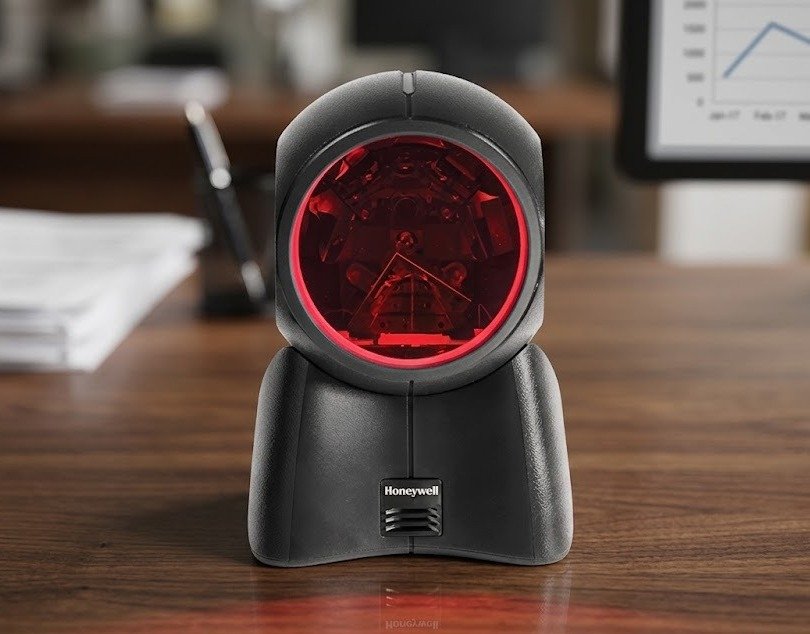
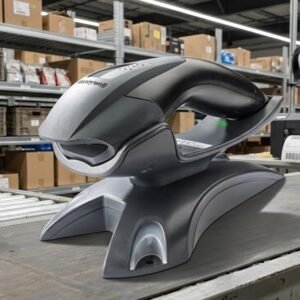
The Honeywell Orbit 7190g is a corded hybrid desktop barcode scanner that combines omnidirectional laser scanning with area-imaging technology.
Its laser engine provides fast scanning of traditional 1D merchandise barcodes, while the integrated imager reads supported 1D, PDF and 2D codes from printed labels and customer smartphones. This dual-engine design makes it suitable for modern retail checkout counters that handle both physical products and digital barcodes.
The Honeywell Orbit 7190g allows a business to scan traditional product barcodes and modern digital codes with one compact presentation scanner.
Its 20-line omnidirectional laser pattern is optimised for fast pass-through scanning of common retail barcodes. Employees can move products across the scanning field without carefully aligning every barcode with one horizontal laser line.
The integrated 640 × 480-pixel imager reads supported PDF and 2D formats, including QR-code applications. It can also capture compatible coupons, identification codes and loyalty barcodes displayed on customer smartphones.
The scanner automatically uses different working behaviour for merchandise codes and digital-screen codes. This helps provide fast product scanning for the cashier without unnecessarily directing laser and LED illumination toward customers presenting smartphones.
Its adjustable head can tilt through a 30-degree range, and the complete scanner can be lifted for scanning large or bulky products that cannot easily be moved across the checkout counter.
Buy the Honeywell Orbit 7190g from GS Systemz for retail, pharmacy, supermarket and point-of-sale barcode-scanning requirements in Pakistan.
The Orbit 7190g combines established Orbit laser performance with digital 2D barcode scanning.
Key features:
The exact cable, colour, EAS capability and supported barcode configuration depend on the selected Honeywell product kit.
The Orbit 7190g is designed mainly for customer-facing retail and point-of-sale environments.
| Application | Suitability |
|---|---|
| Supermarket checkout | Excellent |
| Retail product scanning | Excellent |
| Convenience stores | Excellent |
| QR-code scanning | Excellent |
| Mobile coupons | Excellent |
| Digital loyalty cards | Excellent |
| Smartphone identification codes | Excellent |
| Pharmacy billing | Excellent |
| Membership verification | Excellent |
| Product-menu scanning | Good |
| Customer-service counters | Good |
| Large-product scanning | Good |
| Fixed inventory workstations | Good |
| EAS-enabled checkout | Available on selected model |
| Wireless warehouse scanning | Not supported |
| Long-range shelf scanning | Not designed for this |
| Outdoor use in rain | Not suitable |
| Heavy industrial scanning | Consider a rugged scanner |
Honeywell positions the Orbit 7190g for highly efficient retail checkout applications where merchandise barcodes and digital smartphone codes must be processed from one device.
Here are the main official Honeywell Orbit 7190g specifications:
| Specification | Detail |
|---|---|
| Product name | Honeywell Orbit 7190g |
| Product type | Hybrid presentation barcode scanner |
| Form factor | Corded desktop scanner |
| Main scanning technology | Omnidirectional laser and area imager |
| Laser scan pattern | Five fields of four parallel lines |
| Total laser lines | 20 |
| Imaging array | 640 × 480 pixels |
| Laser scan speed | Up to 1,120 scan lines per second |
| Imager capture speed | Up to 30 frames per second |
| Laser decode capability | Standard 1D and GS1 DataBar |
| Imager decode capability | Standard 1D, PDF and 2D |
| Laser minimum resolution | 5 mil |
| Imager minimum 1D resolution | 4 mil |
| Imager minimum 2D resolution | 6.7 mil |
| Minimum print contrast | 35% |
| Imager horizontal scan angle | 40 degrees |
| Imager vertical scan angle | 30.5 degrees |
| Laser pitch tolerance | 60 degrees |
| Laser skew tolerance | 60 degrees |
| Imager pitch tolerance | 60 degrees |
| Imager skew tolerance | 70 degrees |
| Head adjustment | Up to 30 degrees |
| Host interfaces | USB, RS-232, keyboard wedge and IBM 468xx/RS-485 |
| Input voltage | 5V DC ±0.25V |
| Operating current | 472mA at 5V |
| Standby current | 255mA at 5V |
| Dimensions | 108 × 103 × 148mm |
| Weight | Approximately 410g |
| Drop resistance | Designed for 1.2-metre drops |
| Environmental protection | Sealed against airborne particles; Honeywell page lists IP5X |
| Operating temperature | 0°C to 40°C |
| Storage temperature | -40°C to 60°C |
| Operating humidity | 5%–95%, non-condensing |
| Laser ambient-light tolerance | Up to approximately 4,842 lux |
| Imager ambient-light tolerance | Up to approximately 100,000 lux |
| Warranty | Three-year factory warranty |
Barcode performance can vary according to barcode dimensions, print quality, contrast, surface reflections and environmental conditions.
Hybrid scanning means the Orbit 7190g contains two different barcode-reading technologies inside one desktop scanner.
The laser engine is optimised for fast scanning of ordinary linear merchandise barcodes.
The area imager captures digital 1D, PDF and 2D symbols, including codes displayed on compatible smartphone screens.
This hybrid design gives retailers the speed of an Orbit laser scanner while adding the flexibility required for:
A business does not need to place a separate digital-code scanner beside its standard merchandise scanner.
The Orbit 7190g uses dual working modes designed for two different checkout activities.
When the cashier presents merchandise, the scanner uses its omnidirectional laser system for rapid pass-through scanning of printed linear product barcodes.
When a customer presents a digital code on a smartphone, the scanner uses imaging technology to capture the on-screen barcode. Honeywell designed this behaviour to reduce unnecessary laser and illumination exposure toward customers while maintaining fast retail scanning.
This automatic optimisation is useful for counters that process:
The required barcode symbology must still be enabled in the scanner configuration.
Omnidirectional laser scanning allows a linear barcode to be read from several orientations.
A standard single-line laser scanner requires the operator to position one laser line across the complete barcode. The Orbit 7190g projects five fields containing four parallel laser lines each, producing a total pattern of 20 lines.
The product barcode can therefore be presented:
The scanner produces up to 1,120 laser scan lines per second, helping it decode retail products quickly as they pass through the scanning field.
A 2D area imager captures a complete visual image of the barcode rather than reading one horizontal line.
This allows the Orbit 7190g to process traditional linear barcodes as well as supported square and stacked symbols.
Common 1D barcode applications include:
Common 2D and PDF applications include:
Honeywell officially lists standard 1D, PDF and 2D decoding through the imaging engine. The precise symbology list and enabled formats depend on configuration.
Yes. The Honeywell Orbit 7190g reads supported QR codes through its integrated area imager.
Honeywell lists a typical scanning range of approximately 0–200mm for a 20 mil QR code. Actual performance depends on the code’s dimensions, quality, contrast and screen brightness.
QR-code applications can include:
The exact QR-code workflow should be tested with the business’s POS or customer application before several scanners are deployed.
Yes. Fast scanning of normal merchandise barcodes is one of the Orbit 7190g’s primary functions.
Its 20-line laser pattern reads standard 1D and GS1 DataBar symbols used on:
Honeywell lists a typical laser scanning range of approximately 0–275mm for a 13 mil UPC barcode and up to 300mm for a 26 mil UPC-E code.
Yes. The integrated area imager allows the Orbit 7190g to read compatible digital barcodes displayed on customer smartphones.
Honeywell specifically identifies smartphone coupons and identification cards as suitable digital scanning applications.
Mobile-screen scanning can be used for:
When an on-screen barcode is difficult to scan:
Screen damage, strong reflections and very small codes can reduce scanning performance.
The Orbit 7190g may read some damaged or poorly printed barcodes, depending on how much usable data remains.
The omnidirectional laser pattern provides multiple opportunities to cross a linear barcode, while the imager captures the complete symbol for 2D decoding.
Scanning may still fail when:
Replace or reprint heavily damaged labels when reliable product identification is important.
The Orbit 7190g’s omnidirectional laser engine produces up to 1,120 scan lines per second.
Its integrated area imager captures up to 30 frames per second.
The two figures describe different scanning systems:
| Engine | Listed Performance |
|---|---|
| Omnidirectional laser | 1,120 scan lines per second |
| Area imager | 30 frames per second |
The laser speed supports fast pass-through scanning of retail merchandise, while the imaging rate supports digital and 2D barcode capture.
Actual checkout productivity can depend on:
The figure of 1,120 scan lines per second does not mean the device scans 1,120 separate products per second.
The scanning range depends on whether the barcode is read by the laser or area imager.
| Barcode Type | Typical Range |
|---|---|
| 5 mil Code 39 | 0–50mm |
| 7.5 mil Code 39 | 0–150mm |
| 10 mil Code 39 | 0–220mm |
| 13 mil UPC | 0–275mm |
| 26 mil UPC-E | 0–300mm |
| Barcode Type | Typical Range |
|---|---|
| 5 mil Code 39 | 0–70mm |
| 13 mil UPC | 0–245mm |
| 6.7 mil PDF417 | 0–70mm |
| 10 mil Data Matrix | 0–75mm |
| 20 mil QR Code | 0–200mm |
| 20 mil Code 39 | 0–327mm |
These are Honeywell’s typical performance figures. Barcode quality and environmental conditions can affect the practical reading distance.
Yes. The minimum supported resolution depends on the scanning engine.
| Scanning Engine | Minimum Listed Resolution |
|---|---|
| Laser engine | 5 mil |
| Imager for 1D codes | 4 mil |
| Imager for 2D codes | 6.7 mil |
A mil is one-thousandth of an inch and describes the narrowest barcode element.
Small barcodes require:
Test unusually small jewellery, electronics or pharmaceutical barcodes before purchasing multiple scanners.
Print contrast describes the visual difference between the dark barcode elements and the lighter background.
Honeywell lists a minimum reflectance difference of 35% for the Orbit 7190g.
A barcode can become difficult to read when:
Clear black-on-white barcode printing normally provides the best scanning reliability.
Yes. The Orbit 7190g is primarily a desktop presentation scanner, but its housing can be lifted from the counter and moved toward the barcode on a large product.
This is useful for:
Its scanning head can also be tilted through a 30-degree range to target products of different shapes and sizes.
The scanner remains corded, so movement is limited by the length and position of the interface cable.
The scanning head can tilt through approximately 30 degrees.
The operator can adjust the head toward the normal location where product or smartphone barcodes are presented.
The adjustable head is useful when:
Do not force the scan head beyond its designed adjustment range.
The Orbit 7190g is designed to recognise two different checkout workflows.
The laser engine supports rapid scanning of printed retail barcodes as products move across the counter.
The area imager captures compatible smartphone coupons, identification codes, loyalty cards and other digital symbols.
Honeywell designed these modes so the scanner automatically adapts to the type of code being presented. This provides efficient merchandise scanning while reducing unnecessary illumination directed toward a customer’s face.
The Honeywell Orbit 7190g supports several common POS interfaces:
The interface cable included with the scanner depends on the selected product kit.
USB is commonly used with:
The scanner can draw power directly through compatible USB installations, removing the need for a separate power adapter in many setups.
RS-232 may be required for:
An RS-232 installation may require:
Keyboard-wedge operation allows barcode data to be transmitted through the keyboard input path of a compatible computer.
IBM 468xx support through RS-485 is intended for compatible retail checkout systems.
Confirm the required connection before ordering because different Orbit 7190g kits contain different cables.
Automatic interface detection allows the Orbit 7190g to recognise a compatible attached cable and configure itself for the appropriate host connection.
This reduces the need to scan several programming barcodes when moving the scanner between supported USB, serial or keyboard interfaces.
Automatic detection can make installation easier when:
The cable must still be compatible with the Orbit 7190g and the connected host system.
No. The Orbit 7190g is a corded desktop scanner.
It does not contain a rechargeable battery or use Bluetooth for normal operation. Honeywell lists USB, RS-232, keyboard wedge and IBM RS-485 host connections.
A corded desktop scanner is suitable when:
Choose a cordless handheld scanner when staff need to move between shelves, cartons or warehouse aisles.
The Orbit 7190g is designed for retail point-of-sale systems.
Its multiple host interfaces and automatic interface detection help it connect with compatible modern and legacy checkout equipment.
Compatibility still depends on:
Test the scanner with the actual POS or inventory application before purchasing several units.
Selected Orbit 7190g EAS models support EAS interlock and an integrated RF EAS antenna.
EAS means electronic article surveillance. It is used in retail security systems to deactivate or process compatible security tags during checkout.
EAS integration may help combine:
EAS is not included in every Orbit 7190g. Confirm:
Do not advertise integrated EAS as a standard feature of every 7190g kit.
The Honeywell Orbit 7190g is designed to withstand drops from approximately 1.2 metres.
Its housing is also sealed against airborne particulate contaminants, and Honeywell’s current product specifications list an IP5X rating.
It is suitable for normal indoor environments such as:
It is not designed as a waterproof or heavy-duty industrial scanner.
The Honeywell product page lists an IP5X rating for the Orbit 7190g.
The first digit, 5, indicates that the scanner is protected against dust entering in quantities that could interfere with satisfactory operation.
The X means no water-protection rating is specified in that classification.
Therefore, the scanner should not be:
Keep the scanner in a dry indoor environment and prevent liquid from entering its scan window or cable connection.
Honeywell lists an operating-temperature range of 0°C to 40°C.
The scanner can be stored between -40°C and 60°C and used at 5%–95% relative humidity when condensation does not form.
Its area imager can tolerate surrounding light levels of up to approximately 100,000 lux, while the laser system has a lower listed ambient-light tolerance of approximately 4,842 lux.
Avoid:
Choose the Orbit 7190g when your business needs fast scanning of normal printed product barcodes and occasional or regular scanning of digital 2D codes.
| Requirement | Recommendation |
|---|---|
| Standard retail product barcodes | Orbit 7190g is excellent |
| Omnidirectional 1D scanning | Supported |
| QR-code scanning | Supported |
| PDF417 scanning | Supported |
| Data Matrix applications | Supported through 2D capability |
| Smartphone coupons | Supported |
| Digital loyalty cards | Supported |
| Hands-free checkout scanning | Supported |
| Large-product scanning | Scanner can be lifted |
| Adjustable scan head | Supported |
| USB connection | Supported |
| RS-232 connection | Supported |
| Keyboard-wedge connection | Supported |
| EAS integration | Available on selected model |
| Wireless scanning | Not supported |
| Battery operation | Not supported |
| Waterproof use | Not suitable |
| Heavy industrial work | Choose a rugged scanner |
The Orbit 7190g is particularly suitable for retail counters that want to retain fast laser merchandise scanning while adding digital QR and smartphone-code support.
The Honeywell MK7120 is a 1D-only laser presentation scanner. The Orbit 7190g adds an area imager for PDF and 2D barcode scanning.
| Feature | Honeywell MK7120 | Honeywell Orbit 7190g |
|---|---|---|
| Scanner technology | Omnidirectional laser | Hybrid laser and area imager |
| Laser pattern | 20 lines | 20 lines |
| Laser speed | Up to 1,120 lines/s | Up to 1,120 lines/s |
| Normal product barcodes | Supported | Supported |
| GS1 DataBar | Supported | Supported |
| QR codes | Not supported | Supported |
| PDF417 | Not supported | Supported |
| Data Matrix | Not supported | Supported through 2D imaging |
| Smartphone codes | Not recommended | Supported |
| Hands-free operation | Supported | Supported |
| Adjustable head | Supported | Supported |
| Best use | Traditional printed barcodes | Printed and digital checkout codes |
Choose the MK7120 when the business only scans traditional 1D retail barcodes.
Choose the Orbit 7190g when customers also present QR codes, digital coupons, loyalty cards or smartphone identification codes.
Both scanners read 1D and 2D codes, but they use different scanning designs.
| Feature | Honeywell Orbit 7190g | Honeywell HF680 |
|---|---|---|
| Main technology | Hybrid laser and area imager | Area imager only |
| Traditional 1D scanning | 20-line laser system | Imaging system |
| QR-code scanning | Supported | Supported |
| Smartphone codes | Supported | Supported |
| Laser speed | 1,120 lines/s | Not applicable |
| Imaging array | 640 × 480 pixels | 1280 × 800 pixels |
| Imager frame rate | 30 fps | Model uses megapixel imaging |
| Head adjustment | Up to 30 degrees | Adjustable |
| Main strength | Fast traditional merchandise scanning plus 2D | Affordable full-imaging checkout scanning |
| Best use | High-volume mixed retail checkout | Standard 1D and 2D retail counters |
Choose the Orbit 7190g when fast omnidirectional laser scanning of merchandise remains a priority.
Choose the HF680 when a full area-imaging scanner provides a better balance of price, digital-code scanning and modern retail functionality.
The Orbit 7190g combines a laser with an imager. The Genesis XP 7680g is a newer high-performance presentation scanner based entirely on megapixel area imaging.
| Feature | Orbit 7190g | Genesis XP 7680g |
|---|---|---|
| Main technology | Laser-imager hybrid | XP area imaging |
| 1D merchandise scanning | 20-line laser | Imaging |
| QR-code scanning | Supported | Supported |
| Smartphone scanning | Supported | Supported |
| Imaging resolution | 640 × 480 pixels | 1280 × 800 pixels |
| Motion tolerance | Laser and 30fps imaging performance | Up to 400cm/s |
| Environmental protection | IP5X listed | IP52 |
| Mounting options | Adjustable desktop head | Stand, wall, POS, kiosk and vertical options |
| 360-degree LED ring | No | Yes |
| Disinfectant-ready housing | Not a core listed feature | Supported |
| Main strength | Fast hybrid retail checkout | Advanced imaging and flexible installation |
| Best use | Traditional and digital retail codes | Demanding retail, healthcare and kiosk use |
Choose the Orbit 7190g when the business prefers the familiar speed of omnidirectional laser merchandise scanning.
Choose the Genesis XP 7680g when stronger imaging performance, mounting flexibility, visual feedback and current XP technology justify the investment.
GS Systemz offers the Honeywell Orbit 7190g for businesses in Pakistan that need fast desktop scanning of printed and digital barcodes.
This product page helps customers evaluate:
Before placing an order, confirm:
Checking these details helps ensure that the supplied scanner matches your checkout counter, POS terminal and barcode requirements.
Place the Orbit 7190g on a stable, dry counter with its scanning field directed toward the normal product and smartphone presentation area.
Scanner-care tips:
Regular cleaning, correct positioning and compatible barcode settings can reduce failed scans and checkout interruptions.
Buy the Honeywell Orbit 7190g if your business needs fast hands-free scanning of traditional merchandise barcodes and modern digital codes.
It is suitable for:
It is especially useful when fast 1D laser scanning remains important but customers increasingly present QR codes and other barcodes on smartphones.
Get the Honeywell Orbit 7190g 1D 2D Desktop Barcode Scanner from GS Systemz for supermarket, retail, pharmacy, membership and point-of-sale scanning.
Use its 20-line omnidirectional laser system for fast product scanning and its integrated area imager for QR codes, PDF symbols and compatible digital barcodes displayed on customer smartphones.
Confirm the exact product kit, colour, interface cable, EAS capability, barcode configuration, local warranty and package contents before adding the Honeywell Orbit 7190g to your POS setup.
The Honeywell Orbit 7190g is a corded hybrid presentation scanner that combines a 20-line omnidirectional laser with an integrated 2D area imager.
Yes. Its area imager reads supported 2D symbols, with a typical range of approximately 0–200mm for a 20 mil QR code.
Yes. Its laser engine reads standard 1D and GS1 DataBar merchandise barcodes using a 20-line omnidirectional pattern.
Yes. Honeywell designed the scanner to read compatible smartphone coupons, identification cards and other digital barcodes.
Its laser engine produces up to 1,120 scan lines per second, while its area imager captures up to 30 frames per second.
No. It is a corded desktop scanner supporting USB, RS-232, keyboard wedge and IBM 468xx through RS-485.
Yes. The scanner can be lifted from the counter, and its scan head can tilt through a 30-degree range for bulky products.
Selected EAS models support EAS interlock and an integrated RF EAS antenna. Confirm the exact part number before ordering.
Honeywell lists a three-year factory warranty. Local warranty coverage and claim procedures should be confirmed with GS Systemz.
You can buy the Honeywell Orbit 7190g 1D 2D Desktop Barcode Scanner from GS Systemz in Pakistan.
Reviews
There are no reviews yet.