
₨10,800.00
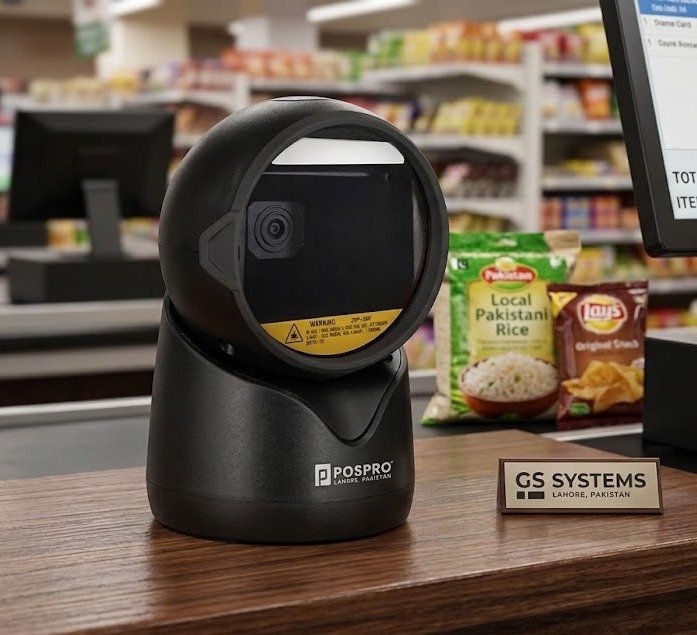
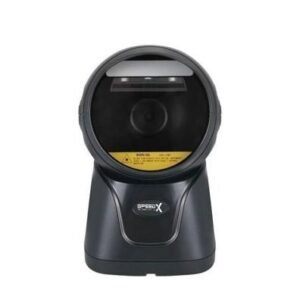
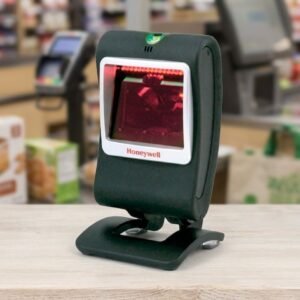
The POSPRO PBS-5000 2D Desktop Barcode Scanner is a hands-free presentation scanner designed for retail checkout counters, pharmacies, supermarkets, restaurants, courier offices and inventory workstations.
Its CMOS area-imaging system reads common printed 1D barcodes along with QR Code, Data Matrix, PDF417 and other supported 2D formats. It can also scan compatible barcodes displayed on smartphones, tablets and computer screens.
The desktop design allows employees or customers to present a product, card, receipt or mobile device in front of the scanning window without repeatedly lifting and triggering a handheld scanner.
POSPRO currently lists the PBS-5000 in Pakistan as a 2D desktop barcode scanner. Pakistan import records identify the PBS-5000 as an OEM version of the Winson WAI-5770, whose manufacturer documentation confirms desktop area imaging, paper-and-screen scanning and support for standard 1D, PDF and 2D barcodes.
The PBS-5000 provides an affordable way to add hands-free 1D and 2D barcode scanning to a fixed checkout or service counter.
It can process traditional product labels and modern digital codes with one device. This makes it more flexible than a basic 1D laser scanner when customers use QR codes, mobile loyalty cards, digital invoices or electronic order references.
The scanner is suitable for businesses that need to read:
The manufacturer describes the underlying WAI-5770 platform as a desktop area imager capable of scanning standard 1D, PDF and 2D codes from both printed material and smart-device screens.
Key features include:
The exact sensor revision, interface cable, scanning speed, colour and electrical figures can vary between OEM production batches. GS Systemz should verify these details against the physical PBS-5000 unit before publication.
| Application | Suitability |
|---|---|
| Supermarket checkout | Excellent |
| Retail product scanning | Excellent |
| Pharmacy billing | Excellent |
| QR-code scanning | Excellent |
| Mobile loyalty cards | Excellent |
| Digital coupons | Excellent |
| Restaurant order codes | Excellent |
| Courier parcel processing | Excellent |
| E-commerce order verification | Excellent |
| Customer membership scanning | Excellent |
| Ticket verification | Excellent |
| Library checkout | Excellent |
| Fixed inventory workstation | Good |
| Reception and registration | Good |
| Product price-checking station | Good |
| Hands-free POS scanning | Excellent |
| Wireless aisle scanning | Not supported |
| Long-range warehouse scanning | Not designed for this |
| Outdoor use in rain | Not recommended |
| Industrial forklift scanning | Choose a rugged industrial scanner |
The OEM manufacturer lists retail POS, healthcare, supermarkets, warehouses, libraries, catering, logistics, express delivery and registration counters among the applicable environments for this scanning platform.
The following table combines confirmed POSPRO product information with published WAI-5770 OEM specifications.
| Specification | Detail |
|---|---|
| Product name | POSPRO PBS-5000 |
| Product type | Desktop presentation barcode scanner |
| Scanner technology | CMOS area imaging |
| Operation | Corded and hands-free |
| Barcode capability | Standard 1D, PDF and 2D |
| QR-code support | Yes |
| Screen scanning | Supported |
| Printed barcode scanning | Supported |
| Aiming system | Laser-free aiming |
| Published sensor resolution | 640 × 480 on commonly listed configuration |
| Other published revision | Some listings show 960 × 640 |
| Published imaging speed | Up to approximately 60fps |
| Minimum published 1D resolution | Approximately 5 mil |
| Minimum published 2D resolution | Approximately 10 mil |
| Minimum published print contrast | Approximately 15% for UPC/EAN configuration |
| Host interfaces | USB HID, USB VCP and RS-232 |
| Input power | 5V DC |
| Published maximum current | Approximately 200–335mA, depending on revision |
| Published dimensions | Approximately 94 × 100 × 152mm |
| Published weight | Approximately 260g |
| Drop resistance | Approximately 1.2m onto concrete |
| Supported systems | Windows, Android, macOS, iOS and Linux |
| Keyboard languages | Multiple international layouts |
| Battery | Not required |
| Wireless connection | No |
| Installation | Plug and play on compatible USB HID systems |
| Local warranty | Must be confirmed with GS Systemz |
Manufacturer and supplier pages publish different imaging-resolution and current-consumption figures for WAI-5770 production variants. The exact PBS-5000 unit should therefore be checked before using those batch-sensitive figures as guaranteed specifications.
A desktop barcode scanner is placed on a counter or workstation and scans barcodes presented in front of its reading window.
It is different from a document scanner. The PBS-5000 does not scan full pages, photographs or identity-card images. It captures and decodes barcode data.
Desktop presentation scanning is useful when:
The user normally passes the barcode through the scanner’s active field. The scanner detects, decodes and transmits the data to the connected software.
Hands-free presentation scanning means the scanner remains positioned on the counter while products or digital codes are moved in front of it.
The employee does not need to lift the scanner for every transaction.
This can improve workflows involving:
The PBS-5000’s large scanning window is designed to provide a convenient presentation area for paper and screen barcodes.
A 2D area imager captures a complete picture of the barcode instead of reading only one horizontal laser line.
This allows the PBS-5000 to read linear barcodes and square or stacked symbols.
The OEM manufacturer lists these barcode families for the WAI-5770 scanning platform used by the PBS-5000. Individual formats may need to be enabled through scanner configuration.
Yes. The PBS-5000 is a 2D area-imaging scanner and supports QR-code scanning.
It can be used for compatible:
Both Pakistan product listings and the underlying manufacturer documentation identify QR and other 2D barcode support.
The actual QR-reading distance depends on the code’s physical size, module density, print quality, screen brightness and scanner revision.
Yes. The scanner reads standard 1D retail and inventory barcodes in addition to QR and other 2D formats.
It is suitable for barcodes used on:
This allows a business to use one scanner for conventional merchandise and newer digital-code workflows.
Yes. Screen scanning is one of the main advertised features of the PBS-5000 and its underlying WAI-5770 platform.
The scanner is designed to read compatible barcodes displayed on:
The manufacturer states that the scanner can read screen-displayed barcodes, including codes on reflective mobile-device surfaces.
When a mobile code is difficult to scan:
A cracked screen, low brightness or very small code can reduce performance.
Yes. Compatible barcodes displayed on desktop or laptop screens can be scanned.
This may help with:
The scanner decodes the barcode itself and then transfers the resulting text or numbers to the connected software.
The PBS-5000 may read barcodes with minor printing defects when enough barcode information remains visible.
Area imaging can be more flexible than a basic single-line laser scanner when a barcode is:
Scanning can still fail when:
Severely damaged product, medicine or courier labels should be replaced.
Yes. The manufacturer specifically promotes the WAI-5770 platform for reading barcodes from reflective surfaces such as smartphone screens.
For better reflective-screen performance:
Changing the angle is often more effective than repeatedly moving the phone quickly.
Current Pakistani product listings advertise support for small high-density barcodes. Published WAI-5770 specifications commonly list minimum resolution around 5 mil for 1D codes and 10 mil for 2D codes, although the exact limit can vary by production revision.
High-density performance depends on:
Businesses using very small jewellery, electronics, pharmacy or component labels should test the actual barcode before ordering several units.
The manufacturer describes the scanner as having extremely fast reading performance with motion tolerance. Published WAI-5770 supplier specifications commonly list an imaging rate of up to approximately 60 frames per second.
This can support ordinary high-traffic workflows such as:
The 60fps figure describes image capture. It does not mean that the scanner completes 60 separate transactions every second.
Actual productivity depends on barcode quality, software response, computer performance, interface mode and employee handling.
Laser-free aiming uses LED-based illumination or a visual scan indication rather than a traditional visible laser beam.
The manufacturer describes this as a customer-friendly approach that provides an accurate scanning indication without using a laser aiming source.
Potential advantages include:
Laser-free does not mean the illumination should be stared into unnecessarily.
A 2D area imager captures the full symbol, allowing compatible barcodes to be presented at different rotations.
A product can generally be presented:
The complete barcode must remain visible within the scanner’s field.
This omnidirectional behaviour can reduce the need to align every product label precisely with one horizontal line.
Published manufacturer information lists three main interface options:
The physical interface supplied with a PBS-5000 depends on its product kit.
USB HID mode allows scanned barcode data to appear like text entered from a keyboard.
It is commonly suitable for:
USB VCP creates a virtual serial port on a compatible computer.
This may be useful when software expects structured serial communication rather than ordinary keyboard input.
A compatible driver or port configuration may be required.
RS-232 is intended for:
An RS-232 version may require the correct cable, communication settings and external power arrangement.
Confirm the included interface before ordering.
The USB HID configuration is designed for plug-and-play installation on compatible systems.
A normal setup may involve:
The manufacturer states that its scanners normally operate without manual driver installation in standard plug-and-play keyboard mode.
USB virtual COM, RS-232 and advanced integrations may require additional configuration.
The OEM manufacturer lists compatibility with common platforms including:
Compatibility depends on the host port, adapter, interface mode and software application.
A scanner being recognised by the operating system does not automatically guarantee compatibility with every POS or inventory program.
Test the exact hardware and software combination before a large deployment.
Yes. The manufacturer lists several keyboard-language layouts, including English and a selection of European and international layouts.
The correct keyboard setting is important because symbols can be transmitted incorrectly when the scanner and computer use different layouts.
For example, an incorrect layout may affect:
Configure the scanner to match the computer’s active keyboard layout.
The PBS-5000 can work with compatible POS, inventory, pharmacy, restaurant and courier applications.
In USB HID keyboard mode, barcode data normally enters the active field in the same way as keyboard typing.
Compatibility depends on:
The scanner should be tested with the actual software before purchasing several units.
It should work with many locally developed POS applications that accept barcode data through keyboard input.
Common examples of compatible workflows may include:
Compatibility cannot be guaranteed solely from the scanner model. GS Systemz should test the PBS-5000 with the customer’s specific POS, ERP or inventory software when the installation is specialised.
The scanner can read compatible QR codes, but it does not independently process financial transactions.
Its role is to capture the QR data and send it to the connected POS or payment application.
Successful payment processing depends on:
The scanner should not be advertised as a complete payment terminal.
Yes, when connected to compatible price-checking software or a POS database.
The scanner reads the product barcode and transmits the value to the connected system. The software then searches the product database and displays the price.
The PBS-5000 does not store or calculate product prices by itself.
A complete price-checking setup normally requires:
No. The PBS-5000 is a corded desktop scanner.
It normally connects through USB or, on compatible configurations, RS-232.
A corded design is suitable when:
Choose a wireless handheld scanner when staff need to scan cartons, shelves or inventory away from the workstation.
No. It receives power through its compatible wired connection or power arrangement.
This provides several advantages:
The scanner stops operating when its connected host or external power source is switched off.
The OEM manufacturer lists resistance to drops from approximately 1.2 metres onto concrete.
This is suitable for ordinary commercial environments such as:
The PBS-5000 is not presented as a rugged industrial scanner.
Protect it from:
No verified IP water-resistance rating was found for the PBS-5000 or corresponding WAI-5770 platform.
Do not:
Use a soft, slightly damp cloth and prevent moisture from entering the scanner or cable connection.
Package contents can vary by distributor and product batch.
A typical package may include:
RS-232 cables, power adapters and other accessories may be sold in separate kits.
GS Systemz should confirm the actual package contents before presenting any accessory as included.
| Requirement | Recommendation |
|---|---|
| Standard product barcodes | Supported |
| QR-code scanning | Supported |
| Data Matrix scanning | Supported |
| PDF417 scanning | Supported |
| Smartphone-screen scanning | Supported |
| Computer-screen scanning | Supported |
| Hands-free counter scanning | Excellent |
| Small high-density labels | Supported within model limits |
| USB keyboard operation | Supported |
| USB virtual COM | Available on compatible configuration |
| RS-232 connection | Available on compatible configuration |
| Multiple keyboard languages | Supported |
| Battery operation | Not required |
| Wireless movement | Not supported |
| Outdoor waterproof use | Not suitable |
| Heavy industrial use | Choose a rugged scanner |
| Long-range pallet scanning | Not designed for this |
Choose the PBS-5000 when your business needs an affordable fixed scanner for mixed printed and digital 1D or 2D codes.
| Feature | PBS-5000 Desktop Scanner | Handheld Scanner |
|---|---|---|
| Normal position | Fixed on counter | Held by employee |
| Hands-free operation | Primary design | Requires stand on many models |
| Product presentation | Move item toward scanner | Move scanner toward item |
| Mobile-phone scanning | Convenient | Supported on compatible 2D models |
| Large-product scanning | Less convenient | Easier |
| Checkout speed | Excellent for small items | Good |
| Counter space | Requires fixed position | Can be stored separately |
| Aisle movement | No | Possible with wireless model |
| Best use | Checkout and service counters | Products of different sizes |
Choose the PBS-5000 for continuous fixed-counter scanning.
Choose a handheld model when labels are frequently attached to large, heavy or awkward products.
| Feature | Basic 1D Desktop Scanner | PBS-5000 2D Scanner |
|---|---|---|
| UPC and EAN | Supported | Supported |
| Code 39 and Code 128 | Supported | Supported |
| QR Code | Not supported | Supported |
| Data Matrix | Not supported | Supported |
| PDF417 | Usually not supported | Supported |
| Smartphone codes | Usually limited | Supported |
| Digital coupons | Usually not supported | Supported |
| Barcode rotation | Depends on scan pattern | Omnidirectional area imaging |
| Modern POS workflows | Limited | Better suited |
| Best use | Printed product labels | Printed and digital codes |
A 2D scanner is the safer long-term choice when a business expects to use QR payments, digital loyalty programmes or electronic order codes.
GS Systemz can offer the PBS-5000 to businesses in Pakistan that need an affordable desktop 2D scanner for retail, pharmacy and service-counter applications.
This page helps buyers evaluate:
Before ordering, confirm:
These checks are important because the PBS-5000 is an OEM product and production batches may use different sensor or electrical specifications.
Correct placement, configuration and cleaning can improve daily barcode performance.
The PBS-5000 is suitable for:
It is particularly suitable when hands-free scanning and affordable 2D capability are more important than wireless movement or industrial ruggedness.
Check availability of the POSPRO PBS-5000 2D Desktop Barcode Scanner with GS Systemz in Pakistan.
Use it to scan common product barcodes, QR codes, Data Matrix, PDF417 and compatible digital codes displayed on smartphones or computer screens.
Confirm the sensor revision, interface cable, colour, local warranty and complete package contents before adding the PBS-5000 to your POS or inventory setup.
The PBS-5000 is a POSPRO desktop area-imaging scanner designed to read standard printed and digital 1D, PDF and 2D barcodes.
Yes. It supports QR Code, Micro QR and other compatible 2D barcode formats.
Yes. It reads common UPC, EAN, Code 39, Code 128, GS1 and other supported linear barcode formats.
Yes. The scanner is designed to read compatible digital barcodes directly from smartphones and computer screens.
Yes. It is a desktop presentation scanner that automatically reads barcodes presented in front of its scanning window.
Published manufacturer information lists USB HID keyboard, USB virtual COM and RS-232 interface options. The supplied connection depends on the product kit.
No. It is a corded scanner and receives power through its compatible wired connection or power arrangement.
It can work with compatible POS and inventory applications, particularly in USB HID keyboard mode. The actual software should be tested before a large deployment.
No verified waterproof or IP rating was found. Keep it dry and do not immerse or spray the scanner.
You can check availability of the POSPRO PBS-5000 2D Desktop Barcode Scanner with GS Systemz in Pakistan.
Reviews
There are no reviews yet.