
₨9,000.00
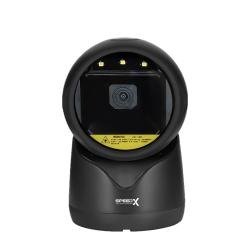
The Speed-X 9600 2D Desktop Barcode Scanner is a corded, hands-free presentation scanner designed for retail checkout counters, supermarkets, pharmacies, restaurants, courier offices and fixed inventory workstations.
Its CMOS area-imaging engine reads common 1D product barcodes and modern 2D formats, including QR Code, Data Matrix, PDF417, MicroPDF417, Aztec, MaxiCode and Han Xin Code. It can capture compatible barcodes from printed labels, product packaging, smartphones and computer screens.
The scanner automatically detects a barcode placed within its reading field. Employees can therefore scan products, loyalty cards, receipts and digital codes without repeatedly lifting a handheld scanner or pressing a trigger.
Its commonly published specification set includes a 640 × 480-pixel CMOS sensor, 60-frame-per-second image decoding, USB connectivity and a compact desktop housing.
| Feature | Published specification |
|---|---|
| Scanner type | Desktop presentation barcode scanner |
| Scanning technology | CMOS area imaging |
| Sensor resolution | 640 × 480 pixels |
| Published decoding speed | 60 FPS |
| Barcode support | 1D and 2D |
| QR-code support | Yes |
| Screen scanning | Yes |
| Scanning mode | Automatic hands-free presentation |
| Minimum resolution | Approximately 4 mil |
| Field of view | Approximately 36° horizontal × 27° vertical |
| Scan orientation | Pitch ±65°, skew ±65°, roll 360° |
| Primary interfaces | USB HID keyboard and USB VCP |
| Battery | Not required |
| Wireless operation | No |
| Dimensions | Approximately 94 × 100 × 152mm |
| Weight | Approximately 260g |
| Drop resistance | Approximately 1.5m |
| Operating temperature | -20°C to 60°C |
These figures appear consistently across several detailed Speed-X 9600 listings. However, other sellers publish slightly different sensor-light, field-of-view, resolution and physical specifications, which may indicate more than one production revision.
The Speed-X 9600 allows a business to scan traditional merchandise labels and modern digital codes with one fixed device.
A basic 1D scanner generally reads UPC, EAN, Code 39 and Code 128 labels but cannot process QR Code, Data Matrix or PDF417. The Speed-X 9600’s area-imaging engine supports both barcode categories, making it more adaptable to current POS, loyalty, ticketing and inventory workflows.
The scanner can support:
Its hands-free design can also reduce repeated wrist movement. Products or screens are presented to the scanner while the device remains positioned on the counter.
Key features include:
The exact interface, firmware, light source and enabled barcode formats should be verified against the GS Systemz unit.
| Application | Suitability |
|---|---|
| Retail product checkout | Excellent |
| Supermarket billing | Excellent |
| Pharmacy billing | Excellent |
| QR-code scanning | Excellent |
| Mobile loyalty cards | Excellent |
| Digital coupons | Excellent |
| Restaurant order codes | Excellent |
| Courier parcel processing | Excellent |
| E-commerce order verification | Excellent |
| Membership scanning | Excellent |
| Electronic ticket scanning | Excellent |
| Customer registration | Good |
| Library circulation | Good |
| Product price checking | Good |
| Fixed inventory workstation | Good |
| Warehouse packing desk | Good |
| Hands-free counter operation | Excellent |
| Large or heavy products | Less convenient than handheld |
| Wireless aisle scanning | Not supported |
| Long-range pallet scanning | Not designed for this |
| Outdoor wet environments | Not recommended |
| Harsh industrial operation | Choose a rugged industrial scanner |
The Speed-X 9600 is primarily intended for fixed indoor commercial workstations rather than mobile warehouse or industrial scanning.
| Specification | Published detail |
|---|---|
| Product name | Speed-X 9600 |
| Product category | 2D desktop barcode scanner |
| Connection type | Corded |
| Scanning technology | CMOS area imaging |
| Sensor resolution | 640 × 480 pixels |
| Decoding speed | 60 FPS |
| Commonly listed light source | White LED |
| 1D barcode support | Yes |
| 2D barcode support | Yes |
| QR-code support | Yes |
| Screen scanning | Supported |
| Pitch tolerance | ±65° |
| Skew tolerance | ±65° |
| Roll or tilt tolerance | 360° |
| Field of view | Approximately 36° horizontal × 27° vertical |
| Minimum resolution | Approximately 4 mil |
| Minimum print contrast | Greater than 20% for listed UPC/EAN test |
| Interfaces | USB HID keyboard and USB VCP |
| Input voltage | 5V DC ±5% |
| Maximum published current | Approximately 335mA |
| Dimensions | Approximately 94 × 100 × 152mm |
| Weight | Approximately 260g |
| Indicators | LED and beeper |
| Operating temperature | -20°C to 60°C |
| Storage temperature | -30°C to 70°C |
| Humidity | 5%–95%, non-condensing |
| Published drop resistance | 1.5m onto concrete |
| Battery | Not required |
| Wireless connectivity | No |
| IP rating | No verified rating found |
| Local warranty | Confirm with GS Systemz |
This is the most consistently published Speed-X 9600 specification set.
Some Speed-X 9600 sellers publish a different specification set, including:
These differences may reflect different production batches, scan engines, specification formatting or reseller errors. A scans-per-second figure and an imaging-frame-rate figure also do not necessarily describe the same measurement.
GS Systemz should verify these details directly from:
The published product page should avoid combining conflicting specifications from different revisions.
A desktop scanner stays in a fixed position at a counter or workstation.
Instead of moving the scanner toward each product, the user presents a barcode in front of its reading window. The device detects the barcode, decodes the information and sends it to the connected POS or inventory application.
Desktop scanners are useful when:
The Speed-X 9600 is marketed as an auto-sensing desktop scanner for fixed-counter use.
Auto-sensing means the scanner automatically attempts to read a barcode when it enters the active scanning field.
A normal transaction involves:
The user normally does not need to press a trigger for each barcode.
This design is useful at:
A CMOS area imager captures a complete picture of the barcode instead of reading only one narrow laser line.
This allows the Speed-X 9600 to process:
The Speed-X 9600’s commonly published sensor resolution is 640 × 480 pixels.
Sensor resolution is only one part of scanning performance. Focus, illumination, processing speed, barcode quality and decoding software also affect the result.
FPS means frames per second.
A published speed of 60 FPS indicates that the scanner’s imaging system can process up to approximately 60 image frames each second under its stated operating conditions.
It does not mean that a cashier can complete 60 separate transactions each second. The software, computer, barcode quality and physical product handling also affect transaction speed.
A higher frame rate can help when:
Published barcode lists include:
Some barcode formats may need to be enabled by scanning programming codes from the manual.
Published 2D formats include:
The Speed-X 9600 is therefore suitable for a wide range of product, payment-reference, loyalty, ticketing and inventory applications.
A specialised format should be tested before purchasing multiple scanners because firmware and default symbology settings can differ.
Yes. QR-code scanning is one of the primary functions of the Speed-X 9600.
It can support compatible:
QR Code appears in the detailed published decode list for the scanner.
The scanner captures and transmits the encoded information. It does not independently approve a payment or verify a ticket.
Yes. The Speed-X 9600 can read compatible payment-related QR codes displayed on smartphones.
Published working-distance figures include:
| Payment code | Published range |
|---|---|
| QR code measuring approximately 3 × 3cm | 10–320mm |
| QR code measuring approximately 2.3 × 2.3cm | 0–260mm |
These are typical reseller-published test figures, not guaranteed distances for every payment application.
Successful payment processing also depends on:
The Speed-X 9600 is a scanner, not a complete payment terminal.
Yes. It supports the common 1D formats used on retail products and inventory labels.
It may be used with barcodes found on:
UPC, EAN, Code 39, Code 128 and GS1 formats are included in its published barcode list.
Yes. Screen-code scanning is a major advertised application of the Speed-X 9600.
The scanner can be used with compatible:
Current product descriptions specifically promote it for digital and mobile QR scanning.
When a phone barcode is difficult to scan:
A cracked screen, low brightness or very small code may reduce performance.
Yes. Compatible barcodes displayed on a desktop monitor or laptop screen can be presented to the scanner.
This may support:
The scanner transfers the decoded characters to the connected application. The application remains responsible for validating, searching or processing the information.
Current product descriptions promote the scanner for reading damaged, faded and low-quality barcodes. Its area-imaging design can provide more flexibility than a basic single-line scanner when a code is presented at an angle or has minor print defects.
It may improve the scanning of labels that are:
Scanning may still fail when:
Severely damaged medicine, inventory and courier labels should be replaced.
The most detailed Speed-X 9600 specification set lists a minimum resolution of approximately 4 mil.
A mil is one-thousandth of an inch. Four mil equals approximately 0.102mm.
This does not guarantee successful reading of every 4 mil code. Small-barcode performance also depends on:
Businesses scanning jewellery tags, electronic components, pharmaceutical labels or compact Data Matrix codes should test their actual labels before ordering several units.
Published depth-of-field figures include:
| Barcode | Typical published range |
|---|---|
| Code 39, 5 mil | 10–90mm |
| Code 39, 13 mil | 0–175mm |
| UPC-A, 13 mil | 10–170mm |
| QR Code, 20 mil | 0–130mm |
| QR Code, 30 mil | 0–180mm |
| Payment QR, approximately 3 × 3cm | 10–320mm |
| Payment QR, approximately 2.3 × 2.3cm | 0–260mm |
These are typical test results rather than guaranteed working distances. Barcode size, print quality, screen brightness, contrast and scanner revision can change practical performance.
Print contrast measures the difference between the dark barcode elements and their lighter background.
Detailed listings publish a minimum contrast value greater than 20% for a 13 mil UPC or EAN barcode under the stated test conditions.
A barcode may become difficult to scan when:
Clear black-on-white printing normally offers better daily reliability than codes near the minimum threshold.
The most commonly published Speed-X 9600 scanning angles are:
These wide presentation angles allow compatible barcodes to be scanned while upright, sideways, diagonally or upside down.
Pitch describes tilting the top of the barcode toward or away from the scanner.
Skew describes angling one side of the barcode closer than the other.
Roll describes rotating the barcode around the scanner’s line of sight.
The complete symbol must still remain visible within the imaging field.
The most consistently published field of view is approximately:
The field of view describes the angular area captured by the scanner’s imaging engine.
A wider presentation area can make it easier to position:
One seller publishes a 39° × 29° field of view, which may represent another scan-engine revision. GS Systemz should check the supplied manual before selecting either figure for the final specification table.
The most detailed and repeated Speed-X 9600 listings identify a white LED light source.
Another current seller describes a red LED light source. This may indicate a different scanner revision or an inaccurate copied specification.
For accurate GS Systemz content:
The illumination colour does not change the fundamental requirement to keep the barcode visible and free from excessive glare.
The scanner uses visual and audible feedback to indicate scanner status and successful decoding.
These indicators may help the operator confirm that:
LED and beeper indicators are included in the published physical specifications.
A successful beep confirms that the scanner decoded a code. The user should still confirm that the information reached the correct software field.
The most consistently published interfaces are:
Some sellers also list RS-232, but this is not included in every detailed Speed-X 9600 specification. The exact interface must therefore be confirmed from the scanner kit.
USB HID mode sends barcode information like keyboard typing.
It can work with:
USB VCP creates a virtual serial port on a compatible computer.
It may be useful when software expects structured serial communication rather than ordinary keyboard input.
A driver, port selection or application configuration may be required.
A seller lists RS-232 among the Speed-X 9600 connection options, but GS Systemz should confirm:
Do not advertise RS-232 as standard box content unless it is physically verified.
Yes. The commonly sold USB HID configuration is advertised as plug and play on compatible computers and POS terminals.
A normal setup involves:
USB VCP, serial communication and specialised data formatting may require additional configuration.
A standard USB HID keyboard configuration normally works without a separate scanner driver on a compatible system.
A driver or software configuration may still be required for:
The actual scanner should be tested with the customer’s software before several units are purchased.
Current product descriptions identify compatibility with common desktop operating systems, including:
Compatibility depends on:
Recognition by the operating system does not automatically guarantee compatibility with every POS, ERP or inventory application.
Yes. Multiple keyboard-language support appears in detailed product specifications.
The scanner’s keyboard setting should match the computer’s active keyboard layout.
An incorrect layout may affect:
The exact supported-language list should be checked in the supplied programming guide.
Yes. Published information lists custom data output and programmable data editing among the scanner’s capabilities.
A prefix or suffix can help software process scanned data.
Common examples include:
Programming should be tested carefully because incorrect output rules may change valid barcode information.
The Speed-X 9600 can work with compatible POS, pharmacy, restaurant, courier and inventory applications.
In USB HID mode, scanned information normally enters the active field like keyboard text.
Compatibility depends on:
Its plug-and-play USB configuration is promoted for POS terminals and computers.
It should work with many locally developed POS applications that accept standard keyboard-style barcode input.
Potential workflows include:
Compatibility should be tested when the application requires virtual serial communication, unusual commands or specialised data formatting.
Yes, when connected to compatible price-checking software and a product database.
The process works as follows:
The scanner does not independently store prices, manage products or calculate inventory.
A complete price-checking solution requires:
No. The Speed-X 9600 is a corded desktop scanner.
It does not contain a normal rechargeable battery or provide Bluetooth mobility.
A wired scanner is suitable when:
Choose a wireless handheld scanner when staff need to scan shelves, cartons or products away from the workstation.
No rechargeable battery is required for normal operation.
The scanner receives power through its USB connection or the applicable wired power arrangement.
Benefits include:
Detailed product specifications list resistance to a 1.5-metre drop onto concrete.
This can provide reasonable protection against accidental falls in normal commercial environments such as:
A drop rating does not make the scanner unbreakable. Repeated impacts can damage its housing, imaging window, base, cable or internal electronics.
No verified IP or waterproof rating was found for the Speed-X 9600.
The scanner should not be:
Keep moisture away from the imaging window, housing, base and interface cable.
The most consistently published environmental specifications are:
These figures are published by several Speed-X 9600 sellers.
Avoid:
The most repeated physical specifications are:
Some listings reverse the first two measurements or publish a weight of 265g. This is a small difference but should still be verified against GS Systemz stock.
These dimensions make the scanner suitable for:
Package contents can vary by seller and interface kit.
A typical package may include:
An RS-232 cable, external power adapter or specialised mounting accessory may not be included.
GS Systemz should inspect the physical package before promising any accessory as standard box content.
| Requirement | Recommendation |
|---|---|
| Standard product barcodes | Supported |
| QR-code scanning | Supported |
| Data Matrix scanning | Supported |
| PDF417 scanning | Supported |
| Smartphone-screen scanning | Supported |
| Computer-screen scanning | Supported |
| QR payment-code capture | Supported with compatible software |
| Hands-free checkout | Excellent |
| 60 FPS decoding | Published |
| Minimum 4 mil resolution | Published for commonly listed revision |
| USB HID keyboard | Supported |
| USB Virtual COM | Supported |
| RS-232 | Verify exact kit |
| Multiple keyboard languages | Supported |
| Custom data output | Supported |
| Battery charging | Not required |
| Wireless mobility | Not supported |
| Waterproof operation | No verified rating |
| Long-range pallet scanning | Not suitable |
| Rugged industrial work | Choose an industrial scanner |
Choose the Speed-X 9600 when fast desktop scanning, QR support and USB integration are more important than wireless movement.
Both are Speed-X desktop 2D barcode scanners, and their public specification sets overlap significantly.
| Feature | Speed-X 9600 | Speed-X 9500 |
|---|---|---|
| Scanner type | Desktop 2D imager | Desktop 2D imager |
| Sensor resolution | 640 × 480 | 640 × 480 |
| Published speed | 60 FPS | Public listings vary |
| Minimum resolution | 4 mil commonly listed | 5 mil 1D and 10 mil 2D commonly listed |
| QR-code support | Yes | Yes |
| Screen scanning | Yes | Yes |
| USB HID | Yes | Yes |
| USB VCP | Yes | Yes |
| RS-232 | Verify kit | Commonly listed |
| Dimensions | Approximately 94 × 100 × 152mm | Approximately 100 × 94 × 152mm |
| Weight | Approximately 260g | Approximately 265g |
| Operating temperature | -20°C to 60°C | Commonly 0°C to 50°C |
| Best use | Higher published speed and finer resolution | Standard affordable desktop scanning |
The 9600 has the stronger published 60 FPS and 4 mil specification set. The 9500 may have more consistently listed RS-232 availability. The final choice should be based on physical testing, interface requirements, warranty and price.
| Feature | Speed-X 9600 | Speed-X 9700 |
|---|---|---|
| Sensor resolution | 640 × 480 | 1280 × 800 |
| Published decoding speed | 60 FPS | No consistent numerical figure |
| Minimum resolution | 4 mil commonly listed | 5 mil Code 39 |
| Field of view | 36° × 27° | Different platform specification |
| General scan range | Format-specific ranges published | Up to 450mm general depth of field |
| QR-code scanning | Supported | Supported |
| Screen scanning | Supported | Supported |
| USB operation | Supported | Supported |
| RS-232 | Verify exact kit | Verify exact kit |
| Main strength | Documented 60 FPS speed | Higher sensor resolution |
| Best selection method | High-speed checkout | Higher-resolution imaging |
Choose the Speed-X 9600 when a documented 60 FPS frame rate and 4 mil resolution are priorities.
Choose the Speed-X 9700 when its higher 1280 × 800 image resolution and broader published depth of field better match the intended barcodes.
| Feature | Speed-X 9600 Desktop | Handheld scanner |
|---|---|---|
| Normal position | Fixed on counter | Held by employee |
| Hands-free operation | Primary design | Often requires a stand |
| Small-product checkout | Excellent | Good |
| Phone-code scanning | Convenient | Supported on compatible models |
| Large-product scanning | Less convenient | Easier |
| Battery | Not required | Required on wireless models |
| Wireless movement | No | Available on selected models |
| Counter space | Requires fixed area | Can be stored separately |
| Best use | Checkout and service counters | Mixed-size or mobile scanning |
Choose the Speed-X 9600 for continuous fixed-counter scanning.
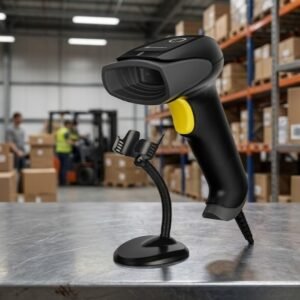
Choose a handheld scanner when barcodes are frequently attached to large, heavy or awkward products.
| Feature | Basic 1D scanner | Speed-X 9600 |
|---|---|---|
| UPC and EAN | Supported | Supported |
| Code 39 and Code 128 | Supported | Supported |
| QR Code | Not supported | Supported |
| Data Matrix | Not supported | Supported |
| PDF417 | Usually not supported | Supported |
| Smartphone codes | Often limited | Supported |
| Barcode orientation | More alignment required | Omnidirectional imaging |
| Digital loyalty cards | Usually unsuitable | Suitable |
| Electronic tickets | Usually unsuitable | Suitable |
| Modern POS flexibility | Limited | Better |
A 2D scanner is a stronger long-term choice when a business expects to use QR codes, digital customer identification, mobile loyalty programmes or modern inventory labels.
GS Systemz can offer the Speed-X 9600 to businesses in Pakistan that need a desktop scanner for printed and digital barcode workflows.
This product page helps buyers evaluate:
Before placing an order, confirm:
Correct placement, cleaning, barcode quality and software configuration can improve daily scanning reliability.
The Speed-X 9600 may be suitable for:
It is best suited to businesses that prioritise fast hands-free scanning, QR support and fixed USB connectivity over wireless mobility.
Check availability of the Speed-X 9600 2D Desktop Barcode Scanner with GS Systemz in Pakistan.
Use it to scan standard retail barcodes, QR Code, Data Matrix, PDF417, MicroPDF417 and compatible digital codes displayed on smartphones or computer screens.
Confirm the scan-engine revision, light source, minimum resolution, interface kit, cable, local warranty and complete box contents before adding the Speed-X 9600 to your retail, pharmacy, courier or inventory setup.
The Speed-X 9600 is a corded desktop CMOS area-imaging scanner designed for automatic hands-free scanning of supported 1D and 2D barcodes.
Yes. Its published 2D barcode list includes QR Code, Data Matrix, PDF417, MicroPDF417, Aztec, MaxiCode and Han Xin Code.
Yes. It reads common retail formats including UPC, EAN, Code 39, Code 128 and GS1 barcodes.
Yes. The scanner is promoted for QR payments, mobile loyalty cards and other compatible digital-screen barcodes.
The most consistently published specification lists a 640 × 480-pixel CMOS area-imaging sensor.
Detailed listings publish a decoding rate of 60 frames per second. Actual transaction speed also depends on the barcode, computer and POS software.
The most repeated detailed specification lists approximately 4 mil, although another seller lists 5 mil. Confirm the scan-engine revision before publication.
USB HID keyboard and USB Virtual COM are consistently listed. RS-232 appears in some listings and must be verified against the exact kit.
No verified IP or waterproof rating was found. Keep the scanner dry and do not immerse or spray it.
You can check availability of the Speed-X 9600 2D Desktop Barcode Scanner with GS Systemz in Pakistan.
Reviews
There are no reviews yet.