
₨5,450.00
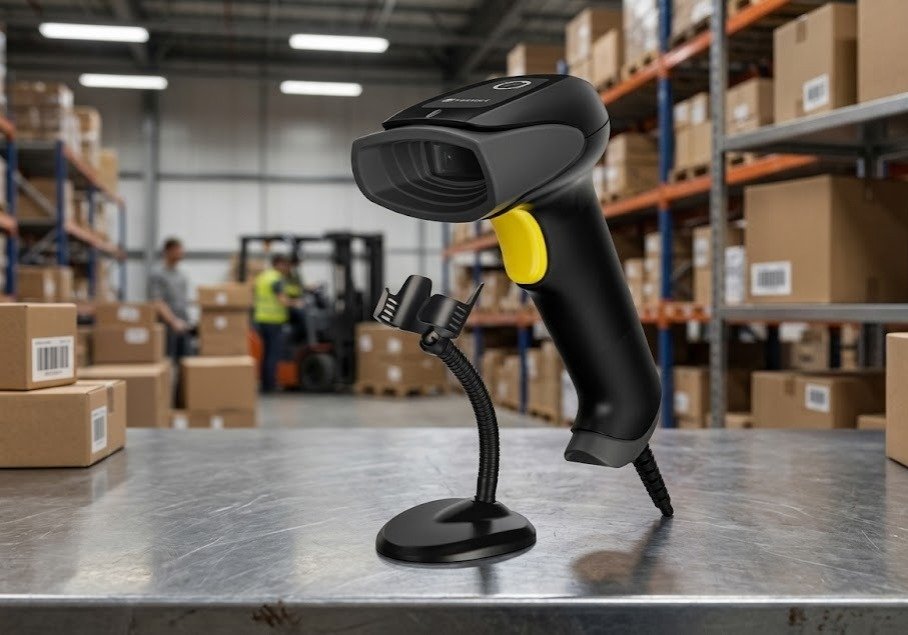
The POSPRO PBS-QR1000 2D Wired Barcode Scanner With Stand is an economical handheld scanner designed for retail billing, pharmacies, inventory counters, courier offices, libraries, logistics desks and e-commerce order processing.
It reads traditional 1D product barcodes and commonly used 2D formats, including QR Code, Data Matrix and PDF417. The scanner can also capture compatible barcodes displayed on smartphones, tablets and computer screens.
An adjustable stand is included with commonly advertised packages. The operator can use the scanner in two ways:
The commonly sold version connects through USB and is advertised as plug and play. Some reseller information also lists RS-232 and USB virtual serial support, but GS Systemz should verify those interfaces against the exact physical kit before publication.
| Feature | Published information |
|---|---|
| Brand | POSPRO |
| Model | PBS-QR1000 |
| Series | Econo Series |
| Product type | Wired handheld barcode scanner |
| Barcode support | 1D and 2D |
| QR-code support | Yes |
| Data Matrix support | Advertised |
| PDF417 support | Advertised |
| Printed-label scanning | Yes |
| Mobile-screen scanning | Yes |
| Computer-screen scanning | Yes |
| Included stand | Advertised with standard packages |
| Stand type | Flexible and adjustable |
| Confirmed connection | USB |
| Installation | Plug and play on compatible USB systems |
| Other listed interfaces | RS-232 and virtual serial; verify exact kit |
| Scan confirmation | LED and buzzer |
| Normal colour | Black and yellow |
| Battery | Not required |
| Wireless connection | No |
| Sensor resolution | Not officially published |
| Scan speed | Not officially published |
| Working distance | Not officially published |
| Drop rating | No reliable numerical figure published |
| IP rating | No verified rating published |
| Local warranty | Confirm with GS Systemz |
Current Pakistan listings consistently confirm the product’s 1D/2D capability, included stand, USB connection, ergonomic handheld design and screen-scanning use.
The PBS-QR1000 provides affordable 2D scanning for businesses that need more than ordinary product-barcode reading.
A basic 1D scanner can usually read UPC, EAN, Code 39 and Code 128 labels. It cannot normally process QR Code, Data Matrix or PDF417. The PBS-QR1000 supports both barcode categories, making it suitable for traditional billing and newer digital workflows.
Its main advantages include:
The scanner is especially useful where employees handle products of different sizes. Small items can be passed in front of the scanner while it sits in the stand, while larger packages can be scanned by lifting the scanner from the stand.
Published features include:
POSPRO’s authorised reseller describes the scanner as a low-cost 2D model with paper-code support, mobile-payment screen scanning, LED and buzzer feedback, an ergonomic body and a durable cable.
The exact internal scan engine, minimum resolution, illumination colour, reading distance and environmental rating are not published in a complete model-specific datasheet.
| Application | Suitability |
|---|---|
| Retail product billing | Excellent |
| Grocery-store checkout | Excellent |
| Pharmacy billing | Excellent |
| QR-code scanning | Excellent |
| Data Matrix scanning | Supported |
| PDF417 scanning | Supported |
| Mobile loyalty cards | Excellent |
| Electronic coupons | Excellent |
| QR-payment references | Excellent with compatible software |
| E-commerce order verification | Excellent |
| Courier parcel processing | Excellent |
| Logistics data entry | Excellent |
| Customer membership codes | Excellent |
| Digital ticket scanning | Excellent |
| Library circulation | Good |
| Fixed inventory workstation | Excellent |
| Warehouse packing desk | Good |
| Product receiving | Good |
| Hands-free counter scanning | Supported with stand |
| Large-product scanning | Good in handheld mode |
| Wireless aisle scanning | Not supported |
| Long-range pallet scanning | Not designed for this |
| Outdoor wet environments | Not recommended |
| Heavy industrial operation | Choose a rugged scanner |
Current product listings recommend the PBS-QR1000 for retail, warehouses, inventory, logistics, libraries and related commercial environments.
A complete official technical datasheet was not publicly available. The following table separates confirmed information from details requiring GS Systemz stock verification.
| Specification | Available information |
|---|---|
| Product name | POSPRO PBS-QR1000 |
| Product series | Econo Series |
| Product category | Wired 2D barcode scanner |
| Form factor | Handheld with stand |
| Operation | Handheld or hands-free |
| Barcode capability | 1D and 2D |
| QR Code | Supported |
| Data Matrix | Advertised |
| PDF417 | Advertised |
| Paper barcode scanning | Supported |
| Mobile-screen scanning | Supported |
| Computer-screen scanning | Supported |
| Included stand | Advertised |
| Primary connection | USB |
| USB installation | Plug and play |
| RS-232 | Listed by one reseller; verify kit |
| USB virtual serial | Listed by one reseller; verify kit |
| Indicators | LED and buzzer |
| Housing colour | Commonly black and yellow |
| Battery | Not required |
| Wireless communication | No |
| Sensor type | 2D imaging engine; exact technology not officially documented |
| Sensor resolution | Verify supplied manual |
| Scan speed | Verify supplied manual |
| Minimum 1D resolution | Verify supplied manual |
| Minimum 2D resolution | Verify supplied manual |
| Minimum print contrast | Verify supplied manual |
| Scanning distance | Verify supplied manual |
| Pitch, skew and roll | Verify supplied manual |
| Dimensions | Measure physical unit |
| Weight | Measure physical unit |
| Cable length | Verify box contents |
| Operating temperature | Verify supplied manual |
| Drop resistance | General durability claimed; no reliable height published |
| IP rating | No verified rating found |
| Local warranty | Confirm with GS Systemz |
| Package contents | Inspect physical stock |
Galaxy and Multan IT Traders identify USB plug-and-play connectivity, QR, PDF417, Data Matrix, screen scanning and an included stand.
The PBS-QR1000 is a handheld wired scanner supplied with a stand.
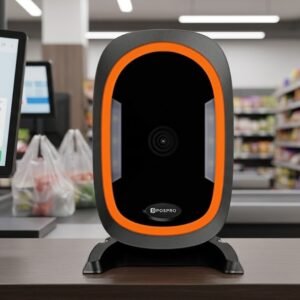
It should not be classified as a dedicated desktop presentation scanner. A true desktop scanner normally has a fixed housing and large scan window. The PBS-QR1000 has a handheld body and trigger, but its stand adds a hands-free operating option.
Remove the scanner from the stand and aim it toward:
Place the scanner in its stand and present:
This two-mode design provides more flexibility than either a basic handheld scanner without a stand or a permanently fixed desktop unit.
The included stand holds the scanner at a suitable counter angle.
Public product listings describe it as flexible and adjustable, allowing the operator to aim the scanner toward the normal product or smartphone presentation area.
The stand can help with:
Whether the scanner automatically detects a barcode while resting in the stand may depend on its operating mode and configuration. GS Systemz should test hands-free auto-sensing before claiming that no trigger action is ever required.
Yes, the included stand is advertised for hands-free scanning.
The stand keeps the scanner pointed toward the active scanning area, allowing products or screens to be presented in front of it.
Hands-free operation may improve:
The exact presentation-mode behaviour should be tested on GS Systemz stock because no public programming manual confirms its trigger and auto-sensing settings.
A 2D scanner captures an image of the complete barcode and analyses its horizontal and vertical pattern.
This allows the PBS-QR1000 to read conventional linear product codes and supported square or stacked symbols.
Retailer listings explicitly name QR Code, PDF417 and Data Matrix. A complete model-specific decode list was not found, so other formats should be tested before publication.
Yes. QR-code scanning is one of its primary advertised functions.
It can support compatible QR applications such as:
Current POSPRO dealer listings specifically promote QR and mobile-payment code scanning.
The scanner only reads and transmits the encoded information. It does not independently approve a payment or verify a customer.
Yes. Data Matrix is included in current published barcode-type information for the PBS-QR1000.
Data Matrix may be used for:
Very small or specialised Data Matrix symbols should be physically tested because no verified minimum module-size specification is available.
Yes. PDF417 appears in the current published feature lists.
PDF417 may appear on:
Successful reading depends on the code’s size, condition, print contrast and scanner configuration.
Yes. It reads standard 1D product barcodes as well as supported 2D formats.
It can be used with labels found on:
Its 1D and 2D compatibility is consistently confirmed across local product listings.
Yes. Screen scanning is a confirmed feature.
The scanner is advertised for reading codes displayed on:
Reseller listings explicitly identify mobile and computer-screen barcode scanning.
When a mobile code is difficult to scan:
The scanner can capture compatible QR codes used within mobile-payment workflows.
POSPRO’s dealer description mentions WeChat and Alipay scanning, demonstrating its intended use with screen-based payment codes.
Actual payment processing depends on:
The PBS-QR1000 is a barcode reader, not an independent payment terminal.
Yes. Current listings state that the PBS-QR1000 reads compatible codes from computers as well as mobile phones.
This may support:
The scanner sends decoded text or numbers to the connected application. The software performs the database search, validation or transaction.
POSPRO dealer material describes strong decoding of complex codes, but no numerical damaged-barcode performance test is published.
It may help with labels that are:
Scanning can still fail when:
Severely damaged pharmacy, courier and inventory labels should be replaced.
No reliable minimum resolution is publicly documented for this model.
Small-code performance depends on:
Businesses using small pharmacy labels, jewellery tags, electronic components or compact Data Matrix symbols should test their actual codes before purchasing multiple units.
Do not publish a 3 mil, 4 mil or 5 mil claim unless it appears in the manual supplied with GS Systemz stock.
No verified model-specific working-distance table was found.
Practical distance will depend on:
Large, clearly printed product barcodes will normally be readable from farther away than small, dense Data Matrix or QR codes.
GS Systemz should test representative barcodes before publishing a maximum distance in centimetres.
One reseller labels the product as “laser,” but the same listing also identifies it as a 2D QR scanner. A traditional single-line laser engine cannot decode general 2D formats such as QR Code, Data Matrix and PDF417.
The safer and technically appropriate description is:
2D image barcode scanner
Do not describe the PBS-QR1000 as a laser scanner unless the supplier provides a model-specific technical document explaining its imaging and aiming system.
USB is the consistently confirmed connection.
Some reseller information additionally lists:
These additional interfaces may relate to different cable or hardware configurations and should be verified before being advertised as included.
In USB keyboard or HID mode, the scanner sends barcode data as keyboard-style text.
It can be used with:
Virtual serial operation creates a COM port on a compatible computer.
It may be useful when software expects structured serial communication rather than keyboard input.
RS-232 may support:
A serial setup may require the correct cable, external power and communication settings.
Yes. The commonly sold USB package is consistently advertised as plug and play.
A normal installation involves:
Specialised serial or data-formatting workflows may require additional configuration.
A standard USB keyboard configuration will normally work without a separate barcode-scanner driver on a compatible operating system.
A driver or manual configuration may still be needed for:
No public model-specific programming manual was found, so use the instructions supplied with the physical scanner.
The PBS-QR1000 can work with compatible POS, inventory, pharmacy, courier and logistics applications.
In USB keyboard mode, decoded information normally enters the active software field like keyboard text.
Compatibility depends on:
A practical test should be completed before purchasing several units.
It should work with many locally developed POS systems that accept keyboard-style barcode input.
Possible applications include:
Software requiring unusual commands, serial communication or specialised data formatting should be tested separately.
Many configurable scanners can add Enter, Tab or another suffix after the decoded barcode.
However, no verified PBS-QR1000 programming guide was publicly available.
Before promising this feature, confirm:
Use the programming guide supplied with the exact unit. Instructions from another POSPRO model may not work correctly.
No. It is a wired barcode scanner.
It normally connects to the host through a USB cable and does not use Bluetooth or a wireless dongle.
Wired operation is suitable when:
Choose a wireless model when employees need to scan shelves, aisles or distant cartons.
No rechargeable battery is required.
The scanner receives power through its wired USB connection or applicable interface arrangement.
Benefits include:
Product descriptions mention durable construction, strong drop resistance, modular assembly and heat-resistant cable material. However, no trustworthy drop height or tumble-test figure is published.
Do not claim that it survives a specific:
unless that information is present in the supplied manual.
The PBS-QR1000 is suitable for normal indoor commercial work, but it is not presented as a certified rugged industrial scanner.
One reseller mentions dustproof protection, but no verified IP rating is published.
Without an IP code, the scanner should not be marketed as waterproof.
Do not:
Keep the scan window, trigger, stand and cable connection dry.
Commonly advertised package contents include:
The stand and USB connection are consistently advertised, but GS Systemz should inspect the package before promising every accessory.
An RS-232 cable, separate power adapter or replacement cable may not be included.
| Requirement | Recommendation |
|---|---|
| Standard product barcodes | Supported |
| QR-code scanning | Supported |
| Data Matrix scanning | Advertised |
| PDF417 scanning | Advertised |
| Printed-paper scanning | Supported |
| Mobile-screen scanning | Supported |
| Computer-screen scanning | Supported |
| Handheld use | Excellent |
| Hands-free use | Supported with included stand |
| USB plug and play | Supported |
| RS-232 | Verify exact kit |
| Virtual serial | Verify exact kit |
| Battery charging | Not required |
| Wireless mobility | Not supported |
| Long-range pallet scanning | Not suitable |
| Waterproof operation | No verified IP rating |
| Heavy industrial use | Choose a rugged scanner |
| Very small specialist codes | Test before bulk purchase |
Choose the PBS-QR1000 when affordability, QR support, an included stand and mixed handheld or hands-free use are the main priorities.
| Feature | PBS-QR1000 | PBS-QR1200 |
|---|---|---|
| Product positioning | Econo Series | Standard 2D CMOS wired model |
| Form factor | Handheld with stand | Handheld |
| Included stand | Commonly advertised | Not consistently confirmed |
| 1D and 2D | Supported | Supported |
| QR Code | Supported | Supported |
| Screen scanning | Supported | Supported |
| Published sensor | Not documented | 640 × 480 CMOS |
| USB HID | Commonly supplied | Published |
| USB VCP | Verify kit | Published |
| RS-232 | Verify kit | Published |
| Environmental figures | Not published | Some temperature figures published |
| Best use | Economical scanning with stand | Buyers needing clearer technical documentation |
Choose the PBS-QR1000 when the included stand and lower-cost positioning are important.
Choose the PBS-QR1200 when its published CMOS resolution and interface details better match the buyer’s technical requirements. The PBS-QR1200 is separately listed as a 640 × 480 CMOS wired scanner.
| Feature | PBS-QR1000 | PBS-4410 |
|---|---|---|
| Barcode class | 1D and 2D | 1D |
| QR Code | Supported | Not advertised |
| Data Matrix | Advertised | Not supported by advertised model |
| PDF417 | Advertised | Not supported by advertised model |
| Screen scanning | Supported | Not confirmed |
| Stand | Included in common package | Verify package |
| Wired operation | Yes | Yes |
| Best use | Product and digital codes | Traditional linear barcodes |
Choose the PBS-QR1000 when QR codes, mobile screens or modern 2D formats are required.
Choose the PBS-4410 only when the business needs economical wired scanning of conventional 1D product labels.
| Feature | PBS-QR1000 | Desktop presentation scanner |
|---|---|---|
| Body style | Handheld | Fixed desktop housing |
| Stand | Included | Integrated body or base |
| Manual scanning | Easy | Less convenient |
| Hands-free scanning | Available with stand | Primary design |
| Large-product scanning | Easier | More difficult |
| Small-item checkout | Good | Excellent |
| Mobile-screen scanning | Supported | Usually supported on 2D models |
| Shelf-label scanning | Possible within cable reach | Not practical |
| Best use | Mixed product sizes | Continuous fixed-counter scanning |
Choose the PBS-QR1000 when the scanner must switch between handheld and counter operation.
Choose a dedicated desktop scanner when almost every barcode will be presented at one fixed checkout position.
| Feature | Basic 1D scanner | PBS-QR1000 |
|---|---|---|
| UPC and EAN | Supported | Supported within compatible 1D formats |
| Code 39 and Code 128 | Supported | Supported within compatible 1D formats |
| QR Code | No | Yes |
| Data Matrix | No | Advertised |
| PDF417 | Usually no | Advertised |
| Mobile-screen scanning | Often limited | Supported |
| Digital loyalty cards | Usually unsuitable | Suitable |
| Payment QR references | Not supported | Can capture compatible codes |
| Future flexibility | Limited | Better |
A 2D scanner is the better long-term choice when a business expects digital customer codes, mobile payments, electronic tickets or modern inventory labels.
GS Systemz can offer the PBS-QR1000 to businesses in Pakistan that need an economical wired 2D scanner with a stand.
This product page helps buyers understand:
Before ordering, confirm:
Correct setup, clean labels and careful cable handling can improve daily scanning reliability.
The scanner may be suitable for:
It is most suitable when affordable 2D scanning, mobile-screen support and an included stand are more important than wireless mobility or industrial ruggedness.
Check availability of the POSPRO PBS-QR1000 2D Wired Barcode Scanner With Stand from GS Systemz in Pakistan.
Use it to scan conventional product labels, QR Code, Data Matrix, PDF417 and compatible digital barcodes displayed on smartphones or computer screens.
Confirm the exact interface, stand, cable, supported symbologies, sensor revision, local warranty and complete package contents before adding the PBS-QR1000 to your retail, pharmacy, courier or inventory setup.
The PBS-QR1000 is a wired handheld scanner that reads supported 1D and 2D barcodes and is commonly supplied with an adjustable stand.
Yes. QR-code support is a primary advertised feature of the scanner.
Yes. Current product listings include Data Matrix and PDF417 among its supported barcode categories.
Yes. It is advertised for scanning compatible barcodes from mobile phones and computer displays.
Yes. Current product listings advertise a flexible, adjustable stand with the scanner. Package contents should still be checked before dispatch.
Yes. The stand allows the scanner to be positioned for hands-free counter scanning, subject to its configured operating mode.
USB plug-and-play connectivity is consistently confirmed. RS-232 and virtual serial are listed by one reseller and should be verified against the exact kit.
No. It is a wired scanner and does not require battery charging or wireless pairing.
No verified IP or waterproof rating was found. Keep the scanner dry and do not immerse or spray it.
You can check availability of the POSPRO PBS-QR1000 2D Wired Barcode Scanner With Stand from GS Systemz in Pakistan.
Reviews
There are no reviews yet.