
₨5,600.00
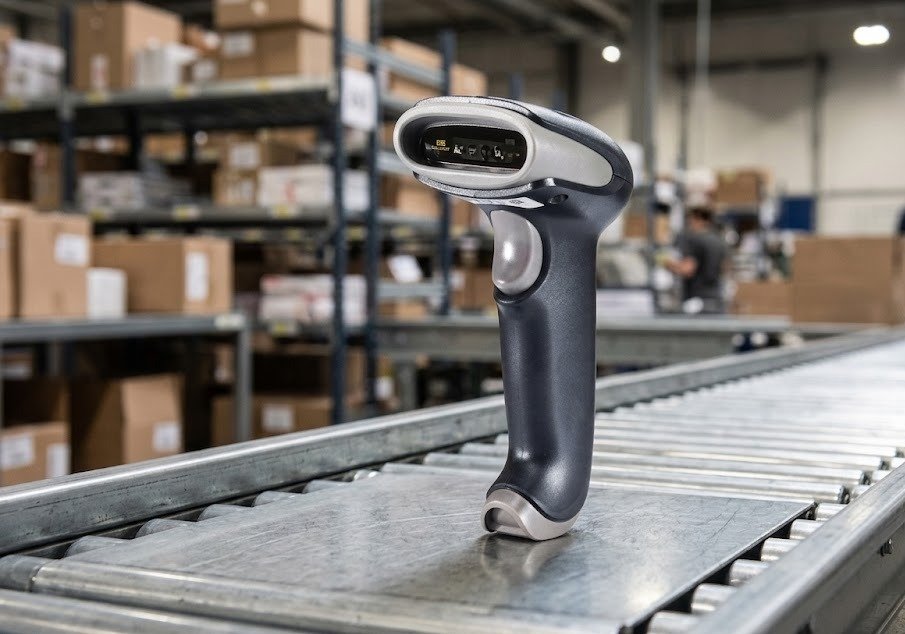
The POSPRO PBS-QR1200 is a wired handheld barcode scanner designed to read common 1D and 2D barcodes from printed labels, product packaging, mobile phones and computer displays.
Its 640 × 480-pixel CMOS imaging engine supports QR-code and screen-based scanning, making it suitable for retail checkout, pharmacies, courier operations, logistics workstations, e-commerce order processing and inventory applications.
Unlike a 1D-only laser scanner, the PBS-QR1200 can handle both traditional product barcodes and supported two-dimensional symbols. Its wired design provides continuous power and stable data transmission without battery charging or wireless pairing.
Published product information lists USB HID keyboard, USB Virtual COM and RS-232 connection options. The exact cable and interface supplied with the GS Systemz package should be confirmed before ordering.
| Feature | Published information |
|---|---|
| Brand | POSPRO |
| Product type | Wired handheld barcode scanner |
| Imaging technology | CMOS area imaging |
| Sensor resolution | 640 × 480 pixels |
| Barcode support | 1D and 2D |
| QR-code support | Yes |
| Printed-label scanning | Yes |
| Mobile-screen scanning | Yes |
| Computer-display scanning | Yes |
| Main interfaces | USB HID, USB VCP and RS-232 |
| Windows compatibility | Confirmed |
| Plug-and-play operation | Advertised |
| Minimum published contrast | Greater than 20% for 13 mil UPC/EAN |
| Published pitch angle | ±60° |
| Operating temperature | -20°C to 60°C |
| Storage temperature | -40°C to 80°C |
| Wireless connection | No |
| Rechargeable battery | Not required |
| Exact dimensions | Verify physical stock |
| Exact weight | Verify physical stock |
| Drop rating | No reliable POSPRO figure published |
| IP rating | No verified rating published |
| Local warranty | Confirm with GS Systemz |
The product is listed by Postech as the PBS-QR1200 2D CMOS Wired Barcode Scanner, while POSPRO reseller documentation describes it as a handheld scanner for 1D, 2D, printed and screen-based codes.
The PBS-QR1200 is suitable for businesses that need affordable handheld scanning for both conventional product labels and modern digital codes.
Its handheld shape allows the operator to move the scanner toward labels attached to products, boxes, shelves, packages or documents. This makes it more flexible than a fixed desktop scanner when items differ in size or cannot easily be moved toward a checkout window.
The scanner can support workflows involving:
POSPRO product information specifically promotes the PBS-QR1200 for cashier, mobile-payment, logistics and express-delivery applications.
Confirmed and consistently published features include:
These features are listed in the product descriptions published by POSPRO dealers and Pakistani distributors.
The exact scan speed, barcode list, cable length, dimensions, weight and drop resistance should be checked from the physical unit or supplied manual before being published as guaranteed specifications.
| Application | Suitability |
|---|---|
| Retail product scanning | Excellent |
| Pharmacy billing | Excellent |
| QR-code scanning | Excellent |
| Mobile loyalty cards | Excellent |
| Digital coupons | Excellent |
| Courier parcel processing | Excellent |
| E-commerce order verification | Excellent |
| Logistics data entry | Excellent |
| Warehouse picking | Good |
| Inventory management | Excellent |
| Product receiving | Excellent |
| Membership scanning | Excellent |
| Computer-screen scanning | Excellent |
| Fixed POS workstation | Excellent |
| Large-product scanning | Good |
| Shelf-label scanning | Good within cable reach |
| Wireless aisle scanning | Not supported |
| Long-range pallet scanning | No verified long-range specification |
| Outdoor wet environments | Not recommended |
| Heavy industrial operation | Choose a certified rugged scanner |
POSPRO markets the scanner for retail, mobile-payment, logistics, express-delivery, warehousing and e-commerce workflows.
The following specifications are published directly for the POSPRO PBS-QR1200.
| Specification | Published detail |
|---|---|
| Product name | POSPRO PBS-QR1200 |
| Product category | 2D CMOS wired barcode scanner |
| Form factor | Handheld |
| Connection type | Corded |
| Sensor | CMOS image sensor |
| Image resolution | 640 × 480 pixels |
| 1D barcode support | Yes |
| 2D barcode support | Yes |
| QR-code support | Yes |
| Screen-code scanning | Yes |
| Windows compatibility | Yes |
| Interfaces | RS-232, USB HID keyboard and USB VCP |
| Minimum print contrast | Greater than 20% for UPC/EAN-13, 13 mil |
| Published pitch angle | ±60° |
| Operating temperature | -20°C to 60°C |
| Storage temperature | -40°C to 80°C |
| Main housing material | ABS plastic |
| Impact cushioning | Rubber elements are advertised |
| Battery | Not required |
| Wireless communication | No |
| Model reference on one listing | SDLS-1319 |
| Dimensions | Not authoritatively published |
| Weight | Not authoritatively published |
| Drop resistance | Not authoritatively published |
| IP protection | No verified rating found |
| Local warranty | Confirm with GS Systemz |
The sensor, interfaces, temperature limits, pitch angle and print-contrast figure are published by a current Pakistani distributor.
One retailer identifies the distributor model reference as SDLS-1319, but no public manufacturer document was found that establishes this as a globally recognised OEM model. GS Systemz should use the physical product label as the final reference.
The PBS-QR1200 is a handheld wired scanner.
The word “wired” describes how it connects to the computer or POS terminal. It does not mean the scanner must remain fixed on a desktop platform.
A handheld scanner is moved toward the barcode and is generally operated using its trigger. This is useful for:
A desktop presentation scanner normally remains fixed while products are moved in front of it.
POSPRO’s product page identifies the PBS-QR1200 as a “2D CMOS Wired Handheld Barcode Scanner.”
CMOS refers to the image sensor used to capture the barcode.
A CMOS area imager takes a digital picture of the complete barcode and then uses decoding software to interpret the encoded information.
This allows the PBS-QR1200 to read traditional linear barcodes and supported square or stacked 2D symbols.
Compared with a basic single-line laser scanner, CMOS imaging can offer:
The PBS-QR1200 uses a published 640 × 480-pixel CMOS sensor.
The 640 × 480 specification describes the pixel dimensions of the scanner’s image sensor.
The sensor captures an image measuring:
The decoding system analyses that image to locate and interpret a barcode.
A higher pixel count can give the scanner more visual information, but resolution alone does not determine scanning performance. The following also matter:
POSPRO specifically promotes the 640 × 480 sensor as providing fast and accurate decoding with a low error rate.
A 1D barcode stores information across a series of vertical bars and spaces.
Common 1D applications include:
A 2D barcode stores information across horizontal and vertical patterns.
Common 2D applications include:
The PBS-QR1200 is advertised for both 1D and 2D barcode scanning.
A complete public symbology list was not found for the POSPRO-branded model. Businesses using a specialised barcode format should test it or check the programming guide before ordering multiple scanners.
The confirmed product description states that the scanner reads a variety of 1D and 2D barcodes, but it does not provide an authoritative format-by-format list.
For common commercial use, the scanner is intended for categories such as:
Similar 640 × 480 CMOS handheld platforms commonly decode Code 128, EAN-13, EAN-8, UPC-A, UPC-E, Code 39, Code 93, Codabar, QR Code, Data Matrix and PDF417. However, that list should not be presented as guaranteed PBS-QR1200 compatibility without testing the physical scanner or consulting its programming manual.
Yes. The PBS-QR1200 is sold as a 1D and 2D QR scanner.
It can support compatible QR-code applications such as:
QR-code and mobile-screen scanning are central features in POSPRO’s published description.
The scanner reads the QR data and transfers it to the connected software. It does not independently authorise a payment or verify a ticket.
The scanner can capture compatible payment-related QR codes shown on a customer’s mobile phone.
Successful transaction processing still depends on:
POSPRO promotes screen scanning as a way to make payment-code capture more convenient.
The PBS-QR1200 is a barcode reader, not a complete payment terminal.
Yes. The PBS-QR1200 reads supported 1D barcodes in addition to QR and other compatible 2D codes.
It may be used with product labels found on:
Its ability to read both 1D and 2D codes is confirmed in POSPRO product listings.
Yes. Mobile-screen scanning is a confirmed feature.
The scanner can read compatible codes displayed on:
POSPRO states that the PBS-QR1200 reads codes from printed paper, mobile phones and computer displays.
When a phone barcode is difficult to scan:
A cracked screen, low brightness or extremely small barcode may reduce performance.
Yes. Computer-display scanning is specifically included in the product description.
This may help with:
The scanner decodes the barcode and sends its characters to the connected computer. The software remains responsible for searching, validating or processing the information.
POSPRO promotes the scanner’s decoding efficiency, but it does not publish a detailed damaged-barcode performance rating.
Its CMOS imaging system may help with codes that are:
Scanning may still fail when:
Severely damaged pharmacy, courier and inventory labels should be replaced instead of repeatedly scanned.
No verified minimum resolution, such as 3 mil or 5 mil, was published specifically for the POSPRO PBS-QR1200.
Small-code performance depends on:
Businesses scanning jewellery tags, electronic components, small pharmacy labels or compact Data Matrix codes should test their physical barcodes before purchasing multiple units.
Do not add a minimum-resolution claim until it is confirmed from the manual supplied with GS Systemz stock.
POSPRO’s description promotes efficient scanning and refers generally to long-distance barcode reading, but it does not publish a verified distance table for the PBS-QR1200.
The practical working distance depends on:
Large, clearly printed barcodes can normally be read from farther away than small, dense codes.
GS Systemz should avoid publishing a specific maximum distance until it has been confirmed through the product manual or a physical scanning test.
Print contrast describes the visual difference between the dark barcode elements and the lighter background.
One current PBS-QR1200 listing publishes a print-contrast requirement greater than 20% for a 13 mil UPC or EAN barcode.
A barcode can become difficult to scan when:
Clear black-on-white labels generally provide more dependable scanning than codes printed near the minimum threshold.
Pitch describes how far a barcode can be tilted forward or backward relative to the scanner.
The published PBS-QR1200 specification lists a pitch angle of ±60 degrees.
This can make it easier to scan labels that are:
The public specification does not provide reliable roll and skew figures. Those values should not be added without the supplied manual.
Published interface options include:
These interfaces are confirmed in current product listings.
USB HID mode sends decoded barcode data like keyboard typing.
It is suitable for:
USB VCP creates a virtual serial port on a compatible computer.
This can be useful when an application expects serial-style communication rather than ordinary keyboard input.
A driver, COM-port selection or software configuration may be required.
RS-232 can support:
An RS-232 installation may require:
The GS Systemz package should clearly state which interface and cable are included.
POSPRO describes the scanner as plug and play through its supported interfaces.
A normal USB HID setup involves:
USB Virtual COM and RS-232 installations may need additional software configuration.
A standard USB HID keyboard configuration will normally work without a separate barcode-scanner driver on a compatible Windows system.
A driver or manual configuration may still be required for:
Windows compatibility is specifically listed for the PBS-QR1200.
Compatibility with macOS, Linux, Android or iOS was not authoritatively confirmed for the POSPRO-branded unit and should be tested before publication.
The scanner can work with compatible POS, pharmacy, inventory, courier and logistics applications.
In USB HID mode, scanned information normally appears in the active software field like typed text.
Compatibility depends on:
The scanner should be tested with the customer’s actual application before a large deployment.
It should work with many Pakistan-based POS applications that accept keyboard-style barcode input.
Potential workflows include:
Specialised applications may require USB VCP, RS-232 or custom data formatting.
Many configurable barcode scanners can add an Enter, Tab or another suffix after decoded data.
However, no public POSPRO programming manual was found that confirms the exact PBS-QR1200 programming commands.
GS Systemz should test or verify:
Do not publish specific programming instructions until the correct PBS-QR1200 manual is available.
No. The PBS-QR1200 is a wired scanner.
Its published connection options are USB HID, USB VCP and RS-232 rather than Bluetooth or 2.4GHz wireless communication.
A wired scanner is suitable when:
Choose a wireless scanner when employees must move between aisles, shelves or distant packages.
No rechargeable battery is required for normal use.
The scanner receives power through its compatible USB connection or wired power arrangement.
Benefits include:
An RS-232 kit may require a separate power arrangement, depending on its cable and host equipment.
The PBS-QR1200 is advertised with an ABS body and rubber components intended to provide impact cushioning.
However, no reliable POSPRO drop-test figure was found.
Do not claim that the scanner survives a specific:
until that specification is verified from the supplied manual.
The scanner is appropriate for normal indoor commercial use, including:
It is not presented as a certified rugged industrial scanner.
No verified IP or waterproof rating was found for the POSPRO PBS-QR1200.
The scanner should not be:
Keep moisture away from the scanning window, trigger, housing and cable connection.
Published environmental limits include:
These figures are listed by a current Pakistani distributor.
Avoid:
No reliable humidity or ambient-light specification was published specifically for the POSPRO model.
No authoritative POSPRO specification for dimensions or weight was found.
A similar Winson 640 × 480 handheld CMOS platform publishes dimensions of approximately 90 × 67 × 168mm and a weight around 130g, but the public evidence does not prove that every PBS-QR1200 uses that exact housing.
GS Systemz should measure and weigh the physical product before publishing exact figures.
A stand is not confirmed as standard box content in the POSPRO product information reviewed.
A typical package may include:
A stand, RS-232 cable, power adapter or replacement cable may be sold separately.
Inspect the actual GS Systemz package before promising any accessory.
| Requirement | Recommendation |
|---|---|
| Standard 1D product barcodes | Supported |
| QR-code scanning | Supported |
| General 2D barcode scanning | Supported |
| Printed-paper scanning | Supported |
| Mobile-screen scanning | Supported |
| Computer-screen scanning | Supported |
| Handheld operation | Supported |
| USB keyboard input | Supported |
| USB Virtual COM | Supported |
| RS-232 | Supported on compatible kit |
| Windows compatibility | Confirmed |
| Battery charging | Not required |
| Wireless mobility | Not supported |
| Long-range pallet scanning | No verified specification |
| Waterproof operation | No verified protection |
| Rugged industrial use | Choose a certified industrial model |
| Specialist small codes | Test before bulk purchase |
Choose the PBS-QR1200 when handheld flexibility, screen scanning and affordable wired 2D capability are the main priorities.
| Feature | Basic 1D scanner | PBS-QR1200 |
|---|---|---|
| UPC and EAN barcodes | Supported | Supported within compatible 1D formats |
| Code 39 and Code 128 | Commonly supported | Supported within compatible 1D formats |
| QR Code | Not supported | Supported |
| General 2D codes | Not supported | Supported |
| Smartphone-screen scanning | Often limited | Supported |
| Computer-display scanning | Often limited | Supported |
| Digital loyalty cards | Usually unsuitable | Suitable |
| Electronic tickets | Usually unsuitable | Suitable |
| Modern POS flexibility | Limited | Better |
The PBS-QR1200 is the stronger long-term option when a business expects to use QR codes, screen-based identification or digital customer workflows.
| Feature | PBS-QR1200 | Desktop presentation scanner |
|---|---|---|
| Normal operation | Held and aimed by user | Remains fixed on counter |
| Trigger use | Normally required | Usually automatic |
| Large-product scanning | Easier | Less convenient |
| Shelf-label scanning | Possible within cable reach | Not practical |
| Small-product checkout | Good | Excellent |
| Phone-screen scanning | Supported | Usually convenient |
| Counter space | Requires storage area | Requires fixed platform area |
| Best use | Mixed-size products and parcels | Continuous small-item checkout |
Choose the PBS-QR1200 when the operator needs to move the scanner toward products, boxes or labels.
Choose a desktop model when products are continuously passed in front of one fixed checkout window.
| Feature | PBS-QR1200 Wired | Wireless scanner |
|---|---|---|
| Connection | USB or RS-232 cable | Bluetooth or wireless receiver |
| Battery | Not required | Usually required |
| Charging | Not required | Required |
| Movement | Limited by cable | Greater mobility |
| Data stability | Stable physical connection | Depends on radio coverage |
| Maintenance | Lower | Battery management required |
| Best use | Fixed POS or packing station | Aisles, shelves and mobile stock work |
Choose the PBS-QR1200 for reliable scanning near one computer.
Choose a wireless model when employees need to move beyond normal cable reach.
GS Systemz can supply the PBS-QR1200 to businesses in Pakistan that need affordable handheld 2D scanning.
This product page helps buyers evaluate:
Before placing an order, confirm:
Correct label quality, cable care and software configuration can improve daily scanning reliability.
The scanner may be suitable for:
It is best suited to businesses that prioritise affordable handheld QR scanning and stable wired connectivity over wireless mobility or certified industrial ruggedness.
Check availability of the POSPRO PBS-QR1200 2D CMOS Wired Barcode Scanner with GS Systemz in Pakistan.
Use it to scan normal product barcodes, QR codes, printed labels and compatible digital symbols displayed on smartphones or computer screens.
Confirm the interface kit, cable, supported symbologies, scanner dimensions, stand availability, local warranty and complete box contents before adding the PBS-QR1200 to your retail, pharmacy, courier, logistics or inventory setup.
The PBS-QR1200 is a POSPRO wired handheld barcode scanner that uses a 640 × 480 CMOS sensor to read supported 1D and 2D codes.
Yes. It is marketed as a 1D, 2D and QR-capable handheld scanner.
Yes. The scanner supports a variety of conventional 1D barcodes in addition to supported 2D formats.
Yes. POSPRO states that it reads codes from printed paper, mobile phones and computer displays.
Published specifications list a 640 × 480-pixel CMOS imaging sensor.
Published interface options include USB HID keyboard, USB Virtual COM and RS-232. The supplied cable depends on the product kit.
No. It is a wired scanner and receives power through its compatible interface or wired power arrangement.
No. It is a corded model intended for operation within the reach of its USB or RS-232 cable.
No verified IP or waterproof rating was found. Keep the scanner dry and do not immerse or spray it.
You can check availability of the POSPRO PBS-QR1200 2D CMOS Wired Barcode Scanner with GS Systemz in Pakistan.
Reviews
There are no reviews yet.