
₨14,750.00
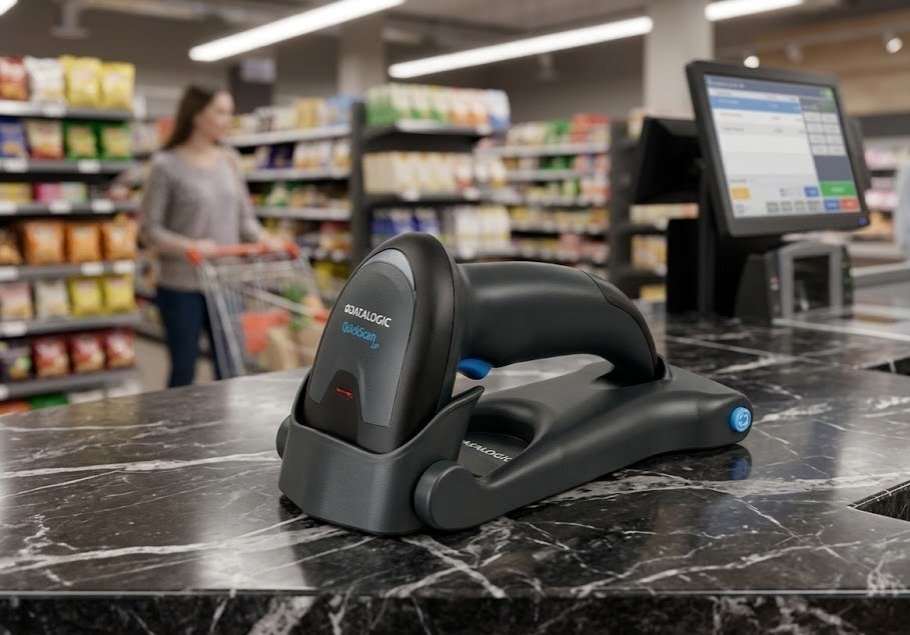
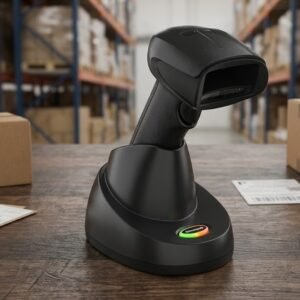
The QW2100 QuickScan Datalogic Scanner With Moveable Stand is a lightweight corded 1D barcode scanner built for retail billing, document processing, banking, light manufacturing, libraries and fixed inventory workstations.
Its official product name is the Datalogic QuickScan Lite QW2100. The scanner uses linear-imaging technology with a thin, extended red scanning line that is particularly effective for long or truncated 1D barcodes. Datalogic designed it for longer labels commonly found on utility bills, financial documents and electronic components.
The supplied or optional moveable stand lets the scanner operate in two ways:
The official stand is collapsible, lightweight and equipped with a tiltable head for different scanning angles.
The QW2100 documentation and support materials remain available through Datalogic’s current website. However, multiple specialist barcode-equipment suppliers classify QW2100 configurations as discontinued and identify the newer Datalogic QuickScan QD2200 or QD2220 as the replacement. Availability in Pakistan may therefore consist of remaining stock, imported stock or legacy inventory.
Before ordering, GS Systemz should confirm:
| Feature | Official specification |
|---|---|
| Official product name | Datalogic QuickScan Lite QW2100 |
| Scanner type | Corded handheld linear imager |
| Barcode capability | Standard 1D and selected stacked linear codes |
| QR-code support | No |
| Data Matrix support | No |
| Maximum read rate | 400 reads per second |
| Minimum resolution | 4 mil / 0.102mm |
| Field of view | 56° ±2° |
| Maximum listed range | Up to 60cm with a 20 mil barcode |
| Good-read confirmation | Beeper, LED and Datalogic Green Spot |
| USB model | QW2120-BK |
| Serial/keyboard model | QW2170-BK |
| Stand | Collapsible, multi-position and tiltable |
| Stand model | STD-QW20-BK |
| Weight | 119g |
| Dimensions | 170 × 65 × 70mm |
| Drop resistance | Repeated 1.5m drops onto concrete |
| Environmental sealing | IP42 |
| Original factory warranty | Three years |
| Current availability | Check GS Systemz stock |
The figures above come from Datalogic’s official QW2100 Revision F datasheet.
The QW2100 is a practical choice for businesses that only need conventional linear barcode scanning.
Its major advantages include:
Datalogic positions the QW2100 as an entry-level scanner for retail, light manufacturing, document and bill processing, and banking or financial environments.
The QW2100 projects a thin, bright and extended scan line. This helps the user capture long barcodes without moving the scanner excessively or increasing the scanning distance.
Datalogic’s patented Green Spot projects a visible green confirmation directly onto the barcode after a successful read. This supplements the scanner’s audible beeper and good-read LED.
Green Spot confirmation is useful in:
The QW2100 stand can be used as:
Datalogic identifies the black stand as accessory STD-QW20-BK. Its head can be tilted to different positions for convenient counter scanning.
When configured for stand mode, the QW2100 automatically begins scanning when a barcode enters its field of view. The trigger can still be used for a normal single read.
The scanner includes over-moulded rubber protection and is officially rated to withstand repeated 1.5m drops onto concrete.
| Application | Suitability |
|---|---|
| Retail product billing | Excellent |
| Grocery checkout | Excellent |
| Book and ISBN scanning | Excellent |
| Utility-bill barcodes | Excellent |
| Document processing | Excellent |
| Banking and financial forms | Excellent |
| Library circulation | Excellent |
| Membership cards | Excellent |
| Inventory data entry | Excellent |
| Light manufacturing | Good |
| Electronic-component labels | Excellent |
| Courier labels using 1D codes | Good |
| Hands-free counter scanning | Supported with stand |
| Small high-density 1D labels | Supported down to 4 mil |
| Long and truncated barcodes | Excellent |
| QR-code scanning | Not supported |
| Data Matrix scanning | Not supported |
| PDF417 scanning | Not supported |
| Mobile-payment QR codes | Not supported |
| Wireless shelf scanning | Not supported |
| Harsh industrial environments | Consider a rugged industrial model |
The wide scanning angle and extended line were specifically designed to handle long and wide linear barcodes.
| Specification | Official detail |
|---|---|
| Scanner family | QuickScan Lite QW2100 |
| Scanning technology | Linear imager |
| Light source | Red LED, 610–650nm |
| Maximum read rate | 400 reads per second |
| Minimum resolution | 0.102mm / 4 mil |
| Minimum print contrast | 25% |
| Field of view | 56° ±2° |
| Pitch angle | ±65° |
| Roll or tilt angle | ±45° |
| Skew or yaw angle | ±70° |
| Good-read indicators | Adjustable beeper, Green Spot and LED |
| Input voltage | 5V DC ±0.5V |
| Typical operating current | Less than 180mA at 5V |
| Typical standby current | Less than 25mA at 5V |
| USB interface | QW2120-BK |
| RS-232/Keyboard Wedge | QW2170-BK |
| Dimensions | 170 × 65 × 70mm |
| Weight | 119g |
| Colour | Black |
| Operating temperature | 0°C to 50°C |
| Storage temperature | -40°C to 70°C |
| Humidity | 5%–95%, non-condensing |
| Ambient-light tolerance | Up to 120,000 lux |
| ESD air-discharge protection | 16kV |
| Drop rating | Repeated 1.5m drops onto concrete |
| Sealing | IP42 |
| Original factory warranty | Three years |
| Stand accessory | STD-QW20-BK |
These figures are published in Datalogic’s official January 2020 QW2100 datasheet.
QW2100 is the overall QuickScan Lite product-family name.
The full model number identifies the interface:
| Model | Interface |
|---|---|
| QW2120-BK | USB |
| QW2170-BK | RS-232 and Keyboard Wedge |
| STD-QW20-BK | Black holder or moveable stand |
Datalogic offered the scanner in different packages, including scanner-only configurations and kits containing a scanner, cable and stand.
For most modern POS computers, the QW2120 USB kit is the more straightforward choice. Older billing terminals or specialised equipment may require QW2170 RS-232 or Keyboard Wedge connectivity.
No. The QW2100 is a linear imager.
Its narrow, bright scanning line has a laser-like appearance, but the device uses imaging technology rather than a conventional laser-scanning engine. Datalogic describes it as having a “laser-like” thin and extended line.
The accurate product description is:
Datalogic QuickScan Lite QW2100 1D Linear-Imaging Barcode Scanner
The QW2100 is primarily a 1D barcode scanner.
It automatically recognises standard linear formats, GS1 DataBar linear codes and several stacked GS1 DataBar or composite formats.
It does not support general 2D formats such as:
A Datalogic 2D area imager is required when QR codes or modern square symbols are part of the business workflow.
The QW2100 programming guide includes support for common formats such as:
The product reference guide provides individual programming options for these symbologies.
Some formats may be disabled by default and must be enabled through the correct programming guide or Datalogic Aladdin software.
Yes. The QW2100 is designed for common product barcodes such as UPC, EAN, Code 39 and Code 128.
It can be used with linear labels printed on:
No. QR Code is a two-dimensional format, while the QW2100 is a linear imager designed for 1D and selected stacked linear codes.
Do not select the QW2100 for:
A verified Datalogic 2D model is required for those applications.
Datalogic’s official QW2100 datasheet does not claim reliable mobile-screen barcode scanning.
Some linear imagers may read a compatible 1D barcode from a sufficiently bright display, but performance can vary according to:
Phone-screen scanning should be tested on the actual QW2100 unit before GS Systemz advertises it as a supported feature. It cannot scan a QR code even when the QR code is displayed on a phone.
The official maximum read rate is 400 reads per second.
This figure describes the scanner engine’s reading performance. It does not mean a cashier can process 400 separate products every second.
Practical checkout speed also depends on:
A mil is one-thousandth of an inch.
The QW2100 supports a minimum listed resolution of 4 mil, equal to approximately 0.102mm.
This makes it suitable for selected compact 1D labels, but performance still depends on:
Businesses using jewellery labels, small electronic-component codes or compact medicine labels should test their physical barcodes before ordering several scanners.
Datalogic publishes the following typical ranges:
| Barcode density | Typical reading range |
|---|---|
| 5 mil | 2.5–15cm |
| 7.5 mil | 0–24cm |
| 10 mil | 0–35cm |
| 13 mil | 0–40cm |
| 20 mil | 0–60cm |
Actual depth of field depends on barcode length, print resolution, contrast, ambient light and scanning angle.
A large 20 mil barcode can therefore be read from much farther away than a small 5 mil code.
The official angle tolerances are:
These figures indicate how far the barcode can be angled relative to the scanner while remaining readable under suitable conditions.
Wide-angle tolerance helps when scanning:
The stand has a collapsible arm and a tiltable holder head. It can be adjusted to several positions or folded into a compact passive holder.
To use it:
The official instructions warn users to operate the release buttons when raising the stand arm to avoid damaging its locking mechanism.
Yes. The scanner supports a stand mode in which reading activates automatically when an item enters its scanning field. No trigger press is normally required in this mode.
This is useful for:
The scanner can still be removed from the stand for handheld use.
The interface depends on the exact model.
The QW2120-BK version uses USB and is suitable for most modern:
The QW2170-BK supports:
This version may be used with older POS terminals, legacy billing systems and specialised equipment.
GS Systemz should clearly state the exact model and included cable. A USB cable cannot be assumed for every QW2100 package.
The QW2120 USB keyboard configuration can provide straightforward installation on a compatible computer.
A typical setup involves:
Serial and Keyboard Wedge versions may require additional interface settings.
Yes. The QW2100 programming guide provides prefix, suffix, label-ID and character-conversion settings. An Enter, Tab or another control character can be configured after scanned data.
Configuration can be performed through:
Datalogic provides its Aladdin configuration utility without a software licence charge.
Use the manual that matches the exact QW2120 or QW2170 interface.
Yes. It can work with compatible POS, inventory, library, banking and document-processing software.
In USB keyboard mode, decoded data normally enters the active field like keyboard typing.
Compatibility depends on:
A test with the customer’s actual software is recommended before a multi-unit order.
No. The QW2100/QW2120/QW2170 is a corded scanner.
Datalogic’s wireless QuickScan 2100 models belong to other product variations, including Bluetooth and STAR-system models. The QW2100 Lite itself uses USB, RS-232 or Keyboard Wedge connectivity.
Choose a wireless scanner when employees need to scan shelves, aisles or cartons beyond cable reach.
No. It receives power from its wired host connection or the appropriate interface power arrangement.
Benefits include:
Datalogic rates the QW2100 for repeated drops from 1.5m onto concrete. It also uses over-moulded rubber to protect the scanner during accidental impacts.
The scanner additionally has:
It is suitable for general commercial environments, but it is not positioned as a rugged industrial warehouse scanner.
No. Its official rating is IP42.
IP42 provides limited protection against objects larger than 1mm and vertically dripping water when the device is appropriately positioned. It does not make the scanner waterproof.
Do not:
Datalogic offered several package configurations. A kit may include:
Some packages contain the scanner only, while others include the scanner, cable and stand.
GS Systemz should verify every package component before publishing the box contents.
| Requirement | Recommendation |
|---|---|
| Standard retail 1D barcodes | Supported |
| Long utility-bill barcodes | Excellent |
| UPC and EAN labels | Supported |
| Code 39 and Code 128 | Supported |
| GS1 DataBar | Supported |
| Small 4 mil 1D codes | Supported under suitable conditions |
| Hands-free counter use | Supported with stand |
| Handheld operation | Supported |
| USB connection | Choose QW2120 |
| RS-232 connection | Choose QW2170 |
| Green Spot feedback | Supported |
| QR-code scanning | Not supported |
| Data Matrix scanning | Not supported |
| Mobile QR payment scanning | Not supported |
| Wireless movement | Not supported |
| Waterproof use | Not supported |
| Heavy industrial operation | Consider a rugged scanner |
Choose the QW2100 when the priority is dependable wired scanning of conventional or unusually long 1D barcodes.
Choose a 2D scanner when QR Code, Data Matrix, PDF417 or dependable smartphone scanning is required.
| Feature | QW2100 | QD2200/QD2220 |
|---|---|---|
| Product generation | Legacy QuickScan Lite | Newer QuickScan series |
| Barcode class | 1D linear imager | 1D linear imager |
| Wired connection | Yes | Yes |
| QR Code | No | No |
| Green Spot | Supported | Check exact QD2200 configuration |
| Stand | Moveable stand available | Stand options available |
| Current positioning | Discontinued in multiple sales channels | Replacement model |
| Best choice | Existing installations or available legacy stock | New long-term deployments |
Specialist suppliers identify the QD2200/QD2220 series as the replacement for discontinued QW2100 configurations.
For a new deployment, compare replacement-product availability, warranty and long-term support before choosing legacy QW2100 stock.
| Feature | QW2100 | 2D area imager |
|---|---|---|
| UPC and EAN | Yes | Yes |
| Code 39 and Code 128 | Yes | Yes |
| Long 1D barcodes | Strong capability | Depends on model |
| QR Code | No | Yes |
| Data Matrix | No | Yes |
| PDF417 | No | Usually yes |
| Mobile QR payments | No | Yes |
| Digital loyalty QR codes | No | Yes |
| Cost and complexity | Lower | Usually higher |
| Best use | Traditional linear labels | Modern printed and digital codes |
The QW2100 remains useful where every required barcode is linear. A 2D scanner offers more flexibility for future digital workflows.
GS Systemz can position the Datalogic QW2100 for Pakistani businesses requiring wired 1D scanning and a moveable hands-free stand.
This page helps buyers assess:
Before ordering, confirm:
The QW2100 may be suitable for:
Check availability of the QW2100 QuickScan Datalogic Scanner With Moveable Stand from GS Systemz in Pakistan.
Select the correct configuration:
Confirm current stock, interface, product condition, stand, cable, local warranty and replacement support before ordering.
The QW2100 is a compact corded 1D linear-imaging scanner designed for retail, document processing, light manufacturing and financial environments.
No. It reads standard 1D and selected stacked linear formats but does not support QR Code or Data Matrix.
Some QW2100 kits include the collapsible STD-QW20-BK stand, while other packages contain only the scanner or scanner and cable. Confirm the package before ordering.
Yes. When configured in stand mode, it can activate automatically when a barcode enters its field of view.
Its official maximum read rate is 400 reads per second.
Datalogic lists a typical range of up to 60cm for a suitable 20 mil barcode. Smaller and denser codes have shorter reading ranges.
The QW2120 version uses USB, while the QW2170 version supports RS-232 and Keyboard Wedge interfaces.
No. It has an IP42 rating, which provides limited protection but does not make the scanner waterproof.
Multiple specialist suppliers classify QW2100 configurations as discontinued and identify the QD2200 or QD2220 series as the replacement. Datalogic still hosts the QW2100 documentation.
You can check availability of the Datalogic QuickScan Lite QW2100 with moveable stand from GS Systemz in Pakistan.
Reviews
There are no reviews yet.