
₨5,600.00
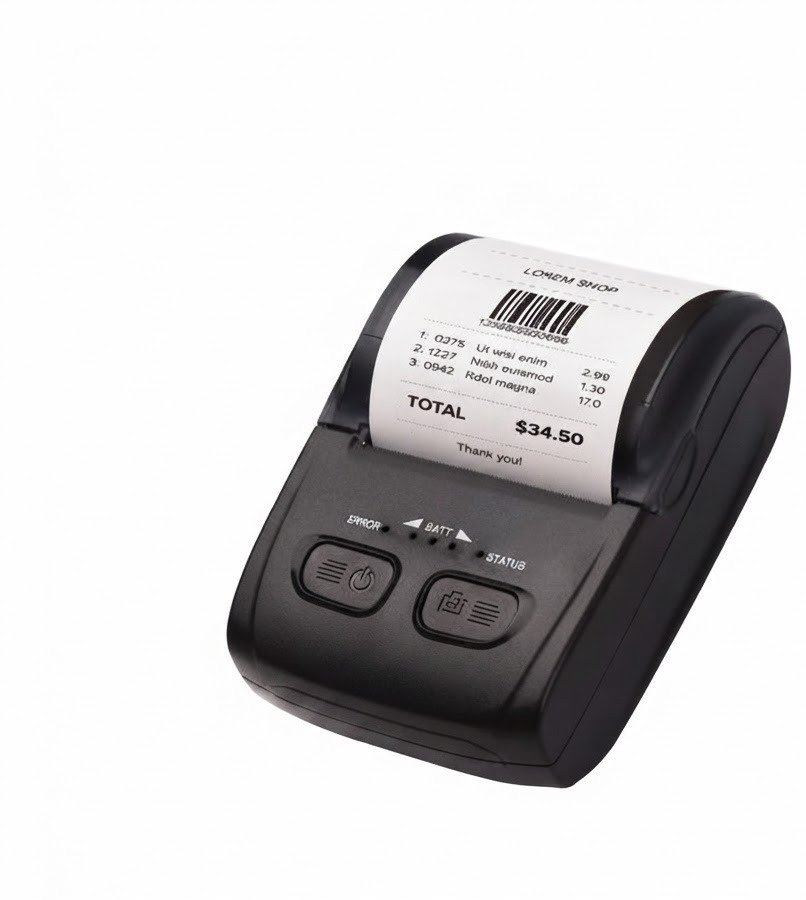
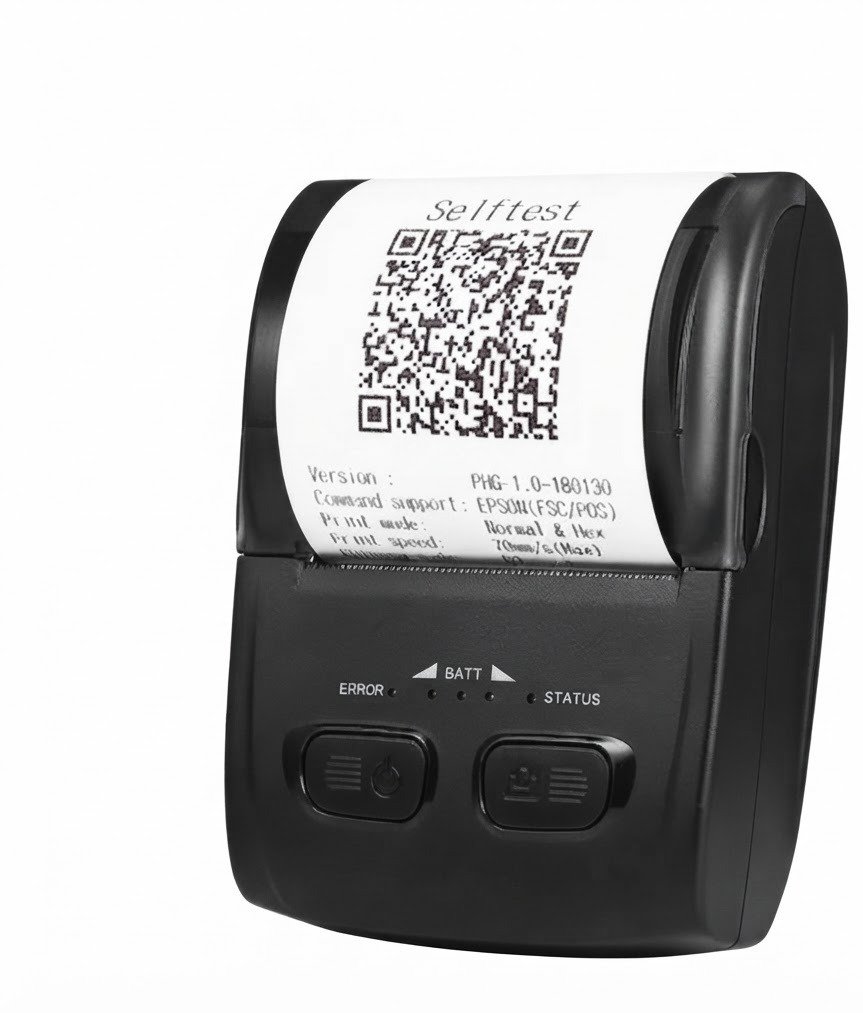
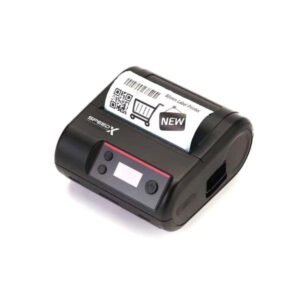
The BT500M Mini Portable Bluetooth+USB Printer 58mm is a rechargeable thermal receipt printer designed for mobile billing, deliveries, restaurants, cafés, retail counters, field services and other portable transaction workflows.
Its complete product name is the Speed-X BT500M Mini Portable Bluetooth + USB Thermal Printer. It connects wirelessly to compatible phones and tablets through Bluetooth or directly to computers through USB. Current Pakistan listings consistently advertise 90mm/s maximum printing, 203 dpi resolution, ESC/POS compatibility and a rechargeable 1500mAh lithium-polymer battery.
The BT500M prints on 58mm-class heat-sensitive receipt rolls and does not require ink cartridges, toner or ribbons. Its compact body measures approximately 112 × 79 × 48mm and weighs around 200g, making it practical for employees who need to carry a printer between customers, tables, vehicles or work locations.
The Speed-X BT500M is a small, battery-powered direct-thermal printer for producing narrow receipts, payment slips, order tickets, invoices, simple logos, 1D barcodes and QR codes.
It supports:
These functions are consistently listed by several current Speed-X retailers in Pakistan.
| Feature | Published specification |
|---|---|
| Brand | Speed-X |
| Model | BT500M / BT-500M |
| Printer category | Portable thermal receipt printer |
| Printing method | Direct thermal line printing |
| Paper category | 58mm thermal roll |
| Physical paper width | 57.5 ± 0.5mm |
| Effective printable width | Approximately 48mm |
| Resolution | 384 dots per line / 203 dpi |
| Maximum print speed | Up to 90mm/s |
| Connectivity | Bluetooth + USB |
| Bluetooth version | Bluetooth 4.0 listed by one seller |
| Command language | ESC/POS |
| Battery | 7.4V, 1500mAh lithium polymer |
| Charging input | 5V/1A |
| Maximum roll diameter | Approximately 40mm |
| Maximum listed paper thickness | 0.12mm |
| 1D barcode printing | Supported |
| QR-code printing | Supported |
| Bitmap printing | Supported |
| Paper-out sensor | Supported |
| Automatic cutter | Not confirmed |
| Cash-drawer port | Not confirmed |
| Wi-Fi | No |
| Ethernet LAN | No |
| Dimensions | Approximately 112 × 79 × 48mm |
| Weight | Approximately 200g |
| Print-head-life estimate | Approximately 50km |
| Operating systems | Android, iOS, Windows and Linux |
| Local warranty | Confirm with GS Systemz |
| Package contents | Confirm before dispatch |
The published physical paper width is 57.5 ± 0.5mm. The technically consistent printable width is approximately 48mm because the print head produces 384 dots at eight dots per millimetre. Some seller tables incorrectly describe the full 58mm paper width as the effective print width.
The BT500M is designed for businesses that need to produce receipts without returning to a permanent checkout counter.
Its portable design can be useful for:
Unlike a desktop receipt printer, the BT500M includes a rechargeable battery. Unlike an inkjet printer, it does not require cartridges or liquid ink. Bluetooth allows supported mobile applications to send receipts without a fixed cable, while USB provides a direct connection for compatible computers.
Its main advantages include:
The BT500M measures approximately 112 × 79 × 48mm and weighs around 200g. Its compact size allows it to fit inside a work bag, delivery kit or mobile POS setup more easily than an 80mm desktop printer.
The built-in rechargeable battery means the printer can be used away from a wall socket, subject to battery condition and print volume.
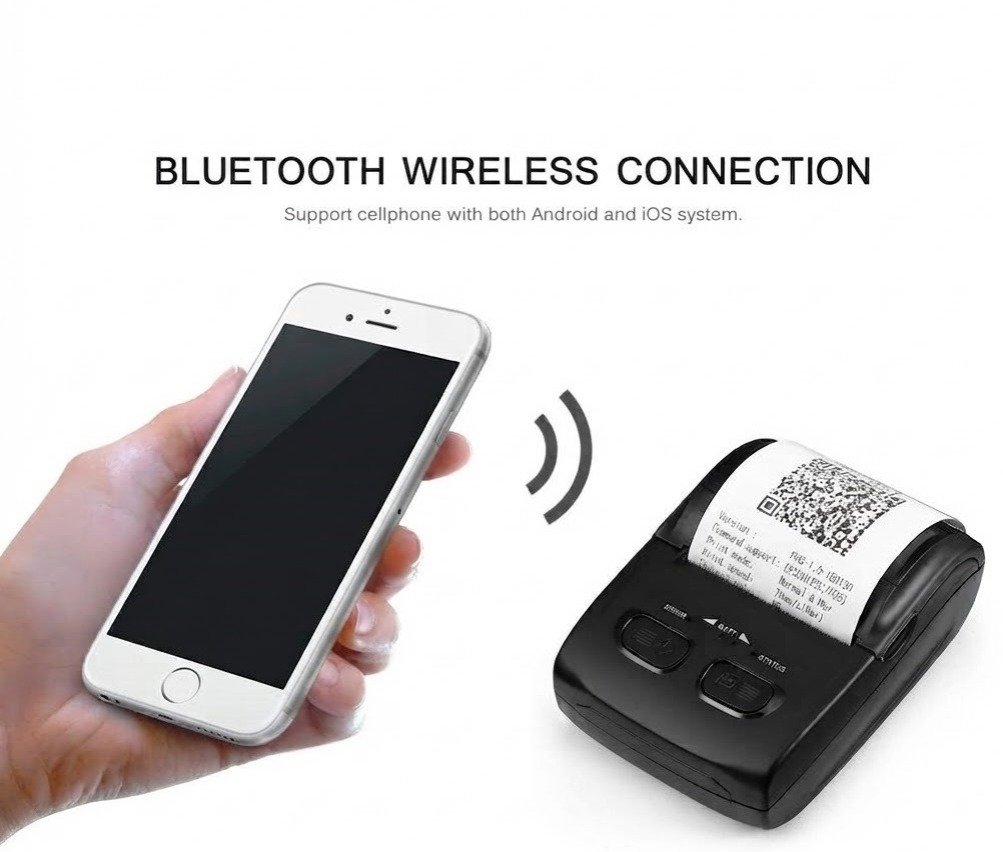
Current listings consistently confirm Bluetooth connectivity, while one seller identifies the wireless version as Bluetooth 4.0.
Bluetooth can support printing from compatible:
A successful Bluetooth pairing does not guarantee that every application can print. The selected billing or POS application must support the printer’s Bluetooth method, ESC/POS commands or a compatible printer SDK.
USB allows the BT500M to connect directly to a compatible computer.
A USB connection may be preferable when:
The supplied cable and driver should be checked to confirm whether USB supports both printing and charging on the available revision.
The BT500M is consistently advertised with a maximum print speed of 90mm per second.
Actual speed may be lower when printing:
The 90mm/s figure represents the printer’s maximum rated paper movement under suitable conditions rather than a guaranteed speed for every receipt design.
The printer has a published resolution of 384 dots per line at eight dots per millimetre, equivalent to approximately 203 dpi.
This is suitable for:
It is not designed for colour documents or photo-quality printing.
The BT500M supports ESC/POS commands. Compatible software can use these commands to control receipt formatting and printer functions.
Common ESC/POS-controlled functions include:
No automatic cutter is listed, so software cutter commands should not be assumed to work.
| Application | Suitability |
|---|---|
| Mobile retail receipts | Excellent |
| Delivery payment slips | Excellent |
| Courier confirmations | Excellent |
| Restaurant table-side bills | Excellent |
| Café receipts | Excellent |
| Taxi or transport receipts | Excellent |
| Field-service invoices | Excellent |
| Event-registration slips | Excellent |
| Temporary sales counters | Excellent |
| Small-business billing | Excellent |
| Android mobile POS | Good with compatible app |
| iPhone or iPad POS | Application-dependent |
| Windows USB printing | Supported with correct driver |
| Linux printing | Advertised; testing required |
| QR-code printing | Supported |
| 1D barcode printing | Supported |
| Business-logo printing | Supported |
| Wi-Fi printing | Not supported |
| Ethernet network printing | Not supported |
| Cash-drawer control | Not confirmed |
| Automatic receipt cutting | Not confirmed |
| Adhesive shipping labels | Not recommended |
| A4 documents | Not supported |
| Colour printing | Not supported |
| High-volume checkout | Consider an 80mm desktop printer |
The BT500M is most suitable for portable, low- to moderate-volume receipt printing. A larger desktop printer is generally more appropriate for continuous supermarket or restaurant-counter use.
| Specification | Published detail |
|---|---|
| Printing technology | Thermal line printing |
| Effective printing width | Approximately 48mm |
| Print resolution | 384 dots per line / 8 dots per mm / 203 dpi |
| Maximum speed | 90mm/s |
| Interfaces | USB + Bluetooth |
| Bluetooth version | 4.0 listed by Marko |
| Line spacing | 3.75mm, command-adjustable |
| Font A capacity | 32 characters per line |
| Font B capacity | 42 characters per line |
| Font A size | 12 × 24 dots |
| Font B size | 9 × 17 dots |
| Paper type | Direct-thermal roll |
| Paper width | 57.5 ± 0.5mm |
| Maximum paper thickness | 0.12mm |
| Maximum roll diameter | 40mm |
| Paper loading | Clamshell loading |
| Print commands | ESC/POS |
| Battery type | Rechargeable lithium polymer |
| Battery rating | 7.4V, 1500mAh |
| Charger | 5V/1A |
| Input buffer | 4KB |
| NV flash | 40KB |
| Dimensions | Approximately 112 × 79 × 48mm |
| Weight | Approximately 200g |
| Operating temperature | Approximately 5°C to 45°C |
| Operating humidity | Approximately 10%–80% |
| Storage temperature | Approximately -10°C to 50°C |
| Storage humidity | Approximately 10%–90%, non-condensing |
| Print-head-life estimate | Approximately 50km at listed density |
| Operating systems | Android, iOS, Linux and Windows |
| Wi-Fi | No |
| Ethernet LAN | No |
| AirPrint | Not confirmed |
| Automatic cutter | Not confirmed |
| Warranty | Local seller or distributor coverage varies |
These figures are consistent across several Pakistan listings. No public Speed-X manufacturer manual was found, so GS Systemz should verify its stock against the carton label, self-test information and included documentation.
The BT500M is a 58mm-class printer because it uses paper approximately 57.5 ± 0.5mm wide.
Its actual printable area is approximately 48mm.
The two measurements describe different parts of the printing system:
At eight dots per millimetre, a 384-dot print line covers 48mm. The remaining paper width forms the left and right margins.
The BT500M uses direct-thermal rolls with the following published limits:
A full-size 58mm desktop-printer roll may be too large in diameter for the portable compartment.
Before purchasing rolls in bulk, confirm:
No. The BT500M uses direct-thermal technology.
The printer heats selected areas of coated thermal paper to produce black text and graphics. It does not require:
Thermal receipts can fade when exposed to strong heat, sunlight, moisture, oils, alcohol or certain plastics. Important transaction records should also be stored digitally.
Yes. QR Code is explicitly included in the printer’s published 2D barcode support.
QR codes on receipts may be used for:
For reliable scanning:
The printer outputs the QR image; the connected software creates and controls the encoded data.
The listed formats include:
The POS application must generate the barcode or send the appropriate ESC/POS command.
The BT500M is a printer, not a barcode scanner.
Yes. It supports bitmap download and printing.
Current specifications state that the printer can hold up to five bitmap graphics, with a maximum listed size of approximately 8KB per bitmap.
For better logo quality:
The published extended character sets include Arabic and several other international code pages.
Correct Arabic output still depends on:
The presence of an Arabic code page does not guarantee correct contextual joining or right-to-left layout in every application. Test the exact Urdu or Arabic receipt format before deployment.
Android compatibility is consistently advertised.
A typical Android setup involves:
The printer may pair successfully but still fail to print when the application does not support its Bluetooth or ESC/POS implementation.
iOS compatibility is advertised by current sellers.
This should not be confused with universal Apple AirPrint support. One current seller explicitly lists AirPrint as unavailable.
iPhone or iPad printing may require:
GS Systemz should test the customer’s intended iOS application before confirming compatibility.
Windows support is listed consistently, but the correct driver must be available for the customer’s Windows version.
A normal USB installation may involve:
Windows 11 is not specifically named in the detailed published specifications. Confirm driver operation before promising Windows 11 compatibility.
Linux support is advertised.
Actual compatibility can depend on:
A practical test with the customer’s Linux application is recommended before supplying several units.
A typical Bluetooth workflow is:
The exact Bluetooth name and PIN should be obtained from the supplied instructions or printer configuration information.
A typical USB setup involves:
Confirm that the supplied cable supports data transmission rather than charging only.
The printer uses a rechargeable 7.4V, 1500mAh lithium-polymer battery. It charges through a listed 5V/1A supply.
Battery runtime depends on:
A battery-capacity figure does not guarantee a fixed number of printed receipts.
Marko advertises approximately five to six days of standby, but the reviewed detailed technical tables do not provide a standardised active-runtime test or fixed number of receipts.
The safest product wording is:
Rechargeable 1500mAh battery with power-saving and sleep modes; actual printing and standby time vary according to receipt volume, Bluetooth use, print density and battery condition.
GS Systemz should test the available unit before publishing a guaranteed active runtime.
Current specifications identify a 5V/1A charger but do not consistently publish a full charging time.
Before publication, GS Systemz should confirm:
An automatic cutter is not listed in the detailed specifications reviewed for this page.
Portable 58mm printers commonly use a manual tear edge to reduce size, weight and battery consumption. GS Systemz should inspect the physical unit before stating whether it uses:
Do not advertise automatic cutting unless it is physically verified.
No. Current listings identify:
One current seller explicitly lists Wi-Fi and LAN as unavailable.
Choose another printer when the business requires:
No cash-drawer output is confirmed.
Portable receipt printers usually do not include the 24V drawer port used on desktop POS printers. Choose a compatible desktop receipt printer when automatic cash-drawer opening is required.
Some sellers describe portable printers as suitable for “labels,” but no reliable BT500M specification confirms:
The verified media system is a continuous 58mm thermal roll. The BT500M should therefore be marketed primarily for receipts, slips and continuous tickets rather than individual adhesive labels.
Yes. The compact body, rechargeable battery and Bluetooth interface make it suitable for compatible delivery workflows.
It may print:
The delivery application must support the printer’s communication method.
Yes, particularly for table-side or temporary receipt printing.
Possible restaurant uses include:
A larger LAN-equipped desktop printer is usually better for a permanent kitchen station or continuous high-volume printing.
Yes. Its battery operation and compact design make it practical for mobile transaction records.
Potential uses include:
Protect the printer from direct vehicle-dashboard heat, rain, dust and impacts.
A typical package may include:
Package contents are not consistently published. Confirm whether the GS Systemz package includes:
| Requirement | Recommendation |
|---|---|
| Portable 58mm receipts | Supported |
| Bluetooth printing | Supported |
| USB printing | Supported |
| 90mm/s maximum speed | Advertised |
| 203 dpi output | Supported |
| Rechargeable battery | Supported |
| Android printing | Advertised; app testing required |
| iPhone or iPad | Advertised; app-dependent |
| Windows | Supported with correct driver |
| Linux | Advertised |
| ESC/POS | Supported |
| QR-code printing | Supported |
| 1D barcode printing | Supported |
| Bitmap logos | Supported |
| Paper-out detection | Supported |
| Wi-Fi | Not supported |
| Ethernet LAN | Not supported |
| AirPrint | Not supported |
| Automatic cutter | Not confirmed |
| Cash-drawer port | Not confirmed |
| Adhesive labels | Not recommended without media testing |
| A4 documents | Not supported |
| Colour printing | Not supported |
Choose the BT500M when portability, Bluetooth, USB and 58mm mobile receipts are the main requirements.
| Feature | BT500M | BT450M |
|---|---|---|
| Paper category | 58mm | 58mm |
| Printable width | Approximately 48mm | Approximately 48mm |
| Resolution | 203 dpi | 203 dpi |
| Maximum advertised speed | 90mm/s | Up to 90mm/s, with some conflicting figures |
| Connectivity | Bluetooth + USB | Bluetooth + USB |
| Battery | 1500mAh | 1500mAh |
| Dimensions | Approximately 112 × 79 × 48mm | Published dimensions vary |
| Weight | Approximately 200g | Approximately 196–200g |
| Paper-out sensor | Clearly listed | Listed by some sources |
| Best use | Better-documented portable platform | Alternative economical portable model |
The two models share many specifications. The BT500M currently has the more consistent published technical profile, but GS Systemz should compare the physical units before claiming major performance differences.
| Feature | BT500M | BT600M |
|---|---|---|
| Paper category | 58mm | 80mm |
| Portability | More compact | Larger |
| Receipt width | Narrow | Wider |
| Product descriptions | Less horizontal space | More horizontal space |
| Bluetooth | Supported | Advertised on BT600M |
| USB | Supported | Advertised |
| Best use | Compact mobile receipts | More detailed mobile invoices |
Choose the BT500M when minimum size and easy carrying are important.
Choose an 80mm portable printer when receipts require longer product names, larger logos, more tax information or wider QR codes.
| Feature | BT500M | SP-200U |
|---|---|---|
| Paper category | 58mm | 80mm |
| Printer type | Portable | Desktop |
| Battery | Yes | No |
| Bluetooth | Yes | No |
| USB | Yes | Yes |
| Speed | Up to 90mm/s | Up to 220mm/s |
| Automatic cutter | Not confirmed | Supported |
| Cash-drawer connection | Not confirmed | Supported |
| Best use | Mobile billing | Fixed retail checkout |
Choose the BT500M for mobile and field use.
Choose the SP-200U for faster fixed-counter printing, wider receipts and cash-drawer integration.
GS Systemz can position the BT500M for Pakistani businesses that need compact mobile receipt printing with Bluetooth and USB.
This product page helps buyers understand:
Before ordering, confirm:
The printer may be suitable for:
Check availability of the Speed-X BT500M Mini Portable Bluetooth + USB Printer 58mm from GS Systemz in Pakistan.
Use it for mobile sales receipts, restaurant bills, delivery confirmations, taxi receipts, booking slips, field-service invoices and other compatible portable thermal-printing workflows.
Confirm the Bluetooth profile, USB mode, battery, charger, mobile application, driver, paper-roll dimensions, local warranty and complete package contents before ordering.
The BT500M is a portable 58mm direct-thermal receipt printer with Bluetooth, USB, ESC/POS and a rechargeable 1500mAh battery.
No. It prints on heat-sensitive thermal paper without ink, toner or ribbons.
It uses 57.5 ± 0.5mm thermal paper with a maximum published roll diameter of approximately 40mm.
The paper is approximately 58mm wide, while the technically consistent printable width is around 48mm.
Current Pakistan listings consistently advertise a maximum print speed of 90mm/s.
Android and iOS compatibility are advertised, but the selected POS application must support the printer’s Bluetooth or ESC/POS communication method.
Yes. QR Code is included in its published barcode support.
It uses a rechargeable 7.4V, 1500mAh lithium-polymer battery with a listed 5V/1A charger.
Wi-Fi and Ethernet are not supported. An automatic cutter is not listed in the detailed specifications and should not be assumed.
You can check availability of the Speed-X BT500M Mini Portable Bluetooth + USB 58mm Thermal Printer from GS Systemz in Pakistan.
Reviews
There are no reviews yet.