
₨8,300.00
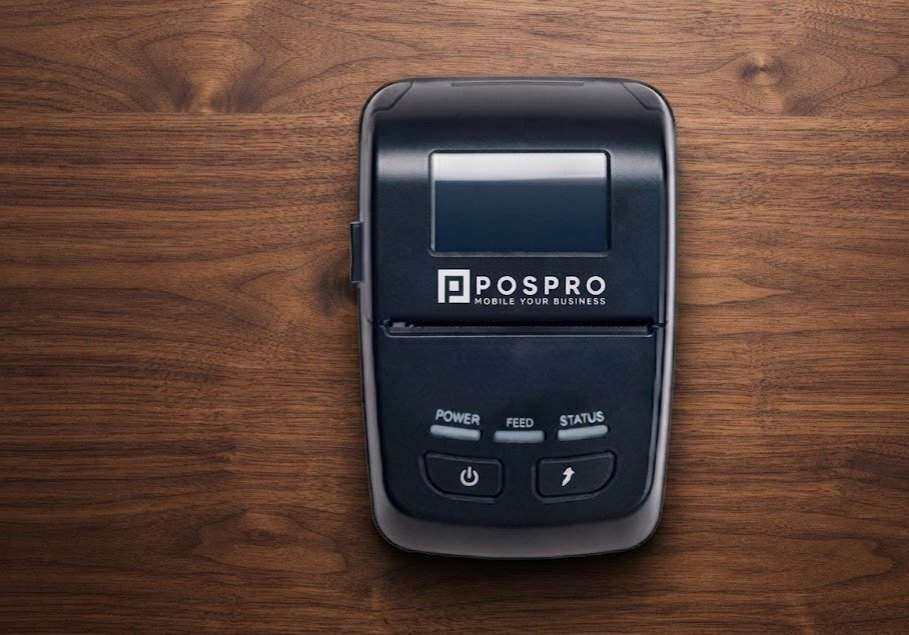
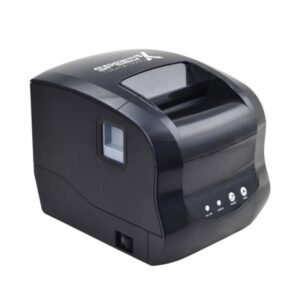
The POSPRO Bluetooth Printer POSPRO 50, officially listed locally as the POSPRO MP-50, is a compact 58mm mobile thermal receipt printer designed for portable billing, delivery services, restaurants, cafés, mobile sales, taxis, courier operations and field POS applications.
Multiple Pakistan-based POS suppliers identify the product specifically as the POSPRO MP-50 58mm Bluetooth Mobile Receipt Printer. Local listings also confirm support for 1D barcodes, QR Code printing, NV logo/image printing, paper-out alerts and multiple languages.
Postech maintains a dedicated software section for the MP-50, including Windows, Android, iOS and Linux resources, making the model particularly useful where a business needs to integrate portable receipt printing into different POS applications.
Because the MP-50 uses direct-thermal technology, it prints on heat-sensitive receipt paper without requiring ink cartridges, toner or printer ribbons.
The POSPRO MP-50 is a portable Bluetooth receipt printer designed around 58mm thermal paper.
It can be used to produce:
Local Pakistani retailers consistently classify the MP-50 as a compact mobile Bluetooth printer rather than a full-size desktop receipt printer.
| Feature | Specification / Status |
|---|---|
| Brand | POSPRO |
| Model | MP-50 / MP 50 |
| Printer category | Portable mobile receipt printer |
| Printing technology | Direct thermal |
| Paper category | 58mm |
| Bluetooth | Confirmed |
| 1D barcode printing | Confirmed |
| QR Code printing | Confirmed |
| NV logo/image printing | Confirmed |
| Paper-out alert | Confirmed |
| Multiple languages | Confirmed |
| Windows resources | Available |
| Android SDK | Available |
| iOS SDK | Available |
| Linux driver | Available |
| Virtual COM driver | Available |
| Exact speed | Verify POSPRO hardware revision |
| Resolution | Likely 203 dpi; verify revision |
| Printable width | Likely around 48mm |
| USB data printing | Likely; verify physical port |
| ESC/POS | Strongly likely; verify MP-50 manual |
| Wi-Fi | Not confirmed |
| Ethernet LAN | Not confirmed |
| Automatic cutter | Not reliably confirmed |
| Cash-drawer output | Not reliably confirmed |
| Battery capacity | Verify physical battery |
| Local warranty | Confirm with GS Systemz |
The confirmed POSPRO-specific features come from current Pakistani listings and Postech’s MP-50 driver resources.
The main advantage of the MP-50 is mobility.
Instead of keeping the customer beside a fixed checkout counter, employees can carry the printer and produce a receipt where the transaction takes place.
This can benefit:
The MP-50 also provides a wider range of software resources than many generic Bluetooth printers. Postech provides MP-50-specific Windows, Android, iOS and Linux downloads, as well as a virtual COM driver, manual and supporting tools.
The POSPRO MP-50 is consistently identified as a 58mm mobile receipt printer.
The 58mm format is well suited to:
A 58mm printer is generally smaller and easier to carry than an 80mm portable printer, although it provides less horizontal space for long item descriptions.
Bluetooth is the MP-50’s primary advertised interface.
This allows compatible phones, tablets or computers to send receipts wirelessly without keeping a data cable attached to the printer.
Bluetooth is particularly useful for:
The phone and printer successfully pairing does not automatically guarantee application compatibility. The billing application must also support the printer’s communication method or SDK.
QR Code printing is explicitly listed among the MP-50’s local features.
QR codes on receipts can be used for:
For reliable scanning, keep sufficient blank space around the code and avoid printing it too small.
The MP-50 is also advertised as supporting multiple 1D barcode formats.
The printer can therefore be used for receipts containing barcodes for:
The MP-50 prints barcodes. It does not scan them.
Current local specifications state that the MP-50 supports NV logo download and picture printing.
This can allow receipts to display:
For clear thermal output, use a high-contrast monochrome logo rather than a detailed full-colour graphic.
The MP-50 includes a paper-out alert according to current local listings.
This helps operators recognise when the thermal roll needs to be replaced instead of troubleshooting an apparent printing failure.
Multiple-language printing is also advertised for the MP-50.
Actual Urdu or Arabic printing depends on:
Businesses requiring Urdu or Arabic receipts should test their actual billing software before deployment.
The local POSPRO listings confirm the product identity and primary features but do not publish a complete hardware table.
The MP-50 feature wording closely matches the Xprinter XP-P501A mobile printer platform. Xprinter publishes the following specifications for that platform:
| Specification | Matching Platform |
|---|---|
| Printing method | Direct thermal |
| Resolution | 203 dpi |
| Paper width | 58mm |
| Printable width | 48mm |
| Maximum print speed | 70mm/s |
| Maximum roll diameter | 40mm |
| Interfaces | USB + Bluetooth |
| Command system | ESC/POS |
| 1D barcode formats | UPC-A, UPC-E, EAN-13, EAN-8, Code 39, ITF, Codabar, Code 93, Code 128 |
| 2D barcode | QR Code |
| Dimensions | Approx. 124 × 83 × 51mm |
| Weight | Approx. 230g |
| Battery | 7.4V / 1800mAh on current official specification |
| Charging input | DC 5V/2A |
| Systems | Windows, Android, iOS, macOS and Linux |
These figures should not automatically be presented as guaranteed POSPRO specifications because no public POSPRO document formally confirms that the MP-50 is an XP-P501A rebrand.
For GS Systemz, the safer specification wording is:
203 dpi, 48mm print width and approximately 70mm/s are likely matching-platform specifications; verify the physical POSPRO MP-50 before publishing them as fixed figures.
The evidence suggests that the MP-50 uses the same or a closely related hardware design.
The unusual feature combination advertised for both includes:
The official Xprinter platform adds 203 dpi, 70mm/s printing, 48mm printable width, USB + Bluetooth and ESC/POS.
However, no official POSPRO source reviewed here states that Xprinter manufactures the MP-50.
Therefore, GS Systemz should describe this only as:
A closely matching hardware platform, not a confirmed OEM relationship.
The MP-50 is a 58mm printer.
The likely 48mm figure describes the printable area rather than the physical paper width.
On the technically matching platform:
This is normal for portable receipt printers because a small margin remains on each side of the paper.
Customers should purchase 58mm thermal paper, not 48mm paper.
Use compatible 58mm direct-thermal receipt rolls.
If the physical MP-50 matches the P501A-type platform, the likely roll requirements are:
Do not assume that a large 58mm desktop-printer roll will fit. Portable printers normally use smaller roll diameters.
Before ordering paper in bulk, verify:
No.
The MP-50 uses direct-thermal printing.
The print head heats specially coated paper to create black text and graphics.
It does not require:
The primary consumable is thermal paper.
Thermal receipts can fade when exposed to sunlight, heat, oil, moisture, alcohol or certain plastics. Keep important transaction records digitally as well.
The strongest POSPRO-specific local sources do not provide a reliable exact speed.
The closely matching XP-P501A platform is officially rated for up to 70mm/s.
Therefore, GS Systemz should avoid repeating unrelated claims such as 200–260mm/s that appear in generic or incorrectly copied listings.
Recommended wording:
Portable high-speed thermal printing; matching-platform speed is up to 70mm/s. Verify the exact POSPRO MP-50 revision.
The matching platform uses 203 dpi resolution.
203 dpi is normally suitable for:
Because the local MP-50 pages do not independently publish the dpi figure, GS Systemz should verify the actual printer before presenting 203 dpi as an absolute model specification.
Yes.
QR Code printing is specifically confirmed by local MP-50 listings.
Possible uses include:
For more reliable QR scanning:
The POSPRO pages only state that multiple 1D barcodes are supported.
The closely matching platform supports:
GS Systemz should test any mission-critical barcode type before guaranteeing it for the POSPRO firmware.
Postech provides dedicated MP-50 Windows, Android and iOS development resources, while the matching P501A platform officially uses ESC/POS emulation.
This makes ESC/POS compatibility highly likely.
ESC/POS commonly controls:
The POSPRO MP-50 manual should still be treated as the final authority.
Yes.
Postech provides a dedicated Android SDK for the MP-50.
A typical setup may involve:
The app must support the MP-50 or compatible printer protocol.
Postech also provides an iOS SDK for the MP-50.
This means iOS integration is supported at the development level.
It does not mean the printer automatically works with every iPhone billing application or supports Apple AirPrint.
Compatibility may require:
Yes.
Postech lists:
for the MP-50 Thermal Mobile Printer.
A normal installation may involve:
Confirm support for the exact Windows version used by the customer.
Yes.
A dedicated Linux driver is listed in Postech’s MP-50 software resources.
Successful operation may depend on:
Test the intended Linux environment before deploying multiple printers.
USB printing is technically likely.
Postech provides a Virtual COM driver and Windows driver for the MP-50, while the closely matching XP-P501A officially supports USB + Bluetooth.
However, because Pakistani retail titles mainly advertise the MP-50 as a Bluetooth printer, physically confirm:
Recommended wording:
Bluetooth confirmed; USB data printing should be verified on the exact stock revision.
No reliable MP-50 source reviewed confirms built-in:
The matching platform uses USB + Bluetooth rather than Ethernet or Wi-Fi.
For router-based printing or a permanent network kitchen printer, choose a network-capable desktop thermal printer instead.
An automatic cutter is not reliably confirmed.
The official matching platform describes a manual tear mechanism rather than a motorised cutter.
This is normal for portable printers because a manual tear bar:
Do not advertise an automatic cutter unless the actual GS Systemz unit contains one.
Cash-drawer support is not reliably confirmed.
Portable printers normally prioritise mobility and battery efficiency rather than providing a 24V cash-drawer output.
Choose a desktop POS receipt printer when automatic drawer opening is required.
Dedicated adhesive-label functionality is not confirmed.
There is no reliable MP-50 evidence for:
The MP-50 should therefore be marketed primarily as a mobile receipt printer.
For product stickers or courier labels, choose a dedicated mobile label printer.
Yes.
Its portability makes it suitable for:
A high-speed desktop USB/LAN printer remains more suitable for permanent high-volume kitchen printing.
Yes.
The MP-50 can be useful for:
Bluetooth allows a compatible delivery application to print while the employee is away from a fixed office.
Yes.
A portable 58mm printer can support:
Keep the printer away from extreme dashboard heat, moisture and direct sunlight.
| Feature | POSPRO MP-50 | POSPRO MP-300 |
|---|---|---|
| Paper category | 58mm | 80mm |
| Portability | More compact | Larger |
| Receipt width | Narrower | Wider |
| Bluetooth | Yes | Yes |
| QR Code | Yes | Yes |
| Exact speed | Verify; matching platform 70mm/s | About 75mm/s published |
| MP-300 battery | — | 2000mAh published |
| Product descriptions | Less space | More space |
| Best use | Compact mobile receipts | Detailed mobile receipts |
Choose the MP-50 when portability matters most.
Choose the MP-300 when wider receipts and more room for detailed transaction information are needed.
| Feature | POSPRO MP-50 | Speed-X BT500M |
|---|---|---|
| Paper | 58mm | 58mm |
| Bluetooth | Yes | Yes |
| USB | Likely; verify | Confirmed |
| QR Code | Confirmed | Confirmed |
| Barcodes | Confirmed | Confirmed |
| Resolution | Likely 203 dpi | 203 dpi published |
| Speed | Matching platform up to 70mm/s | Up to 90mm/s published |
| Software resources | Strong POSPRO SDK support | Seller/platform dependent |
| Best use | POSPRO software ecosystem | More fully documented hardware |
The MP-50 may be preferable where POSPRO SDK and driver support matter.
The BT500M may be preferable where published hardware specifications are the main buying priority.
| Feature | 58mm MP-50 | 80mm mobile printer |
|---|---|---|
| Size | Smaller | Larger |
| Weight | Usually lower | Usually higher |
| Receipt width | Narrow | Wide |
| Product descriptions | Less room | More room |
| Detailed tax receipts | More restricted | Better |
| Carrying convenience | Excellent | Moderate |
| Paper consumption | Lower | Higher |
| Best use | Simple mobile receipts | Detailed invoices |
Choose 58mm for portability.
Choose 80mm when receipt readability and item detail are more important.
A consistent official local MP-50 package list was not found.
A typical mobile printer package may contain:
GS Systemz should inspect its actual package before advertising any accessory as included.
GS Systemz can position the POSPRO MP-50 for customers in Pakistan who need compact Bluetooth receipt printing for mobile transactions.
Before ordering, customers should confirm:
Current pricing, warranty and stock availability should be confirmed at the time of purchase.
For computer deployment, use the MP-50 resources provided through the POSPRO/Postech driver section.
The MP-50 may be suitable for:
Check availability of the POSPRO MP-50 58mm Bluetooth Mobile Thermal Receipt Printer from GS Systemz in Pakistan.
The MP-50 is suitable for mobile sales receipts, restaurant bills, delivery confirmations, taxi receipts, customer-payment slips, service invoices and other portable thermal-printing workflows.
Before ordering, confirm the exact printing speed, resolution, USB functionality, battery capacity, charger, mobile application compatibility, cutter type, local warranty and complete package contents.
The POSPRO MP-50 is a compact 58mm Bluetooth mobile thermal receipt printer designed for portable POS and field billing.
No. It uses direct-thermal paper and does not require ink, toner or ribbons.
It uses 58mm thermal receipt paper. The technically matching platform has an approximately 48mm printable area.
Yes. Bluetooth mobile printing is a confirmed core feature of the POSPRO MP-50.
Yes. QR Code printing is explicitly advertised by current Pakistani MP-50 listings.
Yes. Local specifications confirm multiple 1D barcodes plus NV logo and picture printing.
Postech provides dedicated Android and iOS SDK resources for the POSPRO MP-50. Application compatibility should still be verified.
Yes. Postech provides Windows and Linux drivers as well as Windows SDK and virtual COM resources for the MP-50.
An automatic cutter is not reliably confirmed. The matching mobile platform uses a manual tear mechanism, so GS Systemz should inspect the physical MP-50 before advertising an auto cutter.
You can check availability of the POSPRO MP-50 58mm Bluetooth Mobile Thermal Receipt Printer from GS Systemz in Pakistan.
Reviews
There are no reviews yet.