
₨10,850.00
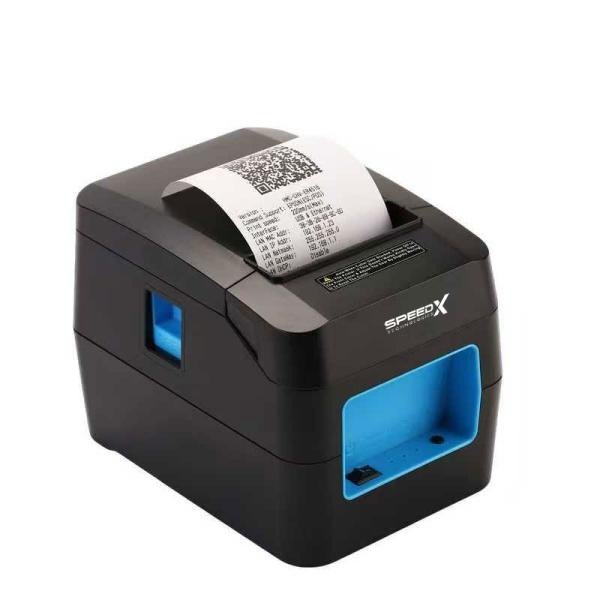
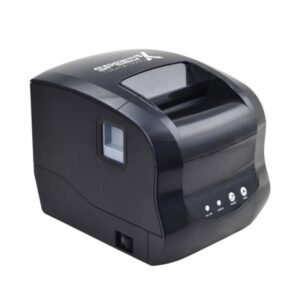
The Speed-X SP-90A BT WiFi USB Thermal Receipt Printer is an 80mm point-of-sale printer designed for retail shops, supermarkets, restaurants, cafés, pharmacies, bakeries, ticket counters and other businesses requiring fast receipt printing.
It uses direct-thermal printing technology, so it prints on compatible heat-sensitive paper without ink cartridges, toner or ribbons. The commonly advertised SP-90A configuration supports USB, Bluetooth and Wi-Fi, allowing it to connect with fixed POS computers, networked workstations and compatible mobile billing devices.
The printer offers a published maximum speed of approximately 220mm per second, a resolution of 203 dpi, a printable width of approximately 72mm, and support for standard 80mm thermal-paper rolls. It also supports ESC/POS commands, receipt logos, common 1D barcodes and QR-code printing.
An automatic cutter is included in commonly advertised configurations, helping separate receipts quickly after printing. Current listings publish a cutter-life estimate of up to one million cuts and a print-head-life estimate of up to 100km under specified operating conditions.
| Feature | Published information |
|---|---|
| Brand | Speed-X |
| Model | SP-90A |
| Product type | Desktop thermal receipt printer |
| Printing method | Direct thermal line printing |
| Paper class | 80mm thermal receipt roll |
| Exact paper width | 79.5 ± 0.5mm |
| Maximum printable width | Approximately 72mm |
| Resolution | 203 dpi or 8 dots/mm |
| Published print speed | Approximately 160–220mm/s |
| Main interfaces | USB, Bluetooth and Wi-Fi |
| Ethernet/LAN | Listed by some sellers; verify physical ports |
| Automatic cutter | Advertised |
| Cutter-life estimate | Up to 1,000,000 cuts |
| Print-head-life estimate | Up to 100km |
| Command language | ESC/POS |
| 1D barcode printing | Supported |
| QR-code printing | Supported |
| Logo and bitmap printing | Supported |
| Maximum roll diameter | Approximately 80mm |
| Paper loading | Clamshell or drop-in loading |
| Cash-drawer output | 12V/1A listed |
| Operating systems | Windows, Linux, Android and iOS listed |
| Dimensions | Approximately 185 × 133 × 133mm |
| Weight | Approximately 0.9kg |
| Colour | Commonly black |
| Local warranty | Confirm with GS Systemz |
| Current availability | Subject to stock confirmation |
These specifications are consistently repeated by several Pakistani distributors, although no complete manufacturer-issued SP-90A datasheet was publicly located.
The SP-90A combines fast receipt printing with several connectivity options.
Its USB port can provide a stable connection to a desktop computer or conventional POS terminal. Wi-Fi can allow compatible systems to send print jobs through a local network, while Bluetooth can support compatible mobile or tablet-based billing workflows.
Its main advantages include:
The printer is particularly useful for businesses that want one receipt printer capable of connecting to different devices instead of purchasing separate USB and wireless models.
The SP-90A is commonly listed with an adjustable or operating print-speed range of approximately 160–220mm per second, with 220mm/s presented as the maximum.
Fast printing can help reduce receipt delays during:
Actual speed may be lower when printing dense graphics, large logos, QR codes or receipts containing extensive formatting.
The printer uses a published resolution of 203 dpi, equivalent to approximately eight dots per millimetre.
This resolution is normally suitable for:
Image quality still depends on the original logo file, receipt design, print density and thermal-paper quality.
USB provides a direct wired connection between the printer and a compatible POS computer.
It is usually the preferred connection when:
The exact USB connector and included cable should be verified from the physical package.
Wi-Fi can allow the printer to join a compatible local network and receive print jobs from supported applications.
This may be useful for:
Wi-Fi compatibility depends on the printer’s supported network mode, router settings, IP configuration, POS software and driver or SDK support.
Bluetooth can support direct wireless printing from compatible phones, tablets, laptops and POS devices.
Possible Bluetooth workflows include:
Bluetooth support does not guarantee compatibility with every Android or iOS application. The business application must support ESC/POS receipt printing through the printer’s Bluetooth profile.
Commonly published SP-90A specifications include an automatic cutter with an estimated service life of up to one million cuts.
An auto cutter can:
The actual cutter design, partial-cut behaviour and cutter-life conditions should be checked in the supplied manual.
The printer uses a clamshell or drop-in paper-loading design.
A normal paper change involves:
The published maximum roll diameter is approximately 80mm.
| Application | Suitability |
|---|---|
| Retail sales receipts | Excellent |
| Supermarket checkout | Excellent |
| Restaurant customer bills | Excellent |
| Kitchen order tickets | Good with compatible software |
| Café and bakery billing | Excellent |
| Pharmacy receipts | Excellent |
| Clothing-store billing | Excellent |
| Hardware-store invoices | Excellent |
| Grocery and convenience stores | Excellent |
| Mobile POS billing | Good with compatible Bluetooth software |
| Network receipt printing | Good with verified Wi-Fi setup |
| Queue and token tickets | Good |
| Event or admission receipts | Good |
| Courier transaction receipts | Good |
| Cash-drawer control | Supported with compatible drawer |
| QR-code printing | Supported |
| Product barcode printing | Supported for simple applications |
| Adhesive label printing | Not confirmed |
| Shipping-label printing | Not recommended without media-sensor verification |
| A4 document printing | Not supported |
| Battery-powered mobile printing | Not supported |
| Colour printing | Not supported |
The SP-90A is principally an 80mm receipt printer. Although some retailers call it a receipt-and-label printer, no reliable public specification confirms a gap sensor, black-mark sensor or adjustable label-media system. It should not be marketed as a dedicated adhesive-label printer until GS Systemz tests the exact revision.
| Specification | Published detail |
|---|---|
| Printing method | Direct thermal line printing |
| Print resolution | 203 dpi / 8 dots per mm |
| Dots per line | Listings mention 576 or 512 dots depending revision |
| Maximum print width | Approximately 72mm |
| Print speed | Approximately 160–220mm/s |
| Paper type | Direct-thermal receipt paper |
| Paper width | 79.5 ± 0.5mm |
| Maximum roll diameter | Approximately 80mm |
| Paper loading | Clamshell/drop-in |
| Interfaces | USB, Wi-Fi and Bluetooth |
| Ethernet/LAN | Mentioned by some sellers; verify exact revision |
| Command system | ESC/POS |
| Adjustable line spacing | Listed as command-adjustable |
| Standard line spacing | Approximately 3.75mm |
| Font A | Approximately 12 × 24 dots |
| Font B | Approximately 9 × 17 dots |
| 1D barcode printing | UPC-A, UPC-E, EAN-13, EAN-8, Code 39, ITF, Codabar, Code 93 and Code 128 |
| 2D barcode printing | QR Code |
| Graphics | Bitmap download and printing |
| NV flash | Approximately 256KB |
| Power-adapter input | AC 100–240V, 50–60Hz |
| Power-adapter output | DC 12V/2A |
| Cash-drawer output | DC 12V/1A |
| Dimensions | Approximately 185 × 133 × 133mm |
| Weight | Approximately 0.9kg |
| Operating temperature | Approximately 5°C to 45°C |
| Operating humidity | Approximately 10%–80% |
| Storage temperature | Approximately -10°C to 50°C |
| Storage humidity | Approximately 10%–90%, non-condensing |
| Print-head life | Up to 100km under listed density conditions |
| Cutter life | Up to 1,000,000 cuts |
| Listed operating systems | Windows, Linux, Android and iOS |
| Local warranty | Varies by seller and distributor |
The public listings contain uncertainty around whether the print line is 576 or 512 dots and whether every unit includes Ethernet. GS Systemz should check the printer self-test page, rear interface panel and carton label before publishing those fields as fixed specifications.
The SP-90A uses 80mm-class receipt paper, but its maximum printable area is approximately 72mm wide.
These measurements describe different things:
The unprinted margins on the left and right account for the difference.
Businesses should purchase standard 80mm direct-thermal rolls rather than 72mm paper.
No. The SP-90A uses direct-thermal printing.
Heat from the print head creates the image on chemically treated thermal paper. This means the printer normally requires:
It does not normally require:
Thermal receipts can fade when exposed to heat, sunlight, moisture, oils or certain plastics. Important records should also be retained digitally.
The commonly published maximum is 220mm per second, while specification tables show a working range of approximately 160–220mm per second.
The maximum figure may apply under ideal conditions with:
Complex logos, QR codes, dark graphics and low-quality paper may reduce practical output speed.
DPI means dots per inch.
At 203 dpi, the printer creates approximately 203 thermal dots across each inch of printed content. This resolution is standard for many POS receipt printers and is generally sufficient for readable text, receipt logos and correctly sized barcodes.
For better output:
Yes. QR-code printing is included in current SP-90A specifications.
Possible uses include:
The QR code must be generated correctly by the POS software or sent using a supported ESC/POS command.
For reliable scanning:
Published barcode support includes:
Barcode support refers to printing, not barcode scanning. The SP-90A creates the code on paper; a separate barcode scanner reads it.
Yes. Bitmap download and graphics printing are listed features.
A receipt may include:
For the clearest logo, prepare a monochrome image at a size appropriate for the approximately 72mm printable area.
Yes. Current specifications list the ESC/POS command system.
ESC/POS is commonly used by receipt printers and POS applications to control:
ESC/POS compatibility does not guarantee that every command used by every Epson-compatible application will behave identically. The software should be tested with the physical printer.
Windows support is consistently listed for the SP-90A.
A typical Windows installation may require:
The correct driver should be obtained from the supplier or the media included with the printer.
Android support is listed, particularly for Bluetooth or Wi-Fi printing.
Actual Android compatibility depends on:
A phone detecting the printer through Bluetooth does not prove that a particular billing application can print to it.
Test the intended Android application before purchasing multiple printers.
iOS support is listed by several sellers, but compatibility should be treated as application-dependent.
iPhones and iPads generally require:
Do not assume that the printer supports Apple AirPrint. No public SP-90A specification reviewed for this page confirms AirPrint.
Linux drivers are listed by current sellers.
Compatibility may depend on:
A self-test can confirm printer hardware, but a test print from the actual Linux POS system is still necessary.
USB connects the printer directly to one computer or POS terminal.
USB is normally best when:
USB cannot normally be shared with multiple devices unless the host computer shares the printer through its operating system or network.
Wi-Fi printing normally requires the printer to join the same local network as the host device.
A typical setup may involve:
The exact procedure depends on the printer firmware and supplied configuration utility.
For business installations, a reserved or static IP address can prevent the printer’s address from changing after a router restart.
Bluetooth creates a short-range wireless connection between the printer and a compatible host.
A typical process may involve:
The exact pairing name, PIN and Bluetooth profile should be confirmed from the self-test page or supplied manual.
The public listings identify USB, Bluetooth and Wi-Fi as available connectivity options, but they do not clearly confirm simultaneous multi-interface operation.
Some receipt printers accept jobs through several ports, while others prioritise one active connection or require configuration changes.
GS Systemz should test:
Avoid promising simultaneous three-device printing without a physical test.
Some sellers list “Internet” or Ethernet in addition to USB, Bluetooth and Wi-Fi, while other SP-90A listings identify only the three interfaces named in the target product.
This likely indicates different interface-board revisions or copied generic specifications.
Before advertising LAN:
The safest product-page specification for the targeted version is:
USB + Bluetooth + Wi-Fi; Ethernet subject to physical revision.
A 12V/1A cash-drawer output is included in published specifications.
The drawer may open automatically when the POS software sends the appropriate ESC/POS pulse command.
Compatibility depends on:
Do not connect a cash drawer with incompatible voltage or wiring.
The verified specifications clearly support 80mm thermal receipt paper.
Some sellers describe it as a receipt-and-label printer, but the public specification set does not clearly confirm:
Therefore, GS Systemz should market it primarily as an 80mm thermal receipt printer.
Use it for adhesive labels only after testing the exact media and confirming a suitable sensor in the physical printer.
Yes. An automatic cutter with a published life estimate of up to one million operations is consistently listed.
If the cutter stops operating:
The published print-head-life estimate is up to 100km, commonly stated under a print-density condition of 12.5% or less.
Print-head life can be reduced by:
A service-life estimate is not a fixed warranty period.
A standard package may include:
Bluetooth and Wi-Fi are built into the relevant printer configuration and do not normally require a separate USB dongle.
Box contents vary by distributor. GS Systemz should inspect the package before advertising every accessory.
| Requirement | Recommendation |
|---|---|
| 80mm retail receipts | Supported |
| High-speed counter printing | Supported up to 220mm/s |
| USB POS connection | Supported |
| Wi-Fi network printing | Supported on targeted configuration |
| Bluetooth mobile printing | Supported with compatible app |
| 203 dpi text and graphics | Supported |
| Automatic receipt cutting | Supported |
| QR-code printing | Supported |
| 1D barcode printing | Supported |
| Logo printing | Supported |
| ESC/POS software | Supported |
| Windows POS systems | Supported |
| Android POS applications | Compatibility testing required |
| iPhone or iPad POS | Application-dependent |
| Cash-drawer opening | Supported with compatible drawer |
| Adhesive-label printing | Not confirmed |
| Battery-powered mobile use | Not supported |
| A4 printing | Not supported |
| Colour printing | Not supported |
Choose the SP-90A when a business needs fast 80mm receipts and flexible USB, Bluetooth and Wi-Fi connectivity.
Choose a dedicated barcode-label printer when adhesive product, courier or shelf labels are the main requirement.
| Feature | SP-90A | SP-200U |
|---|---|---|
| Paper class | 80mm | 80mm |
| Maximum published speed | Up to 220mm/s | Around 220mm/s |
| USB | Yes | Yes |
| Bluetooth | Yes | Normally no |
| Wi-Fi | Yes | Normally no |
| Automatic cutter | Advertised | Advertised |
| Mobile POS use | Better suited | Limited by USB |
| Network printing | Supported through Wi-Fi | Requires sharing or another interface |
| Best use | Wireless and mixed-device workflows | Fixed USB checkout |
Choose the SP-90A when wireless printing is important.
Choose the SP-200U when the printer will remain connected to one USB POS computer and lower interface complexity is preferred.
| Feature | SP-90A | SP-350U |
|---|---|---|
| Paper class | 80mm | 80mm |
| Published maximum speed | 220mm/s | Around 300mm/s |
| USB | Yes | Yes |
| Bluetooth | Yes | Depends on SP-350 configuration |
| Wi-Fi | Yes | Depends on configuration |
| Main advantage | Wireless flexibility | Higher published speed |
| Best use | Mobile, network and fixed billing | High-volume fixed counter printing |
Choose the SP-90A when Bluetooth and Wi-Fi are essential.
Choose an SP-350-series configuration when higher printing speed is the priority and the required interface is available.
| Feature | SP-90A 80mm printer | 58mm printer |
|---|---|---|
| Receipt width | Wider | Narrower |
| Product descriptions | More space | Less space |
| Logo size | Larger | Smaller |
| QR-code space | Better | More restricted |
| Counter size | Larger printer | More compact |
| Paper cost per receipt | Usually higher | Usually lower |
| Restaurant bills | Better suited | Suitable for simple bills |
| Detailed retail receipts | Better suited | Limited width |
| Best use | Standard professional POS receipts | Compact, low-volume billing |
An 80mm printer is usually better for detailed receipts and restaurant bills. A 58mm model may be sufficient for basic totals and short item descriptions.
GS Systemz can position the SP-90A for Pakistani businesses that need a high-speed, wireless-capable POS receipt printer.
This product page helps buyers evaluate:
Before ordering, confirm:
The printer may be suitable for:
It is most suitable when 80mm receipt printing, Bluetooth, Wi-Fi and USB connectivity are more important than battery-powered mobility or dedicated label-media handling.
Check availability of the Speed-X SP-90A BT WiFi USB Thermal Receipt 80mm High Print Speed Printer from GS Systemz in Pakistan.
Use it for retail receipts, restaurant bills, customer invoices, order tickets, transaction records, QR-enabled receipts and compatible mobile or network POS workflows.
Confirm the exact interface configuration, Ethernet availability, automatic cutter, included cables, mobile-app compatibility, local warranty and complete box contents before ordering.
The SP-90A is an 80mm direct-thermal receipt printer with USB, Bluetooth and Wi-Fi connectivity, 203 dpi resolution and a published maximum speed of 220mm/s.
No. It prints directly onto compatible heat-sensitive thermal paper and does not use ink cartridges, toner or ribbons.
It uses 80mm-class thermal paper with a published width of 79.5 ± 0.5mm and a printable width of approximately 72mm.
Current specifications list approximately 160–220mm per second, with 220mm/s as the maximum.
Yes. Current listings advertise an automatic cutter with a life estimate of up to one million cuts.
Yes. Published specifications include QR-code printing as well as common 1D barcode formats.
Android and iOS support is listed, but the chosen billing application must support the printer’s Bluetooth, Wi-Fi or ESC/POS communication method.
Some sellers list Ethernet or “Internet,” while others list only USB, Bluetooth and Wi-Fi. Check the rear ports of the exact GS Systemz unit before ordering.
Dedicated label support is not confirmed because no reliable public specification identifies a gap or black-mark sensor. It should primarily be used as an 80mm receipt printer.
You can check availability of the Speed-X SP-90A 80mm Bluetooth, Wi-Fi and USB Thermal Receipt Printer from GS Systemz in Pakistan.
Reviews
There are no reviews yet.