
₨5,600.00
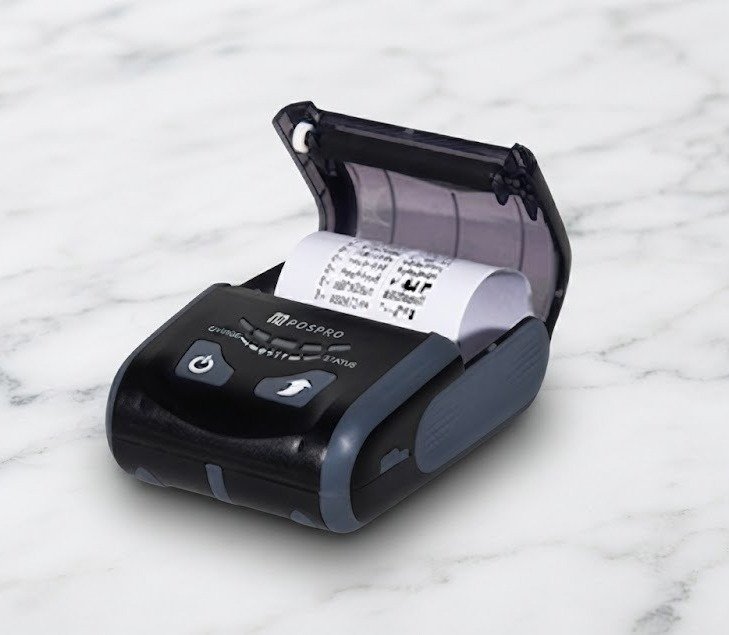
The POSPRO Bluetooth Printer POSPRO MP 200, officially listed as the POSPRO MP-200, is a compact 2-inch mobile thermal receipt printer designed for portable billing, delivery operations, restaurants, retail stores, warehouses, logistics and field-service businesses.
It uses direct-thermal technology to produce black text, graphics and supported barcodes on heat-sensitive paper without ink cartridges, toner or ribbons.
Current local sources identify the MP-200 as a mobile Bluetooth receipt printer, while a detailed Pakistani listing publishes 203 dpi resolution, up to 80mm/s print speed, approximately 48mm printable width, ESC/POS commands and a 1600mAh rechargeable battery.
Postech currently includes the POSPRO MP-200 in its mobile thermal-printer software section and provides Windows, Android and iOS development resources plus Windows and virtual COM drivers.
The POSPRO MP-200 is a battery-powered portable receipt printer for businesses that need to print transactions away from a fixed checkout counter.
It can be used for:
Postech’s current business update describes the MP-200 as a mobile receipt printer with Bluetooth connectivity and lightweight construction for retail, restaurants, logistics, warehouses and field operations.
| Feature | Published specification |
|---|---|
| Brand | POSPRO |
| Model | MP-200 / MP 200 |
| Product type | Mobile thermal receipt printer |
| Printer class | 2-inch / 58mm-class |
| Printing method | Direct thermal line printing |
| Paper width | 56mm in detailed local specification |
| Printable width | Approximately 48mm |
| Resolution | 203 dpi / 8 dots per mm |
| Horizontal resolution | 384 dots per line |
| Maximum speed | Up to 80mm/s |
| Bluetooth | BT 4.0 + BLE listed |
| USB | Listed |
| Wi-Fi | Listed in detailed specification; verify exact stock |
| RS232 | Listed; verify physical interface/cable |
| Command language | ESC/POS |
| Battery | 1600mAh rechargeable lithium-ion |
| Published continuous use | Up to approximately 5.5 hours |
| Charging time | Approximately 3–5 hours |
| Maximum roll diameter | Approximately 40mm |
| Paper thickness | Approximately 60–80µm |
| QR Code | Supported |
| PDF417 | Supported |
| 1D barcodes | Supported |
| MCBF | Approximately 5 million lines |
| Print-head life | Approximately 50km |
| Dimensions | Approximately 112 × 79 × 45mm |
| Weight | Approximately 335g with battery and paper |
| Auto cutter | Not confirmed |
| Cash-drawer port | Not confirmed |
| Warranty | Confirm GS Systemz local warranty |
The detailed specifications above come from a Pakistan-based MP-200 product listing. Interface combinations should still be physically verified because mobile-printer families are sometimes sold in different Bluetooth, USB or Wi-Fi configurations.
The MP-200 is designed for businesses where mobility matters more than desktop-printer speed.
A cashier, waiter, delivery rider or field employee can carry the printer and produce a receipt close to the customer instead of returning to a fixed checkout station.
Its main advantages include:
Yes. POS Experts identifies the MP-200 as a 2-inch mobile Bluetooth receipt printer, which places it in the 58mm portable-printer class.
The detailed local technical listing specifies:
These figures are not contradictory.
The physical roll is wider than the printable area because margins remain along the sides.
For buying paper, customers should follow the actual MP-200 paper-compartment specification rather than assuming every standard desktop 58mm roll will fit.
The detailed local specification publishes:
The maximum 40mm roll diameter matters because portable printers use smaller paper rolls than full-size desktop receipt printers.
Before purchasing rolls in bulk, check:
A roll may be described commercially as 58mm-class but still be too large in diameter for the MP-200.
No.
The MP-200 uses direct-thermal printing.
The thermal print head applies heat to specially coated receipt paper, causing selected areas to darken.
The printer therefore does not require:
The main consumable is compatible thermal paper.
Thermal receipts can fade when exposed to high temperatures, direct sunlight, oils, alcohol, moisture or certain plastics. Important transaction records should also be retained digitally.
The detailed Pakistan specification lists a maximum speed of 80mm per second.
This is appropriate for portable receipt workflows such as:
Actual speed can vary according to:
The MP-200 should not be compared directly with a 200–300mm/s desktop POS printer because the two product types solve different problems.
The MP-200’s detailed published resolution is 203 dots per inch, or approximately eight dots per millimetre.
At this resolution, it is suitable for:
It is not intended for photographic or colour printing.
The MP-200 provides approximately 48mm of printable width using 384 dots per line.
This means businesses should design receipts for a narrow mobile format.
Long product descriptions may wrap onto a second line more frequently than on an 80mm printer.
A 48mm printable area is generally adequate for:
Yes.
Bluetooth is the defining advertised interface of the MP-200. POS Experts describes it as a mobile Bluetooth receipt printer, while Postech’s current promotional material also specifically highlights Bluetooth connectivity.
The detailed technical listing specifies:
Bluetooth BT 4.0 + BLE
Bluetooth can be useful with compatible:
The POS application must still support the printer’s communication method.
USB is included in the detailed MP-200 technical specification, while Postech provides a Windows driver and virtual COM driver specifically for the MP-200.
USB may be useful for:
GS Systemz should verify whether the USB connector on its exact MP-200 stock supports:
The detailed local MP-200 specification lists Wi-Fi among its available interfaces.
However, POS Experts and Postech primarily market the product as a Bluetooth mobile printer rather than specifically promoting Wi-Fi.
This could indicate:
For GS Systemz, the safest product wording is:
Bluetooth confirmed; Wi-Fi should be verified on the exact stock revision.
Do not promise Wi-Fi until the printer’s menu, self-test page, carton or physical interface confirms it.
RS232 also appears in the detailed technical interface list.
Portable printers sometimes provide serial connectivity through:
GS Systemz should check the physical unit before advertising RS232 as standard in every MP-200 package.
Yes. The local detailed specification explicitly identifies ESC/POS as the printer’s command language.
Compatible POS applications may use ESC/POS commands for:
Software should still be tested because not every ESC/POS implementation behaves identically.
Yes.
The published MP-200 barcode specification includes QR Code and PDF417.
QR Codes can be used on receipts for:
For reliable scanning:
The local technical listing specifically names:
and states support for QR and PDF417 as additional formats.
Because the source uses “etc.” after the listed formats, GS Systemz should avoid publishing a much larger complete symbology list unless it is verified in the MP-200 command manual.
The MP-200 prints barcodes. It does not scan them.
ESC/POS and graphics-capable receipt printers can generally produce monochrome receipt graphics, but the detailed MP-200 listing does not clearly document an NV-logo memory specification.
Logo printing should therefore be tested with the customer’s intended software.
For good thermal output:
The detailed local specification publishes a 1600mAh rechargeable lithium battery.
This distinguishes the MP-200 from a fixed desktop receipt printer.
Battery operation is useful for:
Battery runtime will vary depending on receipt length, print density, Bluetooth use, Wi-Fi use where fitted, battery age and temperature.
The detailed local specification claims approximately 5.5 hours of use.
This should be treated as a supplier test estimate rather than a guaranteed shift duration.
Actual runtime can be shorter when:
For the GS Systemz page, use:
Up to approximately 5.5 hours under published test conditions; actual runtime varies by usage.
The published charging time is approximately 3–5 hours.
The same listing states that charging can be performed through:
Verify the actual charging input and included adapter before publication.
Yes.
The detailed specification mentions a power alarm with LED indication and a flashing red warning when battery power is low.
This helps mobile users identify when charging is required before the printer stops during a transaction.
The detailed listing publishes:
These are durability and environmental estimates, not warranty periods.
No verified drop rating or IP ingress-protection rating was found, so the MP-200 should not be advertised as rugged, waterproof or dustproof without additional documentation.
| Specification | Published detail |
|---|---|
| Printing technology | Thermal line printing |
| Resolution | 203 dpi |
| Print density | 8 dots/mm |
| Printable width | 48mm |
| Dots per line | 384 |
| Paper width | 56mm |
| Paper thickness | 60–80µm |
| Maximum roll diameter | 40mm |
| Print speed | Up to 80mm/s |
| Font A | 12 × 24 |
| Font B | 9 × 24 |
| Font A characters/line | 32 |
| Font B characters/line | 42 |
| Chinese font | 24 × 24 |
| Chinese characters/line | 16 |
| Bluetooth | BT4.0 + BLE |
| USB | Listed |
| Wi-Fi | Listed; verify exact revision |
| RS232 | Listed; verify exact revision |
| Commands | ESC/POS |
| Barcodes | Code 39, EAN-13, Codabar, QR, PDF417 and others stated |
| Battery | 1600mAh rechargeable lithium |
| Published battery use | Up to 5.5 hours |
| Charging time | Approximately 3–5 hours |
| Charging methods | USB, adapter or mobile power |
| MCBF | Approximately 5 million lines |
| Print-head life | Approximately 50km |
| Operating temperature | -10°C to 50°C |
| Operating humidity | 20%–85% |
| Storage temperature | -20°C to 70°C |
| Storage humidity | 5%–95% |
| Dimensions | Approx. 112 × 79 × 45mm |
| Weight | Approx. 335g with battery and paper |
The detailed specification gives dimensions of approximately 112 × 79 × 45mm and a working weight of around 335g with battery and paper installed.
This makes it significantly easier to carry than an 80mm desktop receipt printer.
It can fit into:
It should still be protected from moisture, strong impacts and extreme heat.
Yes.
Postech publishes an Android SDK specifically for the MP-200 Thermal Mobile Printer.
A typical Android workflow is:
The app must support the printer or a compatible ESC/POS connection.
Postech also publishes an iOS SDK for the MP-200.
This indicates that iOS applications can be developed or configured to communicate with the model.
It does not mean every iPhone application works automatically.
Compatibility may depend on:
No evidence reviewed confirms universal Apple AirPrint support.
Yes.
Postech provides:
for the POSPRO MP-200.
A typical computer setup may involve:
Specific Windows-version compatibility should be confirmed from the current driver package.
Unlike the MP-50 and MP-300 entries, Postech’s current MP-200 row does not explicitly list a Linux driver. It lists Windows, iOS and Android development resources, plus Windows and virtual COM drivers.
Some technically similar MP-200 platforms advertise Linux compatibility, but GS Systemz should not guarantee Linux support for the POSPRO version unless tested or supported by an appropriate driver.
No reliable MP-200 source reviewed confirms an automatic cutter.
Portable mobile printers typically use a manual tear edge because it:
GS Systemz should inspect the physical printer before describing its paper separation method.
No cash-drawer output is confirmed.
Mobile battery-powered printers generally do not include the 24V cash-drawer connector found on desktop POS receipt printers.
If automatic drawer opening is essential, a desktop thermal printer is generally the more appropriate option.
Dedicated adhesive-label functionality is not confirmed.
No reliable MP-200 evidence reviewed here confirms:
The MP-200 should therefore be marketed primarily as a mobile receipt printer.
Use a dedicated mobile label printer when printing courier, product or asset labels.
Yes.
Postech specifically includes restaurants among the MP-200’s intended uses.
It can be useful for:
A wired LAN desktop printer remains more appropriate for a permanent high-volume kitchen station.
Yes.
The printer’s portable format is particularly useful for:
A courier app must support the MP-200’s Bluetooth or ESC/POS method.
Yes.
Postech currently markets it for warehouse and logistics environments.
Possible uses include:
It should not be confused with a dedicated barcode-label printer when adhesive warehouse labels are required.
| Feature | MP-200 | MP-50 |
|---|---|---|
| Printer class | 2-inch mobile | 58mm mobile |
| Printable width | 48mm published | Around 48mm likely |
| Resolution | 203 dpi published | Matching platform suggests 203 dpi |
| Speed | Up to 80mm/s | Exact POSPRO speed less clearly documented |
| Bluetooth | BT4.0 + BLE listed | Bluetooth confirmed |
| Battery | 1600mAh published | Verify MP-50 battery |
| Android SDK | Yes | Yes |
| iOS SDK | Yes | Yes |
| Windows driver | Yes | Yes |
| Best use | Better-documented technical platform | Compact POSPRO mobile alternative |
The MP-200 currently has a more complete local technical specification.
| Feature | MP-200 | MP-300 |
|---|---|---|
| Paper class | 2-inch / 58mm | 3-inch / 80mm |
| Printable width | 48mm | Approximately 72mm |
| Speed | Up to 80mm/s | Up to 75mm/s |
| Resolution | 203 dpi | 203 dpi |
| Bluetooth | Yes | Yes |
| Battery | 1600mAh | 2000mAh |
| Receipt width | Narrower | Wider |
| Portability | Better | Larger |
| Detailed invoices | More limited | Better |
| Best use | Compact mobile billing | Detailed mobile receipts |
Choose the MP-200 when compact size is the priority.
Choose the MP-300 when wider receipts and more room for item descriptions, taxes and customer details are needed.
| Feature | POSPRO MP-200 | Speed-X BT500M |
|---|---|---|
| Paper class | 58mm-class | 58mm |
| Print width | 48mm | About 48mm |
| Resolution | 203 dpi | 203 dpi |
| Speed | Up to 80mm/s | Up to 90mm/s |
| Bluetooth | BT4.0 + BLE listed | Bluetooth supported |
| USB | Listed | Supported |
| Battery | 1600mAh | 1500mAh |
| POS software resources | Strong POSPRO SDK support | More seller-dependent |
| Best use | POSPRO business ecosystem | Alternative compact mobile printer |
Choose according to software compatibility, battery requirements, availability and tested application support rather than speed alone.
A complete MP-200 package list is not consistently published.
A typical package may contain:
GS Systemz should inspect its stock before advertising any of these accessories as guaranteed.
GS Systemz can position the MP-200 for businesses in Pakistan that need a compact mobile Bluetooth receipt printer with strong POS software integration.
The product page should help customers evaluate:
Before ordering, confirm:
For software integration, use the MP-200 resources supplied through the POSPRO/Postech driver section.
The MP-200 may be suitable for:
Check availability of the POSPRO MP-200 Mobile Bluetooth Thermal Receipt Printer from GS Systemz in Pakistan.
It is suitable for retail transactions, restaurant bills, delivery receipts, courier confirmations, warehouse slips, mobile sales invoices and other portable receipt-printing applications.
Confirm the exact Bluetooth/Wi-Fi/USB interface configuration, battery, charger, paper-roll size, driver compatibility, cutter type, local warranty and box contents before ordering.
The POSPRO MP-200 is a compact 2-inch mobile Bluetooth thermal receipt printer intended for retail, restaurants, logistics, warehouses and field operations.
No. It uses direct-thermal paper and requires no ink, toner or ribbons.
A detailed Pakistani specification lists a maximum speed of up to 80mm/s.
The published resolution is 203 dpi, with approximately 384 dots across a 48mm printable width.
Yes. Bluetooth is a confirmed core feature, and a detailed listing specifies Bluetooth 4.0 plus BLE.
Yes. QR Code and PDF417 printing are included in the detailed published barcode specification.
The detailed local specification lists a rechargeable 1600mAh lithium battery with up to approximately 5.5 hours of published use.
Postech provides dedicated Android and iOS SDK resources for the POSPRO MP-200. Application compatibility should still be tested.
An automatic cutter is not reliably confirmed. GS Systemz should inspect the exact physical unit before advertising motorised cutting.
You can check availability of the POSPRO MP-200 Mobile Bluetooth Thermal Receipt Printer from GS Systemz in Pakistan.
Reviews
There are no reviews yet.