
₨18,520.00
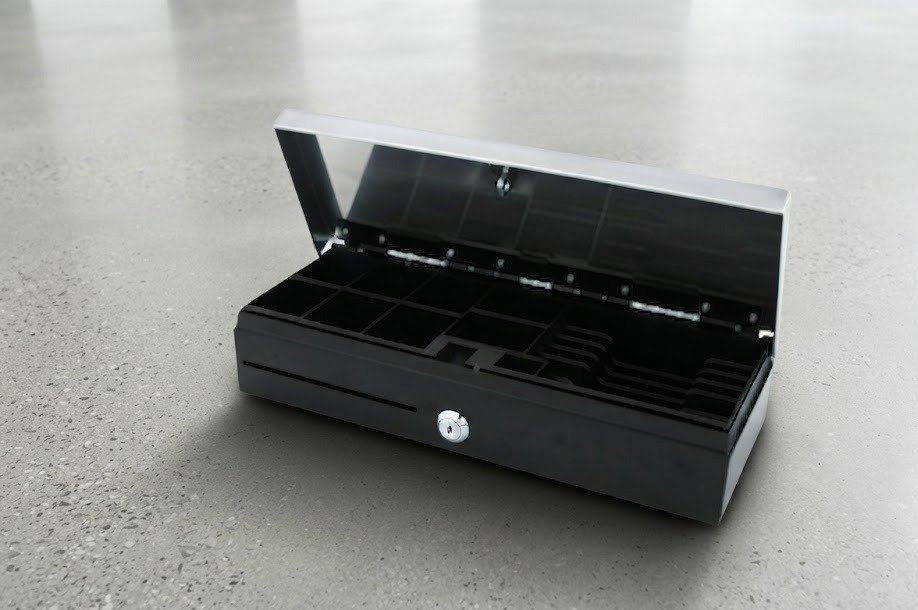
The Honeywell Flip-Top Cash Drawer BC303IIP is a space-saving point-of-sale cash drawer designed for supermarkets, pharmacies, restaurants, cafés, retail stores and other checkout environments where counter depth is limited.
Unlike a conventional pull-out cash drawer, the BC303IIP opens upward. This flip-top design reduces the amount of counter depth required and gives cashiers direct access to organised banknote and coin compartments.
Detailed specifications publicly available for the closely matching Birch POS-303IIP platform include a steel cabinet, approximately 460 × 170 × 100mm dimensions, six bill compartments, eight adjustable coin sections, a front media slot, microswitch, 24V printer-trigger interface and durability rated around one million operations.
Because no Honeywell-issued BC303IIP datasheet was found, GS Systemz should verify these detailed measurements and interface specifications against its physical Honeywell-labelled stock before publishing them as fixed manufacturer specifications.
The BC303IIP is a flip-top POS cash drawer used to organise cash and connect to a compatible point-of-sale system.
It can store:
In a typical POS installation, the drawer connects to the cash-drawer output of a compatible thermal receipt printer. When an authorised cash transaction is completed, the printer sends an electrical pulse to release the drawer.
The biggest difference is the opening mechanism.
A conventional cash drawer slides forward toward the cashier. A flip-top drawer opens vertically from the top.
This can make the BC303IIP particularly useful for:
The matching POS-303IIP platform is approximately 170mm deep, whereas many conventional pull-out drawers require considerably more counter depth.
| Feature | Published / matched specification |
|---|---|
| Local product name | Honeywell BC303IIP |
| Product type | Flip-top POS cash drawer |
| Opening direction | Upward |
| Matching documented platform | Birch POS-303IIP |
| Construction | Steel |
| Dimensions | Approx. 460 × 170 × 100mm |
| Bill compartments | 6 |
| Coin compartments | 8 adjustable |
| Cash insert | Heavy-duty ABS |
| Front media slot | Yes |
| Microswitch | Documented |
| Printer trigger | Supported |
| Documented voltage | 24V |
| Connector | RJ11/RJ12 terminology varies |
| Lock | Key-operated |
| Inner locking cover | Documented on matching configuration |
| Durability | Approx. 1,000,000 operations |
| Net weight | Approx. 4.3kg |
| Colour | Black or beige on matching platform |
| USB | Not standard |
| Ethernet | No |
| Wi-Fi | No |
| Battery | No |
| Warranty | Confirm GS Systemz local warranty |
The detailed specifications above correspond to the documented POS-303IIP platform that closely matches the locally listed BC303IIP.
A flip-top cash drawer is primarily a space-management solution.
Its advantages include:
It can be especially valuable where a checkout counter also needs space for:
The matching POS-303IIP platform measures approximately:
460mm wide × 170mm deep × 100mm high.
That equals roughly:
The shallow 17cm depth is the most important measurement when comparing this drawer with standard pull-out models.
The counter also needs sufficient vertical clearance so the lid can open completely.
The documented matching cash tray has six bill compartments.
Businesses can organise these compartments according to their cash-handling requirements.
For a Pakistani checkout environment, individual slots may be assigned according to whichever denominations are handled most frequently.
The matching platform has eight adjustable coin compartments.
Adjustable coin sections provide greater flexibility than a permanently fixed tray because a business can adapt the available space according to its cash-handling pattern.
A front media slot is included in the documented POS-303IIP configuration. It is intended for items such as cheques and credit-card receipts.
Depending on company procedures, it can also be useful for:
These items may be inserted without opening the entire drawer.
The matching POS-303IIP uses a heavy-duty ABS cash insert, and documented configurations include an inner locking cover.
A removable cash insert can make shift changes and cash counting easier.
However, GS Systemz should confirm whether its Honeywell-labelled package actually includes:
before listing these as included accessories.
The matching POS-303IIP specification lists a microswitch as standard.
A microswitch can allow compatible POS equipment to detect whether the drawer is:
This can support:
The POS hardware and software must support the status signal for this feature to work.
Yes, when connected to a compatible POS printer/interface.
The documented POS-303IIP includes a solenoid-operated printer interface.
A normal workflow is:
The POS application can often be configured to open the drawer only for specific transaction types.
This is one specification that should be verified physically.
The detailed technical catalogue for POS-303IIP states a 24V RJ11 printer interface, while other product listings describe the same drawer as using RJ12.
A historical Birch product listing also described the POS-303IIP as RJ12.
Because RJ11/RJ12 terminology is often inconsistently used for cash-drawer modular connectors, GS Systemz should check:
Do not determine compatibility solely from the connector shape.
The detailed matching specification identifies a 24V printer interface.
Before connecting the drawer to a thermal printer, verify:
An incompatible electrical connection can prevent opening and may damage equipment.
Not in the standard documented configuration.
The normal architecture is:
POS computer → thermal receipt printer → cash drawer
The computer sends commands to the printer, and the printer provides the electrical pulse required by the drawer.
A direct PC connection normally requires an additional:
No such adapter should be assumed to be included with the BC303IIP.
Normally, a printer-driven cash drawer receives its brief opening pulse from the compatible receipt printer.
It does not require continuous power like a thermal printer or POS computer.
Special USB or serial trigger configurations may work differently.
The documented matching model includes key-lock security.
Manual key access is useful when:
Keys should be controlled carefully because possession of a manual key can bypass normal electronic drawer-opening rules.
The detailed matching specification lists an inner drawer cover with key lock.
A locking inner cover can make it easier to:
Confirm that this cover is included in the actual GS Systemz package.
The matching POS-303IIP has a published durability rating of approximately 1,000,000 opening operations.
This makes it suitable for high-frequency checkout use.
Actual service life depends on:
The cycle rating is a product durability specification, not a warranty period.
The documented matching model weighs approximately 4.3kg net.
Its steel construction provides stability while the flip-top layout keeps the depth relatively compact.
The exact Honeywell-labelled unit should be weighed or checked against its carton if GS Systemz wants to publish this as a fixed WooCommerce attribute.
| Specification | Detail |
|---|---|
| Product type | Flip-top POS cash drawer |
| Construction | Steel |
| Opening | Vertical / top opening |
| Dimensions | Approx. 460 × 170 × 100mm |
| Net weight | Approx. 4.3kg |
| Bill compartments | 6 |
| Coin compartments | 8 adjustable |
| Cash tray | Heavy-duty ABS |
| Media slot | Front access |
| Microswitch | Yes on matching specification |
| Interface voltage | 24V |
| Interface | RJ11 documented; RJ12 also appears in listings |
| Electronic release | Yes |
| Security | Key lock |
| Inner cover | Lockable on documented configuration |
| Durability | Approx. 1,000,000 cycles |
| Colour | Black/beige matching variants |
| USB | Not standard |
| LAN | No |
| Wi-Fi | No |
| Battery | No |
| Warranty | Verify locally |
Detailed hardware specifications are based on the closely matching Birch POS-303IIP documentation rather than a Honeywell-issued BC303IIP datasheet.
Yes, provided the printer has a compatible cash-drawer interface.
Before connecting it, confirm:
The brand of receipt printer is less important than electrical and software compatibility.
Potentially.
If a Speed-X printer provides the correct 24V-compatible drawer output and matching wiring, it may control the drawer.
Verify the exact Speed-X model before connection.
Potentially, yes.
Again, compatibility depends on:
Do not assume compatibility purely because both devices are sold as POS hardware.
Potentially.
The locally advertised Honeywell branding does not mean every Honeywell POS device will automatically have a compatible drawer interface.
Always confirm the exact POS terminal or printer specification.
Check these items first:
If the drawer opens manually with the key but not electronically, the likely issue is with:
Where microswitch sensing is enabled, incorrect status can result from:
Inspect the physical switch before changing POS software settings.
Common causes include:
Do not force the lid closed.
Yes.
Its shallow flip-top design makes it particularly suitable for checkout lanes where forward drawer travel would consume too much space.
The six-note and eight-coin layout also provides substantial organisation for cash transactions.
Yes.
A pharmacy counter often has to accommodate:
A 170mm-deep flip-top drawer can preserve valuable counter space compared with a deep pull-out model.
Yes.
Possible uses include:
Make sure no monitor, printer or other equipment blocks the lid’s upward movement.
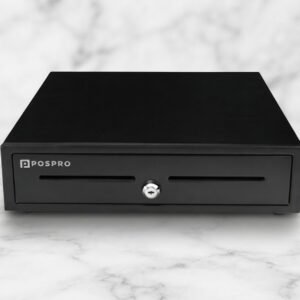
| Feature | BC303IIP | POSPRO PCD-100 |
|---|---|---|
| Opening | Flip top | Pull out |
| Approx. size | 460 × 170 × 100mm | 410 × 420 × 100mm |
| Counter depth | Very low | Much higher |
| Bill compartments | 6 | 5 |
| Coin sections | 8 | Up to 8 |
| Microswitch | Documented on matching platform | Configuration dependent |
| Interface | 24V printer interface | Interface varies |
| Durability | Approx. 1 million cycles | 1 million+ published |
| Best use | Narrow POS counters | General checkout counters |
Choose the BC303IIP when counter depth is the main limitation.
Choose the PCD-100 when a conventional forward-opening drawer better fits the POS furniture.
| Requirement | Flip-Top BC303IIP | Standard Drawer |
|---|---|---|
| Counter depth | Excellent | Requires more |
| Upward clearance | Required | Minimal |
| Forward clearance | Minimal | Required |
| Standing cashier | Excellent | Good |
| Narrow checkout lane | Excellent | Less suitable |
| Equipment placed directly above | Problematic | Usually possible |
| Typical application | Supermarket/pharmacy | General retail |
The better design depends on the checkout furniture rather than one style being universally superior.
The exact Honeywell package is not publicly documented.
Depending on the distributor, a package may include:
GS Systemz should physically inspect its stock before guaranteeing any accessory.
GS Systemz can position the BC303IIP for businesses in Pakistan that need a compact, commercially suitable cash drawer for a space-limited POS counter.
Before ordering, confirm:
The BC303IIP may be suitable for:
Check availability of the Honeywell Flip-Top Cash Drawer BC303IIP from GS Systemz in Pakistan.
Its space-saving flip-top construction makes it suitable for supermarkets, pharmacies, restaurants, cafés and other checkout locations where a conventional deep pull-out cash drawer is difficult to accommodate.
Before ordering, verify the exact branding, dimensions, cash-tray layout, microswitch, 24V interface, RJ pinout, lockable cover, receipt-printer compatibility, keys, warranty and complete box contents.
The BC303IIP is currently listed by a Pakistani POS distributor as a Honeywell flip-top cash drawer designed for point-of-sale installations.
The closely matching POS-303IIP platform measures approximately 460 × 170 × 100mm. GS Systemz should verify this on its Honeywell-labelled unit.
The matching documented tray contains six bill sections and eight adjustable coin compartments.
The matching POS-303IIP documentation lists a microswitch as standard for drawer open/closed status sensing.
The documented matching platform uses a 24V printer interface. Verify compatibility with the exact receipt printer before connection.
The detailed catalogue identifies RJ11, while other POS-303IIP listings use RJ12 terminology. Verify the physical connector, pinout and cable rather than relying on the connector name alone.
Yes, when connected to a compatible POS receipt printer or drawer-trigger interface that sends the required opening pulse.
A lockable inner cover is documented for the matching POS-303IIP configuration, but GS Systemz should confirm whether it is included with its specific package.
The closely matching POS-303IIP platform has a published durability rating of approximately one million operations.
You can check current availability of the Honeywell Flip-Top Cash Drawer BC303IIP from GS Systemz in Pakistan. Confirm the exact model label, interface, voltage, keys and warranty before ordering.
Reviews
There are no reviews yet.