
₨11,200.00
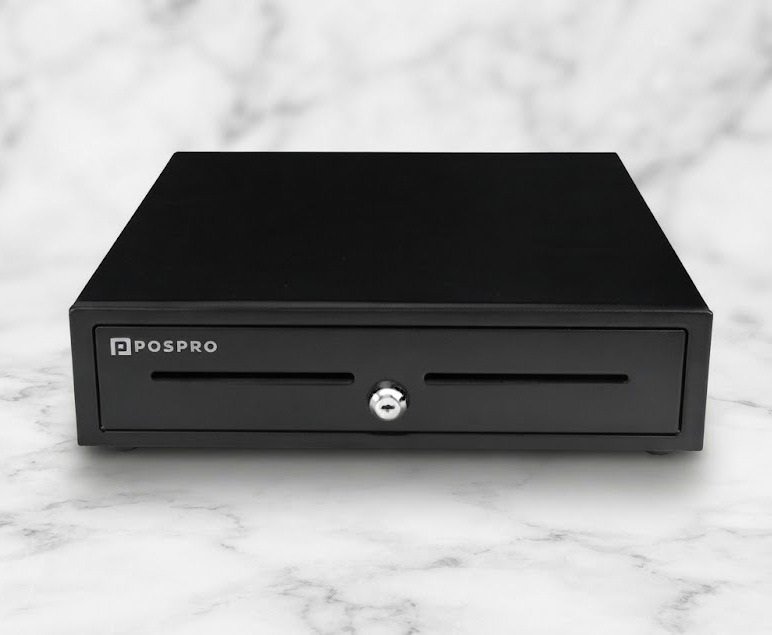
The POS Standard Cash Draw POSPRO PCD-100 is a heavy-duty point-of-sale cash drawer designed for supermarkets, retail stores, restaurants, pharmacies, cafés and other businesses that need secure, organised cash handling at the checkout counter.
Current Pakistan listings describe the PCD-100 family with a thick-gauge cold-rolled steel and SECC body, ABS cash tray, five bill compartments with metal wire grippers, up to eight coin compartments, media slots, a multi-position lock and a durable ball-bearing drawer mechanism.
A commonly published size is approximately 410mm wide × 420mm deep × 100mm high, with a net weight around 6.7kg for the standard/ST specification. The drawer is rated by local distributors for more than 1,000,000 operating cycles.
The POSPRO PCD-100 is a mechanical and electronically triggered cash drawer used as part of a point-of-sale system.
It provides organised storage for:
A typical POS setup connects the drawer to a compatible thermal receipt printer or uses an appropriate interface trigger. When the POS application completes an authorised cash transaction, the system can send an electrical pulse that releases the drawer.
Postech currently lists the POSPRO PCD-100 in its product portfolio specifically as a “POS Standard Cash Draw.”
| Feature | Published specification |
|---|---|
| Brand | POSPRO |
| Model family | PCD-100 |
| Product type | POS cash drawer |
| Construction | Thick-gauge cold-rolled steel & SECC |
| Standard colour | Black |
| Finish | Textured hybrid powder coat |
| Dimensions | Approx. 410 × 420 × 100mm |
| Cash tray | Removable ABS plastic |
| Bill compartments | 5 |
| Bill retention | Metal wire grippers |
| Coin compartments | Up to 8 |
| Media slots | 1 or 2 depending configuration |
| Drawer mechanism | Mute ball-bearing roller |
| Lock | 3-position lock / 4 operating functions |
| Electronic opening | Supported on compatible configuration |
| Common interface | RJ-12 on PCD-100M |
| Other interface options | RJ11, USB, RS232 and custom configurations listed |
| Micro switch | Available on selected configuration |
| Published lifecycle | More than 1,000,000 operations |
| Net weight | Approx. 6.7kg on standard/ST specification |
| Gross weight | Approx. 7.6kg |
| Carton dimensions | Approx. 458 × 468 × 155mm |
| Mounting bracket | MB-100 listed as optional accessory |
| Warranty | Confirm GS Systemz local coverage |
The interface and accessory fields are configuration-dependent. Not every PCD-100 should automatically be advertised with RJ11, RJ12, USB and RS232 simultaneously.
Current Pakistani sources use several related model names:
Postech lists the general product as PCD-100, POS Experts publishes a PCD-100 ST specification with a stainless-steel front, and Wise-Tech sells a PCD-100M configuration with an RJ-12 interface.
These should be treated as variants within the PCD-100 family, not blindly combined into one specification.
Before publication, GS Systemz should inspect the exact model label and rear cable/interface.
The PCD-100 is designed for businesses where the cash drawer is opened and closed repeatedly throughout the working day.
Its main advantages include:
This combination makes the drawer particularly relevant to fixed checkout counters handling frequent cash transactions.
The main drawer body is published as thick-gauge cold-rolled steel and SECC, finished with a textured hybrid powder coating.
The internal cash insert is made from ABS plastic.
This construction combines:
The PCD-100 ST listing additionally specifies a stainless-steel front panel. That feature should only be advertised when the stocked version actually has it.
The standard published configuration includes five bill compartments.
Each note section uses a metal wire gripper to hold banknotes in place.
The compartments can be organised for Pakistani currency according to the business’s transaction patterns.
For example, a retailer may allocate spaces for frequently handled denominations while placing larger or less common notes underneath the removable tray or into a secure media section according to company procedures.
The PCD-100 is commonly described with up to eight coin slots.
Local descriptions sometimes use the wording “5,8 coin slots,” suggesting tray layouts may vary between configurations.
GS Systemz should physically count the compartments in its stocked tray before using an exact coin-slot number in the WooCommerce specification field.
For the main description, the safest wording is:
Five bill compartments with up to eight coin sections.
The PCD-100 specification lists one or two media slots, depending on configuration.
These slots can be useful for temporarily storing:
The operator can insert some documents without fully opening the cash drawer, depending on the tray and media-slot design.
The cash insert is listed as an ABS plastic tray, and the PCD-100 family also offers a lockable-lid accessory.
A removable insert can make shift changes easier because cash may be counted or transferred without moving the entire steel drawer.
Before promising a removable lockable tray as standard, confirm whether the GS Systemz package includes:
The lockable lid is specifically listed as an accessory rather than a guaranteed standard component.
The PCD-100 is published with a 3-position lock supporting four operating functions:
The exact key position and behaviour should be confirmed from the physical drawer because mechanical labels may differ between batches.
The drawer remains secured and should not open from a normal electronic pulse.
The key mechanically releases the drawer.
This can be useful:
The POS system or receipt printer sends the required signal to release the latch.
This mode may allow the drawer to remain accessible during authorised servicing or specific operational procedures.
For security, keys should only be issued to authorised staff.
The exact connection depends on the PCD-100 variant.
POS Experts lists possible interface configurations including:
and separately identifies USB and serial triggers among available accessories.
Wise-Tech’s PCD-100M specification specifically lists an RJ-12 interface.
Therefore, it is inaccurate to promise all four interfaces on every drawer.
RJ-12 is strongly supported for the PCD-100M configuration.
In a typical POS installation, an RJ-type cash drawer connects to the cash-drawer port of a compatible receipt printer.
The workflow is usually:
This avoids requiring a separate USB connection between the drawer and PC.
USB is listed as an interface option, and a USB trigger is separately listed among the available accessories.
This indicates USB support may require:
Do not assume the standard RJ-12 drawer can simply be connected to a computer using a passive RJ-to-USB cable.
For GS Systemz, publish USB only when the required interface hardware is included.
RS232 is also listed among PCD-100 interface options, while a serial-interface trigger appears in the accessories list.
As with USB, this should be treated as an optional interface configuration.
A serial deployment may require:
The general PCD-100/ST specification does not provide a single universal drawer-kick voltage.
A current POS Experts listing for the PCD-100M advertises micro-switch support with 12V–24V in its product title, indicating that electrical configuration matters.
Do not connect the drawer to a receipt printer solely because the RJ plug physically fits.
Before connection, confirm:
A mismatch can cause unreliable operation or damage to the drawer or printer interface.
A micro switch is listed as an optional accessory for the PCD-100 family, while the current PCD-100M listing specifically promotes a micro-switch-equipped configuration.
A micro switch can allow compatible POS hardware/software to determine whether the drawer is:
This can be useful for:
The application must support drawer-status sensing for the feature to provide useful feedback.
The published lifecycle figure is MTBF of more than 1,000,000 operations.
This is intended to position the drawer for repeated commercial use.
However, one million cycles is a laboratory or supplier durability figure rather than a guaranteed number of real-world transactions.
Drawer life can be affected by:
The PCD-100 uses a durable mute ball-bearing roller mechanism according to current product specifications.
The mechanism is intended to provide:
The drawer should still be installed on a level and stable surface.
The most consistently published dimensions are:
410mm (W) × 420mm (D) × 100mm (H).
This is approximately:
Before installing under a POS terminal, measure the available counter depth as well as width.
The drawer needs additional clearance at the front to open fully.
The standard/ST specification publishes:
A current PCD-100M listing elsewhere uses 7.3kg in its product title, suggesting weight may differ by revision, steel front, micro-switch or packaging interpretation.
For the base PCD-100 page, approximately 6.7kg net is the better-supported figure.
| Specification | Published detail |
|---|---|
| Brand | POSPRO |
| Product family | PCD-100 |
| Product type | Standard/heavy-duty POS cash drawer |
| Dimensions | 410(W) × 420(D) × 100(H)mm |
| Main construction | Thick-gauge cold-rolled steel & SECC |
| Finish | Textured hybrid powder coat |
| Colour | Black |
| Front | Stainless-steel front on ST variant |
| Roller | Mute ball-bearing mechanism |
| Tray | ABS plastic |
| Bill compartments | 5 |
| Bill clips | Metal wire grippers |
| Coin compartments | Up to 8 |
| Media slots | 1 or 2 |
| Lock | 3-position |
| Lock functions | Locked open/closed, manual, electronic |
| PCD-100M interface | RJ-12 |
| Other interface options | RJ11, USB, RS232, custom |
| Lifecycle | MTBF 1,000,000+ operations |
| Net weight | Approx. 6.7kg |
| Gross weight | Approx. 7.6kg |
| Carton | Approx. 458 × 468 × 155mm |
| Micro switch | Optional / variant dependent |
| Lockable lid | Optional |
| USB trigger | Optional |
| Serial trigger | Optional |
| MB-100 bracket | Optional |
| Warranty | Distributor/local seller dependent |
Yes, when the cash drawer and receipt printer have compatible drawer interfaces.
A common POS arrangement is:
POS computer → receipt printer → cash drawer
The drawer connects to the compatible cash-drawer port on the receipt printer.
When the POS software completes a cash sale, it sends a command to the printer. The printer then sends the required electrical pulse to release the drawer.
Before connecting the PCD-100, verify the printer’s:
Potentially, yes, if the exact Speed-X printer provides a compatible cash-drawer output and the electrical requirements match the PCD-100 configuration.
Do not determine compatibility from the connector shape alone.
Check:
The same principle applies.
A POSPRO-branded printer and POSPRO drawer are not automatically electrically compatible merely because the brand matches.
The actual printer’s:
must match the selected PCD-100 configuration.
An RJ-connected passive cash drawer normally receives its opening pulse from the connected compatible receipt printer rather than using a permanent external power supply.
USB- or serial-triggered installations may operate differently.
Because the PCD-100 family is sold with multiple interface options, GS Systemz should verify whether its exact package requires:
Yes, when the POS software, receipt printer and cash drawer are properly configured.
Typical configuration options may include:
The actual behaviour is controlled primarily by the POS software and connected printer/interface.
Check these points:
Use the manual key to check whether the mechanical drawer itself operates correctly.
If it opens manually but not electronically, the problem is more likely to involve the interface, printer, cable, voltage or software configuration.
Possible causes include:
Do not force the drawer closed.
Remove the cash tray and inspect for physical obstruction first.
Yes.
Both Wise-Tech and Multan IT position the PCD-100 for supermarkets and department-store cash handling.
It can be suitable for:
Its five bill compartments and multiple coin sections provide a practical layout for transaction-heavy counters.
Yes.
A restaurant can integrate the drawer with a compatible POS terminal and receipt printer for:
A high-volume restaurant should confirm that the POS application supports the exact drawer-trigger workflow.
Yes.
Its heavy construction and organised note/coin insert can make it suitable for fixed pharmacy checkout counters.
A pharmacy should also consider:
| Feature | PCD-100 | PCD-100M |
|---|---|---|
| Product family | POSPRO cash drawer | POSPRO cash drawer |
| Body dimensions | Approx. 410 × 420 × 100mm | Approx. 410 × 420 × 100mm |
| Bill compartments | 5 | 5 |
| Coin slots | Up to 8 | Up to 8 |
| Steel body | Yes | Yes |
| Main interface | Depends on configuration | RJ-12 explicitly listed |
| Micro switch | Optional | Promoted on current PCD-100M listing |
| POS status sensing | Configuration dependent | Micro-switch version better suited |
| Best use | General POS drawer | Defined RJ-12/OPOS-type deployment |
The PCD-100M should be selected when its specific RJ-12 and micro-switch configuration matches the intended POS setup.
| Feature | PCD-100 | PCD-50 |
|---|---|---|
| Positioning | Larger/heavy-duty drawer | Alternative standard drawer |
| PCD-100 dimensions | 410 × 420 × 100mm | Verify exact PCD-50 revision |
| Bill compartments | 5 | PCD-50 versions vary |
| Coin capacity | Up to 8 | Variant dependent |
| Interface options | Multiple | Variant dependent |
| Best use | Busy fixed POS counter | Alternative POS counter requirement |
Current Pakistani listings show both models in the POSPRO cash-drawer range.
Selection should be based on tray layout, dimensions, interface and available counter space rather than model number alone.
| Feature | PCD-100 | Compact Cash Drawer |
|---|---|---|
| Width | Approx. 410mm | Usually smaller |
| Depth | Approx. 420mm | Usually shallower |
| Weight | Approx. 6.7kg | Usually lighter |
| Bill organisation | 5 sections | Often fewer |
| Coin organisation | Up to 8 | Often fewer |
| Heavy-use suitability | Better | Depends on model |
| Counter space needed | Higher | Lower |
| Best use | Standard commercial checkout | Space-limited counter |
Choose the PCD-100 when cash capacity and durability matter more than minimum size.
The PCD-100 ST listing identifies several accessories and options:
These should be presented as optional unless GS Systemz includes them in the specific package.
An MB-100 bracket is listed as an accessory for the PCD-100 family.
This suggests under-counter or specialised mounting configurations may be possible with the correct bracket and installation.
Before mounting:
Never force a cable or use an unverified voltage simply because the connector fits.
The PCD-100 may be suitable for:
GS Systemz can position the PCD-100 for businesses in Pakistan that require a durable POS cash-management solution with organised currency storage and electronic opening capability.
Before ordering, confirm:
Do not select the drawer based only on connector appearance. Interface pinout and voltage compatibility are important parts of POS installation.
Check availability of the POS Standard Cash Draw POSPRO PCD-100 from GS Systemz in Pakistan.
The PCD-100 is suitable for supermarket counters, restaurants, pharmacies, retail stores, cafés and other fixed POS environments requiring organised cash storage and electronically controlled drawer opening.
Confirm the exact PCD-100 variant, RJ interface, micro switch, voltage, tray configuration, keys, accessories, warranty and receipt-printer compatibility before ordering.
The POSPRO PCD-100 is a heavy-duty point-of-sale cash drawer with a steel body, removable ABS cash insert, five bill compartments, multiple coin sections and electronic-opening capability.
The standard published tray has five bill compartments with metal wire grippers.
Current specifications describe up to eight coin slots, although exact tray layout should be verified on the stocked version.
The commonly published size is approximately 410mm wide × 420mm deep × 100mm high.
The PCD-100M specifically lists an RJ-12 interface. Other PCD-100 configurations may use RJ11, USB, RS232 or another interface arrangement.
Yes, when a compatible POS system or receipt printer sends the correct electronic drawer-release signal.
Yes. Current specifications describe a three-position lock with manual, electronically driven and locked operating functions.
Local specifications publish an MTBF of more than one million drawer operations.
No. USB, serial and other interfaces are configuration-dependent, and trigger accessories may be required. Verify the exact GS Systemz variant before purchase.
You can check availability of the POSPRO PCD-100 Standard Heavy-Duty Cash Drawer from GS Systemz in Pakistan. Confirm the interface, voltage, tray layout, micro switch, keys and local warranty before ordering.
Reviews
There are no reviews yet.