
₨11,500.00
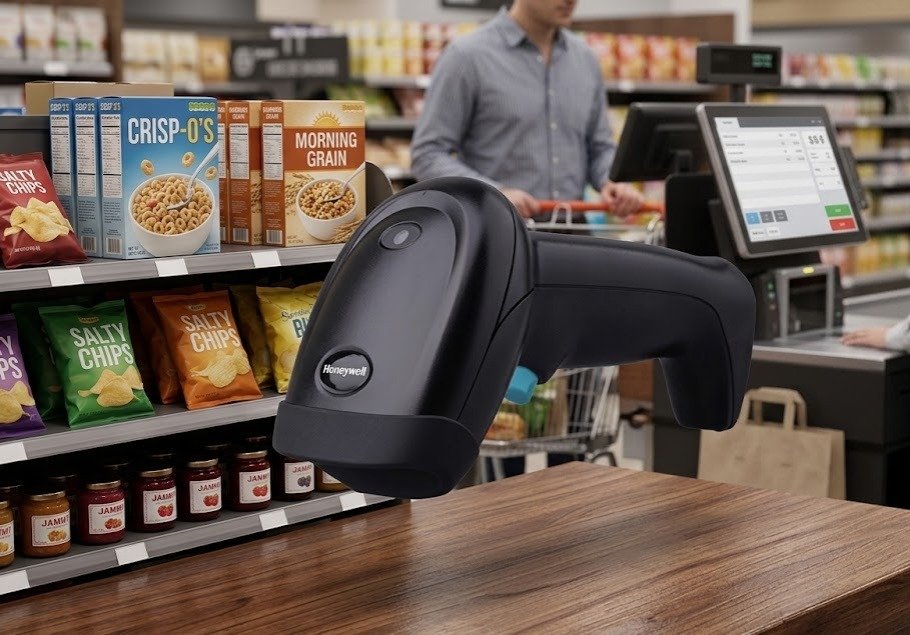
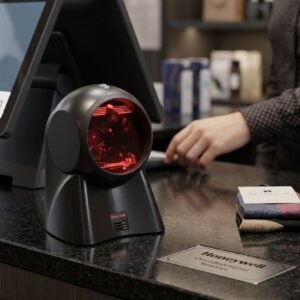
The Honeywell HH360 Handy 1D Barcode Scanner With Stand is a corded linear-imaging scanner designed for retail counters, grocery stores, pharmacies, libraries, courier offices, warehouses and inventory workstations.
Its official product name is the Honeywell Youjie HH360 Linear-Imaging Scanner. It reads standard linear barcodes from product labels, paper documents, smartphones and computer displays. Its 1D imaging engine is also designed to handle high-density, low-quality and moderately damaged barcodes.
The HH360 can scan at up to 300 scans per second and supports a minimum published barcode width of 3 mil. Depending on barcode density, its reading distance can extend to approximately 650mm for a 20 mil Code 39 barcode.
The scanner is available in different interface and package configurations. Selected USB kits include a stand, while scanner-only packages may contain only the HH360 and its interface cable. GS Systemz should confirm the exact kit number and box contents before publication or dispatch.
| Feature | Published specification |
|---|---|
| Brand | Honeywell Youjie |
| Model | HH360 |
| Product type | Corded handheld barcode scanner |
| Scan technology | 1D linear imaging |
| Scan pattern | Single line |
| Scan speed | Up to 300 scans per second |
| Minimum barcode width | 3 mil |
| Barcode support | Standard 1D and GS1 DataBar |
| QR-code support | No |
| Screen scanning | Supported for compatible 1D codes |
| Maximum published range | Up to 650mm for 20 mil Code 39 |
| Interfaces | USB, RS-232 and Keyboard Wedge |
| Stand | Included with selected kits |
| Weight | Approximately 140g |
| Dimensions | Approximately 98 × 126 × 155mm |
| Drop resistance | Random drops from approximately 1–1.5m |
| Environmental sealing | IP40 |
| Original Honeywell warranty | One year |
| Battery | Not required |
| Wireless operation | No |
The technical figures above come from Honeywell’s HH360 datasheet and current Honeywell warranty matrix.
The Honeywell HH360 is suitable for businesses that need dependable scanning of conventional product and inventory barcodes without paying for wireless or 2D functionality they will not use.
Its primary benefits include:
Honeywell designed the HH360 for switching between traditional printed barcodes and linear barcodes displayed on electronic screens, making it useful for online-to-offline retail and customer-service workflows.
The HH360 uses a linear-image scan engine rather than a traditional moving-mirror laser mechanism.
It delivers a published scan rate of up to 300 scans per second, helping process product, document and inventory codes quickly at busy workstations.
The scanner reads compatible 1D codes from:
Screen scanning applies only to supported linear formats. It does not allow the HH360 to read QR codes.
The scanner has a published minimum barcode width of 3 mil. This makes it suitable for selected compact labels used on electronic components, small products, medicine packaging and inventory assets.
The HH360 can read larger, lower-density barcodes from farther away than small, high-density codes.
Its official performance table lists distances ranging from approximately 85–155mm for a 4 mil Code 39 symbol to 20–650mm for a 20 mil Code 39 symbol.
Honeywell describes the HH360 as having no moving scan-engine parts and full impact-resistant bumpers. Its published drop specification covers random drops from approximately 1 to 1.5 metres.
The HH360 platform supports:
The cable and interface supplied depend on the full kit number.
| Application | Suitability |
|---|---|
| Retail product billing | Excellent |
| Grocery checkout | Excellent |
| Pharmacy product scanning | Good for compatible 1D codes |
| Book and ISBN scanning | Excellent |
| Library circulation | Excellent |
| Membership cards | Excellent |
| Courier labels using 1D codes | Excellent |
| Inventory data entry | Excellent |
| Product receiving | Excellent |
| Packing verification | Excellent |
| Utility and financial documents | Good |
| Electronic-component labels | Good |
| Smartphone-displayed 1D codes | Supported |
| Computer-screen 1D codes | Supported |
| Damaged linear barcodes | Supported within practical limits |
| Stand-based counter scanning | Supported with correct stand and settings |
| QR-code scanning | Not supported |
| Data Matrix scanning | Not supported |
| PDF417 scanning | Not supported |
| Mobile QR payments | Not supported |
| Wireless aisle scanning | Not supported |
| Long-range pallet scanning | Not designed for this |
| Wet outdoor use | Not recommended |
The HH360 is best suited to fixed indoor workstations where conventional 1D scanning, durability and screen-code compatibility are more important than wireless mobility or 2D barcode support.
| Specification | Official detail |
|---|---|
| Product name | Honeywell Youjie HH360 |
| Scanner category | Corded handheld scanner |
| Scanning technology | Linear imager |
| Scan pattern | Single line |
| Scan rate | Up to 300 scans per second |
| Minimum resolution | 3 mil |
| Minimum print contrast | 20% |
| Pitch tolerance | Approximately 65° |
| Skew tolerance | Approximately 75° |
| Decoding capability | Standard 1D and GS1 DataBar |
| Interfaces | USB, RS-232 and Keyboard Wedge |
| Input voltage | 5V DC ±0.5V |
| Typical operating power | 900mW, 180mA at 5V |
| Typical standby power | 500mW, 100mA at 5V |
| Dimensions | 98 × 126 × 155mm |
| Weight | 140g |
| Operating temperature | 0°C to 50°C |
| Storage temperature | -40°C to 60°C |
| Humidity | Up to 95% |
| Ambient-light tolerance | Up to 70,000 lux |
| Drop specification | Random drops from 1–1.5m |
| Environmental sealing | IP40 |
| Original warranty | One year |
| Battery | Not required |
| Wireless communication | No |
These specifications are published in Honeywell’s April 2017 HH360 technical datasheet. Honeywell’s current warranty matrix lists the HH360 handheld CCD scanner with a one-year factory warranty.
Honeywell publishes the following typical depth-of-field figures:
| Barcode | Typical reading range |
|---|---|
| Code 39, 4 mil | 85–155mm |
| Code 39, 5 mil | 75–200mm |
| Code 39, 7.5 mil | 55–315mm |
| Code 39, 10 mil | 25–415mm |
| UPC-A, 13 mil | 20–500mm |
| Code 39, 20 mil | 20–650mm |
These figures are typical test results rather than guaranteed distances for every barcode.
Practical scanning distance also depends on:
A larger 20 mil barcode can be read from farther away than a compact 4 mil barcode.
A mil is one-thousandth of an inch.
A minimum width of 3 mil means the HH360 is designed to decode supported linear barcodes whose narrowest element is approximately 0.076mm under suitable conditions.
This does not guarantee successful reading of every 3 mil label. Results also depend on:
Businesses scanning very small jewellery, electronic-component or pharmaceutical labels should test the actual barcode before purchasing multiple units.
No. The HH360 is a linear-imaging scanner.
It projects a single-line aiming pattern, which can look similar to a laser line, but it uses solid-state imaging technology to capture and decode linear barcodes.
The linear-imaging design provides:
The accurate product name is:
Honeywell HH360 1D Linear-Imaging Barcode Scanner
Honeywell’s warranty matrix also categorises the HH360 as a handheld CCD scanner.
The HH360 is a 1D scanner.
It reads linear barcodes composed of bars and spaces. It does not decode square or stacked 2D formats such as:
The official datasheet states that the scanner reads standard 1D and GS1 DataBar symbologies.
Businesses that need QR payments, digital QR tickets or Data Matrix medicine codes should choose a Honeywell 2D area imager such as the HH490, Voyager 1470g or another suitable current model.
The HH360 user guide includes support and configuration options for common linear formats including:
Some formats may be disabled by default and require configuration through the scanner’s programming guide.
Yes. Retail product scanning is one of its primary applications.
The HH360 can read supported linear codes printed on:
Common UPC, EAN, Code 39, Code 128 and GS1 DataBar formats are supported by the scanner platform.
No. The Honeywell HH360 does not read QR codes.
A QR code contains data across horizontal and vertical patterns, requiring a 2D area-imaging scanner. The HH360 captures a single linear scan line and is intended for conventional 1D formats.
Do not use the HH360 for:
Choose a verified Honeywell 2D scanner when these formats are required.
Yes, provided the phone displays a compatible 1D barcode.
Honeywell specifically promotes the HH360 for switching between traditional printed barcodes and linear codes displayed on screens.
It may be used with screen-displayed:
It cannot scan a QR code simply because the QR code appears on a phone.
For better screen scanning:
Yes. Compatible linear barcodes displayed on desktop or laptop monitors can be scanned.
This can support:
The scanner sends the decoded value to the active software field. The connected application performs the product search, validation or transaction.
Honeywell promotes the HH360 for reading poor-quality and damaged linear barcodes.
It may read labels that are:
Scanning can still fail when:
Badly damaged pharmacy, courier or inventory labels should be replaced where identification accuracy is critical.
The HH360 has a published scanning speed of up to 300 scans per second.
This measurement describes how quickly the scan engine samples the barcode. It does not mean an employee can complete 300 separate transactions per second.
Actual workflow speed also depends on:
The stand holds the scanner at a fixed angle, allowing the operator to present products or cards without holding the scanner continuously.
A stand can help with:
The HH360 programming guide includes automatic-trigger and hands-free timing options, indicating that compatible stand-based presentation workflows can be configured.
However, a stand is not included with every HH360 package.
No. Stand inclusion depends on the complete product kit.
Examples include:
| Kit | Published package |
|---|---|
| YJ-HH360-R-2USB-1 | USB scanner kit including stand |
| YJ-HH360-R-2USB | USB scanner kit without confirmed stand |
| YJHH360-1-1USB | Scanner with 1.5m USB cable and no accessories |
A current distributor listing identifies YJ-HH360-R-2USB-1 as a USB kit containing the scanner, USB cable and stand. Another part-number listing identifies YJHH360-1-1USB as a USB scanner package without accessories.
GS Systemz should photograph and list the actual package contents rather than assuming that every HH360 includes a stand.
The user guide includes:
These settings can support automatic or presentation-style reading when the scanner is positioned correctly in a compatible stand.
The exact behaviour should be tested because it may depend on:
The official technical specification lists:
A USB keyboard configuration sends decoded barcode data like typed text.
It is suitable for:
The HH360 user guide includes USB serial-emulation and USB HID POS settings for applications requiring different communication behaviour.
RS-232 may be used with:
Keyboard Wedge is intended for older computer and POS installations that accept scanner input through the keyboard connection.
GS Systemz should state the exact included interface cable in the product specifications.
A compatible USB keyboard kit generally provides straightforward installation.
A typical setup is:
The official user guide includes plug-and-play interface programming for USB, Keyboard Wedge and serial configurations.
RS-232 and USB serial-emulation installations may require additional driver or port settings.
Yes. The HH360 user guide provides prefix and suffix programming, including an option to add a carriage-return suffix to supported symbologies.
Common output options include:
Use the programming guide for the exact HH360 revision. Incorrect programming barcodes can alter interface or barcode settings.
Yes. It can work with compatible POS, inventory, pharmacy, library, courier and document-processing applications.
In USB keyboard mode, barcode data normally appears in the active software field as if it had been typed.
Compatibility depends on:
The scanner should be tested with the customer’s actual application before purchasing several units.
It should work with many Pakistani POS and inventory applications that accept keyboard-style barcode input.
Potential workflows include:
Software requiring RS-232 communication, unusual suffixes or custom data formatting should be tested separately.
No. The HH360 is a corded scanner.
It connects through USB, RS-232 or Keyboard Wedge, depending on the kit.
Choose a wireless model when employees need to scan:
The wired HH360 is preferable when the scanner remains at one billing, library or inventory station.
No. It receives power through its wired connection or the applicable interface arrangement.
Benefits include:
The HH360 uses a solid-state imaging system with no moving scan-engine components and includes impact-resistant protective bumpers.
Its published specifications include:
The scanner remains a general-duty commercial model. It should not be treated as an ultra-rugged warehouse scanner.
No. It has an IP40 environmental rating.
IP40 means the housing provides protection against certain solid objects, but it has no certified water-ingress protection.
Do not:
Use a soft, lightly damp cloth for normal exterior cleaning.
Honeywell publishes:
Its gun-shaped form is designed for comfortable handheld use during intensive scanning. The relatively low weight can help reduce operator fatigue during repeated retail, document or inventory work.
Package contents vary by kit.
A package may include:
Do not assume that the stand or a particular cable is included.
Before publication, GS Systemz should confirm:
Honeywell’s current productivity warranty matrix lists the HH360 handheld scanner with a one-year original warranty.
Availability varies by region. Some Pakistan sellers list the HH360 as out of stock, while an international equipment supplier labels its HH360 stand kit as discontinued.
This does not establish one universal worldwide lifecycle date. It means buyers should verify:
Do not promise current factory production or global support without checking the exact part number.
| Requirement | Recommendation |
|---|---|
| Standard retail 1D barcodes | Supported |
| UPC and EAN products | Supported |
| Code 39 and Code 128 | Supported |
| GS1 DataBar | Supported |
| High-density 3 mil labels | Supported under suitable conditions |
| Long-distance large barcodes | Up to 650mm under published test conditions |
| Printed labels | Supported |
| Smartphone-displayed 1D codes | Supported |
| Computer-screen 1D codes | Supported |
| Damaged linear barcodes | Advertised |
| USB connection | Supported with correct kit |
| RS-232 connection | Supported with correct kit |
| Stand-based operation | Supported with correct kit |
| Battery-free operation | Supported |
| QR-code scanning | Not supported |
| Data Matrix scanning | Not supported |
| Wireless movement | Not supported |
| Waterproof operation | Not supported |
| Harsh industrial operation | Choose a rugged scanner |
Choose the Honeywell HH360 when reliable wired 1D scanning, screen compatibility and high-density performance are the priorities.
Choose a 2D area imager when QR Code, Data Matrix or PDF417 is required.
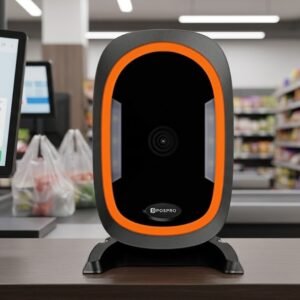
| Feature | Honeywell HH360 | POSPRO PBS-6610 |
|---|---|---|
| Barcode class | 1D | 1D |
| Scan technology | Linear imager/CCD | CCD linear imager |
| Scan speed | 300 scans/sec | Approximately 350 ±50 scans/sec |
| Minimum resolution | 3 mil | Approximately 4 mil |
| Maximum published range | Up to 650mm for 20 mil Code 39 | Depends on barcode and platform |
| Screen scanning | Supported for 1D codes | Supported for 1D codes |
| Interfaces | USB, RS-232 and Keyboard Wedge | Interface varies by kit |
| Sealing | IP40 | No verified POSPRO IP rating |
| Original warranty | One year | Local warranty must be confirmed |
| Best use | Buyers prioritising Honeywell support and 3 mil labels | Economical fast 1D scanning |
The HH360 offers stronger published high-density performance and an official Honeywell warranty specification.
The PBS-6610 may appeal where a lower-cost 1D scanner with a higher published sampling rate is sufficient.
| Feature | Honeywell HH360 | Honeywell HH490 |
|---|---|---|
| Barcode class | 1D | 1D and 2D |
| QR Code | No | Yes |
| Data Matrix | No | Yes |
| PDF417 | No | Yes |
| Screen scanning | Compatible linear codes | Printed and 2D screen codes |
| Scan technology | Linear imager | Area imager |
| Battery | Not required | Not required on corded version |
| Best use | Conventional product and document barcodes | Modern retail, QR and digital workflows |
Choose the HH360 when every required barcode is linear.
Choose the HH490 when the business needs QR payments, Data Matrix, PDF417 or broader mobile-screen compatibility.
GS Systemz can position the Honeywell HH360 for Pakistani businesses that need a dependable wired 1D scanner with optional stand-based operation.
This page helps buyers evaluate:
Before ordering, confirm:
The scanner may be suitable for:
Check availability of the Honeywell HH360 Handy 1D Barcode Scanner With Stand from GS Systemz in Pakistan.
Use it for standard retail labels, books, membership cards, inventory codes, courier documents, high-density barcodes and compatible 1D codes displayed on electronic screens.
Confirm the complete part number, interface cable, stand, product condition, local warranty and box contents before ordering.
The Honeywell Youjie HH360 is a corded handheld linear-imaging scanner designed to read standard 1D and GS1 DataBar barcodes.
No. It is a 1D scanner and does not read QR Code, Data Matrix, PDF417 or other general 2D formats.
It scans at up to 300 scans per second.
Yes, provided the phone displays a supported 1D barcode. It cannot scan a QR code from a phone.
The official performance table lists up to approximately 650mm for a 20 mil Code 39 barcode. Smaller, denser codes have shorter ranges.
Selected kits, including the YJ-HH360-R-2USB-1 package, include a USB cable and stand. Other packages may not include the stand.
The platform supports USB, RS-232 and Keyboard Wedge interfaces. The supplied interface depends on the complete kit number.
No. It is a wired scanner and receives power through its connected interface.
No. It has an IP40 rating, which does not provide certified water-ingress protection.
You can check availability of the Honeywell HH360 1D Linear-Imaging Scanner With Stand from GS Systemz in Pakistan.
Reviews
There are no reviews yet.