
₨45,500.00
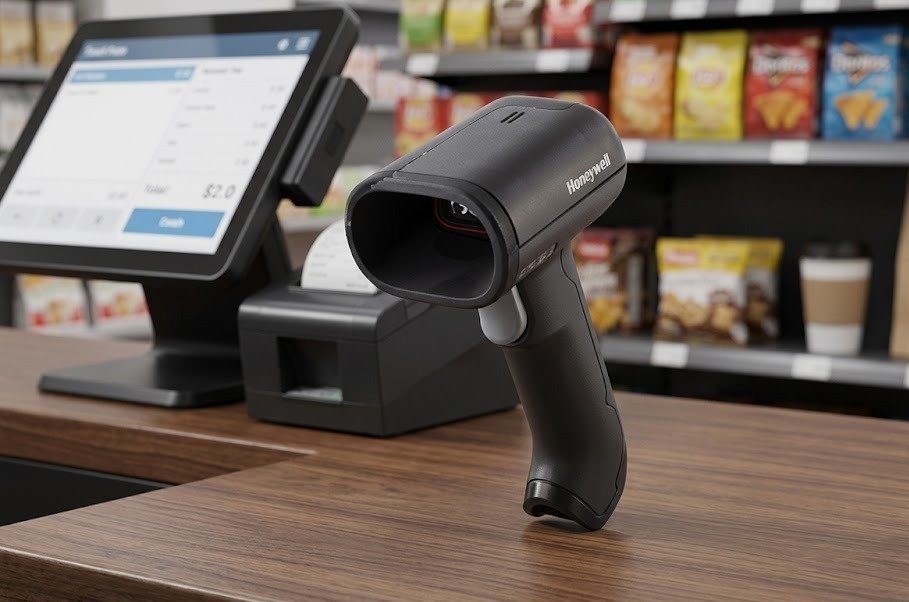
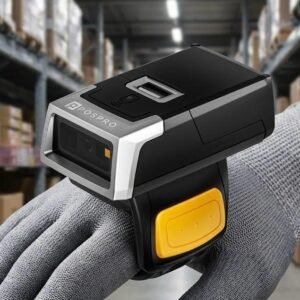
The Honeywell HH492 is a cordless 2D area-imaging barcode scanner designed for retail, inventory management, distribution centres, courier outlets and general commercial scanning.
It reads standard 1D and 2D barcodes, including QR codes, PDF417, Data Matrix and DotCode formats. The scanner can capture printed labels, digital-screen codes and some damaged or poorly printed barcodes.
Bluetooth communication, a charging and communication base, a 2730mAh lithium-ion battery and support for up to 50,000 scans per charge make it suitable for businesses that need reliable scanning away from a fixed workstation.
The Honeywell HH492 combines wireless movement, 2D barcode capability and extended scanning distance in one handheld device.
Its wireless design allows employees to scan products, cartons and inventory without remaining directly beside the connected computer or POS terminal. Honeywell lists a Bluetooth line-of-sight range of up to 30 metres when the scanner is used with its compatible charging and communication base.
The HH492 uses Honeywell’s GEN7 platform and a 1472-based scanning module to decode standard 1D and 2D barcode formats. It is designed to read product codes, digital codes, screen-displayed barcodes, Data Matrix symbols and DotCode applications.
Its extended scanning distance can help checkout staff read barcodes on products inside shopping carts without bending as far toward the item. The scanner is also designed to improve decoding of damaged and poor-quality barcodes that could otherwise require manual data entry.
Buy the Honeywell HH492 from GS Systemz for retail, courier, warehouse and inventory-scanning requirements in Pakistan.
The Honeywell HH492 combines cordless operation with standard-range 1D and 2D area imaging.
Key features:
Honeywell notes that barcode-decoding capabilities depend on the exact scanner configuration.
The Honeywell HH492 is suitable for commercial environments that require wireless scanning of printed and digital barcodes.
| Application | Suitability |
|---|---|
| Retail product scanning | Excellent |
| Supermarket checkout | Excellent |
| QR-code scanning | Excellent |
| Mobile-screen scanning | Excellent |
| Warehouse inventory | Excellent |
| Distribution-centre scanning | Excellent |
| Courier parcel scanning | Excellent |
| Express-delivery outlets | Excellent |
| Product receiving | Excellent |
| E-commerce order picking | Excellent |
| Stock counting | Excellent |
| Carton verification | Good |
| Government document codes | Good |
| Hotel registration codes | Good |
| Fixed POS scanning | Good |
| Outdoor use in rain | Not suitable |
| Heavy industrial environments | Consider a rugged industrial scanner |
Honeywell specifically identifies retail, government departments, distribution centres and express-delivery outlets as suitable applications for the HH492.
Here are the main official Honeywell HH492 technical specifications:
| Specification | Detail |
|---|---|
| Product name | Honeywell HH492 |
| Product type | Cordless 2D area-imaging scanner |
| Scanner technology | CMOS area imager |
| Imaging array | 1040 × 720 pixels |
| Decode capability | Standard 1D, PDF, 2D and DotCode |
| Wireless technology | Bluetooth |
| Bluetooth version | v5.2 in the English datasheet |
| Wireless frequency | 2.4–2.5GHz ISM band |
| Wireless range | Up to 30m line of sight with Honeywell base |
| Host interfaces | USB and HID |
| Minimum print contrast | 25% |
| Motion tolerance | 25cm/s for 13 mil UPC |
| Minimum 1D resolution | 4 mil |
| Minimum 2D resolution | 6.7 mil |
| Horizontal scan angle | 39.2° nominal |
| Vertical scan angle | 27.4° nominal |
| Roll tolerance | ±180° |
| Pitch tolerance | ±65° |
| Skew tolerance | ±65° |
| Battery | 2730mAh lithium-ion |
| Scans per charge | Up to 50,000 |
| Expected operating time | Approximately 12 hours |
| Expected charging time | Approximately four hours |
| Scanner dimensions | 64 × 166 × 84mm |
| Scanner weight | Approximately 190g |
| Base dimensions | 130 × 86 × 85mm |
| Base weight | Approximately 150g |
| Scanner drop resistance | Five drops from 1.5m to concrete |
| Base drop resistance | Two drops from 1m to concrete |
| Environmental sealing | IP40 |
| Ambient-light tolerance | Up to 100,000 lux |
| Scanner operating temperature | -20°C to 50°C when not charging |
| Charging temperature | 5°C to 40°C |
| Storage temperature | -40°C to 60°C |
| Operating humidity | 0%–95%, non-condensing |
| Factory warranty | Three years |
Battery life, wireless range and scanning performance can vary according to usage, barcode quality and environmental conditions.
A 2D wireless scanner uses an image sensor to read both traditional linear barcodes and modern two-dimensional symbols while transmitting the scanned data without a permanent cable connection to the operator’s hand.
The Honeywell HH492 communicates through Bluetooth with its compatible communication base. The base is connected to the computer or POS system and also recharges the scanner when it is docked.
This design allows employees to scan:
Wireless operation improves movement, but the scanner still depends on its base, battery and host-system connection.
CMOS area imaging means the scanner captures an image of the complete barcode rather than reading only one horizontal laser line.
This allows the HH492 to decode linear and two-dimensional barcode formats at different orientations.
Common 1D applications include:
Common 2D applications include:
Honeywell lists a 1040 × 720-pixel CMOS imaging array and standard 1D, PDF, 2D and DotCode decoding. Exact supported symbologies depend on configuration.
Yes. The Honeywell HH492 supports QR-code applications through its 2D area-imaging engine.
Honeywell lists a typical scanning range of approximately 5mm to 300mm for a 20 mil QR code. Actual performance depends on the code’s size, contrast, display quality and environmental conditions.
QR-code scanning can support:
The required QR-code format should be tested with the actual business application before several scanners are deployed.
Yes. The Honeywell HH492 reads standard linear product barcodes in addition to supported two-dimensional codes.
It can be used for:
Honeywell lists a typical scanning range of 25–200mm for a 5 mil Code 39 barcode and 15–400mm for a 13 mil UPC barcode.
Yes. Honeywell designed the HH492 to read compatible digital codes and screen-displayed barcodes as well as printed labels.
This makes it useful for:
Honeywell specifically highlights product codes, digital codes and screen codes among the scanner’s supported use cases.
When an on-screen code is difficult to scan:
Yes. Honeywell designed the HH492 to improve the reading of damaged, poorly printed and difficult-to-read barcodes.
The scanner’s area-imaging system can help reduce failed reads and manual entry when labels are faded, scratched or printed at a lower quality.
It may improve scanning of:
No scanner can decode a barcode when too much of its essential data is missing. Replace or reprint severely damaged labels.
The HH492’s scanning distance depends on the barcode format and density.
| Barcode Type | Typical Scanning Range |
|---|---|
| 5 mil Code 39 | 25–200mm |
| 13 mil UPC | 15–400mm |
| 6.7 mil PDF417 | 15–160mm |
| 10 mil Data Matrix | 15–155mm |
| 20 mil QR Code | 5–300mm |
The scanner’s extended range can help staff reach product barcodes inside shopping carts or on larger packages without moving excessively close to the label.
Actual performance can be affected by:
Yes. Honeywell lists a minimum resolution of 4 mil for 1D barcodes and 6.7 mil for 2D codes.
A mil is one-thousandth of an inch and describes the narrowest bar or barcode element.
Small barcodes require:
Honeywell lists a minimum print contrast of 25%, although clearer black-on-white labels generally provide more dependable results.
Honeywell lists motion tolerance of approximately 25cm per second for a 13 mil UPC barcode at the optimal focal position.
Motion tolerance describes how quickly a barcode can move through the reading area while still being decoded.
Actual scanning speed can depend on:
For reliable scanning, move the barcode smoothly through the reading area rather than waving it unpredictably.
The official Honeywell English datasheet lists a Bluetooth line-of-sight range of up to 30 metres when the HH492 is connected through its compatible Honeywell charging and communication base.
Line of sight means there are no significant walls or obstacles between the scanner and base.
The practical range can be reduced by:
Place the base in an open location when dependable wireless coverage is important.
Honeywell’s English Rev B datasheet lists Bluetooth v5.2 using the 2.4–2.5GHz ISM band with adaptive frequency hopping.
Some Honeywell regional product pages display Bluetooth 5.0. This may reflect regional documentation or different product revisions, so GS Systemz should verify the exact hardware revision supplied with its stock.
Bluetooth is used to transmit barcode data between the scanner and compatible communication base.
The scanner should not automatically be advertised as pairing directly with every:
Direct-host pairing depends on the scanner kit, operating mode and software configuration.
The Honeywell HH492 base performs two main functions:
The official datasheet lists USB and HID host interfaces for the system.
The base provides:
The exact base, USB cable and power adapter included can vary by kit.
Honeywell lists HH492 configurations that may use either a charging and communication base or a compatible USB dongle.
The official product page identifies both the communication base and USB dongle as compatible connection options.
Before ordering, confirm whether the GS Systemz package includes:
Do not assume that both a base and separate dongle are included in every package.
The Honeywell HH492 uses a rechargeable 2730mAh lithium-ion battery.
Honeywell lists capacity for up to 50,000 scans per charge and an expected operating duration of approximately 12 hours. Battery life depends on usage and other operating conditions.
Actual battery endurance can depend on:
The scanner should be charged before long retail, courier or inventory shifts.
Honeywell lists up to 50,000 barcode scans per battery charge.
This figure can support a full working shift in many retail, logistics and inventory environments. Actual results depend on the way the scanner is used.
The scan count may be affected by:
Up to 50,000 scans is a maximum listed figure and should not be treated as a guaranteed result in every environment.
Honeywell lists an expected operating duration of approximately 12 hours.
This may allow the scanner to support a normal business shift before recharging. Battery life depends on workload, wireless conditions and battery health.
For better battery management:
Honeywell lists an expected charging time of approximately four hours.
The scanner’s supported charging temperature is 5°C to 40°C. Charging outside the recommended range may affect performance or battery life.
Charging time can vary according to:
Honeywell lists 2.5W charging from a 5V USB input and 5W from a compatible 5V adapter input.
The HH492 can be placed in its compatible communication base while scanning, depending on the physical installation and scanner configuration.
This can support presentation-style scanning at:
For mobile tasks, the scanner can be removed from the base and carried around the permitted Bluetooth working area.
The communication base is primarily designed for charging and data transmission, so GS Systemz should confirm the intended hands-free angle and presentation behaviour of the exact base kit.
Honeywell lists USB and HID host interfaces for the HH492 system.
The scanner communicates wirelessly with its compatible base, while the base or dongle connects to the host system.
USB can be used with a compatible:
HID, or Human Interface Device mode, can allow scanned barcode data to appear in the active software field like keyboard input.
HID is useful for:
Software compatibility should still be tested before multiple scanners are purchased.
The Honeywell HH492 can work with compatible POS, inventory and barcode-data-entry applications through USB or HID operation.
Compatibility depends on:
Test the scanner with the exact GS Systemz customer setup when specialised ERP, courier or warehouse software is involved.
A successful barcode read does not automatically guarantee that the software will interpret the data correctly.
The official Honeywell HH492 datasheet focuses on Bluetooth transmission through the communication base and does not list large offline batch-memory capacity as a standard feature.
Do not advertise the HH492 as an offline inventory-memory scanner unless this capability is confirmed for the exact configuration or user-guide mode.
For inventory work that requires scanning completely outside the wireless area, confirm whether:
Honeywell describes the HH492 as a durable scanner for commercial environments.
The scanner is designed to withstand five drops from a height of 1.5 metres onto concrete. The communication base is designed to withstand two drops from 1 metre.
It also supports:
The HH492 is suitable for normal retail, courier, warehouse and distribution environments, but it is not designed as a waterproof outdoor industrial scanner.
The Honeywell HH492 has an IP40 environmental-protection rating.
The first digit, 4, indicates protection against solid objects larger than approximately 1mm.
The second digit, 0, means the scanner has no specified protection against water.
Therefore, the HH492 should not be:
Use a soft cloth and prevent moisture from entering the scanning window, charging contacts or housing openings.
The scanner can operate between -20°C and 50°C when it is not charging.
Charging should take place between 5°C and 40°C. The communication base can operate from 0°C to 50°C when it is not charging.
The scanner and base can be stored from -40°C to 60°C and used at up to 95% relative humidity when condensation does not form.
Avoid:
Choose the Honeywell HH492 when your business needs wireless scanning of printed and digital 1D or 2D barcodes.
| Requirement | Recommendation |
|---|---|
| Standard retail barcodes | HH492 is suitable |
| QR-code scanning | Supported |
| Data Matrix scanning | Supported |
| PDF417 scanning | Supported |
| DotCode scanning | Supported |
| Mobile-screen scanning | Supported |
| Damaged-barcode reading | Designed for improved performance |
| Wireless movement | Supported |
| Bluetooth connection | Supported |
| Up to 30m line-of-sight range | Supported with compatible base |
| Full-shift battery use | Approximately 12 hours listed |
| High scan volume | Up to 50,000 scans per charge |
| USB or HID host connection | Supported |
| Offline batch memory | Not confirmed as a standard feature |
| Waterproof use | Not suitable |
| Heavy industrial outdoor use | Consider a rugged scanner |
The HH492 is most suitable for businesses that need 2D scanning and wireless movement without purchasing a higher-priced rugged industrial model.
The HH490 is the corded model, while the HH492 provides cordless Bluetooth operation.
| Feature | Honeywell HH490 | Honeywell HH492 |
|---|---|---|
| Scanner technology | 2D area imager | 2D area imager |
| Standard 1D barcodes | Supported | Supported |
| QR codes | Supported | Supported |
| Digital-screen scanning | Supported | Supported |
| Main connection | Corded | Bluetooth wireless |
| Battery | Not required | 2730mAh lithium-ion |
| Charging base | Not required | Supported |
| Wireless movement | No | Up to 30m line of sight |
| Scans per charge | Not applicable | Up to 50,000 |
| Best use | Fixed workstation | Mobile scanning near a workstation |
Choose the HH490 when the scanner always remains beside the POS terminal or computer.
Choose the HH492 when employees need to move around shelves, shopping carts, cartons or packing areas.
Both models are cordless Honeywell 2D scanners, but they occupy different product positions.
| Feature | Honeywell HH492 | Voyager XP 1472g |
|---|---|---|
| Scanner category | Affordable wireless 2D scanner | Voyager XP retail scanner |
| Scan technology | 2D area imaging | 2D area imaging |
| QR codes | Supported | Supported |
| Mobile-screen scanning | Supported | Supported |
| Damaged-barcode scanning | Supported | XP performance positioning |
| Wireless connection | Bluetooth through base | Bluetooth cordless |
| HH492 battery | 2730mAh | Depends on 1472g kit |
| HH492 scans per charge | Up to 50,000 | Check 1472g specification |
| Environmental sealing | IP40 | Higher protection on selected 1472g specs |
| Best use | Value-focused retail and inventory | Demanding retail workflows |
Choose the HH492 when affordability, long battery endurance and standard commercial scanning are the main priorities.
Choose the Voyager XP 1472g when stronger retail-focused performance or different durability requirements justify the upgrade.
A corded scanner remains connected directly to the computer or POS system. A wireless scanner transmits barcode data through a radio connection.
| Feature | Honeywell HH492 Wireless | Corded Scanner |
|---|---|---|
| Movement | Greater mobility | Limited by cable |
| Battery | Required | Usually not required |
| Charging | Required | Not required |
| Large-product scanning | Easier | Limited by cable |
| Shopping-cart scanning | Easier | Less convenient |
| Stockroom movement | Better | Limited |
| Fixed checkout use | Suitable | Excellent |
| Connection | Bluetooth through base | Direct USB or serial |
| Battery management | Required | Not required |
| Best use | Mobile scanning | Fixed workstation |
Choose the HH492 when employees need to move while scanning.
Choose a corded model when the scanner remains at one desk and battery charging would add unnecessary maintenance.
A 1D scanner reads traditional linear barcodes. A 2D scanner reads linear barcodes as well as square, stacked and digital codes.
| Feature | Basic 1D Scanner | Honeywell HH492 |
|---|---|---|
| UPC and EAN barcodes | Supported | Supported |
| Code 39 and Code 128 | Supported | Supported |
| QR Code | Not supported | Supported |
| Data Matrix | Not supported | Supported |
| PDF417 | Usually not supported | Supported |
| DotCode | Not supported | Supported |
| Mobile-screen codes | Usually limited | Supported |
| Barcode orientation | More alignment required | Area imaging |
| Digital payments | Usually unsuitable | Suitable for compatible codes |
| Best use | Basic product scanning | Mixed printed and digital codes |
Choose the HH492 when QR codes, digital tickets, mobile payments or modern logistics symbols are part of the workflow.
GS Systemz offers the Honeywell HH492 for businesses in Pakistan that need wireless 1D and 2D barcode scanning.
This product page helps customers evaluate:
Before placing an order, confirm:
Checking these details helps ensure that the scanner matches your POS, inventory, courier or warehouse system.
Keep the scanner, base, battery and charging contacts in a clean, dry commercial environment.
Scanner-care tips:
Correct base placement, charging and regular cleaning can improve wireless and scanning reliability.
Buy the Honeywell HH492 if your business needs cordless scanning of printed and digital 1D or 2D barcodes.
It is suitable for:
It is particularly useful when staff need to move up to 30 metres from the compatible base while scanning products, cartons or inventory.
Get the Honeywell HH492 2D Wireless Scanner from GS Systemz for retail, courier, inventory, warehouse and point-of-sale barcode scanning.
Use it to capture standard product barcodes, QR codes, Data Matrix, PDF417, DotCode and compatible digital-screen codes without being restricted by a handheld cable.
Confirm the exact scanner kit, communication base, Bluetooth revision, USB cable, battery, warranty and package contents before adding the Honeywell HH492 to your business setup.
The Honeywell HH492 is a cordless 2D area-imaging scanner that reads standard 1D, PDF, 2D and DotCode barcodes.
Yes. It supports QR-code applications and has a typical scanning range of approximately 5–300mm for a 20 mil QR code.
Yes. Honeywell designed it to read compatible digital and screen-displayed barcodes as well as printed labels.
Honeywell lists a Bluetooth line-of-sight range of up to 30 metres when used with its compatible charging and communication base.
Honeywell’s English Rev B datasheet lists Bluetooth v5.2. Some regional Honeywell pages list Bluetooth 5.0, so the exact hardware revision should be confirmed.
Honeywell lists up to approximately 50,000 scans per charge, depending on usage and operating conditions.
The expected operating duration is approximately 12 hours, depending on scanning activity, wireless conditions and battery health.
Honeywell lists an expected charging time of approximately four hours.
The scanner has an IP40 rating. It has protection against certain solid objects but no specified protection against water.
You can buy the Honeywell HH492 2D Wireless Scanner from GS Systemz in Pakistan.
Reviews
There are no reviews yet.