
₨288,500.00
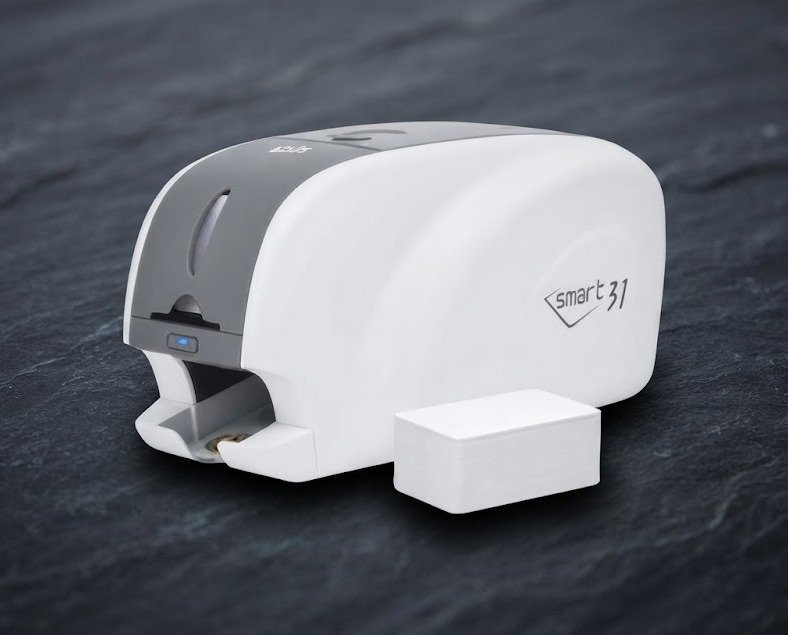
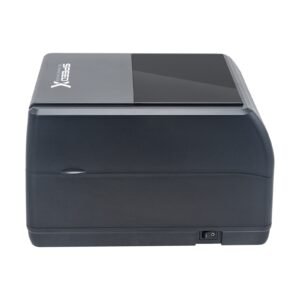
The ID Card Printer SMART-31D (Dual Side Printer) is a professional automatic duplex card printer designed for businesses, schools, universities, hospitals, membership organisations and security departments that need to print information on both sides of PVC ID cards.
Manufactured by IDP, the SMART-31D uses dye-sublimation printing, automatic card feeding and an integrated card-flipping mechanism to print the front and back of a card without requiring the operator to turn it manually. The printer supports standard ISO CR80 cards, including PVC, PET and composite PVC media.
Its current published specification includes 300 dpi full-colour printing, higher-resolution 600/1200 dpi monochrome modes, edge-to-edge output, an 80-card input hopper, 25-card output hopper, USB connectivity and optional Ethernet.
For full-colour front printing with black printing on the reverse using a YMCKOK ribbon, the SMART-31D is rated at approximately 29 seconds per card, or up to 124 cards per hour.
The SMART-31D is the dual-sided model in IDP’s SMART-31 card-printer family.
It is designed to create cards such as:
IDP’s current product catalogue continues to list the SMART-31D as part of its card-printer portfolio for small and mid-sized organisations.
The major difference between the SMART-31D and a basic single-sided printer is its built-in duplex mechanism: after printing one side, the printer automatically flips the card and processes the reverse side.
| Feature | Published specification |
|---|---|
| Brand | IDP |
| Model | SMART-31D |
| Printing mode | Automatic dual sided |
| Printing technology | Dye sublimation |
| Print area | Edge to edge |
| Full-colour resolution | 300 dpi |
| Monochrome resolution modes | 600 / 1200 dpi |
| Card size | ISO CR80 |
| CR80 dimensions | Approx. 54 × 86mm |
| Supported thickness | 0.38mm / 15 mil to 0.76mm / 30 mil |
| Card materials | PVC, PET, composite PVC |
| Monochrome speed | Approx. 5 sec/card |
| YMCKO speed | Up to approx. 23 sec/card |
| YMCKOK duplex speed | Approx. 29 sec/card |
| Duplex YMCKOK throughput | Up to 124 cards/hour |
| Input hopper | 80 cards |
| Output hopper | 25 cards |
| Memory | 64MB RAM |
| Standard connection | USB |
| Ethernet | Optional |
| Magnetic encoding | Optional |
| Contact smart-card encoding | Optional |
| Contactless encoding | Optional |
| Dimensions | Approx. 172 × 472 × 190mm |
| Weight | Approx. 4.2kg |
| Power consumption | Up to 48W |
| Battery | No |
| Local warranty | Confirm GS Systemz terms |
These figures reflect the current SMART-31D product specification.
The SMART-31D is most useful when an organisation regularly needs professionally printed ID cards with different information on the front and back.
A typical employee card, for example, might use:
Front side
Back side
Because the SMART-31D flips the card automatically, the operator does not need to manually feed each card twice.
Key advantages include:
The SMART-31D contains an integrated card-flipping mechanism.
A simplified workflow is:
The user does not have to remove the card halfway through the job.
This is especially useful when printing batches of:
The SMART-31 user manual specifically provides driver controls for selecting one-side or both-side printing when a duplex mechanism is installed.
Current SMART-31D specifications publish different speeds depending on the ribbon and printing method.
| Printing mode | Published speed |
|---|---|
| Monochrome | Approx. 5 sec/card |
| Monochrome throughput | Up to 720 cards/hour |
| YMCKO | Max. approx. 23 sec/card |
| YMCKO throughput | Up to 156 cards/hour |
| YMCKOK duplex | Approx. 29 sec/card |
| YMCKOK throughput | Up to 124 cards/hour |
For a true dual-sided colour/black ID workflow, 124 cards per hour using YMCKOK is the more relevant throughput figure.
Actual production may be slower because of:
Yes, but this requires an important qualification.
IDP lists:
The higher-resolution modes do not mean that full-colour photographs are printed at 1200 dpi.
For accurate product marketing, GS Systemz should use:
300 dpi full-colour printing with up to 1200 dpi monochrome capability.
This is more precise than simply advertising “1200 dpi printing.”
Yes. IDP specifies edge-to-edge printing for the SMART-31 series.
This helps create professional cards where artwork can extend close to the card boundaries.
Edge-to-edge printing is useful for:
Minor unprinted borders can still occur because of card tolerances, mechanical alignment and artwork positioning.
The SMART-31D is designed for standard ISO CR80 cards.
CR80 is the familiar bank-card-sized format used for most:
Supported card materials include:
Published thickness support ranges from approximately:
0.38mm / 15 mil to 0.76mm / 30 mil.
Before purchasing speciality cards, confirm compatibility for:
Standard CR80 cards measure approximately:
54 × 86mm, or roughly 2.12 × 3.38 inches.
The Pakistan SMART-31D distributor specifies this standard directly.
This is approximately the same footprint as a standard credit or debit card.
The printer’s automatic feeding system provides:
This allows moderate batches to be printed without inserting every card manually.
For example, an HR department could load employee records into its card application, place blank cards into the hopper and allow the printer to process a batch automatically.
For the most common dual-sided workflow, the important ribbon is YMCKOK.
YMCKOK represents:
IDP lists ribbon 659376 YMCKOK, rated for approximately 200 cards per roll.
This ribbon is useful where:
That combination is common for employee, student and membership ID cards.
Common SMART-31 consumables include:
| Ribbon | Typical purpose | Published yield |
|---|---|---|
| YMCKOK 659376 | Colour front + black reverse | Approx. 200 cards |
| YMCKO 659366 | Full colour + black + overlay | Approx. 250 prints |
| YMCKO 659863 | Alternate YMCKO roll | Approx. 100 prints |
| K Resin Black | Monochrome black | Approx. 1200 prints |
Additional speciality ribbons may be available for:
Always check ribbon compatibility with the exact SMART-31 printer and intended card design.
The O in YMCKO and YMCKOK is a clear overlay panel.
It is applied over the printed colour area to provide some added surface protection.
The overlay can help protect against normal handling, but it is not equivalent to full card lamination.
For cards exposed to heavy wear, harsh environments or multi-year use, a dedicated laminating card-printer system may be more suitable.
The SMART-31 platform supports speciality ribbon options that can be used for UV-related security printing. Current SMART-31D product material specifically highlights low-cost security using UV printing.
UV printing can help add a security element that is less obvious under normal viewing conditions.
Possible applications include:
It should not be marketed as making a card counterfeit-proof.
Yes, with the appropriate optional encoder.
Published magnetic encoding support includes:
A standard printer without the magnetic encoder cannot gain magnetic encoding merely through software.
Confirm the exact printer part number before promising this capability.
Yes, when fitted with the appropriate optional contact encoder.
Current specifications include ISO 7816 smart-card support.
This can be relevant for specialised:
Software integration must also support the card technology.
Optional contactless encoding configurations are available.
Published technologies include combinations of:
Encoding capabilities are hardware options, not standard features on every SMART-31D.
When selling an encoding version, GS Systemz should publish the complete part number and installed encoder.
Yes.
USB is the standard communication method in the current SMART-31D specification.
USB is appropriate when:
Ethernet is listed as an optional upgrade, not a standard interface on every SMART-31D.
Ethernet is useful when:
Before advertising Ethernet, verify the rear ports and complete printer SKU.
Wi-Fi should be treated as an optional/configuration-dependent capability rather than a standard SMART-31D interface.
Current standard specifications identify USB and optional Ethernet. Separate SMART Wi-Fi hardware has also existed for the SMART-31 platform.
GS Systemz should confirm that the exact unit contains the required wireless module before publishing Wi-Fi as included.
The current SMART-31D product specification lists:
as supported platforms.
For Windows deployment:
Older documentation may list Windows 7/8/10 because it was created before Windows 11. Current driver compatibility should take priority over older reseller listings.
Current product specifications list both macOS and Linux support.
However, card-design software is a separate consideration.
The printer driver may support an operating system while a particular card-design application does not.
Before deployment, verify:
Software inclusion depends on the package sold.
Some international SMART-31D bundles include card-design software, cards and ribbons, while printer-only packages may not.
GS Systemz should clearly specify whether its package contains:
Do not copy another retailer’s bundle contents onto a printer-only SKU.
| Specification | SMART-31D |
|---|---|
| Print mode | Dual sided |
| Print type | Dye sublimation |
| Print area | Edge to edge |
| Colour resolution | 300 dpi |
| Mono resolution | 600 / 1200 dpi supported |
| Card feeding | Automatic |
| Card format | ISO CR80 |
| Card thickness | 0.38–0.76mm |
| Card materials | PVC, PET, composite PVC |
| Monochrome speed | Approx. 5 sec/card |
| YMCKO | Approx. 23 sec/card maximum |
| YMCKOK | Approx. 29 sec/card |
| YMCKOK throughput | Approx. 124 cards/hour |
| Input capacity | 80 cards |
| Output capacity | 25 cards |
| Memory | 64MB |
| User interface | LED button |
| USB | Yes |
| Ethernet | Optional |
| Power | AC 100–220V through supplied power system |
| Max power use | Approx. 48W |
| Operating temperature | Approx. 15–35°C |
| Operating humidity | Approx. 35–70% |
| Dimensions | Approx. 172 × 472 × 190mm |
| Weight | Approx. 4.2kg |
| Magnetic encoder | Optional |
| Contact encoder | Optional |
| Contactless encoder | Optional |
Current specification support:
One Pakistan reseller page lists a 377mm printer length, while current SMART-31D documentation specifies approximately 472mm for the duplex model. The shorter 377mm dimension corresponds more closely to a non-duplex SMART-31 chassis.
For the SMART-31D product page, 172 × 472 × 190mm is the stronger specification.
Yes.
This is one of its strongest applications.
Employee cards can contain:
Front
Back
Automatic duplex printing makes this workflow significantly more convenient than manually turning every card.
Yes.
Schools, colleges and universities can use the SMART-31D for:
The Pakistan SMART-31D distributor explicitly lists student IDs among its intended applications.
Yes, provided the card technology and encoder configuration match the access-control system.
The SMART-31D can print card graphics independently of electronic encoding.
For access-control functionality, the institution may require:
Confirm requirements with the access-control provider before selecting the printer configuration.
| Feature | SMART-31D | SMART-31S |
|---|---|---|
| Primary printing | Dual sided | Single sided |
| Automatic card flipping | Yes | No |
| CR80 cards | Yes | Yes |
| Colour resolution | 300 dpi | 300 dpi |
| Edge-to-edge printing | Yes | Yes |
| Automatic feeding | Yes | Yes |
| Input hopper | 80 cards | 80 cards |
| Standard USB | Yes | Yes |
| Ethernet | Optional | Optional |
| Best use | Front + back IDs | Front-only IDs |
| Physical depth | Larger | Smaller |
The SMART-31D is the better choice when card designs regularly require two printed sides.
The SMART-31S can be more economical when almost every card requires printing only on the front.
| Feature | SMART-31D | Inkjet + Card Tray |
|---|---|---|
| Dedicated card handling | Yes | No |
| Automatic card feed | Yes | Usually no |
| Automatic duplex | Yes | Usually no |
| Batch ID printing | Better | Limited |
| Card encoding options | Available | No |
| Ribbon-based card colour | Yes | Ink cartridges |
| Workflow | Professional card issuance | Low-volume/manual |
| Best use | Organisations | Occasional cards |
A dedicated card printer is a more appropriate choice where ID cards form part of a regular operational workflow.
| Feature | SMART-31D | Retransfer printer |
|---|---|---|
| Technology | Dye sublimation/direct-to-card | Retransfer |
| Purchase cost | Generally lower | Generally higher |
| Speed | Good | Often slower |
| Edge-to-edge output | Yes | Often true over-the-edge |
| Uneven smart-card surfaces | Good with compatible cards | Often better |
| Security options | Good | Often more advanced |
| Best use | Everyday ID programmes | Higher-security/premium cards |
The SMART-31D is appropriate for many standard staff, student and membership programmes.
A retransfer system may be preferable for high-security credentials or cards with uneven embedded electronics.
GS Systemz can position the SMART-31D for organisations in Pakistan that require professional automatic dual-sided ID-card production.
Before ordering, confirm:
Warranty should be stated carefully. IDP Americas currently advertises a three-year programme for the SMART-31 series, while another regional SMART channel advertises 24 months. These regional terms should not be automatically applied to Pakistani stock.
GS Systemz should publish the warranty that actually applies to its supplied unit.
This normally results from duplex-orientation settings.
Check:
Print one sample before producing an entire batch.
Screen colours use RGB light, while the card printer creates colour using dye-sublimation ribbon panels.
Differences can also result from:
Use genuine compatible ribbon and test critical corporate colours before mass printing.
Common causes include:
Card-printer cleanliness is especially important because even a small particle of dust can create a visible defect on a photo ID.
The printer is suitable for:
Check availability of the ID Card Printer SMART-31D (Dual Side Printer) from GS Systemz in Pakistan.
The SMART-31D provides automatic front-and-back CR80 card printing for employee IDs, student cards, access credentials, membership cards, healthcare IDs, transport passes and other professional identification applications.
Before ordering, confirm the exact SMART-31D part number, USB/Ethernet configuration, encoding modules, ribbon package, software, included cards, warranty and complete box contents.
The IDP SMART-31D is an automatic dual-sided dye-sublimation ID card printer designed for CR80 PVC, PET and composite PVC cards.
Yes. The SMART-31D has a duplex mechanism that automatically flips the card so the front and back can be printed without manual reinsertion.
It uses 300 dpi for full-colour output, with 600 and 1200 dpi monochrome printing modes available through IDP’s FINE imaging technology.
Using YMCKOK, the current published figure is about 29 seconds per card, or approximately 124 cards per hour.
It supports ISO CR80 cards in PVC, PET and composite PVC, with published thickness support from approximately 0.38mm to 0.76mm.
IDP’s YMCKOK ribbon 659376 is designed for common duplex workflows with colour on the front and resin black on the reverse and is rated for approximately 200 cards per roll.
USB is standard and Ethernet is an optional configuration or upgrade. Confirm that the exact GS Systemz printer contains the Ethernet option.
Yes, optional magnetic, contact and contactless encoder configurations are available, including support for technologies such as ISO 7811, ISO 7816, MIFARE and DESFire depending on the installed module.
Current SMART-31D specifications list Windows 10/11, macOS and Linux support. Card-design software compatibility should be checked separately.
You can check availability of the IDP SMART-31D Dual Side ID Card Printer from GS Systemz in Pakistan. Confirm the interface, encoder configuration, ribbon, software package and local warranty before ordering.
Reviews
There are no reviews yet.