
₨32,000.00
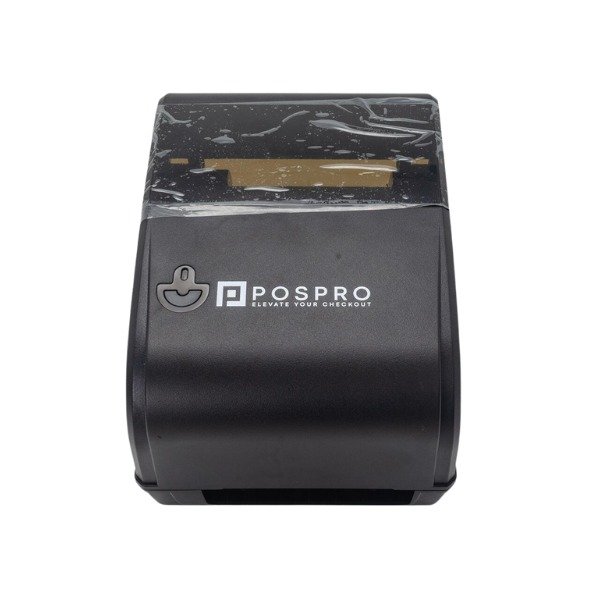
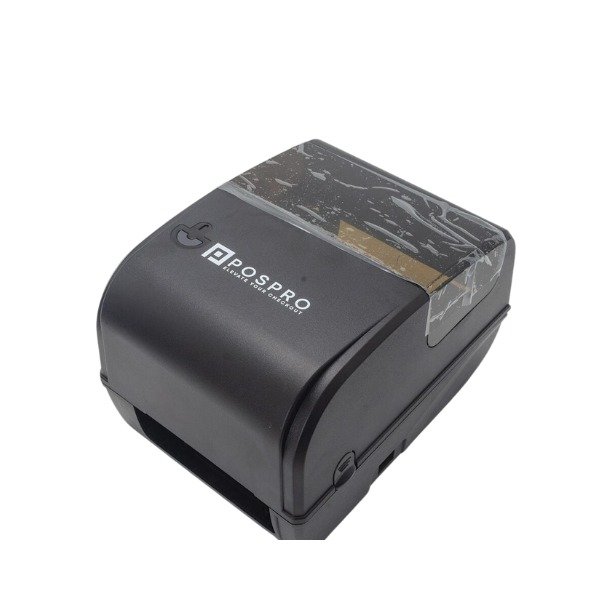
The POSPRO TLP-200 Desktop Barcode Label Printer is a compact 203 DPI printer for producing product, inventory, retail, warehouse and shipping labels. It offers a reported print speed of up to 127 mm/s, support for a 300-metre ribbon and TSPL-EZ printer-language compatibility.
It is designed for businesses that need dedicated barcode-label printing without installing a large industrial printer. Its desktop form makes it suitable for retail counters, offices, stockrooms, pharmacies, small warehouses and e-commerce packing stations.
You should consider the POSPRO TLP-200 when you need a dedicated desktop printer for regular barcode and identification labels.
Unlike a standard office printer, it prints individual labels from a roll. This reduces the need to use full adhesive sheets and makes it easier to print labels when they are required.
The printer is a practical choice for:
Buy the POSPRO TLP-200 and more Point of Sale Products from GS Systemz for local product availability and assistance in Pakistan.
The POSPRO TLP-200 combines 203 DPI label printing with a compact desktop format and support for long ribbon rolls.
Key features:
Available Pakistan product listings report the 127 mm/s speed, 300-metre ribbon capacity and TSPL-EZ, Eltron and Zebra command support. These specifications should be checked against the supplied unit or distributor documentation before publishing them as guaranteed values.
The POSPRO TLP-200 can be used for common monochrome business labels containing barcodes, prices, product names, stock numbers and tracking details.
| Label application | Suitability |
|---|---|
| Retail product barcode labels | Good |
| Price and shelf labels | Good |
| Inventory labels | Good |
| Warehouse bin labels | Good |
| Product identification labels | Good |
| Carton and package labels | Good |
| Basic shipping labels | Good after size verification |
| Office asset labels | Good |
| Pharmacy stock labels | Good |
| File and document labels | Good |
| Very small jewellery labels | Consider 300 DPI |
| Detailed electronics labels | Consider 300 DPI |
| Full-colour product labels | Not suitable |
The final result depends on label dimensions, barcode size, ribbon quality, media quality and software settings.
For extremely small text or highly detailed barcodes, a 300 DPI printer may produce sharper results.
Here are the currently available POSPRO TLP-200 product specifications:
| Specification | Detail |
|---|---|
| Product name | POSPRO TLP-200 |
| Brand | POSPRO |
| Model | TLP-200 |
| Product type | Desktop barcode label printer |
| Print resolution | 203 DPI |
| Print density | Approximately 8 dots per mm |
| Maximum reported speed | Up to 127 mm/s |
| Ribbon capacity | Up to 300 metres |
| Ribbon roller | 25.4 mm |
| Ribbon configuration | Outer-roll ribbon |
| Printer language | TSPL-EZ |
| Command compatibility | Eltron and Zebra commands |
| Printing colour | Monochrome |
| Best for | Retail, inventory, product and warehouse labels |
| Connection interface | Confirm before ordering |
| Maximum label width | Confirm before ordering |
| Supported operating system | Confirm before ordering |
| Driver availability | Confirm before ordering |
| Package contents | Confirm before ordering |
| Warranty | Confirm with GS Systemz |
The product title and 203 DPI resolution are shown on a POSPRO retailer listing, while another local listing reports its speed, ribbon capacity and printer-language support.
Yes. A 203 DPI printhead is suitable for common retail, inventory, shipping and warehouse barcode labels.
A resolution of 203 dots per inch equals approximately eight printed dots per millimetre. This resolution is widely used for standard barcode labels, product names, item numbers, prices and basic monochrome graphics.
It is a practical option when the labels use:
Choose a 300 DPI printer when labels contain very small text, compact barcodes, fine graphics or a large amount of information in a limited space.
The POSPRO TLP-200 is reported to print at speeds of up to 127 mm per second, equivalent to approximately five inches per second.
This speed can support regular label printing at a retail counter, stock desk or small packing station.
Actual printing speed can change according to:
The maximum reported speed should not be treated as a guaranteed speed for every label design.
A longer ribbon reduces the number of times the printer must be opened for ribbon replacement.
The POSPRO TLP-200 is reported to support ribbon rolls of up to 300 metres with a 25.4 mm roller. This can be useful for businesses that print product or inventory labels throughout the working day.
Longer ribbons are particularly useful for:
The ribbon must match the selected label material. Wax, wax-resin and resin ribbons are designed for different surfaces and durability requirements.
Confirm the supported ribbon width, winding direction and label-material combination before purchasing consumables.
The printer is listed as supporting TSPL-EZ together with Eltron and Zebra commands. This can improve compatibility with label systems that send supported printer commands.
TSPL-EZ is associated with the ability to interpret compatible Eltron and Zebra printer-language formats. TSC describes this type of language support as useful across different information-technology environments.
However, printer-language compatibility does not automatically guarantee that the TLP-200 will work with every POS, ERP, courier or inventory system.
Before buying, confirm:
Share your label size, computer ports and software name with GS Systemz before ordering.
The POSPRO TLP-200 may be suitable for shipping and dispatch labels when the required label dimensions fit the printer.
Before using it for courier or e-commerce labels, confirm:
Do not assume that every four-inch shipping format is supported until the printer’s maximum label and print width have been verified.
Yes. The TLP-200 is suitable for retail businesses that need product, price, shelf and inventory labels.
Retailers can use it to print:
It can be placed near a stock computer, checkout area or back-office inventory desk. It does not replace a receipt printer because the two machines serve different purposes.
A barcode label printer produces adhesive labels, while a receipt printer usually produces continuous non-adhesive receipts.
| Feature | POSPRO TLP-200 | Thermal receipt printer |
|---|---|---|
| Main purpose | Barcode and product labels | Customer receipts |
| Typical media | Adhesive label roll | Thermal receipt roll |
| Common output | Barcodes, prices and stock IDs | Bills and order slips |
| Ribbon support | Reported ribbon support | Usually no ribbon |
| Label backing | Normally adhesive liner | No adhesive backing |
| Best location | Stock or label-printing desk | Checkout counter |
| Label-size control | Important | Usually fixed roll width |
Choose the TLP-200 for product and identification labels. Choose a receipt printer for checkout bills and customer receipts.
A 203 DPI printer is suitable for standard labels, while a 300 DPI printer provides finer detail for smaller text and compact barcodes.
| Requirement | 203 DPI | 300 DPI |
|---|---|---|
| Standard retail barcodes | Good | Excellent |
| Large product labels | Good | Excellent |
| Shipping labels | Good | Excellent |
| Medium-sized text | Good | Excellent |
| Very small text | Limited | Better |
| Jewellery labels | Use with care | Better |
| Fine graphics | Basic | More detailed |
| General operating cost | Usually lower | Usually higher |
| Routine retail use | Recommended | Optional |
| High-detail labels | Limited | Recommended |
The POSPRO TLP-200 is a practical option when standard barcode clarity matters more than miniature print detail.
The exact setup process depends on the supplied interface and driver.
A general setup process is:
Do not use driver files intended for a different model unless compatibility has been confirmed.
Regular cleaning helps prevent unclear labels, ribbon marks, media slipping and barcode-scanning problems.
Printer-care tips:
Avoid touching the printhead surface directly. Follow the manufacturer or supplier’s instructions when cleaning internal components.
Buy the POSPRO TLP-200 if you need a compact 203 DPI printer for regular business labels.
It is a suitable option for:
Consider another model if you need 300 DPI printing, colour labels, very wide media, RFID encoding, mobile printing or continuous industrial production.
GS Systemz provides electronics, computer accessories and business technology products for customers in Pakistan.
Buying locally allows you to confirm:
GS Systemz lists its store at Shop #1, Second Floor, Zaitoon Plaza, Hall Road, Lahore, together with local telephone numbers and a support email address.
Get the POSPRO TLP-200 Desktop Barcode Label Printer from GS Systemz for retail, product, inventory, warehouse and dispatch-label printing.
Its 203 DPI print resolution, reported speed of up to 127 mm/s and support for a 300-metre ribbon make it a practical desktop option for regular business-label requirements.
Confirm the label size, connection interface, software compatibility, package contents, warranty, current price and stock status before ordering.
Add the POSPRO TLP-200 to your business setup and print labels when they are required instead of relying on pre-printed adhesive sheets.
The POSPRO TLP-200 is a desktop barcode label printer designed for product, retail, inventory, warehouse and identification labels.
The POSPRO TLP-200 has a listed print resolution of 203 DPI, equal to approximately eight dots per millimetre.
The printer is reported to print at speeds of up to 127 mm per second. Actual speed depends on the label design, media and printer settings.
Yes. Available product information reports support for ribbon rolls of up to 300 metres with a 25.4 mm ribbon roller.
Yes. A local product listing reports support for TSPL-EZ, Eltron and Zebra commands. Software compatibility should still be confirmed before buying.
It may print compatible shipping labels when the required media dimensions, driver and shipping software are supported.
Yes. A 203 DPI printer is suitable for standard product barcodes, inventory labels, prices and medium-sized text.
No. The TLP-200 is intended for barcode and identification labels. A receipt printer is designed for customer bills, receipts and order slips.
Yes. Its desktop design is suitable for shops, offices, pharmacies, e-commerce sellers and small stockrooms that print labels regularly.
You can order the POSPRO TLP-200 from GS Systemz in Pakistan after confirming its current price, stock, warranty and compatibility.
Reviews
There are no reviews yet.