
₨187,999.00
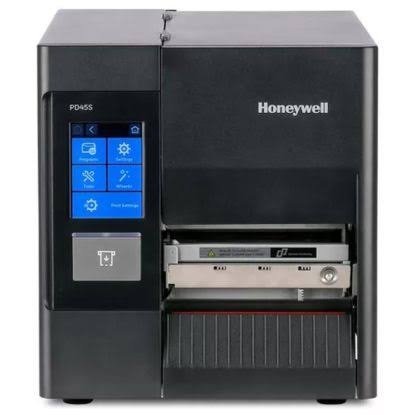
The Honeywell PD45S 203 DPI is a commercial-grade industrial barcode printer for warehouses, manufacturing units, retail operations, healthcare facilities and logistics businesses.
It supports direct thermal and thermal transfer printing, prints at speeds of up to 10 inches per second and handles large label rolls and ribbons for regular business use.
The Honeywell PD45S is a practical choice when your business needs faster and more dependable label printing than a small desktop barcode printer can provide.
Its all-metal frame, large media capacity and industrial print mechanism make it suitable for shipping labels, warehouse barcodes, inventory labels, product identification and manufacturing workflows.
The printer supports multiple command languages and standard USB, Ethernet and serial connections, making it easier to integrate with different computers, networks and business applications.
Buy the Honeywell PD45S 203 DPI Industrial Barcode Printer and more Point of Sale products from GS Systemz.
The Honeywell PD45S combines fast printing, durable construction and flexible media support for industrial barcode-label applications.
Key features:
These features are based on Honeywell’s official PD45S product information. Optional accessories and interfaces may depend on the exact printer configuration.
The Honeywell PD45S 203 DPI is suitable for businesses that regularly print standard 4-inch barcode labels.
| Application | Suitability |
|---|---|
| Shipping and courier labels | Excellent |
| Warehouse inventory labels | Excellent |
| Carton and pallet labels | Excellent |
| Product barcode labels | Excellent |
| Manufacturing labels | Excellent |
| Retail stock labels | Good |
| Asset identification labels | Good |
| Healthcare inventory labels | Good |
| Small text and miniature labels | Consider 300 DPI |
| Occasional home printing | Not necessary |
Honeywell identifies manufacturing, retail, transportation, logistics, healthcare and government as suitable application areas for the PD45S.
Here are the main product specifications:
| Specification | Detail |
|---|---|
| Product name | Honeywell PD45S Industrial Barcode Printer |
| Print resolution | 203 DPI / 8 dots per mm |
| Printing methods | Direct thermal and thermal transfer |
| Print speed | 50–250 mm/s / 2–10 ips |
| Maximum print width | 108 mm / 4.25 inches |
| Maximum continuous print length | 4.8 metres |
| Processor | Arm Cortex-A7, 800 MHz |
| Flash memory | 256 MB |
| RAM | 256 MB DDR3 |
| Maximum media width | 114 mm |
| Minimum media width | 20 mm |
| Maximum label-roll diameter | 203.2 mm / 8 inches |
| Label-roll core | 25.4 mm or 76 mm |
| Maximum ribbon length | Approximately 450 metres |
| Ribbon width | 51–110 mm |
| Ribbon types | Wax, wax-resin and resin |
| Standard connectivity | USB host, USB device, Ethernet and RS-232 |
| Optional connectivity | IEEE 802.11 a/b/g/n/ac Wi-Fi |
| Supported barcodes | Major 1D and 2D barcode formats |
| Dimensions | 438 × 270 × 249 mm |
| Approximate weight | 9.25–9.34 kg |
| Operating temperature | 5°C to 40°C |
| Power input | 100–240V AC, 50–60 Hz |
| Display options | 3.5-inch touchscreen or 2.36-inch keyed LCD |
| Warranty | One-year factory warranty |
The display, weight, wireless connectivity and included accessories can vary according to the exact PD45S model number. Confirm the supplied configuration before ordering.
DPI means dots per inch. The Honeywell PD45S 203 DPI uses approximately 203 dots to produce each inch of printed output.
This resolution is suitable for standard shipping labels, stock labels, warehouse barcodes, pallet labels and product identification.
A 300 DPI printer may be more suitable when you need very small text, compact barcodes or fine graphics on a limited label area.
The 203 DPI version of the Honeywell PD45S prints from 50 to 250 mm per second, or approximately 2 to 10 inches per second.
This speed makes it suitable for businesses that print larger batches of labels during receiving, picking, packing, manufacturing or dispatch operations.
Actual printing speed can depend on label size, print darkness, ribbon type, barcode complexity and software settings.
The PD45S can print with or without a ribbon because it supports two printing methods.
Direct thermal printing uses heat-sensitive labels and does not require a ribbon. It is useful for shipping, courier and short-term identification labels.
Thermal transfer printing uses a ribbon to produce a more durable image. It is suitable for inventory, manufacturing, asset and product labels that need better resistance to handling and storage.
The printer supports wax, wax-resin and resin ribbons up to approximately 450 metres long.
The Honeywell PD45S supports label and liner widths from approximately 20 mm to 114 mm.
Its maximum label-roll diameter is 203.2 mm, or 8 inches, which allows it to hold larger rolls than many desktop barcode printers.
The printer supports continuous labels, non-continuous labels, black-mark media, tags, notched labels and media with guide holes.
Always confirm the label width, roll-core size, media thickness and sensor type before ordering label rolls.
The standard Honeywell PD45S interfaces include:
Wi-Fi is available as an optional interface and may not be included with every PD45S unit.
Confirm the exact part number when you need wireless networking, an industrial interface, a parallel port or additional serial connections.
Yes. Honeywell states that the PD45S supports the main 1D and 2D barcode formats.
This includes common retail, shipping, logistics and product-identification barcode standards. QR-code print quality depends on the label size, print resolution, darkness setting and condition of the printhead.
Honeywell provides InterDriver support for Windows and a CUPS driver for Linux.
The printer also supports several command languages, including Fingerprint, Direct Protocol, IPL, ZSim2 for ZPL-II compatibility and DPL. XML-enabled workflows are available for supported SAP and Oracle WMS environments.
Compatibility should still be checked with your existing label-design software, ERP system, warehouse software or POS application.
The 203 DPI model is the better choice for general industrial barcode-label printing where speed and standard label readability are the main priorities.
| Requirement | Recommended option |
|---|---|
| Standard shipping labels | PD45S 203 DPI |
| Warehouse inventory labels | PD45S 203 DPI |
| Carton and pallet labels | PD45S 203 DPI |
| Higher print speed | PD45S 203 DPI |
| Very small text | PD45S 300 DPI |
| Compact high-density barcodes | PD45S 300 DPI |
| Detailed graphics | PD45S 300 DPI |
| Long thermal transfer ribbon | Either model |
| Network printing | Confirm Ethernet or Wi-Fi requirement |
| Automatic label cutting | Order cutter configuration |
| Label peeling | Order peeler configuration |
The 203 DPI version prints at up to 10 inches per second, while Honeywell lists up to 8 inches per second for the 300 DPI version.
Choose the 203 DPI model for general warehouse, logistics, shipping, retail and manufacturing labels. Choose 300 DPI when finer print detail is more important than maximum speed.
A desktop barcode printer is usually designed for smaller label rolls and light or moderate daily printing.
An industrial printer such as the Honeywell PD45S uses a stronger frame, holds larger media rolls and supports longer thermal transfer ribbons.
| Feature | Desktop Printer | Honeywell PD45S |
|---|---|---|
| Construction | Usually plastic | All-metal frame |
| Best use | Light or occasional printing | Regular industrial printing |
| Maximum label roll | Usually smaller | Up to 8 inches |
| Ribbon capacity | Usually shorter | Up to approximately 450 metres |
| Network connection | Depends on model | Ethernet included |
| Serial connection | Depends on model | RS-232 included |
| Optional cutter and peeler | Limited | Available |
| Suitable environment | Office or small shop | Warehouse or production area |
The PD45S is more suitable when the business needs larger media capacity, faster batch printing and stronger industrial construction.
GS Systemz offers the Honeywell PD45S 203 DPI Industrial Barcode Printer for businesses in Pakistan that need reliable barcode and label-printing equipment.
Before purchasing, customers can confirm:
Checking these details before ordering helps ensure that the supplied printer matches your label size, software and operational requirements.
Place the printer on a stable, clean and well-ventilated surface. Leave enough space around the unit to open the side panel and replace labels or ribbons.
Printer care tips:
Regular cleaning can help reduce faint printing, missing lines, ribbon wrinkles and barcode-reading problems.
Buy the Honeywell PD45S 203 DPI if your business prints standard barcode labels regularly and needs more capacity than a small desktop printer provides.
It is a suitable option for:
It may not be necessary for a small shop or office that prints only a few labels each day.
Get the Honeywell PD45S 203 DPI Industrial Barcode Printer from GS Systemz for warehouse, manufacturing, retail, inventory and logistics label printing.
Confirm the exact display type, connectivity, included accessories, warranty and current price before ordering.
Add the Honeywell PD45S to your barcode-printing setup and produce clear shipping, stock, product and warehouse labels for your daily business operations.
The Honeywell PD45S 203 DPI is an industrial barcode and label printer that supports direct thermal and thermal transfer printing.
The 203 DPI model prints at up to 250 mm per second, or approximately 10 inches per second.
The Honeywell PD45S 203 DPI has a maximum print width of 108 mm, or 4.25 inches.
A ribbon is required for thermal transfer printing. A ribbon is not required when using direct thermal labels.
The printer supports thermal transfer ribbons up to approximately 450 metres long.
Yes. Standard connectivity includes a 10/100 Mbps Ethernet interface, USB connections and RS-232 serial connectivity.
Wi-Fi is optional. Confirm whether the exact printer configuration includes the wireless network interface before ordering.
Yes. The printer supports the main 1D and 2D barcode formats, including QR-style two-dimensional codes.
Yes. The 203 DPI model is suitable for standard shipping, warehouse, carton, inventory and product barcode labels.
You can buy the Honeywell PD45S 203 DPI Industrial Barcode Printer from GS Systemz in Pakistan.
Reviews
There are no reviews yet.