
₨37,500.00
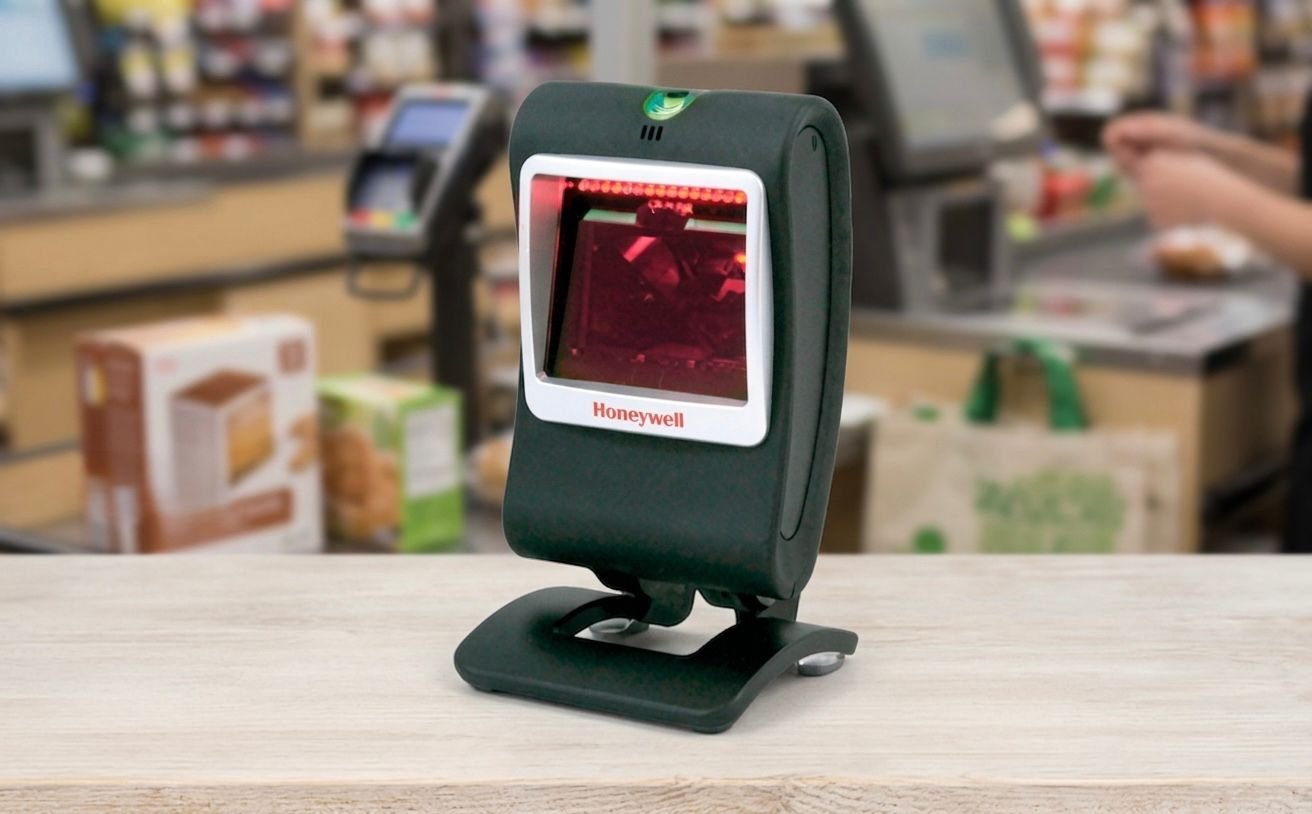
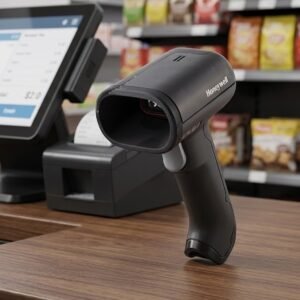
The Honeywell 7580, officially known as the Honeywell Genesis 7580g, is a corded desktop presentation scanner designed to read standard 1D, PDF and 2D barcodes.
It is suitable for retail counters, pharmacies, healthcare facilities, manufacturing workstations and other environments that require hands-free barcode and QR-code scanning. The scanner can also read compatible coupons, tickets and barcodes displayed on mobile-device screens.
The Honeywell Genesis 7580g provides hands-free area-imaging performance in a compact desktop design.
It can read traditional product barcodes, two-dimensional codes and compatible digital-screen barcodes without requiring the operator to align every code with a single laser line.
Honeywell designed the scanner for applications ranging from retail point of sale to healthcare and manufacturing. Its area-imaging engine can read barcodes from reflective surfaces, including supported codes displayed on mobile phones.
The scanner also includes CodeGate technology and an activation button for situations where the user needs to select one specific barcode from a menu, list or group of codes.
Buy the Honeywell Genesis 7580g from GS Systemz after confirming its condition, interface cable, local warranty and package contents.
The Honeywell Genesis 7580g combines desktop presentation scanning with targeted barcode selection and image-capture capabilities.
Key features:
Honeywell states that decoding capabilities can depend on the exact scanner kit and configuration.
The Honeywell Genesis 7580g is suitable for fixed workstations that need fast hands-free scanning of printed and digital codes.
| Application | Suitability |
|---|---|
| Retail product scanning | Excellent |
| Supermarket checkout | Excellent |
| QR-code scanning | Excellent |
| Mobile coupons | Excellent |
| Digital tickets | Excellent |
| Membership codes | Excellent |
| Pharmacy billing | Excellent |
| Healthcare registration | Good |
| Document barcode scanning | Good |
| Signature or image capture | Good |
| Manufacturing workstations | Good |
| Product-menu scanning | Good |
| Fixed inventory workstations | Good |
| Wireless warehouse scanning | Not supported |
| Long-range barcode scanning | Not designed for this |
| Heavy outdoor use | Consider a rugged scanner |
Honeywell positions the scanner for environments ranging from manufacturing and healthcare to retail point of sale.
Here are the main official Honeywell Genesis 7580g specifications:
| Specification | Detail |
|---|---|
| Product name | Honeywell Genesis 7580g |
| Product type | Desktop presentation barcode scanner |
| Scan technology | Area imaging |
| Imaging array | 832 × 504 pixels |
| Decode capability | Standard 1D, PDF, 2D, postal and OCR |
| QR-code capability | Supported through compatible 2D configuration |
| Motion tolerance | Up to 200cm/s for 13 mil UPC |
| Horizontal scan angle | 46 degrees |
| Vertical scan angle | 28 degrees |
| Pitch tolerance | 70 degrees |
| Skew tolerance | 75 degrees |
| Minimum print contrast | 20% |
| Minimum 1D resolution | 4 mil |
| Minimum 2D resolution | 7.5 mil |
| Interfaces | USB, RS-232, keyboard wedge and IBM 46xx/RS-485 |
| Auxiliary port | EAS with interlock on EAS model |
| Input voltage | 5.5V DC ±0.25V |
| Operating power | 2W |
| Standby power | 0.5W |
| Dimensions | 80 × 83 × 150mm |
| Weight | Approximately 340g |
| Drop resistance | Designed for 1.5-metre drops |
| Operating temperature | 0°C to 40°C |
| Storage temperature | -40°C to 60°C |
| Operating humidity | 0%–95%, non-condensing |
| Ambient light tolerance | Up to 100,000 lux |
| Original factory warranty | Three years |
| Current product status | End of life |
| Official replacement | Honeywell Genesis XP 7680g |
The official specifications state that decode capabilities vary according to the kit configuration.
A desktop presentation scanner remains on a counter or workstation and automatically reads barcodes presented inside its scanning area.
The operator can move a product, phone, ticket or document in front of the scanner without picking up the device or pressing a trigger for every scan.
This design is useful for:
The Genesis 7580g also includes an activation button for targeted scanning when automatic presentation mode is not suitable.
A 2D area imager captures a complete image of the barcode rather than reading only one horizontal line.
This allows the Genesis 7580g to read traditional linear barcodes as well as supported square, stacked and postal symbols.
Common 1D applications include:
Common 2D applications include:
Honeywell officially lists standard 1D, PDF, 2D, postal and OCR decoding, depending on the selected scanner configuration.
Yes. The Genesis 7580g is a 2D area-imaging scanner and supports standard two-dimensional barcode applications when enabled in the selected kit.
QR-code scanning can be used for:
The QR code must be large enough, clearly displayed and supported by the scanner’s current configuration.
Because Honeywell notes that decoding capabilities depend on the product kit, confirm the exact enabled symbologies before purchasing multiple units.
Yes. Honeywell specifically states that the Genesis 7580g can read barcodes from highly reflective surfaces such as mobile-phone screens.
It is suitable for scanning:
Honeywell also highlights mobile coupons and mobile tickets as key use cases for the scanner.
When a screen barcode is difficult to scan:
Yes. Honeywell CodeSelect technology allows the scanner to capture up to 15 barcodes in one imaging flash.
The scanner can then output the captured barcode data in a predetermined order.
This feature may be useful for:
The required output order and filtering rules must be configured correctly before deployment.
CodeGate allows the user to aim at a specific barcode and press the scanner’s activation button to transmit it.
This is useful when several barcodes appear close together and automatic presentation scanning may capture the wrong one.
CodeGate can support:
Honeywell includes CodeGate and the activation button specifically for menu-scanning and targeted-scanning applications.
TotalFreedom is Honeywell’s scanner plug-in platform.
It allows compatible decoding and data-formatting applications to be loaded directly onto the scanner. This can reduce the need to modify the connected host system when a business needs specialised barcode processing.
Possible applications include:
The required TotalFreedom licence, application and integration support should be confirmed before purchasing the scanner for a specialised workflow.
Yes. Honeywell states that the scanner can capture and store electronic images.
Examples listed by Honeywell include:
This capability may support document-management, proof-of-condition and customer-service workflows.
Image capture normally requires compatible software and host-system integration. The scanner should not be purchased for image capture without confirming the required application and output process.
Honeywell lists motion tolerance of up to 200cm per second for a 13 mil UPC barcode at the optimal focus point.
Motion tolerance indicates how quickly a barcode can move through the imaging field while still being decoded.
This makes the scanner suitable for:
Actual performance can depend on:
The scanning distance depends on barcode density and type.
| Barcode Type | Typical Scanning Range |
|---|---|
| 5 mil 1D | 10–80mm |
| 7.5 mil 1D | 5–120mm |
| 10 mil 1D | 0–165mm |
| 13 mil 1D | 0–180mm |
| 10 mil PDF | 0–150mm |
| 20 mil Data Matrix | 2–190mm |
These ranges are Honeywell’s typical performance figures. Barcode quality and environmental conditions can affect actual results.
Larger, clearer barcodes can normally be read from farther away than very small or dense codes.
Honeywell lists minimum resolutions of:
Very small barcodes require suitable print quality, contrast and scanning distance.
For better results:
The Genesis 7580g uses area-imaging technology that can improve performance with difficult, poorly positioned or reflective barcodes.
It can also capture images of damaged packages for document-management applications.
However, no scanner can guarantee decoding when important barcode information is missing.
Scanning may fail when:
Severely damaged labels should be replaced when accurate product identification is important.
Print contrast is the difference between the dark barcode elements and the light background.
Honeywell lists a minimum reflectance difference of 20% for the Genesis 7580g.
A barcode may be difficult to read when:
Clear black-on-white labels normally provide the most dependable scanning performance.
The scanner supports multiple host interfaces:
Selected EAS models also provide an EAS interlock auxiliary port.
USB is commonly used with:
RS-232 may be required for:
Keyboard-wedge operation allows scanned data to be entered through the keyboard input path of a compatible system.
IBM 46xx support through RS-485 is intended for compatible retail systems.
The exact interface cable depends on the purchased scanner kit. Confirm the required connection before ordering.
The Genesis 7580g can automatically detect and configure compatible interface cables.
Honeywell states that this simplifies migration to a different interface because the user may not need to scan separate programming barcodes after changing the cable.
This can help when moving the scanner between compatible:
The replacement cable must still be compatible with the exact scanner and host device.
No. The Genesis 7580g is a corded desktop scanner.
It does not use a rechargeable battery and must remain connected to its host system through a compatible interface cable.
A corded scanner is suitable when:
Choose a cordless scanner when staff need to move between shelves, cartons or warehouse areas.
Honeywell designed the Genesis 7580g to withstand drops from approximately 1.5 metres.
The scanner is also sealed to resist airborne particulate contaminants.
It can operate in:
The datasheet does not describe the scanner as waterproof. Keep it away from:
Choose a rugged industrial scanner when water, heavy dust or repeated drops are expected.
Honeywell lists an operating-temperature range of 0°C to 40°C.
The scanner can be stored between -40°C and 60°C and supports 0%–95% relative humidity when condensation does not form.
It is also rated for surrounding light levels of up to 100,000 lux.
These specifications make it suitable for normal indoor commercial and industrial workstations.
Yes. Honeywell officially lists the Genesis 7580g as an end-of-life product.
The official discontinued-products information states:
| Product Status | Date |
|---|---|
| End of life | July 2022 |
| End of contract availability | December 2024 |
| End of service | December 2025 |
| Official replacement | Honeywell Genesis XP 7680g |
This means units may still be available through resellers or remaining stock, but Honeywell’s standard service period has ended.
Before purchasing, confirm:
Choose the Genesis 7580g when you need a compact desktop scanner for printed and digital 1D or 2D barcodes and are comfortable purchasing an end-of-life model.
| Requirement | Recommendation |
|---|---|
| Standard product barcodes | Genesis 7580g is suitable |
| QR-code scanning | Supported by compatible configuration |
| Mobile-screen scanning | Supported |
| PDF417 scanning | Supported |
| Data Matrix applications | Supported through 2D decoding |
| Hands-free scanning | Supported |
| Targeted CodeGate scanning | Supported |
| Multiple-code capture | Supported |
| USB connection | Supported |
| RS-232 connection | Supported |
| Keyboard wedge | Supported |
| Wireless scanning | Not supported |
| Current Honeywell support | Ended |
| New replacement model | Consider Genesis XP 7680g |
| Outdoor industrial use | Consider a rugged scanner |
The Genesis 7580g can still be useful when compatible stock is available at an appropriate price and local support is clearly defined.
A 1D scanner reads traditional linear barcodes. A 2D scanner reads those barcodes as well as square, stacked and digital codes.
| Feature | Basic 1D Scanner | Honeywell Genesis 7580g |
|---|---|---|
| UPC and EAN barcodes | Supported | Supported |
| Code 39 and Code 128 | Supported | Supported |
| QR codes | Not supported | Supported by compatible configuration |
| PDF417 | Usually not supported | Supported |
| Data Matrix | Not supported | Supported through 2D capability |
| Mobile-screen barcodes | Usually limited | Supported |
| Barcode orientation | More alignment required | Area imaging |
| Image capture | Not normally available | Supported |
| Multi-code capture | Not available | Up to 15 codes |
| Best use | Basic product scanning | Mixed print and digital workflows |
Choose the Genesis 7580g when QR codes, digital tickets, coupons or other 2D symbols are required.
The MK7120 is a 1D laser presentation scanner, while the Genesis 7580g uses area-imaging technology for 1D and 2D codes.
| Feature | Honeywell MK7120 | Honeywell Genesis 7580g |
|---|---|---|
| Scan technology | 1D laser | Area imager |
| Standard product barcodes | Supported | Supported |
| QR codes | Not supported | Supported by compatible configuration |
| PDF417 | Not supported | Supported |
| Mobile-screen codes | Not recommended | Supported |
| Hands-free scanning | Supported | Supported |
| Multi-code capture | Not supported | Up to 15 barcodes |
| Image capture | Not supported | Supported |
| Targeted scanning | Standard presentation use | CodeGate button |
| Best use | Traditional retail barcodes | Print and digital 2D workflows |
Choose the MK7120 for standard printed product barcodes.
Choose the Genesis 7580g when the business also needs QR codes, mobile coupons or digital tickets.
The Genesis XP 7680g is Honeywell’s official replacement for the discontinued Genesis 7580g.
| Feature | Genesis 7580g | Genesis XP 7680g |
|---|---|---|
| Product generation | Legacy model | Newer XP model |
| Current status | End of life | Current replacement |
| 1D and 2D scanning | Supported | Supported |
| Hands-free presentation scanning | Supported | Supported |
| Mobile-screen scanning | Supported | Supported |
| Product support | Service period ended | Current support options |
| Design | Legacy desktop design | Newer compact flexible design |
| Best buyer | Replacement or remaining-stock use | New installations |
Choose the 7580g when replacing an existing compatible unit or when remaining stock offers suitable value and local warranty.
Choose the Genesis XP 7680g for new installations that require current Honeywell support.
GS Systemz offers barcode-scanning equipment for customers in Pakistan who need retail, QR-code, pharmacy, healthcare and desktop scanning solutions.
This product page helps customers check:
Before placing an order, confirm:
Checking these details is especially important because the Genesis 7580g is now an end-of-life Honeywell product.
Place the scanner on a stable, dry counter with its imaging window directed toward the normal barcode-presentation area.
Scanner-care tips:
Regular cleaning and correct configuration can improve scanning accuracy and reduce failed reads.
Buy the Honeywell Genesis 7580g if your business needs a desktop scanner for standard product barcodes, QR codes and other supported 2D symbols.
It is suitable for:
It is most appropriate when the buyer understands that the model is discontinued and confirms local warranty and support before purchase.
Get the Honeywell Genesis 7580g 2D QR Desktop Barcode Scanner from GS Systemz for retail checkout, mobile-ticket scanning, QR-code applications, healthcare, manufacturing and point-of-sale use.
Use it to scan standard 1D barcodes, PDF symbols, supported 2D codes and compatible barcodes displayed on mobile-device screens.
Confirm the product condition, interface cable, enabled symbologies, local warranty and package contents before adding the Genesis 7580g to your business setup.
The Honeywell 7580, officially called the Genesis 7580g, is a desktop area-imaging scanner for standard 1D, PDF and 2D barcodes.
Yes. It supports standard 2D barcode applications, including QR-code workflows when enabled in the scanner configuration.
Yes. It reads standard 1D product and retail barcodes as well as supported PDF and 2D symbols.
Yes. Honeywell designed it to read compatible barcodes, coupons and tickets from reflective mobile-device screens.
Yes. It is a desktop presentation scanner that automatically reads barcodes placed within its imaging area.
Honeywell CodeSelect allows it to capture up to 15 barcodes in one flash and output them in a configured order.
It supports USB, RS-232, keyboard wedge and IBM 46xx through RS-485. The included cable depends on the scanner kit.
No. It is a corded desktop scanner and does not use a rechargeable battery.
Yes. Honeywell lists the model as end of life, with service ending in December 2025. Its official replacement is the Genesis XP 7680g.
You can buy the Honeywell Genesis 7580g 2D QR Desktop Barcode Scanner from GS Systemz in Pakistan, subject to current stock and confirmed local warranty.
Reviews
There are no reviews yet.