
₨44,600.00
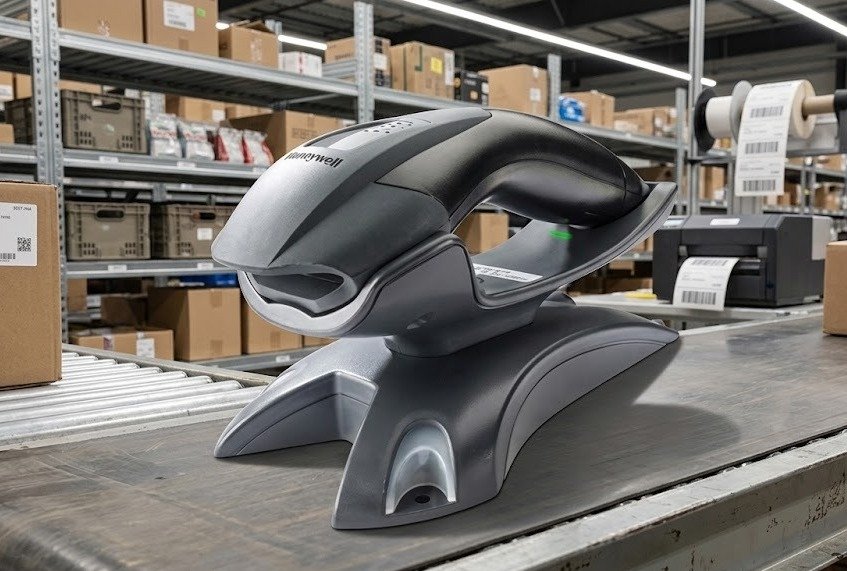
The Honeywell Voyager 1202g is a cordless, single-line laser barcode scanner designed for retail counters, stockrooms, pharmacies, offices and general inventory applications.
It uses Bluetooth wireless technology to scan standard 1D barcodes away from its communication base. The scanner also offers hands-free presentation scanning when placed in its stand or charging base.
The Honeywell Voyager 1202g provides wireless freedom for businesses that need to scan products, cartons or inventory away from a fixed POS terminal.
Its Bluetooth Class 2 radio provides a normal operating range of up to approximately 10 metres from the base. Honeywell states that the range can reach up to 30 metres where there is a clear line of sight between the scanner and base.
The scanner reads standard linear barcodes, including poorly printed, faded, smudged and damaged codes. It can also read high-density 1D barcodes with resolution down to approximately 3.5 mil under suitable conditions.
Its lithium-ion battery provides at least 12 hours of use depending on scanning volume. Honeywell also lists capacity for up to approximately 45,000 scans, helping the scanner support a full working shift in many retail and inventory environments.
Buy the Honeywell Voyager 1202g from GS Systemz for local product availability in Pakistan.
The Honeywell Voyager 1202g combines cordless movement with dependable 1D laser scanning.
Key features:
These features are listed by Honeywell for the Voyager 1202g and the shared Voyager single-line scanning platform. The supplied base, cable and interface depend on the exact product kit.
The Honeywell Voyager 1202g is suitable for businesses that need wireless scanning of printed 1D barcodes.
| Application | Suitability |
|---|---|
| Retail product scanning | Excellent |
| Supermarket checkout | Excellent |
| Pharmacy billing | Excellent |
| Stockroom inventory | Excellent |
| Product receiving | Excellent |
| Shelf-price checking | Excellent |
| Large-item scanning | Excellent |
| Carton verification | Good |
| Fixed POS scanning | Excellent |
| Hands-free counter scanning | Good |
| Library barcode scanning | Good |
| Office asset tracking | Good |
| QR-code scanning | Not supported |
| Data Matrix scanning | Not supported |
| Mobile-screen payment codes | Not recommended |
| Long-range warehouse scanning | Limited |
| Outdoor industrial scanning | Consider a rugged scanner |
Honeywell positions the Voyager 1202g as a general-purpose retail scanner for handheld and hands-free linear barcode applications.
Here are the main Honeywell Voyager 1202g specifications:
| Specification | Detail |
|---|---|
| Product name | Honeywell Voyager 1202g |
| Product type | Cordless general-duty barcode scanner |
| Scanner technology | Single-line laser |
| Decode capability | Standard 1D and GS1 DataBar |
| Minimum listed resolution | Approximately 3.5 mil |
| Scan pattern | Single scan line |
| Scan speed | Approximately 100 scan lines per second |
| Minimum print contrast | Approximately 10% |
| Pitch tolerance | Approximately 60 degrees |
| Skew tolerance | Approximately 70 degrees |
| Depth of field | Up to approximately 367mm, depending on barcode |
| Wireless technology | Bluetooth Class 2 |
| Bluetooth version | Bluetooth 2.1 listed |
| Standard wireless range | Up to approximately 10 metres |
| Clear line-of-sight range | Up to approximately 30 metres |
| Battery type | Rechargeable lithium-ion |
| Listed operating time | 12 hours or more |
| Listed scans per charge | Up to approximately 45,000 |
| Battery replacement | Tool-free and field replaceable |
| Host interfaces | USB, RS-232, keyboard wedge and RS485 |
| Dimensions | Approximately 180 × 66 × 92mm |
| Drop resistance | 30 drops from 1.5 metres |
| Environmental sealing | IP42 stated in Honeywell overview |
| Ambient-light tolerance | Up to approximately 70,000 lux |
| Device management | Honeywell Remote MasterMind ready |
| Warranty | Three-year factory warranty listed for the 1202g |
The exact specifications can vary by region and kit. Confirm the scanner, battery, communication base, interface cable and power supply included with the GS Systemz unit before ordering.
A general-duty scanner is designed for normal indoor business environments such as shops, pharmacies, offices, libraries and stockrooms.
The Voyager 1202g is intended for repeated retail and inventory scanning, but it is not the same as a rugged industrial scanner designed for heavy dust, rain, cold storage or repeated drops onto rough factory floors.
General-duty applications include:
Choose an industrial scanner when the working environment requires stronger sealing, higher drop protection or specialised long-range scanning.
Cordless scanning allows the operator to move away from the POS terminal or computer while transmitting barcode data wirelessly.
The Voyager 1202g communicates with its compatible base through Bluetooth. Honeywell lists up to approximately 10 metres of normal movement and up to 30 metres with a clear line of sight.
Cordless operation is useful when employees need to scan:
The practical wireless range may be reduced by walls, metal shelving, equipment and other environmental obstructions.
Yes. The Honeywell Voyager 1202g uses Bluetooth Class 2 wireless technology.
The scanner normally communicates with its supplied charge and communication base rather than being treated as a simple consumer Bluetooth accessory. Honeywell lists Bluetooth 2.1 and wireless operation from the base.
The base performs several functions:
Confirm whether direct pairing with a particular laptop, tablet or mobile phone is supported by the selected kit and software before ordering.
Honeywell states that the Voyager 1202g provides wireless movement of approximately 10 metres from its base in a normal working environment.
Its maximum range can reach approximately 30 metres where there is a clear, unobstructed line of sight between the scanner and the base.
The practical range may be reduced by:
Place the base in an open, elevated location when consistent wireless coverage is important.
The scanner may stop transmitting barcode data immediately when it moves beyond the working range of its base.
Depending on configuration, the scanner can alert the user when communication is lost. The operator should move back within range and confirm that the required barcode data reached the host application.
Before performing an important stock count:
The Voyager 1202g should not be treated as an offline inventory terminal unless the selected configuration and workflow specifically support stored barcode collection.
The Voyager 1202g reads standard linear or 1D barcodes and GS1 DataBar symbols.
Common supported applications can include:
The exact enabled barcode formats depend on the scanner configuration.
Specialised 1D symbols should be tested before purchasing several units.
No. The Honeywell Voyager 1202g is a single-line 1D laser scanner.
It does not read QR Code, Data Matrix, PDF417 or other two-dimensional barcode formats. Honeywell lists its decode capability as 1D.
Choose a 2D area-imaging scanner when your business needs to scan:
The Voyager 1202g is best suited to printed linear retail and inventory barcodes.
The Voyager 1202g uses laser scanning technology and is designed mainly for printed 1D barcodes.
Laser scanners depend on reflected light from the printed dark and light barcode pattern. They may not reliably read codes displayed on illuminated phone, tablet or computer screens.
Choose a 2D area imager when screen scanning is required for:
Do not advertise the Voyager 1202g as a dependable mobile-screen scanner without testing the exact screen and barcode format.
Yes. Honeywell designed the Voyager 1202g to read poorly printed, smudged, faded and damaged 1D barcodes more effectively than a basic entry-level scanner.
This can help with:
Successful scanning is still not guaranteed when:
Reprint or replace severely damaged labels when accurate identification is important.
Yes. Honeywell states that the Voyager platform can read high-density linear barcodes with resolution down to approximately 3.5 mil under suitable conditions.
A mil is one-thousandth of an inch and describes the width of the narrowest element in a barcode.
Small barcodes require:
High-density performance can be useful for electronics, healthcare products, small retail items and compact inventory labels.
The Voyager single-line laser platform scans at approximately 100 scan lines per second.
This is suitable for ordinary retail, pharmacy and inventory tasks where a barcode is aimed through one visible scan line.
Actual productivity depends on:
The user must place the laser line across the complete width of the barcode for successful decoding.
Honeywell CodeGate technology allows the user to aim the scanner at a barcode and press the trigger before transmitting the data.
This is useful when several barcodes are positioned close together and the operator needs to select one specific code. Honeywell identifies menu scanning as a common CodeGate application.
CodeGate can help with:
The scanner first detects the barcode, and the user confirms transmission with the trigger.
Yes. The Voyager 1202g supports hands-free presentation scanning when positioned in its compatible base or stand.
Automatic in-stand detection changes the scanner’s behaviour when it is placed in the holder. Object detection then helps activate scanning when a barcode is presented.
Hands-free use is practical for:
For larger or awkward products, the scanner can be lifted from the base and used as a cordless handheld device.
Honeywell states that the rechargeable lithium-ion battery provides at least 12 hours of use depending on scanning volume.
The product page also lists capacity for up to approximately 45,000 scans.
Actual battery life can depend on:
Charge the scanner before long shifts and replace an ageing battery when working time becomes noticeably shorter.
Yes. The Voyager 1202g uses a field-replaceable battery that can be removed without tools.
This allows a worn battery to be exchanged without replacing the complete scanner.
Before buying a replacement battery:
Battery replacement should be performed according to Honeywell’s instructions.
The Voyager 1202g base includes a paging button that helps locate a misplaced scanner.
When the button is pressed, the scanner responds with beeps and flashing indicator lights.
This feature is useful in:
Paging works only when the scanner has power and remains within communication range of the base.
The Voyager platform supports several host-system interfaces:
Honeywell also provides automatic interface detection to simplify installation with supported cables.
USB is commonly used with:
RS-232 may be required for:
Keyboard-wedge operation sends barcode data through the keyboard input path of a compatible computer.
RS485 support is intended for compatible IBM retail environments and may require a specific cable or adapter.
Confirm the interface included in the product kit before ordering.
The Voyager 1202g is designed for retail, POS and general barcode-data-entry applications.
In a compatible USB keyboard configuration, scanned data can normally appear in the active software field similarly to typed keyboard input.
Compatibility depends on:
Test the scanner with the actual business software before purchasing multiple units.
Remote MasterMind is Honeywell’s scanner-management platform for supported devices.
Honeywell describes the Voyager 1202g as Remote MasterMind ready, allowing organisations to manage and monitor installed scanners more efficiently.
Depending on the deployment, remote management may help with:
Software availability, licensing and support should be confirmed before purchasing the scanner specifically for remote management.
The Voyager 1202g is built for normal commercial use.
Honeywell describes a shock-mounted internal circuit board, a recessed trigger with rubber protection and a scratch-resistant scanning window. The scanner is designed to withstand 30 drops from approximately 1.5 metres.
It is suitable for:
It should still be protected from unnecessary drops, water exposure and harsh industrial conditions.
Honeywell’s overview describes the Voyager 1202g housing as IP42 rated.
The first digit, 4, indicates protection against solid objects larger than approximately 1mm.
The second digit, 2, indicates limited protection against vertically dripping water when the device is tilted within specified limits.
IP42 does not make the scanner waterproof. Do not:
Use a soft, lightly dampened cloth and follow Honeywell’s cleaning guidance.
Choose the Voyager 1202g when you need wireless scanning of printed 1D barcodes.
| Requirement | Recommendation |
|---|---|
| Standard retail barcodes | Voyager 1202g is suitable |
| Wireless product scanning | Supported |
| Bluetooth operation | Supported |
| Normal range up to 10 metres | Supported |
| Clear line-of-sight range up to 30 metres | Supported |
| Damaged 1D barcode scanning | Designed for improved performance |
| High-density 1D barcodes | Supported down to about 3.5 mil |
| Hands-free counter scanning | Supported |
| Replaceable battery | Supported |
| Full-shift use | Up to 12 hours or more listed |
| QR-code scanning | Not supported |
| Mobile-screen codes | Choose a 2D imager |
| Offline inventory memory | Not a main listed feature |
| Outdoor waterproof use | Not suitable |
| Heavy industrial scanning | Consider a rugged scanner |
The Voyager 1202g is most suitable when wireless movement is required but the business only uses printed linear barcodes.
The Voyager 1200g is the corded model, while the Voyager 1202g adds Bluetooth wireless operation and a rechargeable battery.
| Feature | Voyager 1200g | Voyager 1202g |
|---|---|---|
| Scanner technology | 1D laser | 1D laser |
| Main connection | Corded | Bluetooth cordless |
| Battery | Not required | Rechargeable lithium-ion |
| Wireless mobility | No | Yes |
| Standard range | Limited by cable | Up to approximately 10 metres |
| Clear line-of-sight range | Not applicable | Up to approximately 30 metres |
| Hands-free use | Stand-supported | Base-supported |
| Damaged 1D codes | Supported | Supported |
| High-density scanning | Down to about 3.5 mil | Down to about 3.5 mil |
| Best use | Fixed counter | Mobile counter or stockroom work |
Choose the 1200g when the scanner always remains beside the computer.
Choose the 1202g when staff need to scan large products or move around the workstation.
A 1D scanner reads traditional linear barcodes. A 2D scanner reads linear barcodes as well as square and stacked codes.
| Feature | Voyager 1202g | 2D Area Imager |
|---|---|---|
| UPC and EAN barcodes | Supported | Supported |
| Code 39 and Code 128 | Supported | Supported |
| GS1 DataBar | Supported | Usually supported |
| QR codes | Not supported | Supported |
| Data Matrix | Not supported | Supported |
| PDF417 | Not supported | Supported |
| Printed barcodes | Excellent | Excellent |
| Mobile-screen scanning | Not recommended | Commonly supported |
| Scanning technology | Single-line laser | Image sensor |
| Best use | Traditional product barcodes | Mixed print and digital codes |
Choose the Voyager 1202g when your business scans normal printed product and inventory barcodes.
Choose a 2D scanner when QR payments, digital coupons, tickets or modern logistics codes are required.
A wired scanner connects directly to the host with a cable. The Voyager 1202g communicates wirelessly through its base.
| Feature | Voyager 1202g | Wired Scanner |
|---|---|---|
| User movement | Greater | Limited by cable |
| Battery | Required | Usually not required |
| Charging | Required | Not required |
| Large-product scanning | Easier | Limited by cable length |
| Fixed counter use | Suitable | Excellent |
| Stockroom movement | Better | Limited |
| Connection | Bluetooth through base | Direct USB or serial |
| Risk of cable restriction | Lower | Higher |
| Purchase cost | Usually higher | Usually lower |
| Best use | Mobile scanning near workstation | Fixed checkout scanning |
Choose the Voyager 1202g when mobility provides a clear business benefit.
Choose a wired scanner when scanning occurs only beside one computer and battery management is unnecessary.
GS Systemz offers the Honeywell Voyager 1202g for customers in Pakistan who need wireless 1D barcode scanning for retail, stockroom and inventory applications.
This product page helps customers check:
Before placing an order, confirm:
Checking these details helps ensure that the supplied scanner works with your computer, POS software and daily scanning workflow.
Keep the scanner, battery, communication base and cable in a clean, dry working environment.
Scanner-care tips:
Regular cleaning, proper charging and correct base placement can improve scanning and wireless performance.
Buy the Honeywell Voyager 1202g if your business needs cordless scanning of printed 1D barcodes.
It is suitable for:
It is especially useful when employees need to move around a checkout, stockroom or receiving area without being restricted by a scanner cable.
Businesses that need QR-code or mobile-screen scanning should choose a compatible 2D scanner instead.
Get the Honeywell Voyager 1202g General Duty Scanner from GS Systemz for retail checkout, stock counting, product receiving and general inventory scanning.
Use its Bluetooth wireless connection to scan printed 1D barcodes away from the counter while maintaining communication with its compatible base.
Confirm the product condition, battery, communication base, interface cable, warranty and complete package contents before adding the Honeywell Voyager 1202g to your business setup.
The Honeywell Voyager 1202g is a cordless, single-line laser scanner designed to read standard printed 1D barcodes.
Yes. It uses Bluetooth Class 2 wireless technology to communicate with its compatible base.
Honeywell lists up to approximately 10 metres in a normal environment and up to 30 metres with a clear line of sight.
No. It is a 1D laser scanner and does not read QR Code, Data Matrix or other 2D symbols.
Honeywell states that its lithium-ion battery provides 12 hours or more of operation depending on scanning volume.
Honeywell lists capacity for up to approximately 45,000 scans, depending on use and battery condition.
Yes. It is designed to improve the reading of poorly printed, faded, smudged and damaged 1D barcodes.
Yes. It supports automatic presentation scanning when placed in its compatible base or stand.
Yes. Honeywell describes the lithium-ion battery as field replaceable without tools.
You can buy the Honeywell Voyager 1202g General Duty Scanner from GS Systemz in Pakistan.
Reviews
There are no reviews yet.