
₨8,300.00
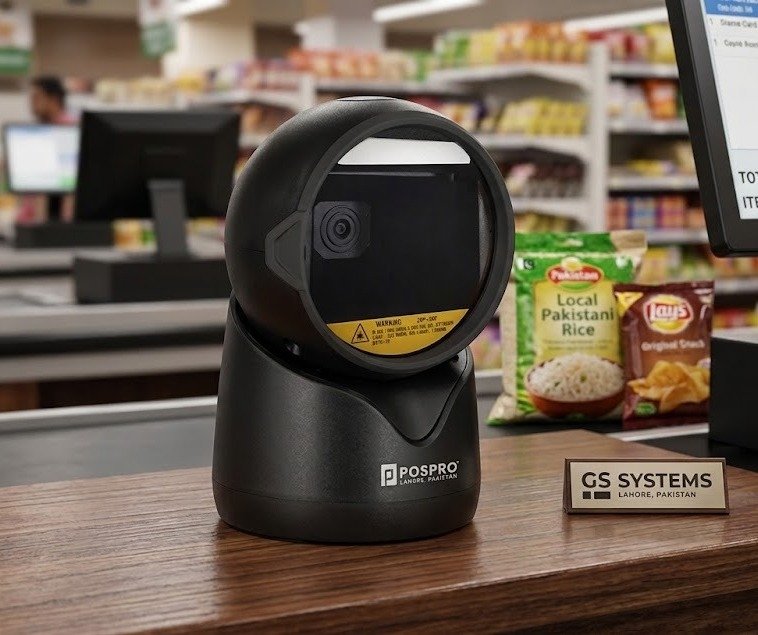
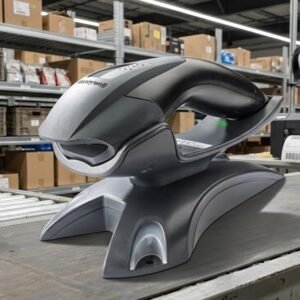
The POSPRO PBS-4500 is a hands-free desktop barcode scanner designed for fixed checkout counters, pharmacy workstations, supermarkets, courier offices, restaurants and customer-service desks.
It supports common 1D and 2D barcode applications and is advertised for scanning codes from both printed paper and digital screens. This means businesses can use one scanner for normal product barcodes, QR codes, digital loyalty cards, online-order references and compatible barcodes displayed on smartphones or computers.
Its plug-and-play USB connection makes it suitable for compatible POS, billing and inventory systems without requiring wireless pairing or daily battery charging. Postech’s current product announcement specifically confirms 1D and 2D support, paper-and-screen scanning and USB plug-and-play connectivity for the PBS-4500.
The PBS-4500 is suitable for businesses that need an affordable fixed scanner for both conventional product labels and modern digital barcode workflows.
A basic 1D scanner can normally process standard retail barcodes but cannot handle QR Code, Data Matrix or many screen-based symbols. The PBS-4500 is sold as a 1D and 2D scanner, giving businesses greater flexibility when customers present digital codes or when inventory systems use modern two-dimensional labels.
The scanner’s desktop design also reduces repeated hand movement. Instead of lifting and triggering a handheld scanner for every transaction, the employee can present products, cards or mobile screens in front of the reading area.
It can support workflows involving:
Verified PBS-4500 features include:
POSPRO reseller information explicitly lists fast 2D scanning, 1D and 2D paper-and-screen support, multiple keyboard languages and support for small high-density barcodes.
The exact scan engine, sensor resolution, minimum module size, cable length and interface mode should be confirmed from the physical product or supplied programming manual.
| Application | Suitability |
|---|---|
| Retail product scanning | Excellent |
| Supermarket checkout | Excellent |
| Pharmacy billing | Excellent |
| QR-code scanning | Excellent |
| Smartphone barcode scanning | Excellent |
| Digital loyalty cards | Excellent |
| Online-order verification | Excellent |
| Courier parcel processing | Excellent |
| Restaurant order codes | Excellent |
| Customer membership cards | Excellent |
| Ticket verification | Excellent |
| Product price checking | Good |
| Library circulation | Good |
| Fixed inventory workstation | Good |
| Reception registration | Good |
| Hands-free checkout | Excellent |
| Large and heavy items | Less convenient than handheld |
| Wireless stock counting | Not suitable |
| Long-range pallet scanning | Not designed for this |
| Outdoor wet environments | Not recommended |
| Rugged industrial work | Choose an industrial scanner |
The PBS-4500 is listed within POSPRO’s desktop barcode-scanner range and is marketed as a fixed hands-free model rather than a wireless warehouse scanner.
A complete authoritative POSPRO datasheet was not publicly available during research. The following table separates confirmed information from specifications that GS Systemz should verify.
| Specification | Available information |
|---|---|
| Product name | POSPRO PBS-4500 |
| Product category | Desktop barcode scanner |
| Scanning position | Hands-free counter operation |
| 1D barcode scanning | Confirmed |
| 2D barcode scanning | Confirmed |
| QR-code scanning | Confirmed by local product classification |
| Printed-paper scanning | Confirmed |
| Smartphone-screen scanning | Confirmed |
| Computer-screen scanning | Supported within screen-scanning use |
| High-density barcodes | Advertised as supported |
| Keyboard languages | Multiple layouts supported |
| Primary connection | USB |
| Installation | Plug and play |
| Wireless connection | No wireless feature publicly listed |
| Scan-engine resolution | Verify physical unit |
| Frames per second | Verify physical unit |
| Minimum 1D resolution | Verify physical unit |
| Minimum 2D resolution | Verify physical unit |
| Print-contrast requirement | Verify manual |
| Scanning distance | Verify manual |
| Field of view | Verify manual |
| Dimensions | Verify physical unit |
| Weight | Verify physical unit |
| Operating temperature | Verify manual |
| Drop rating | No reliable published figure located |
| IP protection | No reliable published figure located |
| Cable length | Verify box contents |
| Local warranty | Confirm with GS Systemz |
| Package contents | Confirm with GS Systemz |
Postech’s current announcement confirms that the PBS-4500 uses plug-and-play USB and supports paper-and-screen 1D and 2D scanning. It does not provide full optical, environmental or mechanical specifications.
A desktop barcode scanner remains positioned at a fixed counter or workstation.
Instead of moving the scanner toward every product, the employee presents the barcode in front of the scanner’s reading area. This is often called presentation scanning or hands-free scanning.
Desktop scanners are useful when:
The PBS-4500 is officially listed by POSPRO resellers as a desktop hands-free scanner.
Hands-free scanning means the operator normally does not need to hold the scanner or press a trigger for every barcode.
A typical transaction works like this:
This workflow can reduce repeated wrist movement and improve the speed of fixed-counter scanning.
A 2D scanner is designed to read traditional linear barcodes as well as square or stacked symbols.
Common 1D applications include:
Common 2D applications include:
The public PBS-4500 description confirms general 1D and 2D support but does not publish a complete symbology list. The formats required by the customer should therefore be tested or checked in the programming manual.
Yes. Pakistani product listings classify the POSPRO PBS-4500 as a desktop scanner supporting 1D, 2D and QR-code applications.
It may be used for compatible:
The scanner reads and transfers the encoded data. It does not independently approve payments, verify tickets or search a product database.
Yes. It supports traditional 1D product barcodes as well as 2D symbols.
It can be used with compatible labels found on:
This mixed barcode capability allows a business to use one desktop scanner for everyday merchandise and newer digital workflows.
Yes. Screen barcode scanning is one of the PBS-4500’s confirmed features.
It may scan compatible barcodes displayed on:
When a phone barcode is difficult to scan:
A cracked display, strong reflection or extremely small barcode may reduce scanning performance.
The product is advertised for screen-barcode scanning, which includes compatible codes displayed on suitable computer screens.
This can support:
The scanner transfers the decoded number or text to the connected application. The software remains responsible for validating or processing the information.
Yes. POSPRO reseller material advertises support for small high-density barcodes.
However, no verified minimum resolution—such as 4 mil, 5 mil or 10 mil—was publicly published for the PBS-4500.
Performance with small codes depends on:
Businesses scanning jewellery labels, small pharmacy codes, electronic components or compact Data Matrix symbols should test the physical label before ordering several units.
The scanner may decode lightly damaged barcodes when enough essential data remains visible.
A 2D scanner can often handle changes in barcode orientation more easily than a basic single-line scanner. However, the public PBS-4500 description does not make a specific damaged-barcode performance claim.
It may help with labels that are:
Scanning may still fail when:
Replace severely damaged product, medicine or courier labels when accurate identification is important.
A 2D desktop scanner is intended to capture complete barcode symbols rather than relying only on one horizontal laser line.
Compatible codes may therefore be presented:
The full symbol must still remain within the scanner’s reading field.
The exact roll, pitch and skew tolerances are not publicly specified for the PBS-4500 and should not be added without a verified datasheet.
POSPRO’s public product description states that the PBS-4500 quickly scans different barcode types and provides fast 2D scanning.
No trustworthy numerical frame rate or motion-tolerance figure was located.
Actual checkout speed depends on:
Do not publish an unsupported claim such as 30fps, 60fps or 100 scans per second unless it appears in the manual supplied with the exact scanner.
Yes. Multiple keyboard-language support is a confirmed feature in the PBS-4500’s public description.
The scanner and computer should use matching keyboard layouts. Otherwise, some transmitted characters may appear incorrectly.
An incorrect keyboard setting can affect:
The exact supported language list should be checked in the supplied configuration manual.
USB is the confirmed connection for the currently promoted PBS-4500. Postech describes it as using plug-and-play USB connectivity.
In a compatible USB keyboard mode, scanned data can appear in the active software field as though it were typed on a keyboard.
This is useful for:
No authoritative source reviewed for this article confirmed an RS-232, USB virtual COM or Ethernet version of the PBS-4500.
GS Systemz should not advertise those interfaces unless they are verified from:
Yes. Postech’s current product announcement describes the PBS-4500 as using plug-and-play USB connectivity.
A basic setup normally involves:
Specialised applications may still require scanner programming, keyboard-layout selection or prefix and suffix configuration.
A standard USB keyboard scanner normally does not need a separate scanner driver on a compatible computer.
However, additional software may be required when:
Because POSPRO does not publish a complete public PBS-4500 integration guide, the exact setup should be verified with the supplied manual.
The PBS-4500 can work with compatible POS, inventory and billing software that accepts barcode data through a USB keyboard-style input.
Compatibility depends on:
USB plug-and-play connectivity and paper-and-screen barcode support are confirmed by Postech’s current product announcement.
Test the scanner with the actual software before purchasing multiple units.
It should work with many locally developed applications that accept ordinary keyboard-style barcode data.
Potential uses include:
Compatibility should be tested when the application requires unusual commands, structured serial data or specialised database integration.
The scanner can capture compatible payment-related QR codes, but it is not a complete payment terminal.
Its role is to read the barcode and transfer the encoded data to the connected software.
Successful payment processing depends on:
The PBS-4500 should not be advertised as independently accepting or authorising payments.
Yes, when connected to compatible price-checking software and a product database.
The process works as follows:
The scanner does not independently store product prices or manage inventory.
A complete price-checking system requires:
No wireless or Bluetooth capability is listed for the PBS-4500.
The confirmed model is a desktop scanner using plug-and-play USB connectivity.
A wired desktop scanner is suitable when:
Choose a wireless handheld scanner when staff need to scan shelves, cartons or products away from the computer.
The PBS-4500 is promoted as a plug-and-play USB desktop scanner, and no battery is listed in its public product information.
The exact power arrangement should still be confirmed from the supplied kit.
A USB-powered fixed scanner generally provides:
No verified IP rating or waterproof claim was found for the PBS-4500.
Therefore, it should not be:
Keep moisture away from the scanning window, housing and USB connection.
The PBS-4500 is intended for normal indoor commercial use.
It may be suitable for:
No trustworthy POSPRO drop-test, tumble-test or IP figure was located.
Protect the scanner from:
Do not publish a specific drop rating without verifying it from the physical manual.
Package contents can vary by importer and product batch.
A typical package may include:
The exact contents must be inspected before publication. Do not promise a separate stand, power adapter or RS-232 cable unless it is present in the GS Systemz package.
| Requirement | Recommendation |
|---|---|
| Standard product barcodes | Supported |
| 1D barcode scanning | Supported |
| 2D barcode scanning | Supported |
| QR-code scanning | Supported |
| Paper-barcode scanning | Supported |
| Smartphone-screen scanning | Supported |
| Computer-screen scanning | Supported |
| Small high-density barcodes | Advertised as supported |
| Multiple keyboard languages | Supported |
| Hands-free checkout | Excellent |
| USB plug and play | Supported |
| Battery charging | Not required in normal USB use |
| Wireless mobility | Not supported |
| Long-range pallet scanning | Not suitable |
| Heavy industrial operation | Not suitable |
| Waterproof operation | No verified protection |
| Specialist tiny codes | Test before bulk purchase |
Choose the PBS-4500 when affordability, hands-free scanning, QR support and USB simplicity are the main priorities.
Both models are sold as POSPRO desktop scanners supporting 1D, 2D, paper and screen barcodes.
| Feature | PBS-4500 | PBS-5000 |
|---|---|---|
| Product category | Desktop scanner | Desktop scanner |
| 1D scanning | Supported | Supported |
| 2D scanning | Supported | Supported |
| QR scanning | Supported | Supported |
| Paper scanning | Supported | Supported |
| Screen scanning | Supported | Supported |
| USB plug and play | Confirmed | Confirmed in current Postech promotion |
| High-density codes | Advertised | Advertised |
| Keyboard languages | Advertised | Advertised |
| Detailed public datasheet | Not located | Limited public specifications |
| Best selection method | Compare physical units | Compare physical units |
The public descriptions do not provide enough verified technical detail to declare one universally faster or more accurate.
GS Systemz should compare:
| Feature | PBS-4500 Desktop Scanner | Handheld Scanner |
|---|---|---|
| Normal position | Fixed on counter | Held by employee |
| Hands-free operation | Primary design | Often requires a stand |
| Small-product checkout | Excellent | Good |
| Phone-code scanning | Convenient | Supported on compatible 2D models |
| Large-product scanning | Less convenient | Easier |
| Counter space | Requires fixed position | Can be stored separately |
| Wireless movement | No | Available on wireless models |
| Best use | Checkout and service counters | Mobile and mixed-size scanning |
Choose the PBS-4500 for continuous fixed-counter scanning.
Choose a handheld scanner when barcodes are often attached to large, heavy or awkward products.
| Feature | Basic 1D Scanner | PBS-4500 |
|---|---|---|
| UPC and EAN | Supported | Supported |
| Code 39 and Code 128 | Supported | Supported |
| QR Code | Not supported | Supported |
| Data Matrix | Not supported | Expected within compatible 2D formats; test |
| PDF417 | Usually not supported | Expected within compatible 2D formats; test |
| Smartphone codes | Often limited | Supported |
| Paper barcodes | Supported | Supported |
| Barcode rotation | More alignment may be required | 2D presentation scanning |
| Digital loyalty codes | Usually unsuitable | Suitable |
| Long-term flexibility | Limited | Better |
A 2D scanner is the safer choice when a business expects to use QR codes, screen-based customer identification or modern inventory labels.
GS Systemz can position the PBS-4500 for businesses in Pakistan that need an affordable desktop scanner for printed and digital barcode workflows.
This product page helps buyers understand:
Before placing an order, confirm:
These checks are important because no complete authoritative public datasheet was located for the PBS-4500.
Correct placement, cleaning and configuration can improve daily scanning reliability.
The PBS-4500 is suitable for:
It is best suited to businesses that prioritise affordable QR capability and hands-free counter scanning over wireless movement or industrial durability.
Check availability of the POSPRO PBS-4500 2D Desktop Barcode Scanner with GS Systemz in Pakistan.
Use it for standard product barcodes, QR codes, printed labels and compatible symbols displayed on smartphones or computer screens.
Confirm the scan-engine revision, USB cable, supported barcode formats, local warranty and complete package contents before adding the PBS-4500 to your retail, pharmacy, courier or POS setup.
The PBS-4500 is a POSPRO hands-free desktop scanner supporting 1D and 2D barcodes from paper and digital screens.
Yes. Pakistani POSPRO listings classify it as a 1D, 2D and QR desktop barcode scanner.
Yes. It supports standard 1D merchandise barcodes as well as compatible 2D codes.
Yes. Paper-and-screen barcode scanning is a confirmed PBS-4500 feature.
The product description states that small high-density barcodes are supported, but no verified minimum resolution is publicly listed.
Yes. Multiple keyboard-language support is included in its public feature list.
Yes. Postech describes it as using plug-and-play USB connectivity.
No wireless feature is publicly listed. The promoted version uses a wired USB connection.
No verified IP or waterproof rating was located. Keep the scanner dry and do not immerse or spray it.
You can check availability of the POSPRO PBS-4500 2D Desktop Barcode Scanner with GS Systemz in Pakistan.
Reviews
There are no reviews yet.