
₨8,100.00
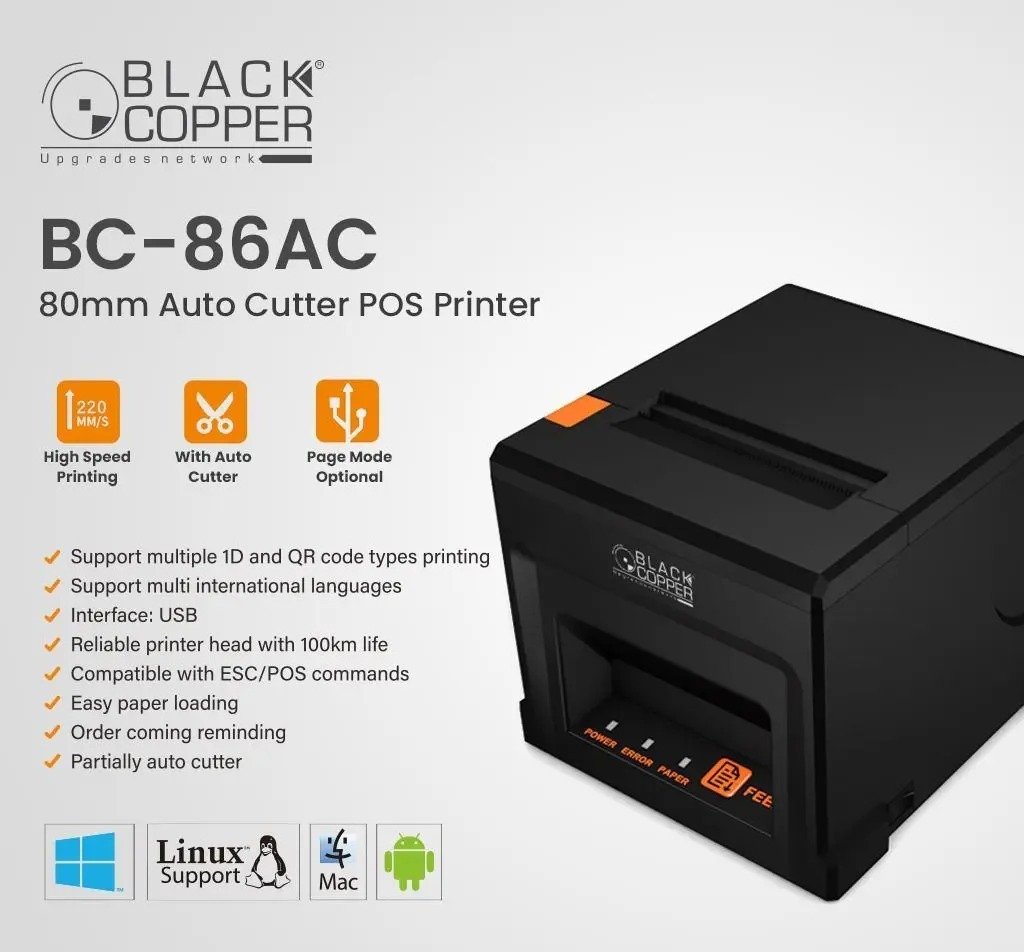
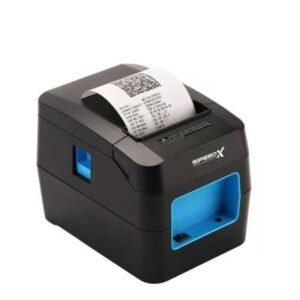
The BlackCopper BC86AC 80mm Thermal Receipt Printer with Auto Cutter is a compact point-of-sale printer designed for retail shops, restaurants, cafés, pharmacies, supermarkets, reception desks and other businesses that regularly print customer receipts.
It uses direct-thermal printing technology, producing black text and graphics on heat-sensitive paper without ink cartridges, toner or ribbons. The standard BC86AC-USB version prints at up to 220mm per second, offers 203 dpi resolution, supports ESC/POS commands and includes an automatic cutter capable of partial or full cuts.
The printer uses 79.5 ± 0.5mm thermal paper, commonly sold as 80mm receipt paper, with an effective printable width of approximately 72mm. Its compact body can be positioned on a counter or installed using a compatible wall-mounting arrangement.
The BlackCopper BC86AC is an 80mm direct-line thermal receipt printer built for fixed POS installations.
Its core features include:
These specifications are consistently repeated by several established BlackCopper resellers in Pakistan.
Both forms appear in Pakistan product listings:
The BlackCopper product collection currently separates the model into BC86AC-USB and BC86AC-USB+LAN variations. This means the interface suffix should be included when a specific configuration is being sold.
For the standard USB product, use:
BlackCopper BC86AC-USB 80mm Thermal Receipt Printer with Auto Cutter
For the network model, use:
BlackCopper BC86AC-USB+LAN 80mm Thermal Receipt Printer with Auto Cutter
| Feature | Published specification |
|---|---|
| Brand | BlackCopper |
| Model | BC86AC / BC-86AC |
| Standard variant | BC86AC-USB |
| Network variant | BC86AC-USB+LAN |
| Product type | Desktop thermal receipt printer |
| Printing method | Direct-line thermal |
| Printing speed | Up to 220mm/s |
| Resolution | 203 dpi |
| Paper category | 80mm thermal receipt roll |
| Physical paper width | 79.5 ± 0.5mm |
| Printable width | Approximately 72mm |
| Paper thickness | Approximately 0.06–0.08mm |
| Standard interface | USB |
| Optional model | USB + Ethernet LAN |
| Command language | ESC/POS |
| Auto cutter | Partial and full cut |
| Published cutter life | Up to 1.5 million cuts |
| Published print-head reliability | Up to 100km |
| Logo printing | Supported |
| 1D barcode printing | Supported |
| QR Code printing | Supported |
| PDF417 printing | Supported |
| Installation | Desktop or wall mounted |
| Dimensions | Approximately 160 × 135 × 121.5mm |
| Net weight | Approximately 0.72kg |
| Driver listings | Windows, macOS, Linux and Android |
| OPOS | Advertised |
| Bluetooth | Not supported |
| Wi-Fi | Not supported |
| Battery | Not included |
| Local warranty | Confirm with GS Systemz |
The numerical specifications in this table are drawn from detailed Pakistan reseller listings. BlackCopper’s current collection confirms that USB and USB+LAN are separate BC86AC configurations.
The BC86AC provides the main capabilities required from a commercial receipt printer without the added complexity of wireless pairing or battery maintenance.
Its main advantages include:
It is particularly suitable for businesses using a fixed Windows-based POS computer and requiring fast, automatically cut receipts. The USB+LAN version may be more suitable where the printer needs to be reached through a wired network.
The BC86AC has a published maximum printing speed of 220 millimetres per second. This can help reduce receipt delays during busy transaction periods.
It may be used for:
Actual speed can be affected by receipt length, logo size, print darkness, barcode content, driver settings and POS-software processing.
The printer uses a published resolution of 203 dots per inch. This is a common commercial receipt-printer resolution suitable for text, simple logos, totals, order details and properly sized barcodes.
For clearer output:
The BC86AC includes an automatic cutter supporting both partial and full cuts. Its published service-life estimate is up to approximately 1.5 million cuts under specified operating conditions.
Partial cutting leaves a small connected section between the receipt and roll. Full cutting separates the receipt completely.
The selected cutting mode may depend on:
The standard BC86AC uses a USB interface for direct communication with a compatible POS computer.
USB is normally suitable when:
BlackCopper also lists a separate BC86AC-USB+LAN configuration. It should not be assumed that every BC86AC includes an Ethernet port.
Before publishing LAN connectivity, inspect:
The USB version and USB+LAN version should ideally be created as separate product variations on the GS Systemz website.
The printer is advertised for desktop and wall-hanging installation. This can be useful in compact kitchens, pharmacies, service desks and reception areas where counter space is limited.
Mounting accessories should be confirmed from the package because public listings do not consistently state that a bracket or screws are included.
| Application | Suitability |
|---|---|
| Retail sales receipts | Excellent |
| Supermarket checkout | Excellent |
| Grocery-store billing | Excellent |
| Restaurant customer bills | Excellent |
| Kitchen order tickets | Good |
| Café and bakery receipts | Excellent |
| Pharmacy invoices | Excellent |
| Clothing-store billing | Excellent |
| Hardware-store receipts | Excellent |
| Hotel reception slips | Excellent |
| Clinic reception receipts | Excellent |
| Customer-service counters | Excellent |
| Queue and token tickets | Good with compatible software |
| Fixed USB POS computer | Excellent |
| Wired network printing | Requires BC86AC-USB+LAN |
| Store-logo printing | Supported |
| 1D barcode printing | Supported |
| QR-code printing | Supported |
| PDF417 printing | Supported |
| Bluetooth mobile printing | Not supported |
| Wi-Fi printing | Not supported |
| Battery-powered printing | Not supported |
| Adhesive shipping labels | Not confirmed |
| A4 documents | Not supported |
| Colour printing | Not supported |
Retail, reception, kitchen and POS applications are specifically identified by current BC86AC distributors.
| Specification | Published detail |
|---|---|
| Printing method | Direct-line thermal |
| Maximum speed | 220mm/s |
| Resolution | 203 dpi |
| Standard interface | USB |
| Optional interface model | USB + Ethernet LAN |
| Print command | ESC/POS |
| Thermal-head reliability | Approximately 100km |
| Cutter type | Automatic partial/full cut |
| Cutter-life estimate | Approximately 1.5 million cuts |
| Paper type | Thermal roll paper |
| Physical paper width | 79.5 ± 0.5mm |
| Effective print width | Approximately 72mm |
| Paper thickness | Approximately 0.06–0.08mm |
| Standard line spacing | 3.75mm, adjustable |
| Font A size | Approximately 1.5 × 3.0mm |
| Font B size | Approximately 1.1 × 2.1mm |
| Character tables | PC437, Katakana and PC850 examples listed |
| Logo support | Yes |
| 1D barcode support | UPC, EAN and Code 39 examples listed |
| 2D barcode support | QR Code and PDF417 |
| Driver support | Windows, macOS, Linux and Android |
| OPOS support | Advertised |
| Printer dimensions | Approximately 160 × 135 × 121.5mm |
| Printer weight | Approximately 0.72kg |
| Box dimensions | Approximately 198 × 184 × 139mm |
| Colour | Verify available GS Systemz stock |
| Warranty | Verify provider and duration |
| Box contents | Verify physical package |
The detailed specifications are consistent across Transworld, MB Communication and Vmart.
The BC86AC is an 80mm-class printer, but its effective printing area is approximately 72mm wide.
The measurements describe different things:
Businesses should buy compatible 80mm thermal-paper rolls rather than 72mm rolls.
The printer uses direct-thermal receipt rolls with these published media specifications:
The maximum roll diameter and core diameter are not reliably documented in the public BC86AC specifications. GS Systemz should verify both measurements before recommending bulk paper.
No. It is a direct-thermal printer.
Heat generated by the print head darkens the coating on compatible thermal paper. The printer does not require:
The normal consumable is thermal receipt paper.
Thermal receipts can fade when exposed to sunlight, high temperatures, oils, moisture, alcohol or certain plastic materials. Important business records should also be retained digitally.
The published thermal print-head reliability figure is approximately 100km. This refers to the estimated total paper length passing under the print head under specified test conditions.
It does not guarantee a fixed number of years.
Print-head service life can be affected by:
The published cutter-life estimate is approximately 1.5 million cuts.
Cutter wear may increase when:
A cutter-life estimate is not the same as a warranty period.
Yes. ESC/POS is the published printer command language.
Compatible POS software may use ESC/POS commands for:
ESC/POS compatibility does not guarantee identical operation with every Epson printer command or software profile. The required functions should be tested using the physical BC86AC.
OPOS support is advertised by multiple local sellers.
OPOS is commonly used by Windows-based retail applications to control POS equipment through compatible software components.
Successful OPOS integration may require:
The required service object should be obtained from the supplier or software provider.
Yes. QR Code and PDF417 are included in the published 2D barcode support.
QR codes may be used on receipts for:
For reliable scanning:
The available specifications explicitly mention UPC, EAN and Code 39 as examples of supported one-dimensional barcode formats.
A complete model-specific programming guide was not located. Formats such as Code 128, ITF or Codabar should be tested before being guaranteed.
The BC86AC prints barcodes; it does not scan products.
Yes. Logo support is explicitly listed.
For clearer logo output:
Windows driver support is published for the BC86AC.
A typical Windows installation involves:
Specific Windows versions are not identified in the detailed specifications. Windows 11 compatibility should be confirmed using the driver supplied with GS Systemz stock.
macOS and Linux driver support are listed by the detailed local distributors.
Practical compatibility may depend on:
The printer should be tested with the customer’s exact operating system before supplying several units.
Android driver support is included in the published specifications, but the standard BC86AC is a USB printer rather than a Bluetooth model.
Android operation may require:
It should not be described as universally compatible with every Android phone or billing application.
No built-in Bluetooth or Wi-Fi is confirmed.
The official BlackCopper collection currently lists:
It does not identify a BC86AC Bluetooth or Wi-Fi version.
Choose another BlackCopper model when direct wireless mobile printing is required.
No. BlackCopper separates the USB and USB+LAN configurations into distinct products.
| Model variation | Interfaces |
|---|---|
| BC86AC-USB | USB |
| BC86AC-USB+LAN | USB and Ethernet LAN |
Before advertising LAN, verify the model suffix and inspect the rear interface panel.
A dedicated cash-drawer output is not confirmed in the detailed BC86AC specifications reviewed for this page.
Do not advertise cash-drawer connectivity without checking:
A drawer plug fitting into a port does not prove that the voltage or wiring is compatible.
The confirmed media is continuous thermal receipt-roll paper.
No reliable BC86AC specification identifies:
The printer should therefore be marketed primarily as an 80mm receipt printer.
Choose a dedicated barcode-label printer for:
Yes. Restaurant kitchens and reception areas are specifically listed among its intended applications.
It may print:
The standard USB model must remain connected to a nearby POS computer. The USB+LAN variation may be more appropriate for a kitchen printer located elsewhere on the network.
Yes. Its 220mm/s output, auto cutter and 80mm paper format make it suitable for standard retail receipt printing. Retail and POS environments are repeatedly identified as primary BC86AC applications.
A retail installation should verify:
Public listings do not provide a consistent BC86AC package list.
A typical package may contain:
The USB+LAN version may not include an Ethernet cable.
GS Systemz should inspect the actual package before promising any accessory.
For the USB+LAN model, also configure and reserve the printer’s network IP address.
Check the following:
A self-test page can help separate hardware problems from driver or software problems.
A blank receipt usually means:
Scratch both sides of the paper with a fingernail. The side that turns dark is normally the heat-sensitive printing side.
Possible causes include:
Turn off the printer and allow the head to cool before using an approved cleaning method.
Check whether:
Do not pull the receipt or force the cutter blade manually.
| Requirement | Recommendation |
|---|---|
| Standard 80mm receipts | Supported |
| 220mm/s printing | Supported |
| 203 dpi output | Supported |
| USB connection | Supported |
| Ethernet LAN | Select BC86AC-USB+LAN |
| Automatic cutter | Supported |
| Partial and full cutting | Supported |
| ESC/POS software | Supported |
| OPOS integration | Advertised |
| Store-logo printing | Supported |
| 1D barcodes | Supported |
| QR Code and PDF417 | Supported |
| Windows | Supported with driver |
| macOS or Linux | Driver testing required |
| Android | Requires compatible USB workflow |
| Bluetooth | Not supported |
| Wi-Fi | Not supported |
| Cash-drawer output | Verify |
| Adhesive labels | Not confirmed |
| A4 documents | Not supported |
| Colour printing | Not supported |
| Battery operation | Not supported |
Choose the BC86AC for a compact fixed POS setup requiring 80mm receipts and automatic cutting.
Select the USB+LAN version when a wired network connection is required.
| Feature | BC86AC-USB | BC86AC-USB+LAN |
|---|---|---|
| USB | Yes | Yes |
| Ethernet LAN | No | Yes |
| Direct computer connection | Yes | Yes |
| Network IP configuration | No | Yes |
| Typical installation | One local POS computer | Networked POS or remote station |
| Printing engine | Expected to be the same family | Expected to be the same family |
| Auto cutter | Advertised | Confirm exact stock |
| Best use | Standard checkout counter | Kitchen or networked counter |
BlackCopper currently lists both products separately, so interface selection should not be left ambiguous.
| Feature | BC86AC 80mm | Typical 58mm printer |
|---|---|---|
| Receipt width | Wider | Narrower |
| Product descriptions | More space | Less space |
| Logo size | Larger | Smaller |
| Tax details | Easier to format | More restricted |
| QR-code space | Better | More limited |
| Paper use | Higher | Lower |
| Printer footprint | Larger | More compact |
| Best use | Professional retail and hospitality | Simple low-volume receipts |
An 80mm printer is normally preferable for detailed retail receipts and restaurant bills. A 58mm printer may be sufficient for short payment slips.
GS Systemz can position the BC86AC for Pakistani businesses needing a compact and economical 80mm POS printer with high-speed printing and automatic cutting.
Before ordering, confirm:
Public warranty terms are not uniform. One Pakistan reseller advertises a three-month brand warranty, but this is seller-specific rather than proof of a universal BlackCopper warranty period. GS Systemz should publish its own applicable warranty terms.
The printer may be suitable for:
Check availability of the BlackCopper BC86AC 80mm Thermal Receipt Printer with Auto Cutter from GS Systemz in Pakistan.
Use it for retail receipts, restaurant bills, kitchen orders, pharmacy invoices, reception slips, payment records and other compatible point-of-sale printing requirements.
Confirm whether the available product is BC86AC-USB or BC86AC-USB+LAN, along with its power adapter, cables, operating-system drivers, warranty and complete package contents before ordering.
The BC86AC is an 80mm direct-thermal receipt printer with 220mm/s printing, 203 dpi resolution, ESC/POS support and an automatic partial/full cutter.
No. It prints on heat-sensitive thermal paper and does not require ink, toner or ribbons.
It uses thermal paper approximately 79.5 ± 0.5mm wide and 0.06–0.08mm thick, commonly sold as 80mm receipt paper.
Its published maximum speed is 220mm per second.
Yes. It supports partial and full cuts, with a published cutter-life estimate of approximately 1.5 million cuts.
The standard BC86AC-USB has USB only. BlackCopper separately lists a BC86AC-USB+LAN version for wired network printing.
Yes. QR Code and PDF417 are included in the published two-dimensional barcode support.
Driver support for Windows, macOS and Linux is advertised, but compatibility should be tested with the customer’s exact operating-system version.
Dedicated label support is not confirmed because no gap sensor, black-mark sensor or label-calibration system is documented. It should primarily be used for continuous 80mm receipt paper.
You can check availability of the BlackCopper BC86AC 80mm Thermal Receipt Printer with Auto Cutter from GS Systemz in Pakistan.
Reviews
There are no reviews yet.