
₨9,300.00
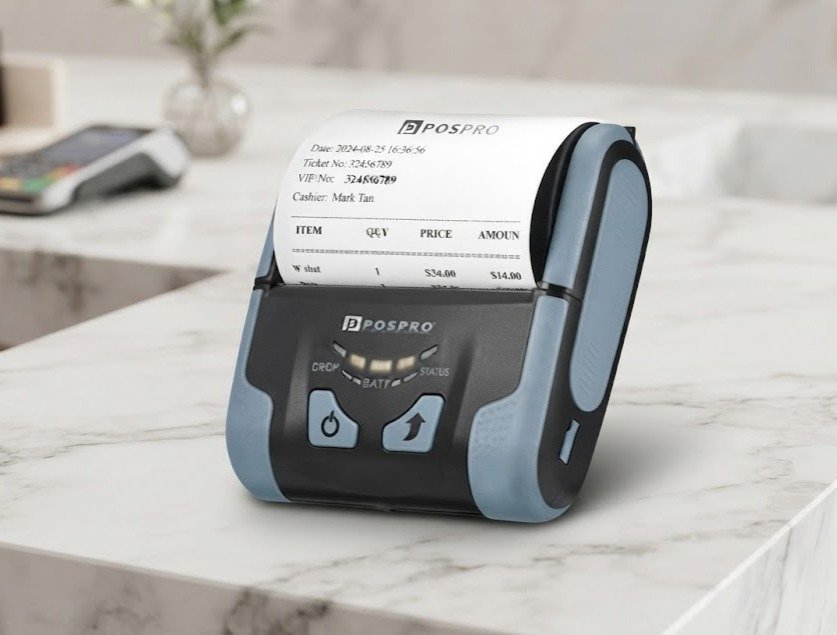
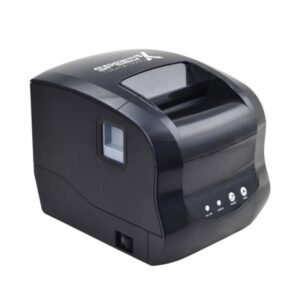
The POSPRO MP 300 is a portable 80mm direct-thermal receipt printer designed for mobile billing, delivery services, restaurants, field sales, transport operations and temporary retail counters.
It is commonly listed in Pakistan as the POSPRO MP-300 3-inch Mobile Bluetooth Receipt Printer. The printer produces black text, graphics, barcodes and QR codes on compatible heat-sensitive paper without ink cartridges, toner or ribbons.
Published local specifications identify:
The MP-300 is most suitable for businesses that need wider mobile receipts than a 58mm pocket printer can provide but do not want to carry a full-size desktop POS printer.
The POSPRO MP 300 is a battery-powered mobile receipt printer using direct-line thermal technology.
Its primary purpose is printing portable transaction documents such as:
POS Experts categorises it as a POSPRO mobile Bluetooth printer, while Postech lists the MP-300 among its supported POSPRO thermal mobile printers and provides Windows, Android, iOS, Linux and virtual COM resources for the model.
| Feature | Published specification |
|---|---|
| Brand | POSPRO |
| Model | MP-300 / MP 300 |
| Product category | Mobile thermal receipt printer |
| Paper category | 3-inch / 80mm thermal roll |
| Physical paper width | 80mm |
| Printable width | Approximately 72mm |
| Resolution | 203 dpi / 8 dots per mm |
| Horizontal resolution | 576 dots per line |
| Maximum print speed | Approximately 75mm/s |
| Main advertised connection | Bluetooth |
| Bluetooth | BT 4.0 and BLE listed |
| Other interfaces | Wi-Fi, USB and RS232 appear in technical tables; verify variant |
| Print command | ESC/POS |
| Battery | 2000mAh rechargeable lithium-ion |
| Continuous-use claim | Around three hours or 100m of printing |
| Charging time | Approximately four to six hours |
| Maximum roll diameter | Approximately 40mm |
| Paper-out alarm | Supported |
| 1D barcodes | Supported |
| QR Code | Supported |
| PDF417 | Supported |
| Print-head-life estimate | Approximately 50km |
| Reliability estimate | Five million lines |
| Dimensions | Approximately 113 × 103 × 45mm |
| Weight | Approximately 335g with battery and paper |
| Automatic cutter | Not confirmed |
| Cash-drawer port | Not confirmed |
| Local warranty | Verify with GS Systemz |
| Package contents | Verify physical package |
The core print-engine and battery specifications are published locally and independently repeated by the manufacturer of the technically matching RPP300 platform.
Both spellings are used:
POS Experts uses MP-300, Wise-Tech uses MP300, and Postech uses MP-300 Thermal Mobile Printer in its driver section.
For the main GS Systemz product page, use:
POSPRO MP 300
The hyphenated variation can appear naturally in the product description, specifications and image alt text.
The available specifications strongly suggest that the POSPRO MP-300 uses the same or a closely related hardware platform as the Rongta RPP300.
Both publish the following exact combination:
However, no public document reviewed for this page formally states that POSPRO rebadges the Rongta RPP300.
The safest wording is:
The POSPRO MP-300 closely matches the Rongta RPP300 technical platform, but the OEM relationship is not officially confirmed.
This distinction prevents unsupported claims about manufacturing origin, firmware interchangeability, replacement parts or driver compatibility.
The MP-300 combines portable battery operation with wider 80mm receipt output.
Its main advantages include:
The matching RPP300 platform also describes double-injection construction, rubber protection, a non-slip body, power indication and standby power saving. These features are platform-level evidence and should be verified on the POSPRO-branded unit before being presented as guaranteed MP-300 features.
The MP-300 uses 80mm thermal paper and provides an effective printing width of approximately 72mm.
This wider receipt format provides more space for:
It is more suitable for itemised receipts than many compact 58mm mobile printers.
The published maximum print speed is approximately 75 millimetres per second.
Actual speed can vary according to:
Plain text normally prints faster than receipts containing large dark graphics.
The printer provides 203 dpi, equivalent to eight dots per millimetre, with 576 dots across the print line.
This resolution is generally suitable for:
It is not intended for colour printing or photographic output.
The technical table lists Bluetooth 4.0 and Bluetooth Low Energy.
Bluetooth may support compatible:
The business application must support the printer’s Bluetooth profile, ESC/POS implementation or supplied software development kit.
The MP-300 is listed with a rechargeable 2000mAh lithium-ion battery. The matching platform claims more than 500 battery cycles, approximately three hours of continuous work or 100m of printed media, and a charging time of four to six hours.
These figures are laboratory or platform estimates rather than guaranteed real-world runtime.
Battery performance depends on:
The printer uses an easy-load paper compartment and accepts rolls up to approximately 40mm in diameter.
Portable printers use smaller rolls than full-size desktop printers. A standard 80mm roll may be the correct width but too large in diameter for the MP-300.
The matching platform officially lists ESC/POS as the printing command system. The local MP-300 specification otherwise matches that platform field for field.
ESC/POS may allow compatible software to control:
An automatic cutter is not confirmed, so cutter commands should not be assumed to operate.
| Application | Suitability |
|---|---|
| Mobile retail receipts | Excellent |
| Delivery payment slips | Excellent |
| Courier confirmations | Excellent |
| Restaurant table-side bills | Excellent |
| Café and food-stall receipts | Excellent |
| Taxi receipts | Excellent |
| Transport tickets | Good with compatible software |
| Field-service invoices | Excellent |
| Event-registration slips | Good |
| Temporary sales counters | Excellent |
| Android mobile POS | Good with compatible app |
| iPhone or iPad POS | SDK and application dependent |
| Windows computer printing | Supported through available drivers |
| Linux printing | Driver resources listed |
| QR-code receipts | Supported |
| 1D barcode receipts | Supported |
| PDF417 printing | Supported |
| Fixed high-volume checkout | Consider a faster desktop printer |
| Ethernet network printing | Not the primary advertised version |
| Automatic cash drawer | Not confirmed |
| Adhesive shipping labels | Not recommended without sensor verification |
| A4 documents | Not supported |
| Colour printing | Not supported |
The printer is best positioned as a mobile receipt printer rather than a desktop checkout, A4 document or dedicated adhesive-label printer.
| Specification | Detail |
|---|---|
| Printing method | Thermal line printing |
| Paper width | 80mm |
| Printing width | 72mm |
| Resolution | 203 dpi / 8 dots per mm |
| Dots per line | 576 |
| Maximum speed | 75mm/s |
| Font A | 12 × 24 dots |
| Font B | 9 × 17 dots |
| Chinese font | 24 × 24 dots |
| Font A characters per line | 48 |
| Font B characters per line | 64 |
| Chinese characters per line | 24 |
| Maximum roll diameter | Approximately 40mm |
| Paper loading | Easy loading |
| MCBF | Five million lines |
| Print-head life | Approximately 50km |
| Battery | 2000mAh rechargeable lithium-ion |
| Dimensions | Approximately 113 × 103 × 45mm |
| Weight | Approximately 335g including paper and battery |
| Specification | Published status |
|---|---|
| Bluetooth | Confirmed by local product title |
| Bluetooth 4.0 and BLE | Listed in technical table |
| Wi-Fi | Listed in technical table; verify exact unit |
| USB | Listed in technical table; verify data-printing mode |
| RS232 | Listed in technical table; verify physical port or cable |
| ESC/POS | Confirmed by technically matching platform |
| Windows driver | Listed by Postech |
| Windows SDK | Listed by Postech |
| Android SDK | Listed by Postech |
| iOS SDK | Listed by Postech |
| Linux driver | Listed by Postech |
| Virtual COM driver | Listed by Postech |
| Specification | Platform figure |
|---|---|
| Operating temperature | Approximately -10°C to 50°C |
| Operating humidity | Approximately 20%–85% |
| Storage temperature | Approximately -20°C to 70°C |
| Storage humidity | Approximately 5%–95% |
| Battery cycles | More than 500 claimed |
| Continuous use | Approximately three hours or 100m |
| Charging time | Approximately four to six hours |
These environmental and battery-life figures should be verified against the POSPRO manual because the local listing does not publish the complete operating table.
Not necessarily.
The local retail title identifies the product as a Bluetooth receipt printer, while the technical table lists Bluetooth, Wi-Fi, USB and RS232 together.
The matching RPP300 family is also sold in several interface configurations internationally. A combined specification table may therefore describe available family options rather than every interface installed in one unit.
Before publishing or ordering, GS Systemz should check:
The safest conversion-focused specification is:
Bluetooth mobile printer; confirm Wi-Fi, USB data and RS232 availability for the exact stock revision.
It is an 80mm-class printer with an approximately 72mm printable area.
These measurements describe different things:
Customers should purchase compatible 80mm thermal rolls whose outer diameter does not exceed the printer’s capacity.
The printer uses:
Before purchasing paper in bulk, confirm:
Portable 80mm rolls are normally smaller than desktop 80mm printer rolls.
No. It uses direct-thermal printing.
Heat from the print head darkens specially coated thermal paper. The printer does not require:
Thermal receipts may fade when exposed to sunlight, high temperatures, moisture, oils, alcohol or certain plastics. Important records should also be stored digitally.
Yes. QR Code and PDF417 are included in the published barcode specification.
Possible QR-code uses include:
For reliable scanning:
The published barcode list includes:
QR Code and PDF417 are separately listed as two-dimensional formats.
The MP-300 prints barcodes; it does not scan them.
The matching platform supports receipt graphics through ESC/POS, while its 203 dpi and 72mm print width are suitable for basic monochrome business logos.
For clearer logo output:
Yes. Postech publishes an Android SDK for the POSPRO MP-300.
A typical Android installation involves:
Bluetooth pairing does not guarantee compatibility with every Android application. The application must support the printer or its ESC/POS connection method.
Postech lists an iOS SDK for the MP-300, and the matching platform provides iOS development resources.
iPhone or iPad printing may require:
No source reviewed confirms universal Apple AirPrint support.
Postech lists:
for the MP-300.
Practical compatibility still depends on:
Windows 11 and specific Linux distributions should be tested before a multi-unit deployment.
A typical Bluetooth setup is:
The exact device name, PIN and Bluetooth profile should be checked in the supplied manual or configuration page.
USB appears in the published MP-300 technical table, and Postech provides virtual COM and Windows driver resources.
However, GS Systemz should verify whether the USB connector on its exact unit supports:
Some interface combinations may vary by MP-300 batch.
The technically matching platform claims approximately three hours of continuous use or 100m of printed media. It also claims more than 500 battery cycles.
Actual runtime depends on:
The safest product statement is:
Rechargeable 2000mAh battery; operating time varies according to print volume, connectivity and battery condition.
The matching platform publishes a charging time of approximately four to six hours.
It supports charging through:
Before publication, confirm the supplied:
No automatic cutter is confirmed in the local or matching-platform specifications.
Portable printers of this size commonly use a manual tear edge to reduce:
GS Systemz should inspect the physical printer before describing the paper-separation method.
No cash-drawer port is confirmed.
Portable battery-powered receipt printers generally do not provide the 24V drawer output found on desktop POS printers.
A desktop receipt printer is usually more suitable when automatic cash-drawer opening is required.
The confirmed configuration is a continuous 80mm receipt-paper system.
No reliable specification confirms:
The MP-300 should therefore be marketed primarily as a mobile receipt printer, not a dedicated shipping- or barcode-label printer.
Yes. It may be useful for:
A faster LAN desktop printer is usually preferable for a permanent high-volume kitchen station.
Yes. Its battery, Bluetooth connection and 80mm paper format make it suitable for compatible mobile-delivery workflows.
It may print:
The delivery application must support the printer’s Bluetooth or ESC/POS method.
Public POSPRO listings do not provide a complete, consistent package list.
A typical package may contain:
Some accessories may be sold separately. Even the matching platform manufacturer warns that pictured accessories may not be included with every package.
GS Systemz should inspect the physical package before guaranteeing any accessory.
| Requirement | Recommendation |
|---|---|
| Portable 80mm receipts | Supported |
| Bluetooth printing | Supported |
| 75mm/s mobile printing | Supported |
| 203 dpi output | Supported |
| 2000mAh battery | Supported |
| Android application development | SDK listed |
| iPhone or iPad integration | SDK listed |
| Windows printing | Driver listed |
| Linux printing | Driver listed |
| ESC/POS software | Supported by matching platform |
| QR-code printing | Supported |
| PDF417 printing | Supported |
| 1D barcode printing | Supported |
| Paper-out warning | Supported |
| USB data printing | Verify exact interface revision |
| Wi-Fi | Verify exact interface revision |
| RS232 | Verify exact interface revision |
| Automatic cutter | Not confirmed |
| Cash-drawer output | Not confirmed |
| Adhesive labels | Not recommended |
| A4 documents | Not supported |
| Colour printing | Not supported |
Choose the MP-300 when portable Bluetooth operation and wider 80mm receipts are more important than desktop-printer speed or automatic cutting.
| Feature | POSPRO MP 300 | Speed-X BT600M |
|---|---|---|
| Paper category | 80mm | 80mm |
| Published resolution | 203 dpi | Not consistently published |
| Published speed | Up to 75mm/s | Not reliably established |
| Bluetooth | BT 4.0 and BLE listed | Supported |
| USB | Listed; verify variant | Supported |
| Battery | 2000mAh | 1500mAh |
| QR Code | Supported | Requires verification |
| ESC/POS | Supported by matching platform | Requires verification |
| Dimensions | Approximately 113 × 103 × 45mm | Not reliably published |
| Best use | Better-documented mobile platform | Alternative portable 80mm printer |
The MP-300 has the stronger published technical specification, while the BT600M may remain an alternative where its exact local stock has been tested.
| Feature | POSPRO MP 300 | Speed-X BT500M |
|---|---|---|
| Paper category | 80mm | 58mm |
| Printable width | Approximately 72mm | Approximately 48mm |
| Speed | Up to 75mm/s | Up to 90mm/s |
| Battery | 2000mAh | 1500mAh |
| Bluetooth | Supported | Supported |
| USB | Variant-dependent | Supported |
| Receipt detail | More horizontal space | More compact format |
| Printer size | Larger | Smaller |
| Best use | Detailed mobile receipts | Compact simple receipts |
Choose the MP-300 when receipt width and battery capacity matter more.
Choose the BT500M when smaller size and lighter 58mm operation are preferred.
| Feature | POSPRO MP 300 | Desktop 80mm printer |
|---|---|---|
| Portability | High | Low |
| Battery | Yes | Usually no |
| Bluetooth | Supported | Model-dependent |
| Speed | Up to 75mm/s | Often 200–300mm/s |
| Automatic cutter | Not confirmed | Common |
| Cash-drawer port | Not confirmed | Common |
| Roll capacity | Smaller portable roll | Larger roll |
| Best use | Delivery and mobile billing | Fixed checkout counter |
Choose the MP-300 for mobile work.
Choose a desktop receipt printer for continuous high-volume printing, automatic cutting and cash-drawer integration.
GS Systemz can position the MP-300 for Pakistani businesses that need a portable, battery-powered 80mm receipt printer.
This page helps buyers understand:
Before ordering, confirm:
Current price and availability should be treated as subject to confirmation.
The printer may be suitable for:
Check availability of the POSPRO MP 300 Mobile Bluetooth Thermal Receipt Printer from GS Systemz in Pakistan.
Use it for mobile sales receipts, restaurant bills, delivery confirmations, taxi receipts, payment slips, booking tickets, field-service invoices and other compatible 80mm portable printing workflows.
Confirm the interface version, Bluetooth profile, battery, charger, paper-roll capacity, drivers, cutter type, local warranty and complete package contents before ordering.
The POSPRO MP 300 is a portable 80mm direct-thermal receipt printer advertised with Bluetooth, 203 dpi resolution, 75mm/s printing and a rechargeable 2000mAh battery.
No. It uses heat-sensitive thermal paper and does not require ink, toner or ribbons.
It uses 80mm thermal paper with an approximately 72mm printable width and a maximum published roll diameter of around 40mm.
Its published maximum speed is approximately 75mm per second.
It uses a rechargeable 2000mAh lithium-ion battery. The matching platform lists approximately three hours of continuous work and four to six hours of charging.
Postech lists Android and iOS SDK resources for the MP-300, but the selected POS application must support the printer’s connection and command method.
Yes. QR Code and PDF417 are included in the published barcode specification.
The technical table lists those interfaces, but local retail titles specifically identify the Bluetooth version. Confirm the ports and model revision on the exact GS Systemz unit.
No automatic cutter is confirmed. The physical paper-separation method should be checked before publication.
You can check current availability of the POSPRO MP 300 Mobile Bluetooth Thermal Receipt Printer from GS Systemz in Pakistan.
Reviews
There are no reviews yet.