
₨14,300.00
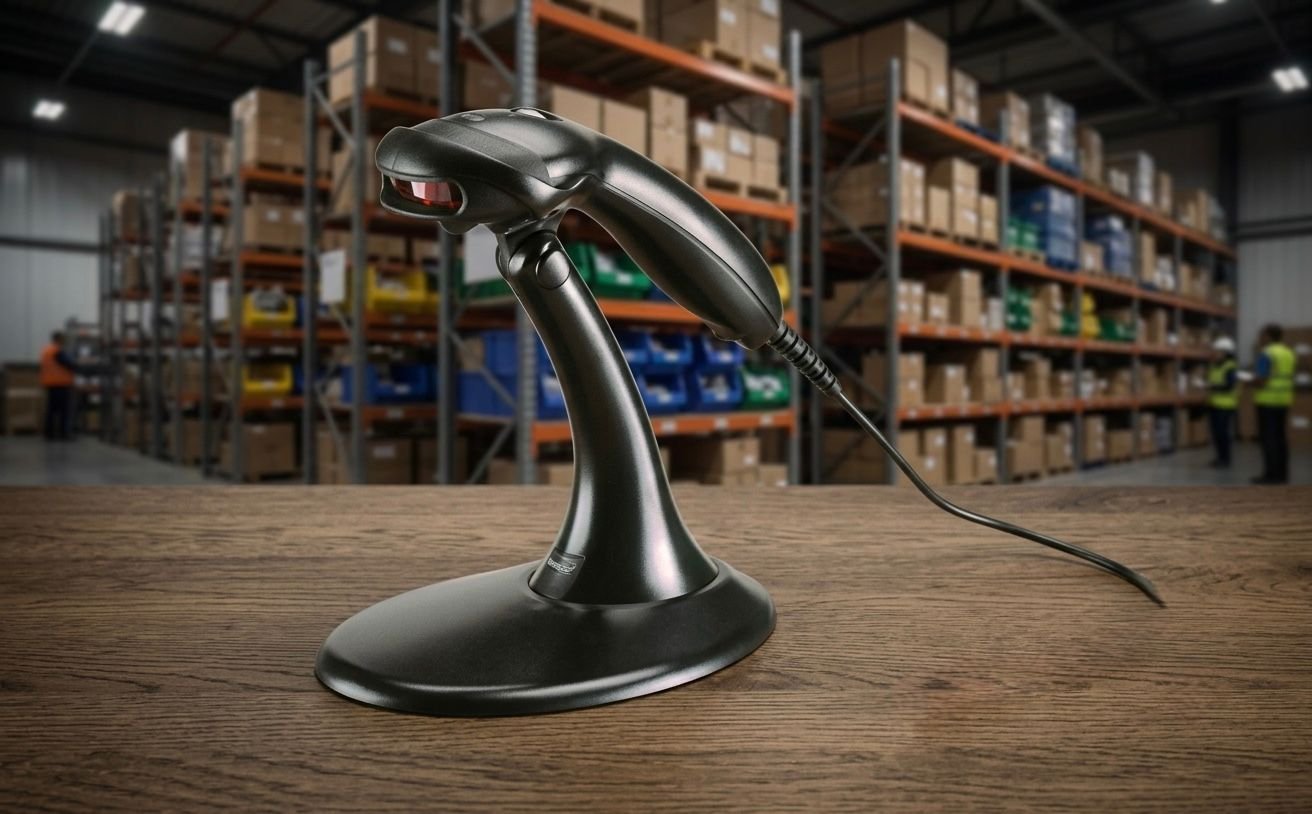
The Honeywell MK9540, officially known as the Honeywell VoyagerCG 9540, is a corded handheld laser scanner designed for standard 1D barcode scanning.
It features automatic infrared activation, CodeGate targeted scanning and a compatible stand that converts the handheld scanner into a fixed presentation scanner. These features make it suitable for retail checkout, pharmacies, libraries, offices and fixed inventory workstations.
The Honeywell MK9540 combines handheld barcode targeting with automatic hands-free scanning.
When used by hand, its visible 650-nanometre laser line helps the operator aim at a specific barcode. Honeywell’s CodeGate technology then allows the user to transmit the selected code by pressing the scanner’s button. This is especially useful when several barcodes are printed close together.
When the scanner is placed in its compatible stand, automatic in-stand detection changes it into a presentation scanner. Employees can move products through the active scanning area without holding the device for every transaction.
The MK9540 reads standard 1D and GS1 DataBar barcodes, making it suitable for traditional product, inventory, asset and membership labels. It does not read QR codes or other 2D symbols.
Buy the Honeywell MK9540 from GS Systemz after confirming the scanner’s condition, stand, interface cable, warranty and complete package contents.
The Honeywell MK9540 provides the following key features:
The exact interface and included accessories depend on the MK9540 product kit.
The Honeywell MK9540 is suitable for indoor commercial applications that use printed 1D barcodes.
| Application | Suitability |
|---|---|
| Retail product scanning | Excellent |
| Pharmacy billing | Excellent |
| Convenience-store checkout | Excellent |
| Library barcode scanning | Excellent |
| Bookstore checkout | Excellent |
| Office asset tracking | Excellent |
| Membership-card scanning | Excellent |
| Product-menu scanning | Excellent |
| Fixed inventory workstation | Good |
| Small warehouse receiving desk | Good |
| Hands-free counter scanning | Excellent with stand |
| Large-product scanning | Good as handheld |
| QR-code scanning | Not supported |
| Data Matrix scanning | Not supported |
| PDF417 scanning | Not supported |
| Mobile-payment codes | Not supported |
| Wireless stock counting | Not supported |
| Outdoor industrial scanning | Consider a rugged scanner |
Honeywell positions the VoyagerCG 9540 as a general-purpose retail scanner for standard 1D and GS1 DataBar applications.
Here are the main official Honeywell MK9540 specifications:
| Specification | Detail |
|---|---|
| Product name | Honeywell MK9540 / VoyagerCG 9540 |
| Product type | Corded handheld barcode scanner |
| Scanning technology | Single-line laser |
| Decode capability | Standard 1D and GS1 DataBar |
| QR-code support | No |
| Scan pattern | Single scan line |
| Scan speed | 72 scan lines per second |
| Laser wavelength | 650nm |
| Minimum resolution | 5 mil / 0.127mm |
| Horizontal scan angle | 50° |
| Pitch tolerance | 68° |
| Skew tolerance | 52° |
| Minimum print contrast | 35% |
| Maximum typical depth | Up to 254mm, depending on barcode |
| Automatic activation | Infrared object detection |
| Targeted scanning | CodeGate technology |
| Hands-free mode | Supported with compatible stand |
| Host interfaces | USB, RS-232, keyboard wedge, RS-485, OCIA and emulation modes |
| Input voltage | 5V DC ±0.25V |
| Operating power | 825mW |
| Standby power | 600mW |
| Dimensions | 198 × 78 × 56mm |
| Weight | Approximately 149g |
| Drop resistance | Designed for 1.5m drops |
| Operating temperature | 0°C to 40°C |
| Storage temperature | -40°C to 60°C |
| Operating humidity | 5%–95%, non-condensing |
| Ambient-light tolerance | Approximately 4,842 lux |
| Configuration software | Honeywell MetroSet 2 |
| Original factory warranty | Five years |
| Current status | Discontinued |
| Product discontinuation date | June 30, 2024 |
| Support discontinuation date | December 31, 2027 |
| Official replacement | Honeywell Voyager 1200g |
The MK9540 was discontinued by Honeywell on June 30, 2024. Honeywell’s current lifecycle information lists December 31, 2027 as the end of service and technical support, with the Voyager 1200g identified as its direct replacement.
The Honeywell MK9540 can operate in two different physical modes.
The employee picks up the scanner, directs the visible laser line across the barcode and presses the CodeGate button to transmit the selected data.
Handheld operation is useful for:
When placed in its compatible stand, the scanner detects the stand and operates as a presentation scanner.
The employee can move compatible product barcodes through the scanning field without holding the scanner. This is useful for repetitive checkout and product-entry tasks.
CodeGate is a targeted barcode-transmission feature included with the VoyagerCG 9540.
The scanner first detects and decodes the barcode under its laser line. The operator then presses the CodeGate button to transmit that selected barcode to the connected computer or POS system.
CodeGate is useful when:
This controlled transmission helps prevent the wrong nearby barcode from being entered into the software.
Scanning means the MK9540 has detected and decoded the barcode under its visible laser line.
Transmitting means the scanner sends the decoded data to the connected computer, POS terminal or application.
With CodeGate enabled, these actions can happen separately:
This workflow is different from automatic presentation scanning, where the scanner normally reads and sends a barcode when it is presented in the active area.
The Honeywell MK9540 contains an infrared sensor that detects when an object is brought into its scanning area.
When the scanner detects a product or barcode, it automatically activates the laser and attempts to decode the symbol. This reduces the need to press the button for every barcode during ordinary presentation scanning.
Automatic activation is useful for:
The CodeGate button remains useful when the operator needs to choose one specific barcode.
A single-line laser scanner projects one visible horizontal line across a barcode.
For successful scanning, the line must cross the complete width of the barcode, including the blank quiet zones on both sides.
The MK9540’s single-line design is suitable for standard linear barcodes such as product, inventory and asset labels. It does not capture a complete image and therefore cannot decode square 2D formats such as QR Code or Data Matrix.
For reliable results:
The Honeywell MK9540 reads standard 1D barcode formats and GS1 DataBar symbols.
Common applications can include:
The exact formats enabled on an individual scanner depend on its configuration. Honeywell confirms standard 1D and GS1 DataBar decoding for the VoyagerCG 9540.
No. The Honeywell MK9540 is a 1D single-line laser scanner and cannot read QR codes.
QR Code, Data Matrix, PDF417 and other two-dimensional symbols require a compatible 2D area-imaging scanner. Honeywell officially lists the MK9540 with 1D decoding capability.
Choose a 2D scanner when your business needs to scan:
The Honeywell Voyager XP 1470g is one possible current Honeywell option for fixed corded 2D scanning.
The MK9540 is designed primarily for printed 1D barcode labels.
Laser scanners depend on reflected laser light from the light and dark bars of a printed symbol. Mobile-phone and computer screens create and emit light differently, so screen-based scanning may be unreliable or unsuccessful.
Do not select the MK9540 for:
Choose a 2D area-imaging scanner when screen scanning is part of the intended workflow.
Yes. Standard printed product barcodes are the main intended use of the Honeywell MK9540.
It can scan linear barcode labels used on:
Honeywell states that the VoyagerCG 9540 decodes all standard 1D barcodes, including GS1 DataBar.
The Honeywell MK9540 scans at up to 72 scan lines per second.
This speed is suitable for ordinary retail, pharmacy, office and inventory applications where the user passes the laser line across a printed 1D barcode.
Actual productivity depends on:
The barcode should be presented smoothly, with the laser line crossing its complete width.
The working distance depends on the width of the narrowest barcode elements.
| Barcode Density | Typical Scanning Range |
|---|---|
| 5.2 mil | 13–51mm |
| 7.5 mil | 0–127mm |
| 10.4 mil | 0–165mm |
| 13 mil | 0–203mm |
| 21 mil | 25–254mm |
Larger, lower-density barcodes can generally be scanned from farther away than narrow, high-density symbols. These are Honeywell’s typical performance figures, and actual results may be affected by barcode quality and environmental conditions.
The Honeywell MK9540 has a listed minimum barcode resolution of 5 mil, equal to approximately 0.127mm.
A mil is one-thousandth of an inch and describes the width of the narrowest barcode element.
Small barcode performance requires:
Honeywell lists a relatively short working range of approximately 13–51mm for a 5.2-mil barcode.
The MK9540 may read barcodes with minor printing defects when enough of the linear pattern remains clear.
However, it is an older single-line laser scanner and does not provide the complete image processing available in modern 2D area imagers.
Scanning may fail when:
Replace or reprint severely damaged labels when reliable identification is required.
Print contrast describes the visual difference between the dark barcode lines and the lighter background.
Honeywell lists a minimum reflectance difference of 35% for the VoyagerCG 9540.
A barcode may become difficult to scan when:
Clear black-on-white labels normally provide the most dependable scanning results.
The MK9540 uses a visible 650-nanometre laser.
The visible red line helps the operator position the scanner across the required barcode. This is especially useful with CodeGate when choosing one barcode from several nearby symbols.
The laser line should:
Users should avoid directing the laser toward people’s eyes.
Yes. The MK9540 supports hands-free presentation scanning when mounted in its compatible stand.
Honeywell’s automatic in-stand detection allows the scanner to recognise when it has been placed in the stand and operate as a fixed presentation scanner.
Hands-free operation is useful for:
The stand must be positioned so the barcode passes through the scanner’s active laser area.
The stand was available as a Honeywell accessory and was included in some MK9540 kits, but not necessarily every product package.
Honeywell identifies a stand with automatic in-stand detection for presentation scanning. The exact included accessories depend on the model number and reseller package.
Before ordering from GS Systemz, confirm whether the package includes:
Do not publish the stand as guaranteed package content without checking the actual stock.
Honeywell lists multiple host-interface options for the MK9540:
The exact interface depends on the scanner kit and attached cable.
USB is commonly used with:
In a compatible keyboard configuration, the scanner can enter barcode data into an active software field like typed keyboard input.
RS-232 may be required for:
An RS-232 installation may require:
Keyboard-wedge operation allows barcode data to enter the computer through its keyboard input path.
IBM RS-485, OCIA, laser emulation and light-pen emulation were intended for compatible legacy POS and business systems.
Confirm the interface before ordering because a USB MK9540 kit may not include the cable needed for a serial installation.
No. The Honeywell MK9540 is a corded barcode scanner.
It does not contain a rechargeable battery and does not support Bluetooth. Honeywell lists it as a corded 1D laser scanner with several physical host-interface options.
A corded scanner is suitable when:
Choose a cordless model when staff must scan products away from the workstation.
The Honeywell MK9540 was designed for point-of-sale and general barcode-data-entry systems.
Its USB, serial, keyboard-wedge and legacy interface options allow it to work with a range of compatible computers and retail terminals.
Compatibility depends on:
Because the scanner is discontinued, test it with the actual POS or inventory software before purchasing multiple units.
MetroSet 2 is Honeywell configuration software for supported legacy scanners.
The MK9540 contains Flash ROM and can receive supported firmware or configuration changes through MetroSet 2 and a compatible computer connection.
Configuration functions may include:
Only change settings after confirming the data format required by the POS or inventory software.
Barcode parsing allows the scanner to change the data before transmitting it to the connected system.
Honeywell lists data-editing capability for formatting barcode information according to the host system’s requirements.
Possible uses include:
Incorrect parsing rules can cause missing or altered barcode information, so configurations should be tested carefully.
The Honeywell MK9540 was designed to withstand multiple drops from a height of approximately 1.5 metres.
Its housing is also sealed to resist airborne particulate contaminants.
It is suitable for ordinary indoor environments such as:
The scanner is not described as waterproof and should not be used in wet or harsh outdoor conditions.
No waterproof rating is published in Honeywell’s official MK9540 specifications.
Honeywell states that the scanner is sealed against airborne particulate contaminants, but this does not mean it is protected against water.
Do not:
Keep the scanner in a dry indoor working environment.
Honeywell lists an operating-temperature range of 0°C to 40°C.
The scanner can be stored between -40°C and 60°C and used at relative humidity from 5% to 95%, provided condensation does not form. Its listed ambient-light tolerance is approximately 4,842 lux.
Avoid:
Yes. Honeywell discontinued the VoyagerCG 9540 on June 30, 2024.
Honeywell currently lists December 31, 2026 as the last renewal date and December 31, 2027 as the end of service and technical support. The listed direct replacement is the Honeywell Voyager 1200g.
| Lifecycle Detail | Official Date |
|---|---|
| Product discontinuation | June 30, 2024 |
| Last support renewal | December 31, 2026 |
| End of service | December 31, 2027 |
| Direct replacement | Honeywell Voyager 1200g |
Remaining units may still be available through resellers, replacement stock or existing inventory.
Before buying, confirm:
The original Honeywell datasheet lists a five-year factory warranty for the VoyagerCG 9540. However, the product was discontinued on June 30, 2024, so that historical warranty statement does not guarantee that remaining reseller stock currently carries a new five-year manufacturer warranty.
GS Systemz should clearly state:
Do not advertise a five-year current warranty unless it is verified for the exact serial number and supplied unit.
Choose the Honeywell MK9540 when you need targeted scanning of printed 1D barcodes and are comfortable purchasing a discontinued model.
| Requirement | Recommendation |
|---|---|
| Standard product barcodes | MK9540 is suitable |
| GS1 DataBar scanning | Supported |
| Handheld operation | Supported |
| Hands-free scanning | Supported with stand |
| Automatic infrared activation | Supported |
| Targeted CodeGate scanning | Supported |
| USB connection | Supported with correct kit |
| RS-232 connection | Supported with correct kit |
| Barcode data editing | Supported |
| QR-code scanning | Not supported |
| Mobile-screen scanning | Not recommended |
| Wireless scanning | Not supported |
| New current Honeywell model | Consider Voyager 1200g |
| 2D barcode requirements | Consider Voyager XP 1470g |
| Waterproof operation | Not suitable |
| Heavy industrial use | Choose a rugged scanner |
The MK9540 is most appropriate as a replacement for an existing installation or as a lower-cost option when verified remaining stock is available.
The MK9520 and MK9540 share the same basic Voyager single-line laser platform.
The primary difference is that the MK9540 includes Honeywell CodeGate technology, while the MK9520 focuses on automatic scanning without the same targeted transmission button.
| Feature | Honeywell MK9520 | Honeywell MK9540 |
|---|---|---|
| Scanning technology | Single-line laser | Single-line laser |
| Standard 1D barcodes | Supported | Supported |
| GS1 DataBar | Supported | Supported |
| Automatic activation | Supported | Supported |
| Hands-free stand use | Supported | Supported |
| CodeGate button | No | Yes |
| Targeted menu scanning | More limited | Better |
| QR-code support | No | No |
| Scan speed | 72 lines/s | 72 lines/s |
| Best use | Automatic product scanning | Product and targeted menu scanning |
Choose the MK9540 when selecting one barcode from several nearby codes is important.
Honeywell lists the Voyager 1200g as the direct replacement for the discontinued VoyagerCG 9540.
| Feature | Honeywell MK9540 | Honeywell Voyager 1200g |
|---|---|---|
| Product status | Discontinued | Replacement model |
| Scanner technology | Single-line laser | Single-line laser |
| Standard 1D barcodes | Supported | Supported |
| QR codes | Not supported | Not supported |
| CodeGate targeting | Supported | Supported on compatible configuration |
| Hands-free scanning | Supported with stand | Supported with stand |
| High-density barcode performance | Older platform | Improved newer platform |
| Damaged-barcode performance | Standard legacy performance | Improved Voyager performance |
| Current product support | Ends December 2027 | Current lifecycle should be verified |
| Best use | Existing installation replacement | New 1D scanner purchase |
Choose the MK9540 when matching an existing scanner setup, cable or workflow is important.
Choose the Voyager 1200g for a new 1D barcode-scanning installation where current product availability and support are priorities.
The Honeywell MK9540 reads only traditional linear barcodes. A 2D area imager reads those barcodes as well as square, stacked and digital codes.
| Feature | Honeywell MK9540 | 2D Area-Imaging Scanner |
|---|---|---|
| UPC and EAN barcodes | Supported | Supported |
| Code 39 and Code 128 | Supported | Supported |
| GS1 DataBar | Supported | Usually supported |
| QR Code | Not supported | Supported |
| Data Matrix | Not supported | Supported |
| PDF417 | Not supported | Supported |
| Mobile-screen scanning | Not recommended | Commonly supported |
| Barcode orientation | Laser line alignment required | Omnidirectional imaging |
| Scanning technology | Single-line laser | Image sensor |
| Best use | Traditional printed barcodes | Printed and digital workflows |
Choose the MK9540 only when the business uses printed 1D barcode labels.
Choose a 2D model when QR payments, digital loyalty cards, electronic tickets or modern logistics codes are required.
GS Systemz offers barcode-scanning equipment for businesses in Pakistan that need retail, inventory and point-of-sale solutions.
This product page helps customers evaluate:
Before placing an order, confirm:
Checking these details is especially important because Honeywell no longer manufactures the MK9540.
Keep the scanner, stand and interface cable in a clean, dry indoor environment.
Scanner-care tips:
Regular cleaning and correct laser alignment can reduce failed barcode reads.
Buy the Honeywell MK9540 if your business needs a corded scanner for traditional printed 1D barcodes and specifically benefits from CodeGate targeting.
It is suitable for:
It is especially useful when employees need both handheld scanning and automatic presentation scanning with a stand.
Businesses requiring QR-code, mobile-screen or wireless scanning should choose a different scanner.
Get the Honeywell MK9540 1D Barcode Scanner with Stand from GS Systemz for retail checkout, pharmacy billing, library scanning, product identification and fixed inventory applications.
Use its automatic infrared activation for hands-free scanning and CodeGate technology to target and transmit one specific barcode from a menu or group of codes.
Confirm the scanner’s condition, included stand, interface cable, local warranty and complete package contents before adding the discontinued Honeywell MK9540 to your POS setup.
The Honeywell MK9540, officially called the VoyagerCG 9540, is a corded single-line laser scanner for standard 1D and GS1 DataBar barcodes.
No. The MK9540 is a 1D laser scanner and does not read QR Code, Data Matrix or PDF417 symbols.
CodeGate allows the operator to aim at one barcode and press a button to transmit only the selected code. It is useful for barcode menus and packaging containing several codes.
Yes. It can work as a fixed presentation scanner when placed in a compatible stand with automatic in-stand detection.
The scanner produces up to 72 scan lines per second.
Honeywell lists a typical maximum range of approximately 254mm for a 21-mil barcode. The distance varies according to barcode density and quality.
Available interfaces include USB, RS-232, keyboard wedge, IBM RS-485, OCIA and selected emulation modes. The included connection depends on the product kit.
No. It is a corded scanner and does not contain a rechargeable battery or Bluetooth radio.
Yes. Honeywell discontinued it on June 30, 2024. Service and technical support are scheduled to end on December 31, 2027.
You can buy the Honeywell MK9540 1D Barcode Scanner with Stand from GS Systemz in Pakistan, subject to current stock, confirmed product condition and local warranty.

Reviews
There are no reviews yet.